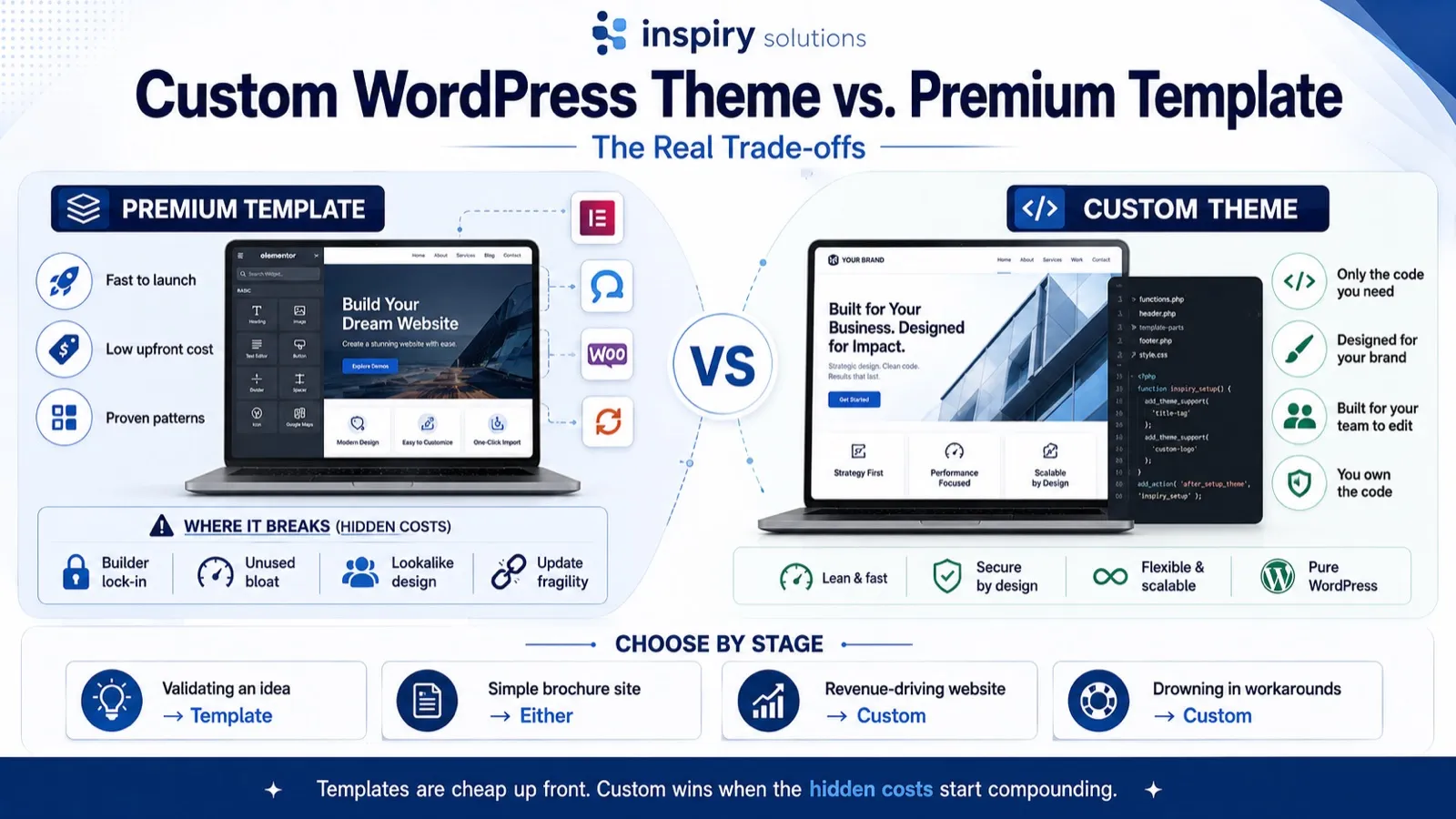
Gutenberg vs Elementor in 2026 is a choice between a simpler WordPress editing foundation and greater visual design control. Gutenberg often suits business websites where staff update content within established layouts. Elementor can suit teams needing flexible page designs, especially when a developer manages templates. Neither guarantees better speed, easier editing or lower maintenance costs. The right choice depends on who edits your pages, how often layouts change and who maintains the website.
This guide compares editing, performance and maintenance, explains when switching makes sense and gives business owners three questions to answer before committing.
The short answer for most business sites
For a new business website with predictable page structures and frequent content updates, Gutenberg is often the sensible starting point. Its native editing tools keep the website relatively simple while allowing staff to update text, images and standard sections.
Elementor remains reasonable when visual flexibility matters or an existing website already relies on carefully built templates. A well-maintained Elementor website does not need replacing simply because another approach exists.
The useful distinction is how much freedom editors need.
A marketing assistant updating staff profiles and service descriptions probably does not need unrestricted layout control. A designer regularly creating campaign landing pages may find that freedom valuable.
Before deciding, establish three requirements:
- Editing: What must non-technical staff change independently?
- Design: Which layouts are fixed, and which change regularly?
- Maintenance: Who handles updates, licences, testing and troubleshooting?
At Inspiry Solutions, we approach WordPress builds on either editor by considering editing workflows and long-term upkeep alongside design.
The goal is a website staff can operate without development help for routine changes.
How each editor works
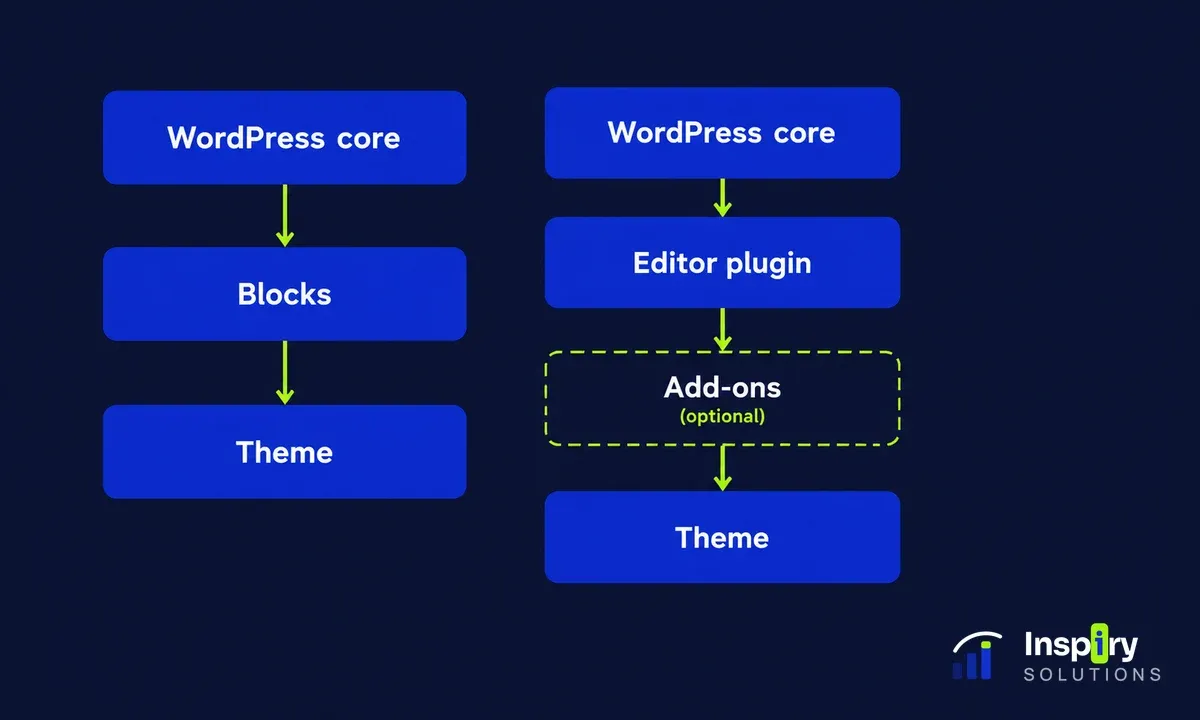
Understanding the difference requires separating WordPress itself, the theme and the editing tools.
A theme controls much of a site’s appearance and template structure. An editor provides the interface for changing content. These responsibilities can overlap.
Gutenberg: blocks, patterns and native WordPress tools
Gutenberg is the name commonly used for WordPress’s native block editor. A block is an individual element, such as a paragraph, heading, image, button or group of columns.
Editors assemble content using these elements rather than working inside one large text field.
The official WordPress block editor documentation explains how blocks create and organise content.
Patterns are prearranged groups of blocks. A developer might create a service introduction containing a heading, description, image and enquiry button. Staff can insert that pattern without rebuilding its elements.
Patterns support controlled editing, while synced patterns keep shared sections consistent across pages.
With a block theme, the WordPress Site Editor can manage templates and broader design elements. A classic theme can still use the block editor without offering the same site-wide controls.
Elementor: visual editing through a plugin
Elementor is a page builder plugin that allows users to arrange layouts visually through controls and live previews.
It provides its own editing interface, widgets, containers and design settings.
Widgets include headings, images, forms and buttons. Templates allow reusable layouts, while Elementor Pro adds theme-building features.
Developers can also create custom widgets and extensions. The Elementor developer documentation explains the framework behind those integrations.
This flexibility creates another system to maintain alongside WordPress. Some websites also install third-party widget packs.
Where themes and templates fit
With Gutenberg, developers can create templates using block themes, custom theme code and configured patterns. Editors may work only within approved areas.
With Elementor, developers can create reusable page templates and shared design settings. Elementor Pro can also manage site-wide templates.
Both approaches support reusable structures. A block-based website is not automatically custom-built, and an Elementor website is not automatically generic.
The distinction between custom themes versus premium templates is a separate architectural decision.
Ask which elements belong to the theme, editor and third-party plugins to understand future maintenance complexity.
Editing experience for your team
A website can look excellent during handover yet become frustrating when staff manage it independently.
The question is not which editor offers more controls, but which exposes appropriate controls to its users.
Freedom versus guardrails
Gutenberg offers content editing through paragraphs, images and other blocks. Developers can lock templates or patterns to restrict structural changes while allowing content updates.
Elementor provides extensive visual controls for spacing, typography, positioning and responsive layouts.
These benefit designers but can introduce inconsistency for routine editors. Someone moving an image might accidentally change container widths or mobile spacing.
Neither editor prevents mistakes automatically. Useful guardrails include approved layouts, restricted permissions, consistent design settings and documented procedures.
What a monthly update actually looks like
Imagine a marketing employee updating a service page with new descriptions, photographs and a call to action.
In a controlled Gutenberg setup, they replace content inside existing blocks, preview and publish. The surrounding layout stays protected.
In Elementor, they open the visual editor, locate relevant widgets, update content and review device previews.
Both workflows can be straightforward. Problems arise when staff must understand technical layout settings to change ordinary content.
A well-organised Elementor website may be easier to maintain than a poorly structured block-based website. Conversely, unrestricted visual editing can encourage inconsistency.
Implementation matters more than reputation.
Test editing before approving the website
Ask actual content editors to complete representative tasks.
Have them change a heading, replace an image, update a service description and preview the result.
Observe where they hesitate or accidentally alter unrelated elements. A developer familiar with the interface is not a substitute for this test.
Staff should repeat ordinary updates confidently without risking the wider design.
Performance and code output
Performance comparisons often reduce Gutenberg vs Elementor to a claim that one is faster. That ignores how websites are constructed.
A lightweight block theme can avoid resources associated with complex visual builders. However, numerous plugins, oversized images and unnecessary scripts can make a block-based website slow.
Elementor introduces its own styling and builder requirements. Additional widgets, animations and extensions may increase browser processing.
The final experience depends on implementation.
Extra layers and unnecessary assets
Every feature should justify the resources it introduces.
An elaborate page might load scripts for sliders, animations, forms and interactive effects. Some are necessary; others contribute little.
Overlapping add-on plugins can worsen the problem.
Instead of blaming the editor, inspect loaded resources and identify what affects visitors.
A disciplined Elementor build can use restrained layouts, optimised images and carefully selected widgets. Gutenberg requires the same fundamentals.
For troubleshooting, read our guide to making an Elementor site faster.
Measure the experience on real pages
Google’s Web Vitals guidance explains important user-experience measurements:
- Largest Contentful Paint (LCP): how quickly the main visible content appears.
- Interaction to Next Paint (INP): how promptly pages respond to interactions.
- Cumulative Layout Shift (CLS): how much visible content unexpectedly moves.
Use these measurements instead of assuming either editor produces better performance.
Compare equivalent content, images, hosting conditions and functionality. Test representative service, content-heavy and interactive pages rather than only the homepage.
Review mobile results, available real-user data, network requests and loaded resources.
A rebuild that improves benchmarks by removing important functionality is not an equivalent comparison.
Better performance comes from development decisions, not editor selection alone.
Maintenance, licences and lock-in
Initial development cost is only part of website ownership.
WordPress websites require updates, security checks, compatibility testing, backups and repairs. Your editor affects dependencies and how easily another developer can take over.
Licence costs and add-on packs
Gutenberg’s core editing experience comes with WordPress without a separate licence. Premium themes, specialist blocks and extensions may require renewals.
Elementor offers free functionality, while Pro includes additional features under a paid subscription.
Before purchasing add-ons, identify their purpose and check for duplicated functionality.
Our guide to auditing add-ons by the work they do explains why plugin count alone does not determine complexity.
Several focused, supported plugins may be preferable to fewer poorly maintained dependencies.
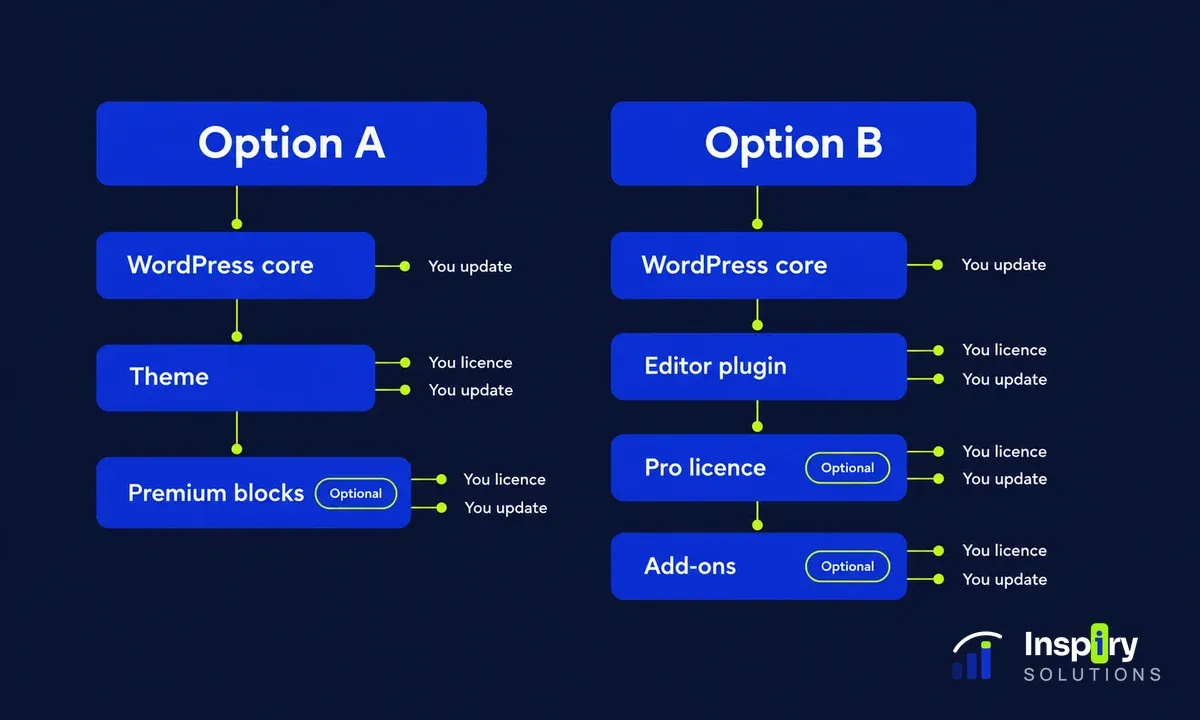
What happens if a licence expires?
An expired Elementor Pro licence does not necessarily remove an existing website immediately.
However, updates, support and premium services may become restricted under applicable licence terms.
Websites relying on Pro templates or widgets therefore have continuing maintenance requirements.
The same applies to premium block plugins and themes.
Request an inventory identifying paid tools, renewal responsibilities and dependent features.
Content portability and changing developers
Gutenberg generally stores content as WordPress blocks. Standard blocks are often easier to retain when changing themes, although custom blocks and plugin-dependent features may cause problems.
Elementor uses its own layout data and rendering system. Removing the plugin does not convert layouts into equivalent native blocks.
This creates an important form of lock-in.
Changing developers becomes easier with documentation, controlled dependencies and appropriate account ownership.
Ensure your business controls hosting, domain registration and administrator access, with clear arrangements for premium licences.
Also request documentation of custom functionality and editing procedures.
These safeguards apply regardless of editor.
Gutenberg vs Elementor side by side
A useful WordPress page builder comparison focuses on operational consequences rather than feature counts.
The table summarises typical differences when both approaches are implemented competently.
| Factor | Gutenberg (block editor) | Elementor |
|---|---|---|
| Where it comes from | Included in WordPress core | Installed as a plugin |
| Licence cost | No separate core editor licence; paid extensions possible | Free version available; Pro and add-ons may require subscriptions |
| Editing freedom | Flexible blocks and patterns, with theme-dependent controls | Extensive visual layout and styling controls |
| Guardrails for editors | Block locking, patterns and template restrictions | Templates, permissions and controlled design workflows |
| Typical page weight risk | Often fewer builder-specific assets; depends on plugins and theme | Additional builder assets possible, particularly with add-ons |
| Content portability if the tool changes | Standard blocks are generally easier to retain | Builder-dependent layouts usually need rebuilding |
| Developer skills needed | WordPress blocks, themes, CSS and sometimes custom development | Elementor configuration, CSS, templates and plugin management |
| Fit for a site edited weekly by non-technical staff | Strong fit when editors use locked patterns | Strong fit when templates and editing permissions are carefully controlled |
The table does not identify a universal winner.
Gutenberg may simplify ownership, while teams producing varied landing pages may value Elementor’s visual controls.
If service pages follow consistent templates, unrestricted editing adds little value. If marketing staff experiment with page structures, excessive restrictions may create developer dependence.
Choose controls that reflect actual work.
Should you switch an existing Elementor site?
Moving from Elementor to Gutenberg is not simply changing a WordPress setting.
Elementor pages use builder-specific layouts, widgets and styling. Moving to native blocks generally requires recreating structures and checking functionality.
Treat the change as a controlled rebuild rather than an automatic conversion.
When rebuilding makes sense
Consider rebuilding when several problems justify significant development work.
The design may be outdated, editors may struggle with routine changes, or the website may depend on abandoned extensions.
A redesign already planned for business reasons provides an opportunity to reconsider the editing architecture.
Performance limitations can also justify investigating alternatives when unnecessary dependencies are difficult to remove.
First establish whether the editor causes those problems.
A rebuild should deliver identifiable operational improvements rather than merely change interfaces.
When staying and optimising is better
If the design remains suitable, editors are comfortable and the website functions reliably, replacement may provide little benefit.
Review unused widgets, extensions, image handling, scripts and expensive page features.
Check whether common layouts can be standardised through Elementor templates.
Remove unnecessary extensions only after assessing functionality and testing changes.
Optimisation may solve problems without rebuilding.
What a genuine migration involves
A proper migration plan should include:
- Inventory existing pages, templates, forms and integrations.
- Identify functionality supplied by Elementor and extensions.
- Recreate approved layouts using blocks and theme components.
- Transfer content and verify images, buttons and links.
- Test responsive layouts, accessibility and forms.
- Compare performance before and after changes.
- Check URLs, metadata, necessary redirects and analytics.
Build and test on staging rather than experimenting on the live website.
Preserve URLs where appropriate to avoid unnecessary search and navigation changes.
Plan editor training. A technically cleaner rebuild can still fail operationally if staff find its workflow unsuitable.
Hypothetical example: a legal services website
Hypothetical example: a legal services business operates a 25-page website. Two employees update service descriptions, team details and enquiry information monthly.
Most pages follow consistent structures. Neither employee needs to redesign sections.
A Gutenberg implementation could use locked patterns for introductions, process explanations and enquiry calls to action. Staff would update content without altering layouts.
Its limitations include less flexibility for unusual pages and developer involvement for structural changes.
An Elementor implementation could use reusable templates and global styling. Staff could update widgets visually while a developer manages templates.
Its risks include accidental styling changes, builder-specific dependencies and ongoing maintenance requirements.
For a new build, this hypothetical team might benefit from controlled blocks.
But rebuilding a reliable Elementor site solely to adopt Gutenberg would be difficult to justify.
The recommendation could change if the team began creating different campaign pages regularly.
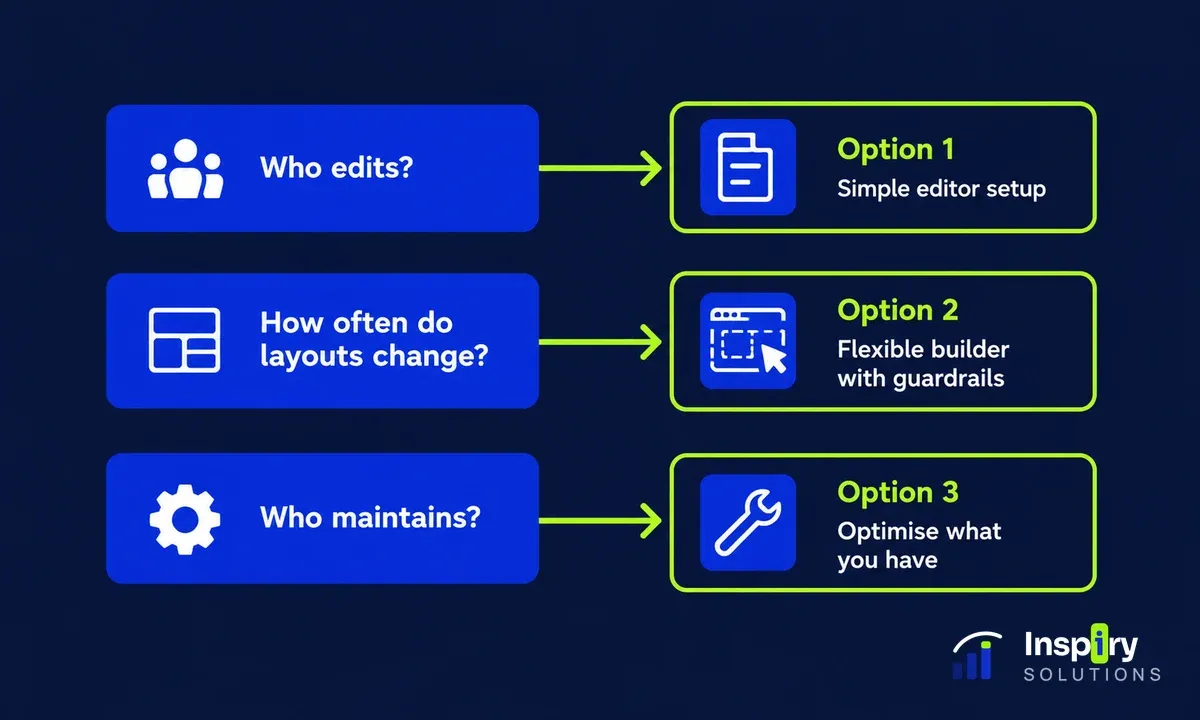
Choosing between Gutenberg vs Elementor: three questions
The most effective decision starts with how your website operates, not competing feature lists.
These questions identify the responsibilities that matter.
Who edits the site, and how confident are they?
Identify everyone responsible for publishing and updating content.
A trained marketer may confidently arrange sections and adjust layouts. An administrator may only need to change text, images and contact details.
More editing options do not automatically improve usability.
For non-technical employees managing consistent page types, Gutenberg with locked patterns can work well.
For designers creating different layouts, Elementor may offer useful control.
Prioritise independent editing without accidental structural changes.
How often do layouts change?
Separate routine content updates from design changes.
Replacing photographs or paragraphs rarely requires unrestricted layout editing. Creating varied campaign landing pages is different.
If pages share approved structures, blocks can separate editorial work from development.
If visual experimentation is frequent, Elementor with reusable components and design rules may support the workflow.
Avoid choosing extensive visual controls for hypothetical requirements.
Select tools based on actual publishing activity.
Who maintains the site and pays for licences?
Identify who updates plugins, tests compatibility, fixes layouts and renews subscriptions.
Businesses with limited technical support may benefit from fewer unnecessary dependencies.
Teams with dependable development support can manage Elementor effectively when implementation is controlled.
Request written answers covering licence ownership, renewal costs, backups, staging and maintenance.
Then test representative editing tasks with staff on staging.
If native blocks satisfy your editing requirements, they may be the simpler foundation.
If Elementor provides valuable visual flexibility and maintenance is managed, it remains appropriate.
For a reliable existing Elementor website, optimisation may be preferable to migration.
The decision requires defining what better means for your team.
Common questions
Is Gutenberg faster than Elementor?
Lightweight block themes often load less builder-specific code than add-on-heavy Elementor websites, but performance depends on implementation. Images, hosting, caching, scripts and integrations affect results. Compare representative pages using real-user data where available and controlled performance tests. Changing editors does not automatically improve Core Web Vitals or loading times.
Can I move my Elementor pages to Gutenberg automatically?
There is no reliable one-click conversion that preserves every Elementor layout as native WordPress blocks. Moving usually involves recreating templates and restructuring layouts. Written content may be reusable, but styling, widgets and responsive behaviour require testing. Inventory pages and functionality first, then build and verify the replacement on staging before launching.
Does Elementor hurt SEO?
Elementor does not inherently hurt SEO. Problems can arise from incorrect headings, excessive page weight, unsuitable templates or poor content structure. These issues also occur with Gutenberg. Evaluate rendered pages, metadata, internal links and performance instead of assuming the editor determines rankings. Implementation quality and useful content matter more than the builder’s name.
Do I need Elementor Pro?
That depends on your required features. Elementor’s free version supports visual page editing, while Pro adds capabilities including theme-building tools and forms. Some websites work adequately with free functionality and a suitable theme. Others depend on Pro templates or widgets. Consider renewal responsibilities and maintenance before selecting paid features.
Which is easier for non-technical editors?
Either editor can work well with appropriate guardrails. Gutenberg supports locked patterns and restricted templates, while Elementor offers reusable layouts and configurable editing permissions. The better choice depends on what employees need to change. Have actual editors test common updates before committing, rather than relying solely on a developer’s demonstration.
Next step: choose the workflow before the builder
A builder decision should begin with your team’s responsibilities rather than design features.
Document who edits the website, which changes occur regularly and who maintains its technical components. Compare both approaches using representative tasks.
For new websites with predictable layouts and frequent content updates, Gutenberg offers a straightforward starting point.
For regular visual experimentation, Elementor may provide worthwhile flexibility.
For existing Elementor websites, investigate actual problems before assuming another editor will solve them.
Not sure whether to optimise your Elementor site or rebuild on blocks? Send us the URL for a free audit, or explore our WordPress development service to see how we build websites teams can edit safely.
Email hello@inspirysolutions.com with your website URL and the main issue you want assessed. Inspiry Solutions will provide a plain-language reply within two working days, helping you identify whether optimisation or rebuilding deserves further investigation.