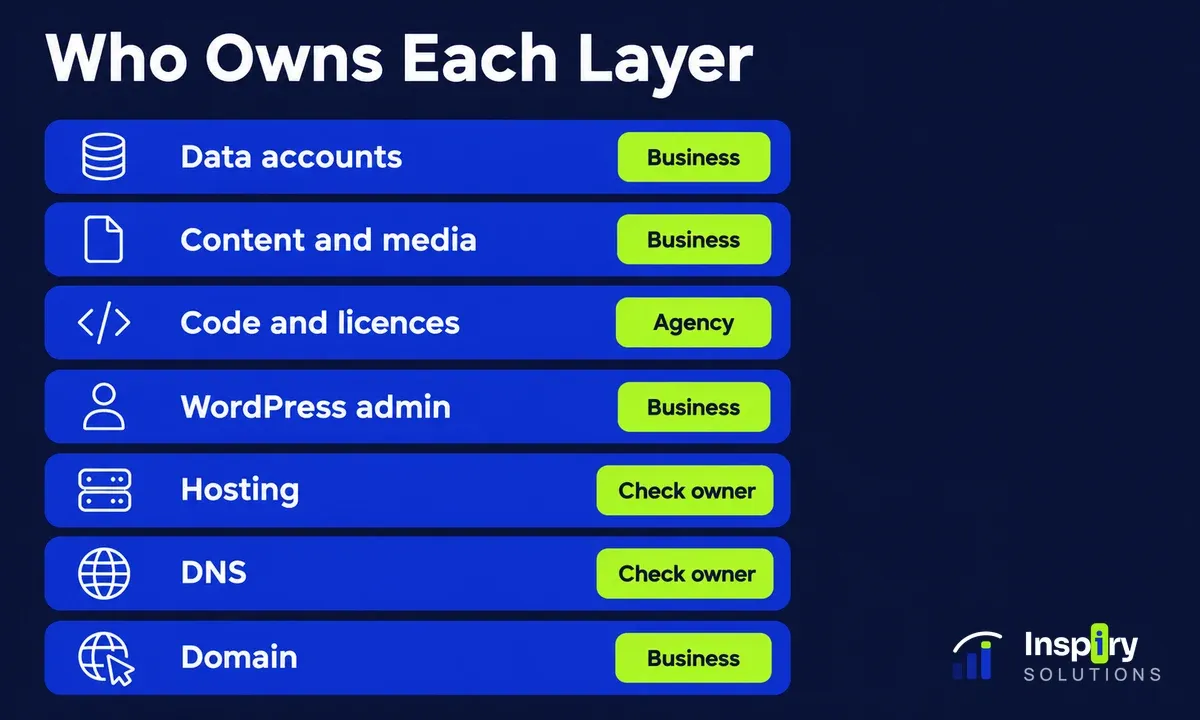
Who owns my website? The answer depends on seven separate layers: your domain name, DNS settings, hosting, WordPress administration, code and licences, content, and data accounts. Paying a developer to build a website does not automatically give you control of every part. To establish website ownership, you need to check who holds each account, what your contract says, and whether you could move the site without relying on the original developer.
If someone else built your website and you are unsure whether you could move it tomorrow, this guide is for you.
Ownership is not one thing: the seven layers of a website
A website depends on several systems, and each can be controlled by a different person or organisation.
Your developer might control the hosting while your business owns the domain. Your content might be yours, but the theme licence could belong to an agency.
Here are the seven layers to investigate.
1. Domain
The domain is your website address, such as example.com. It is registered through a domain registrar, the company that manages registration and renewal.
The registrant is the person or organisation recorded as holding the registration rights.
Quick check: Sign in to the registrar and confirm the registrant details, renewal contact and account access.
Fix: If your developer registered the domain under their account, request a transfer to a registrar account controlled by your business.
2. DNS
Domain Name System (DNS) settings tell internet services where your website and email should go.
Controlling the domain registration does not necessarily mean you can edit DNS.
Quick check: Identify the authoritative nameservers and confirm which account manages the DNS records.
Fix: Obtain administrative access or arrange a controlled transfer, preserving existing website and email records.
3. Hosting
Hosting is the server environment where your website files and database operate.
Some businesses have their own hosting subscription. Others use an agency’s reseller account, where several client websites share an account structure managed by that agency.
Quick check: Ask who owns the hosting account, pays the provider directly and can access backups.
Fix: Arrange an independent hosting account and plan a tested migration if necessary.
4. WordPress install and admin
WordPress is the content management system used to edit and operate your website.
Quick check: Sign in using your own email address and inspect your assigned role under Users.
Fix: Request an individual Administrator account and confirm that you can use it independently.
5. Theme and plugin code and licences
Quick check: Request a list of themes, plugins, licence holders and custom development components.
Fix: Obtain the required files and permitted usage rights, then move essential renewable licences into your business account where possible.
6. Content and media
Material you supplied may have a different ownership position from photography, illustrations or stock assets purchased by an agency.
Quick check: Identify the original sources of important images, documents and written content.
Fix: Collect source files, verify permissions and export the content you are entitled to reuse.
7. Data accounts
Website data accounts include Google Analytics, Google Search Console and Google Business Profile.
Their permissions are separate from WordPress access.
Quick check:
Fix: Add a business-controlled account with the correct permissions, confirm access and then adjust agency permissions.
These seven layers create a clearer picture of website ownership than a single statement from your developer. For future projects, consider builds handed over in your name, with account responsibilities agreed before development begins.
The domain and DNS
When someone asks “who owns website domain name?”, the most useful starting point is the registration record and registrar account, not the person who paid an invoice.
It does not, by itself, establish whose registration rights are recorded or who can make account changes.
Check these details:
- Identify the registrar through an existing registration email or domain lookup.
- Confirm the registrant name and organisation recorded for the registration.
- Check the email address receiving renewal and transfer notices.
- Verify that renewal settings and payment details are under business control.
- Find out who can edit the authoritative DNS zone.
If the registrant cannot be identified publicly, use the registrar dashboard or ask the current account holder for confirmation.
Your website, business email and links used by existing customers may depend on it.
Do not change nameservers simply because you have obtained access. First, export or record the current DNS settings, including mail-related records, and identify every service they support.
One changes the registrar or registration account. The other changes where DNS is managed. They do not always need to happen together.
Hosting and the WordPress admin
If your business holds the hosting contract, you can usually manage billing, technical access and service changes without the original agency.
An agency-managed server can be a legitimate arrangement. The risk arises when you have no independent access, clear exit process or usable backup.
Ask your provider or developer:
- Is the hosting account registered to my business?
- Can I contact the provider and authenticate myself?
- Can I download the site files and database?
- Who can change server settings or terminate the service?
- Where are the backups stored, and who can restore them?
WordPress administration is a separate issue.
According to WordPress documentation on roles and capabilities, the Administrator role provides broad access to site administration.
Use an Administrator account associated with your own business email. Shared accounts make it harder to establish responsibility for changes.
Backups also need attention. A backup that exists only inside your developer’s account is not an independent recovery option.
The WordPress backup guidance explains the importance of protecting website files and databases.
Keep a recent, restorable copy somewhere your business controls.
Code, design and licences
These can have different copyright terms, licensing conditions and contractual rights.
For custom themes and plugins, check the agreement with the developer. It should explain what deliverables you receive, what rights are assigned or licensed and whether source code is included.
Do not assume that paying for development automatically transfers every intellectual property right. Equally, do not assume the agency retains every right. The applicable law, contracts and underlying licences matter.
If the contract is unclear or disputed, obtain legal advice rather than treating general website guidance as a legal answer.
A commercial licence is often linked to the purchaser’s account, subscription or activation system.
The precise consequences depend on the product’s terms.
Review custom themes versus templates when deciding how much of your design depends on existing software.
Request a written inventory that separates:
- Custom code developed for your business.
- Free or open-source software components.
- Premium themes and plugins.
- Third-party scripts and integrations.
- Licence holders, renewals and ongoing dependencies.
Where available and permitted, purchase important premium licences through accounts in your company’s name. Keep purchase records and renewal notices.
Agencies should also establish these arrangements with subcontractors. Clear ownership terms in agency partnerships help distinguish client deliverables from reusable tools and third-party products.
The goal is not to claim ownership of software you cannot legally own. It is to establish your rights to use, maintain and move the website.
Content, images and data
Start by distinguishing material supplied by your business from material sourced or created by someone else.
Ask the agency for original files where the agreement allows. Keep records identifying licensed images and any restrictions on redistribution, modification or future use.
WordPress includes a built-in export feature under Tools > Export. It can produce an XML file containing supported content, such as posts, pages and associated information.
However, that export is not a complete website backup. It does not independently package every theme, plugin, database setting or media file needed to reproduce the original site.
For a complete move, request the relevant database, uploaded files, theme files, custom code and configuration information.
Your data accounts also need checking.
In Google Search Console, ownership verification establishes control over a website property.
For Analytics, review Google’s Analytics account management guidance and check who holds Administrator permissions at the appropriate account level.
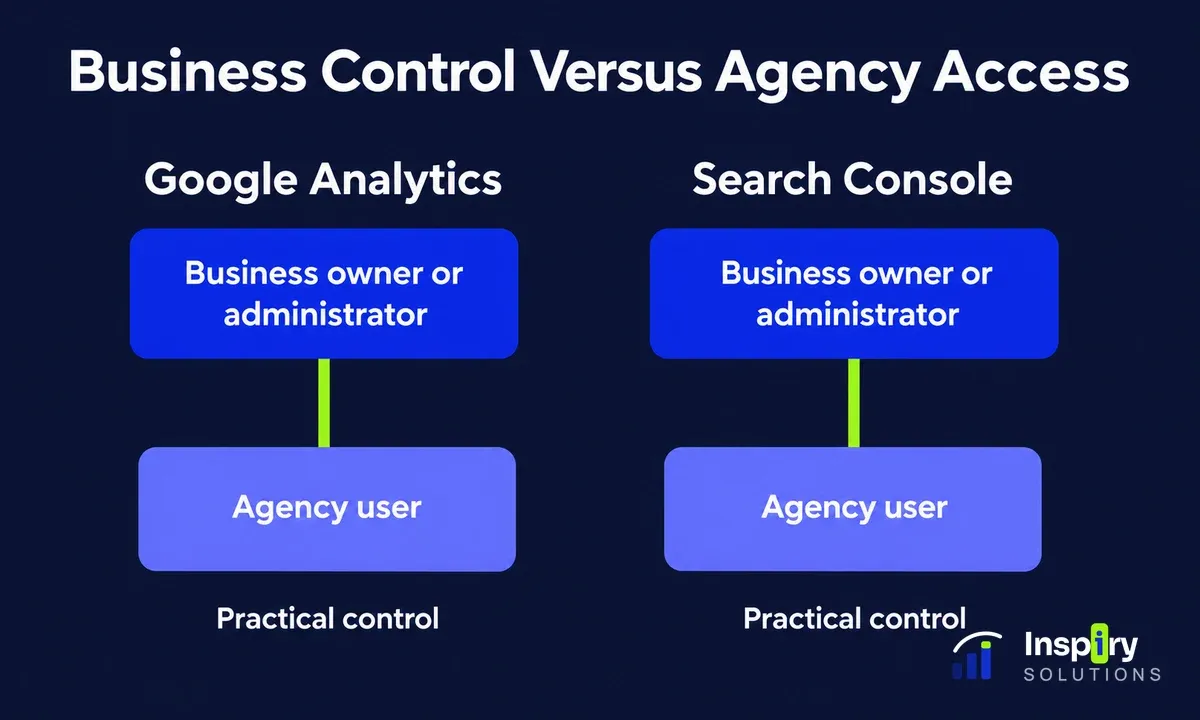
The general rule is straightforward: give agencies the permissions they need to perform their duties, without making the business dependent on their personal accounts.
These settings establish practical control, not every contractual right.
Who owns my website? A 20-minute check
You can complete an initial website ownership audit in about 20 minutes if your existing logins and account details are available.
It is to identify the missing access, record who currently holds it and decide what needs attention first.
Check the domain registrant
Open your registrar account and inspect the registration details, renewal settings and nameservers.
Record the registrar, registrant, account administrator and next renewal date. If information is unavailable, mark it as unverified rather than assuming the developer owns it.
Log in to hosting and WordPress as yourself
Use your own credentials to enter the hosting dashboard and WordPress administration area.
Verify your WordPress role, then confirm whether you can download a backup containing the files and database.
If hosting access is unavailable, identify the provider and account holder. Do not make live server changes during the audit.
Confirm you are owner on Analytics and Search Console
Open Analytics and check account-level access management. Your business-controlled Google account should have the required Administrator permissions.
In Search Console, inspect Users and permissions and confirm that your business is a verified Owner.
Verify access before removing anyone.
List premium licences and who holds them
Review your WordPress themes and installed plugins. Identify paid products, custom components and third-party dependencies.
Ask who purchased each licence, where updates come from and what happens when your agency agreement ends.
You do not need to resolve every licensing question during this initial check.
Ownership audit table
| Layer | What to check | Should be in the name of | Risk if not |
|---|---|---|---|
| Domain | Registrant, registrar, renewal access | Your business | Loss of domain control or renewal problems |
| DNS | Nameservers, DNS provider, record access | Business-controlled account | Website or email disruption |
| Hosting | Provider, billing, server and backup access | Your business, where practicable | Dependency on developer for migration |
| WordPress admin | Administrator permissions and personal login | Authorised business representative | Cannot manage users or essential settings |
| Theme and plugin licences | Purchaser, renewals and licence terms | Your business where transferable | Lost updates, support or activation |
| Custom code | Source files and contractual usage rights | Rights documented for your business | Restrictions on maintenance or reuse |
| Content and media | Source files, copyright and permissions | Your business or properly licensed | Missing assets or reuse disputes |
| Analytics | Account-level Administrator permissions | Business-controlled Google account | Loss of reporting access |
| Search Console | Verified Owner and user permissions | Business-controlled Google account | Loss of search property control |
| Google Business Profile | Primary owner and user access | Authorised business account | Inability to manage business information |
Add a final status beside each row in your own copy: Confirmed, Needs transfer or Unknown.
Store your findings in one access document. Include account URLs, provider names, responsible contacts, recovery emails and renewal information.
If your developer holds the keys
Many websites begin with an agency setting up everything for convenience. Problems arise when those arrangements are never documented or transferred.
List the specific accounts and rights you need, and ask the developer to confirm the proposed handover process.
A practical request could say:
“Could you please confirm who controls our domain, DNS, hosting, WordPress administration, premium licences and Google accounts? We would like to establish business-owned access and arrange the transfer of any accounts currently held on our behalf. Please also provide the latest complete backup and relevant licence information.”
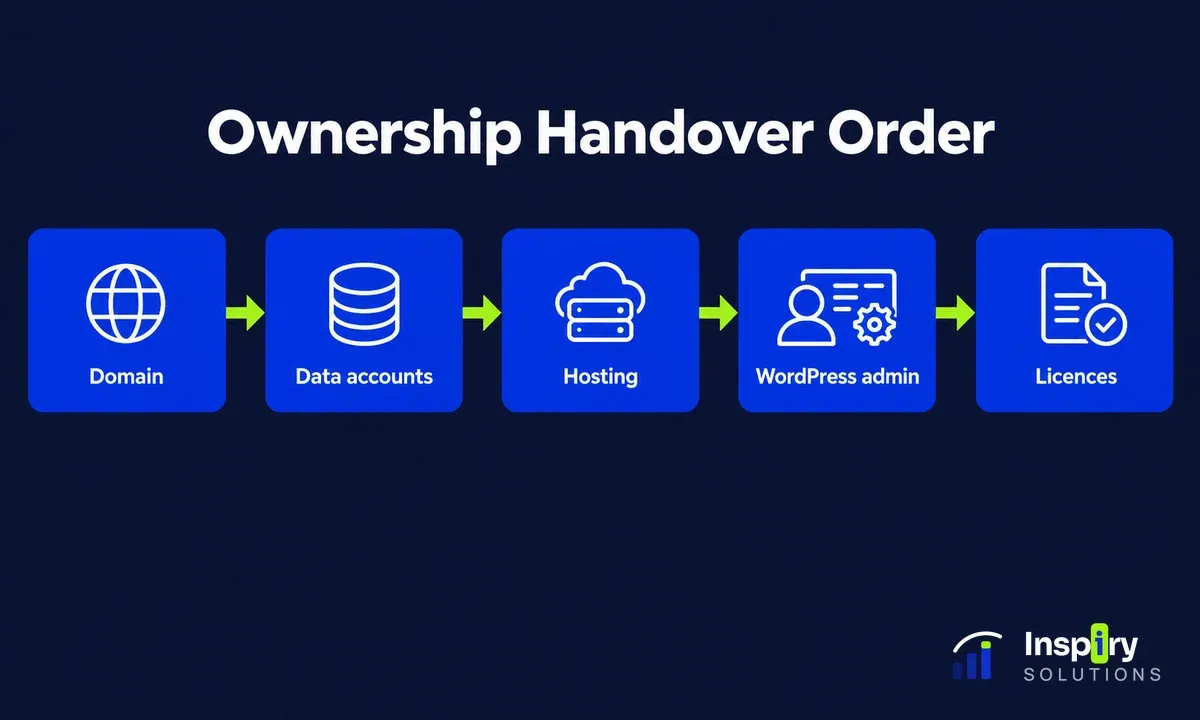
The preferred order for resolving access is:
- Secure the domain registration and confirm DNS control.
- Establish business-controlled access to Analytics, Search Console and Business Profile.
- Prepare an independent hosting account and verified backup.
- Complete the website migration and confirm WordPress Administrator access.
- Finalise theme, plugin and custom code licence arrangements.
Hypothetical example: A consultancy discovers that its domain was registered by a former freelancer, its website runs on an agency’s reseller server and Analytics was configured under an agency-controlled account.
The consultancy first arranges the domain transfer into its business account. It then asks for suitable access to Analytics and verified ownership in Search Console.
Once the important accounts are secured, it prepares new hosting and schedules the website move during a quiet week.
This is an illustrative scenario, not a client case.
Before changing DNS, the developer confirms that the new website works, forms submit correctly, email records are preserved and a rollback option exists.
For the technical transfer, follow a checklist for moving hosting without downtime.
Change relevant passwords, review recovery information and enable two-factor authentication wherever supported. The National Cyber Security Centre small business guidance provides practical security measures for organisations.
If a developer refuses access, preserve the contract, invoices and written correspondence.
Where there is a genuine dispute about ownership or transfer rights, obtain advice from a qualified lawyer. Do not try to settle disputed legal rights by altering accounts or disabling services without authorisation.
Common questions
Do I own my website if I paid for it?
Not automatically for every layer. Payment does not necessarily establish control of all accounts or transfer every intellectual property right. Website ownership depends partly on whose name the accounts are in and what the development contract says. Check each layer separately, including the domain, hosting, code and content. For uncertain contract wording or disputed rights, take legal advice.
Can my web designer keep my domain name?
If your designer is the recorded registrant, they may control the domain in practice, although contractual rights could affect what they are entitled to do. Request a transfer in writing and arrange for registration to move into an account controlled by your business. Because losing the domain is the most damaging single failure, it is the first layer to secure.
Who owns a premium WordPress theme or plugin?
Premium themes and plugins are generally licensed rather than owned outright. The commercial licence is usually associated with whoever bought the product, while the software itself remains subject to its licensing terms. Ask for essential licences to be purchased or maintained in your business’s name where possible, so updates and support can continue after you change developer.
How do I get admin access to my own website?
Ask your developer to create a WordPress Administrator account specifically for you. Use your own business email address rather than a shared login. Once the account works, set a strong password and enable two-factor sign-in where supported. Remember that WordPress Administrator access does not automatically include hosting, domain registration or third-party account permissions.
What should I own when a new website launches?
Your business should control the domain, preferably the hosting account, an individual WordPress Administrator account, essential licences and relevant data accounts. You should also receive a complete usable backup and an access document identifying every provider and responsible person. For custom code and commissioned content, make sure the contract explains the rights being transferred or licensed.
Your next step
Start with the ownership audit table and identify the riskiest gap.
If you cannot control the domain, prioritise that issue. If domain control is secure but backups are unavailable, obtain a recoverable copy before making major changes.
You do not need to move every service simply to establish proper website ownership. An agency can continue managing your website while your business retains the necessary rights, independent access and documented exit process.
Make account control part of every future website agreement. Confirm who registers the domain, purchases licences, provisions hosting, creates Administrator accounts and manages data services before the project launches.
Not sure who holds the keys to your site? Send us your URL for a free audit and we will tell you, in plain language within two working days, what needs moving into your name. Our WordPress development team can handle the handover, including account access, backups and a carefully planned website migration.