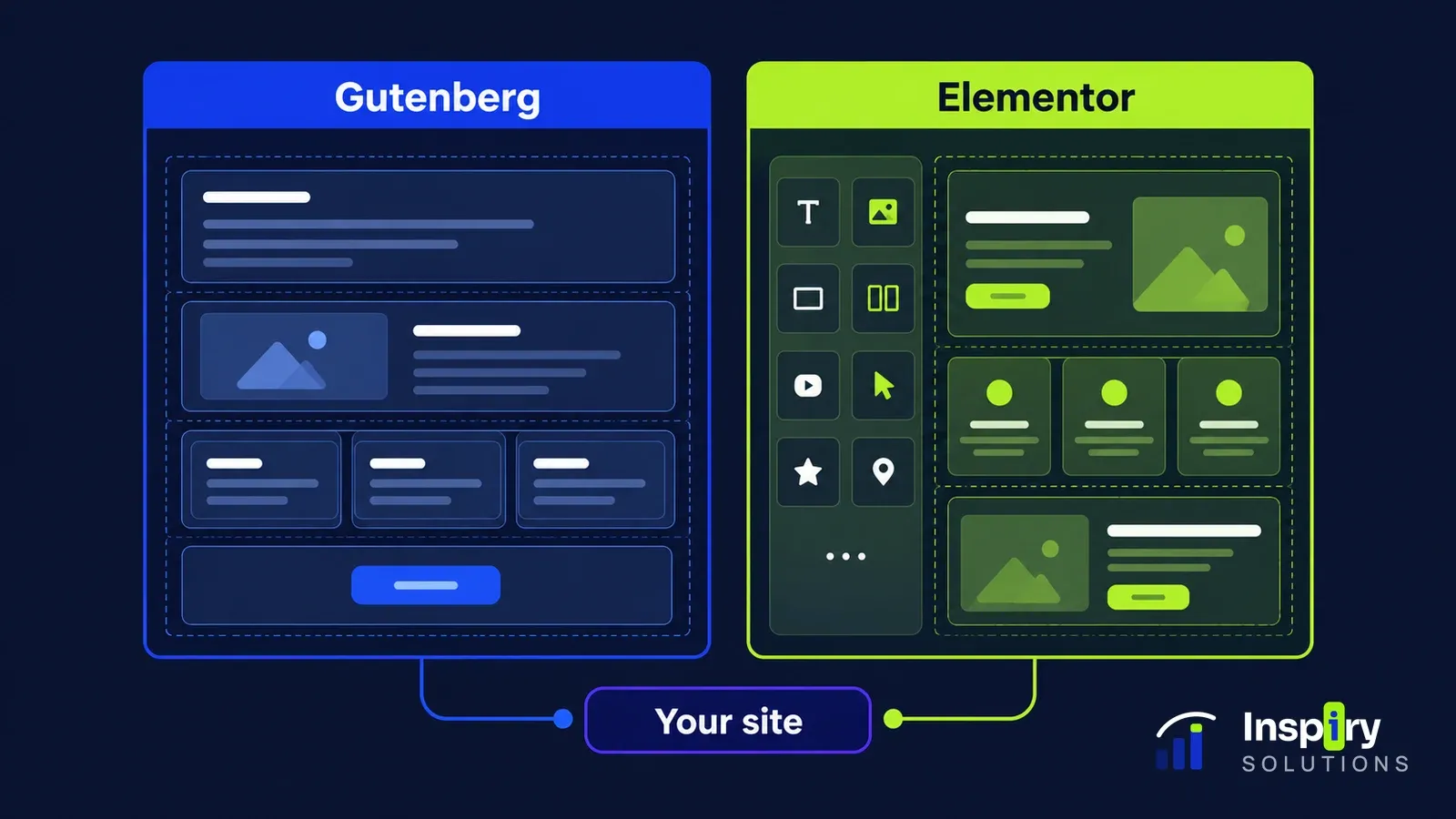
ACF vs Gutenberg blocks is a choice between structured fields, flexible page layouts and a combination of both. ACF fields suit content with a predictable format, such as services and team profiles. Gutenberg blocks give editors more control over arranging individual pages. It is deciding which content needs consistency and which needs flexibility.
If you manage a WordPress project, commission new pages or supervise a marketing team, this guide will help you decide what editors should control, what developers should define and how to test the result before launch.
Fields or blocks: the basic difference
The difference between fields and blocks is what the editing interface asks people to do.
A structured field asks an editor to enter a specific piece of information. A block asks an editor to add or arrange a piece of page content.
What is a custom field?
A custom field stores an additional piece of information against a WordPress item, such as a page, post or service.
For example, a service page might have separate fields for:
- Service summary
- Starting price note
- Main image
- Frequently asked questions
- Related services
- Contact button text
The official ACF documentation explains the field types and how developers display their values.
What is a block?
A block is an individual content element inside the WordPress editor. It might contain a paragraph, heading, image, gallery, columns or another supported layout.
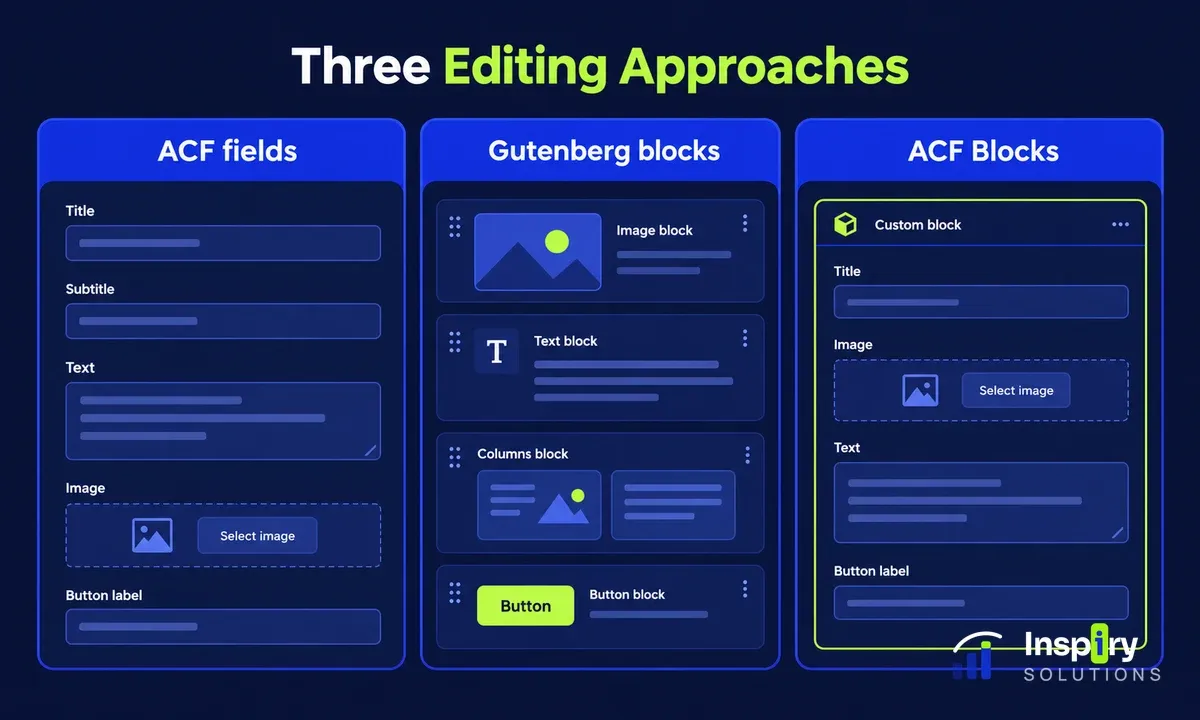
The important question is not whether your developer prefers advanced custom fields vs Gutenberg. It is whether the people maintaining the website should mainly enter information or make layout decisions.
For teams planning a rebuild, WordPress builds shaped around your editors should begin with that distinction rather than treating the editing interface as a final technical detail.
When structured fields work better
Structured fields work best when many content items share the same shape.
Consider a company with multiple locations. Every location page might need an address, opening hours, telephone number, service area and contact link.
Allowing each editor to construct this information manually creates avoidable differences.
With ACF fields, the required inputs can remain predictable while templates control their presentation.
Repeated content needs a defined structure
Common candidates include team profiles, locations, services, vacancies, properties and product specifications.
These records often benefit from a custom post type, which is a dedicated content category within WordPress. For example, a Services post type keeps service records separate from ordinary blog posts.
WordPress’s custom post type documentation explains how developers can register dedicated content types.
Its fields describe the information that record contains.
Keeping those responsibilities separate makes a website easier to extend.
Consistency across multiple pages
Developers can provide clear labels, instructions, suitable input types and validation rules. For example, an image field can request a particular asset, while a select field can limit choices to approved values.
Optional content should be supported deliberately, with templates designed to handle missing values gracefully.
Reusing content without copying it
One of the strongest reasons to use ACF is the ability to reuse structured data.
The same record might contribute information to a detailed service page, a listing grid and structured data.
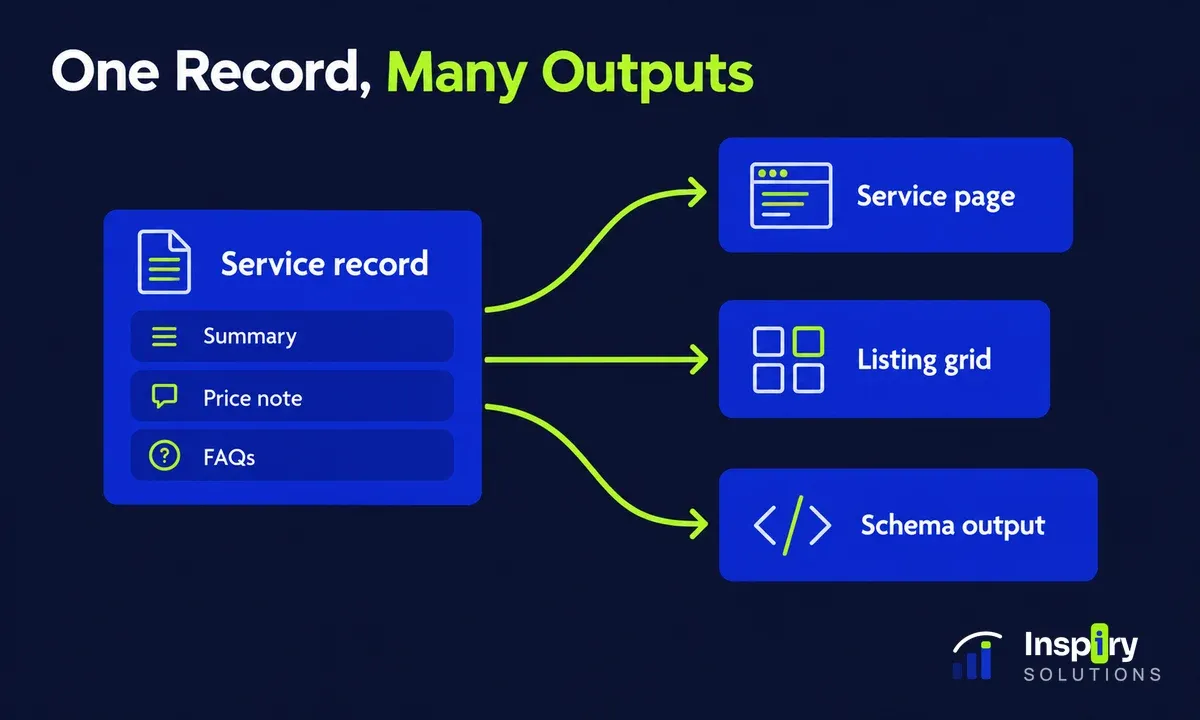
The developer can build templates and queries that read the stored values rather than asking editors to copy the same information into several places.
For example:
- A service page displays the summary and FAQs.
- A listing grid displays the service title and short description.
- A filter uses a stored service category.
- Schema output uses supported information from the record.
Installing ACF does not automatically guarantee valid or useful structured data.
When blocks work better
Gutenberg blocks are often a better choice when pages differ in structure and editors need to arrange content visually.
A marketing team building a campaign page may want a hero section, customer benefits, images, a comparison table and a contact form.
A rigid collection of template fields can make these variations difficult. Editors may repeatedly request developer changes for simple layout adjustments.
Articles and landing pages
The WordPress block editor documentation explains the standard editing interface and block-based content workflow.
Patterns provide guardrails
A block pattern is a predefined arrangement of blocks that editors can insert into a page.
For example, a developer might create approved patterns for:
- Hero sections
- Service benefits
- Testimonials
- Frequently asked questions
- Calls to action
- Two-column content sections
Patterns can be independent or synchronised. A synchronised pattern shares content and structure across its instances, subject to supported overrides.
Lock layouts without blocking useful edits
WordPress supports block locking and template locking to restrict supported layout changes.
A developer can prevent certain blocks from being moved or removed while leaving their text and images editable.
It is to protect the layout decisions that should remain consistent.
When comparing options, comparing the block editor with Elementor can help teams understand the broader difference between content editing and visual page building.
A useful rule is to offer fewer layout choices that work reliably rather than many choices that require constant supervision.
ACF Blocks: the middle option
ACF Blocks combine structured field inputs with the block editor’s ability to place content sections visually.
A developer creates a custom block, defines its fields and writes the template responsible for rendering it.
The editor can then insert that block into a page, complete the approved inputs and position it among other supported blocks.
For example, a custom testimonial block might contain:
- Quote text
- Customer name
- Customer role
- Company name
- Optional photograph
- Approved presentation variation
The editor controls the content, while the developer controls the component’s output.
Controlled inputs inside a visual canvas
Consider a marketing page containing a hero, service introduction, comparison section and enquiry form.
Most of those sections could use core blocks and patterns. However, the comparison section might require strict formatting or specialised behaviour.
An ACF Block could give editors labelled fields for the comparison items without requiring them to assemble the layout manually.
ACF Blocks versus custom Gutenberg blocks
ACF Blocks are one way to build custom editor components. Developers can also create custom Gutenberg blocks using WordPress’s native block development APIs.
This is closely related to deciding when custom code is worth it, especially when standard WordPress features cannot meet a specific workflow.
Licence and maintenance considerations
ACF Blocks are a feature of ACF PRO, so the project needs to account for the appropriate licence and ongoing updates.
The licence arrangement should be documented before handover.
Using ACF Blocks also changes how custom components are defined and managed.
Choose this approach when the editing benefits justify the additional dependency, rather than because it seems more advanced.
ACF vs Gutenberg blocks: the three approaches compared
The practical ACF vs Gutenberg blocks decision involves three approaches, not just two.
| Factor | ACF fields on templates | Core Gutenberg blocks and patterns | ACF Blocks |
|---|---|---|---|
| Editing feel | Form-based fields with fixed inputs | Visual canvas with movable content | Visual canvas containing structured inputs |
| Consistency across pages | High when templates control presentation | Depends on patterns, restrictions and editor discipline | High within individual custom components |
| Layout freedom | Limited unless templates support variations | Broad within available blocks and permissions | Flexible block arrangement with controlled internal layouts |
| Reuse of data elsewhere | Well suited to structured queries and shared outputs | Possible, but less direct for arbitrary content | Possible with additional data modelling and development |
| Developer effort | Field modelling and template implementation | Lower for simple pages, higher for complex restrictions | Custom block registration, fields and rendering |
| Dependency on a plugin | ACF required for the ACF-based implementation | No ACF dependency for core blocks | ACF PRO required |
| Best fit content types | Services, locations, team members, directories | Articles, landing pages, campaign content | Reusable designed sections with structured inputs |
ACF fields on templates
Choose ACF fields when editors repeatedly enter the same categories of information.
This approach is particularly useful when records feed several parts of the site, including search results, listing grids or external integrations.
The trade-off is reduced layout freedom. New page structures may require template development.
Core Gutenberg blocks and patterns
Choose core Gutenberg blocks when the content structure varies and editors need to control its arrangement.
Its main risk is inconsistent layouts when too many options remain available. Patterns, restrictions and training are important.
ACF Blocks
Choose ACF Blocks when reusable page sections require both visual placement and controlled inputs.
An editor might position a comparison component, complete its fields and preview the output without assembling the underlying structure.
However, these components still need developer ownership, template maintenance and an appropriate ACF PRO licence.
The advantage is not unrestricted flexibility. It is the ability to choose where flexibility ends.
Mixing approaches on one site
Many business websites benefit from combining structured fields with blocks.
The important distinction is between the kind of content being stored and the way that content is presented.
Fields can define records that have a predictable structure. Blocks can provide the visual composition needed for articles and marketing pages.
Hypothetical example: A recruitment firm has 40 job sector pages covering areas such as healthcare, engineering and finance.
Every sector page requires an introduction, specialist contact, service summary, related vacancies and FAQs.
Using ACF fields, the firm can keep those inputs consistent across its sector records. Templates then control how the information appears.
The homepage and campaign landing pages use Gutenberg patterns because their layouts change more frequently.
A recruitment campaign might place a testimonial above its enquiry form. Another might lead with employer benefits.
The number of sector pages is illustrative, not a client result or performance claim.
Make the editing experience predictable
Mixing systems introduces a risk: editors may not understand why some screens contain fields while others contain blocks.
The solution is to organise content types around their jobs.
For example, sector pages might use a dedicated WordPress menu item and a structured form. Campaign pages might use a clearly labelled block editor with approved patterns.
Field names should describe content, not technical implementation. Use “Sector introduction” rather than an unexplained internal identifier.
Document the editing rules
A short content model document can identify the intended approach for each content type.
It should specify who edits the content, which fields are required, which layouts are available and where shared information originates.
What this means for maintenance and handover
Where field definitions live
ACF field groups can be stored in the WordPress database, defined through PHP or managed using local JSON files.
This is one reason separating content from presentation matters when choosing a WordPress architecture.
What editors should receive at handover
A useful handover is more than administrator credentials and a brief screen-sharing session.
Documentation should explain:
- Which menu item controls each content type
- Which fields are required and why
- Which blocks or patterns are approved
- How shared content is updated
- Which changes require developer assistance
- How to preview, review and publish safely
- How to report a broken layout
What happens when a licence lapses?
An expired ACF PRO licence does not ordinarily delete existing field values from the WordPress database.
However, losing access to updates and support introduces maintenance and security risks. If the plugin becomes unavailable or is deactivated, dependent fields, blocks and rendering functions may no longer work correctly.
Before changing providers or removing a plugin, identify which templates and components depend on it.
Keep current backups, record the licence owner and test major updates on staging.
Common questions
Is ACF still needed now that Gutenberg exists?
Yes, ACF remains useful for structured, repeated data such as services, locations and team records. Gutenberg blocks are better suited to arranging page content visually. Fields and blocks solve different problems and often work together. The deciding factor is whether editors need to maintain predictable information or control the arrangement of individual pages.
What are ACF Blocks?
ACF Blocks are custom WordPress editor blocks whose settings and content inputs are defined using ACF fields. They allow editors to position a designed component visually while completing controlled inputs such as headings, images and descriptions. Developers define how the component renders. This combines visual editing with a more predictable internal layout.
Will I lose content if I stop using ACF?
Existing ACF field values generally remain in the WordPress database when the plugin is deactivated or removed. However, templates and components that depend on ACF functions may stop displaying those values and would need rebuilding or replacing. Back up the database before making changes, and check how individual field types and blocks store their content.
Which option is faster for editors?
Fields are usually quicker for repeated, fixed-shape content because editors complete predictable inputs without arranging a layout. Gutenberg blocks are often quicker for one-off pages where the structure needs to change. ACF Blocks can help with reusable specialised sections. Test the options with your own editors and actual publishing tasks rather than relying on assumptions.
Test the editing setup before launch
Do not approve a WordPress editing model based only on a developer demonstration.
The real test is whether someone unfamiliar with the implementation can complete normal publishing work.
Give two actual editors access to the staging website and observe them completing realistic tasks.
Give two editors three real tasks
- Create a new service or sector page using the approved structure. Ask the editor to complete the required information, add images and preview it.
- Update an existing page. Change a summary, replace an image and confirm the information appears wherever it is reused.
- Build a campaign page using approved blocks or patterns. Ask the editor to reorder sections, adjust content and prepare it for review.
Watch where the process breaks
Record whether editors can identify the correct screen, understand field labels and recognise the difference between local and shared content.
Note moments when someone asks which field to use, cannot find an image control or accidentally changes a layout.
Incorrect content, accidental design changes and uncertainty about publishing are equally important.
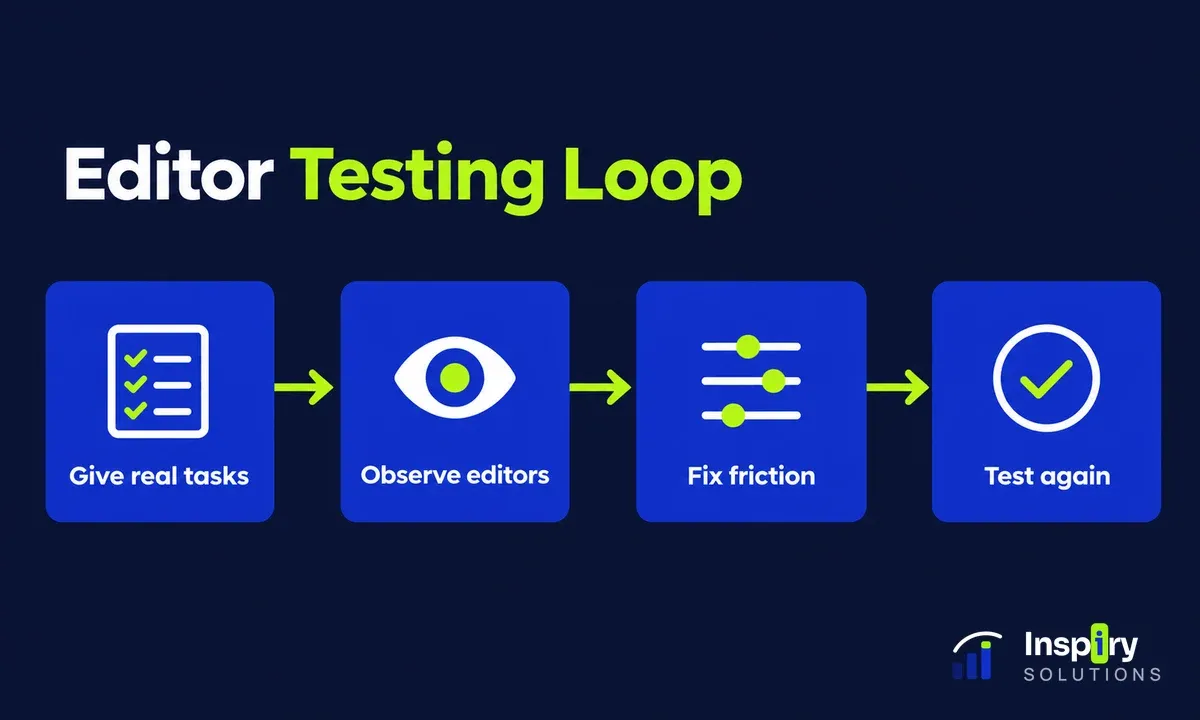
Adjust the model before launch
Rename unclear fields, group related inputs, add instructions and remove unnecessary controls.
If editors repeatedly rearrange a pattern incorrectly, consider locking the relevant structure.
If every campaign requires a completely different layout, overly restrictive fields may be the problem.
Questions to ask your developer
Before approving the build, ask:
- Which content types use structured fields, and why?
- Which pages use Gutenberg blocks or patterns?
- What happens when we need a new page layout?
- Which elements can editors move, remove or restyle?
- Can shared information be updated in one place?
- Where are field definitions and custom block templates stored?
- Who owns and renews any required plugin licences?
- What happens to our content if we change themes or developers?
- Can you demonstrate these workflows using our actual content?
The most useful decision is not whether one WordPress technology is better than another. It is which parts of your content should be structured, which parts need visual freedom and which reusable components require controlled inputs.
Choose fields, blocks or ACF Blocks accordingly, then validate the process on staging before launch.
If your editors struggle with the current setup, send us the site for a free audit. Our WordPress development service designs the editing model before the templates.
Send your website URL to hello@inspirysolutions.com. You will receive a plain-language reply within two working days.