You can block AI crawlers selectively without blocking every route into AI search. Most service businesses should decide separately about training and search access. Blocking a training crawler may fit your content policy, while blocking a search crawler could reduce opportunities for your pages to appear in AI-generated answers. There is no universal setting that suits every website. The sensible approach is to identify each crawler’s documented purpose, decide what your business wants, and check that your server actually follows that decision.
This guide explains crawler purposes, robots.txt rules and how to detect accidental blocks.
The short answer: decide per purpose, not per company
For most service businesses, automatically blocking every AI crawler offers limited benefit. A consultancy, solicitor or local service provider usually wants its public information discoverable wherever potential customers search.
That does not mean every AI company needs unrestricted access.
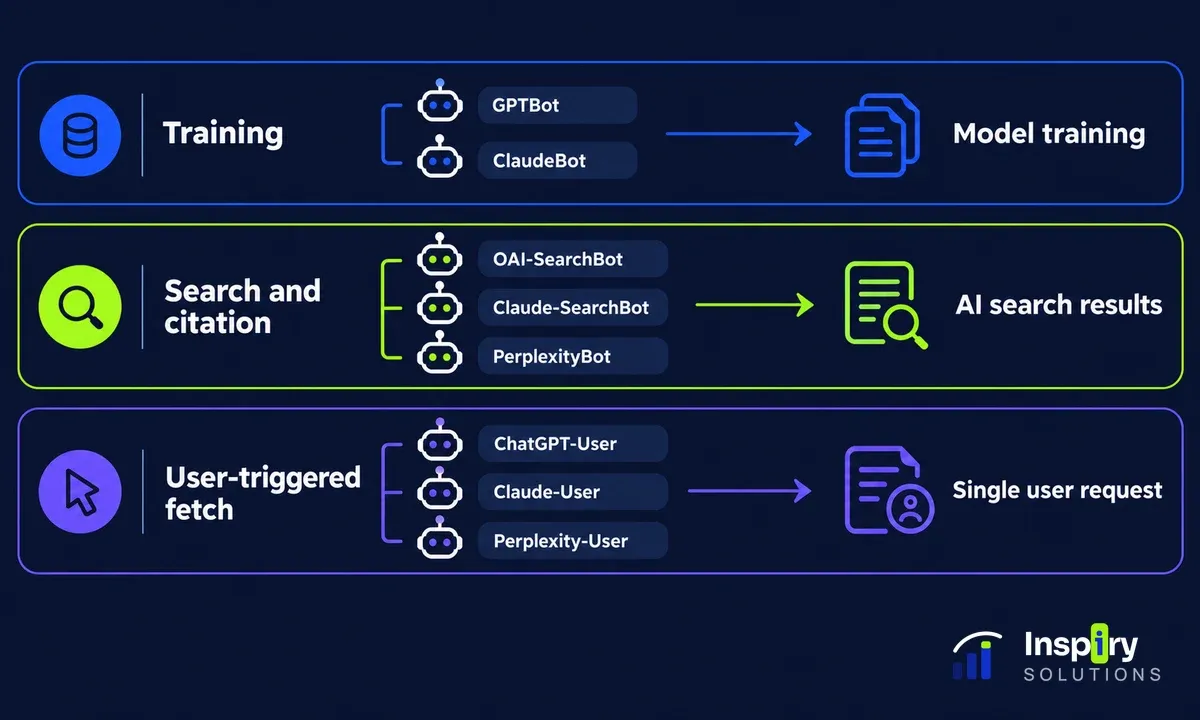
Training crawlers collect material potentially used to develop models. Search crawlers support discovery and AI-generated answers. Other agents retrieve pages following user requests.
Your policy should answer three questions:
- Training: Are you comfortable with your public content contributing to model development?
- Search: Do you want your website considered for AI search results and citations?
- User requests: Should assistants retrieve public pages when users request them?
Allowing search access while deciding separately about training is reasonable for many service businesses.
Publishers selling original research may choose differently because content reuse affects their commercial model.
Our help with AI search visibility starts by checking access and discoverability.
Blocking is a business decision about content reuse and visibility, not a technical default.
Three kinds of AI crawler
AI crawlers are automated programmes that request website pages. Their purposes differ, so blanket policies can create unintended consequences.
Each request normally includes a user agent, an identifier describing the requesting software.
Website owners communicate crawling preferences through robots.txt, usually available at:
https://example.com/robots.txt
This file tells compliant crawlers which paths they may access. It is not a security barrier.
1. Training crawlers
Training crawlers gather publicly accessible information that may contribute to developing AI models.
Examples include GPTBot and ClaudeBot.
Blocking these crawlers communicates that you do not want collection through those routes for training. It does not undo earlier collection or cover every other source of your content.
2. Search and citation crawlers
Search crawlers help AI products discover websites and retrieve information for search experiences.
Examples include OAI-SearchBot, Claude-SearchBot and PerplexityBot.
Blocking them can reduce visibility in their respective search experiences. Allowing access does not guarantee citations, rankings or referral traffic.
3. User-triggered fetchers
Some AI systems retrieve a page because someone requests information about it.
Examples include ChatGPT-User, Claude-User and Perplexity-User.
These requests differ from routine crawling. Providers may treat robots.txt differently for user-triggered activity.
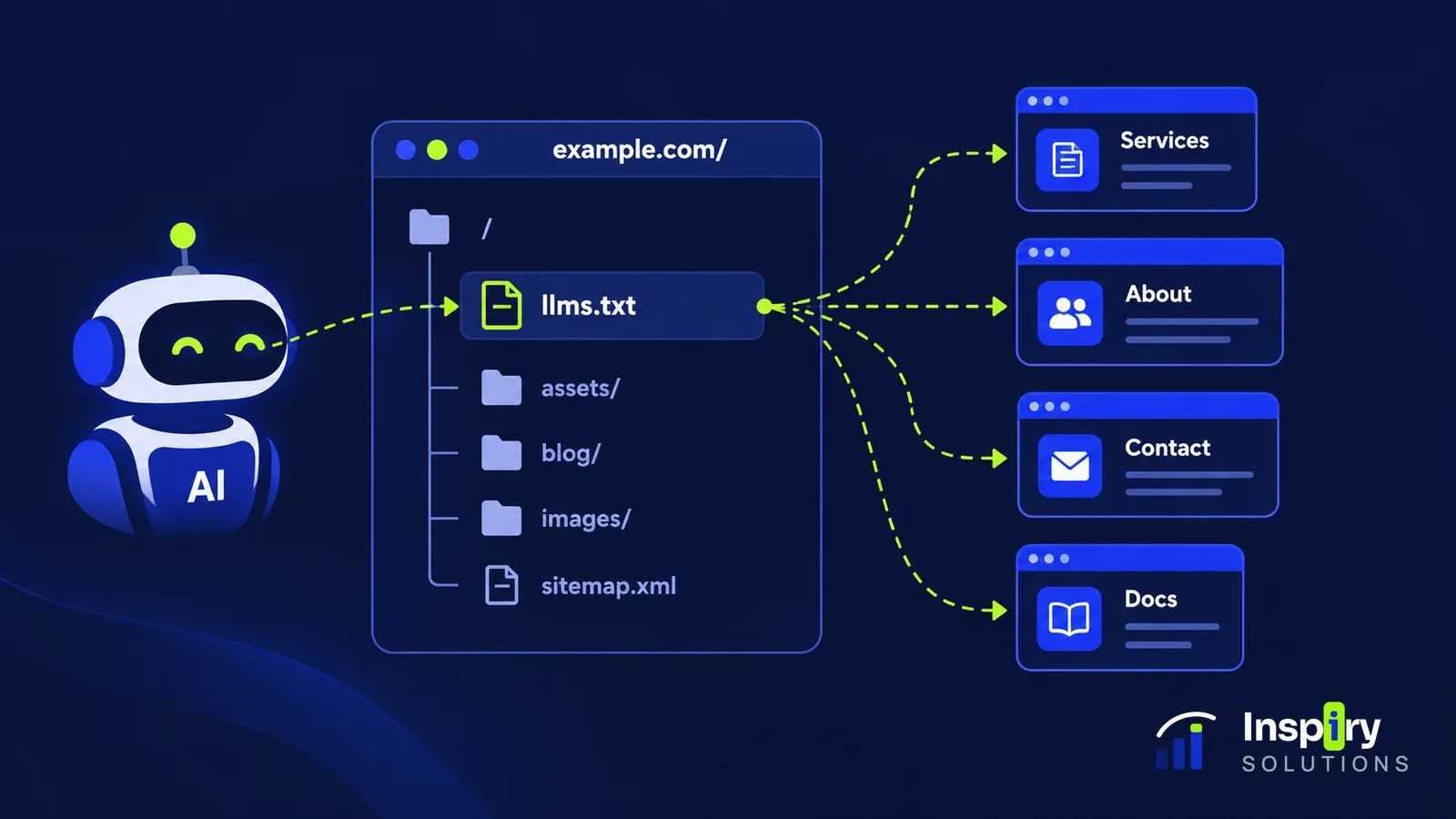
llms.txt is not a replacement for robots.txt. It is a proposed format for presenting information to language models, not an established crawler-blocking mechanism.
Read the llms.txt reading guide file for its intended purpose and limitations.
Providers may add bots or change policies. Check current documentation before updating rules.
Four providers and what they say their AI crawlers do
The following purposes are based on official provider documentation referenced on 12 October 2026.
These distinctions help website owners control AI crawlers individually.
OpenAI
OpenAI’s crawler documentation identifies separate agents for training, search and user-requested access.
GPTBot: Crawls content that may be used to train OpenAI’s generative AI foundation models. Disallowing it indicates that website content should not be used for that training purpose.
OAI-SearchBot: Supports discovery and presentation of websites in ChatGPT search results. OpenAI recommends allowing it when you want search visibility.
ChatGPT-User: Retrieves websites for certain user actions in ChatGPT and Custom GPTs. It is not an automatic web crawler, and robots.txt rules may not apply to these user-initiated requests.
OpenAI also documents OAI-AdsBot for checking pages submitted as ChatGPT advertisements.
If you want to block gptbot robots.txt access without withdrawing from ChatGPT search, these distinctions matter.
You can disallow GPTBot while permitting OAI-SearchBot. Search visibility is not guaranteed.
Anthropic
Anthropic identifies three agents in its official guidance on web crawling and opting out.
ClaudeBot: Collects web content potentially contributing to improving and training Anthropic’s generative AI models.
Claude-SearchBot: Accesses and analyses online content to improve search result relevance and accuracy.
Claude-User: Retrieves website information in response to Claude users’ requests.
Anthropic says restricting ClaudeBot signals that future site materials should be excluded from training datasets.
Disabling Claude-SearchBot may reduce search visibility, while restricting Claude-User can prevent user-directed retrieval.
When creating claudebot robots.txt rules, remember that ClaudeBot does not represent all Anthropic activity.
Anthropic also documents support for the non-standard Crawl-delay directive.
Perplexity
Perplexity describes two agents in its official crawler guidance.
PerplexityBot: Discovers and indexes information so websites can appear and be linked in Perplexity search results. Perplexity says it does not collect material for foundation model training.
Perplexity-User: Retrieves pages following individual user requests, rather than routine crawling or training collection.
Perplexity states that Perplexity-User generally ignores robots.txt restrictions because these requests originate from users.
Consequently, a robots.txt disallow rule should not be treated as a reliable block on every user-triggered request.
Server restrictions are separate. Perplexity publishes IP ranges to help identify genuine requests.
Google’s controls require care because Search and other AI products have different policies.
According to Google’s common crawler documentation, Google-Extended is a robots.txt product token, not a standalone crawler with its own HTTP user-agent string.
It controls use of crawled content for training future Gemini models and grounding in specified Gemini products and services.
Google states that restricting Google-Extended does not affect Google Search inclusion or act as a Search ranking signal.
AI Overviews and AI Mode are Google Search features. Their eligibility follows Search requirements, including Googlebot access, indexing and snippet controls.
A google-extended robots.txt restriction therefore differs from blocking Googlebot, which can affect ordinary Search discoverability.
Should you block AI crawlers? A decision guide
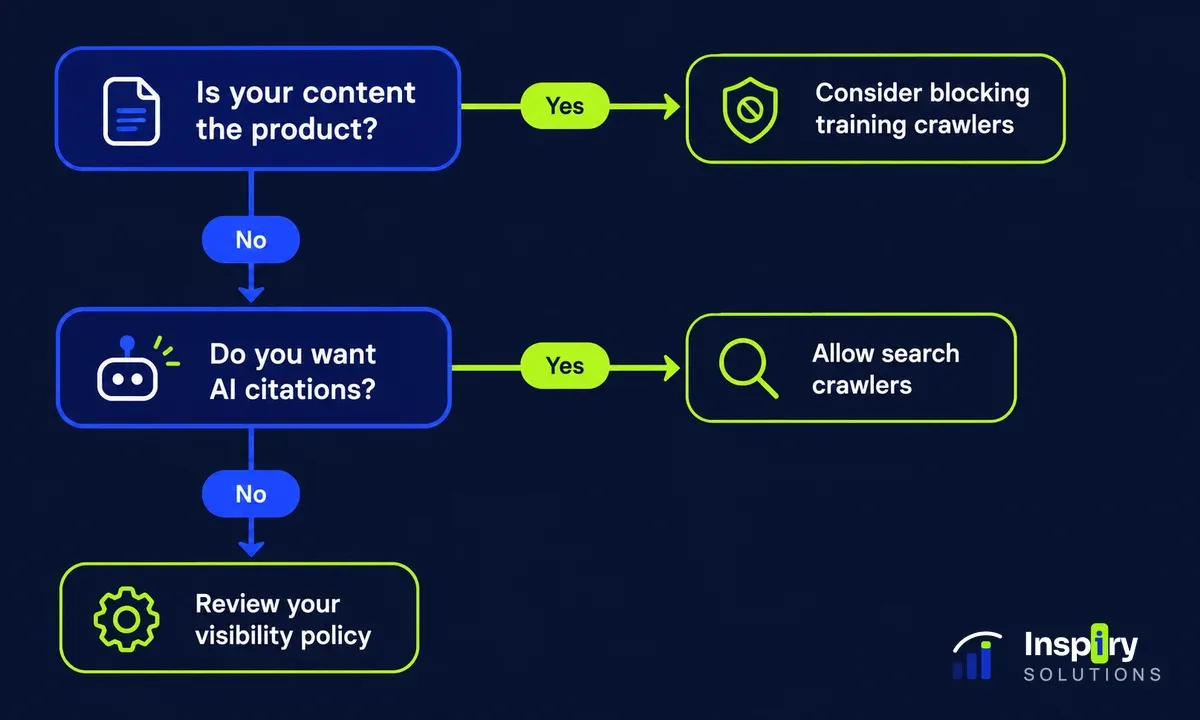
The question “should I block AI bots” needs a business objective before a technical answer.
Start with three considerations.
Do you want AI citations?
If customers research services using AI assistants, allowing search-type crawlers may support discovery. Our guide to getting mentioned in ChatGPT answers covers related factors.
Is your content the product?
Publishers, research databases and paid course providers may have stronger reasons to restrict training access.
However, robots.txt cannot protect confidential information or replace login requirements.
Are crawlers creating server load?
If automated requests cause measurable problems, investigate request patterns.
Caching, rate limits and firewall adjustments may control excessive traffic without excluding search crawlers.
Decision table: which crawler should you allow?
This matrix compares documented purposes and possible policies. Typical choices are not universal requirements.
| Crawler or token | Owner | Documented purpose (as the owner describes it) | Effect of blocking | Typical choice for a service business |
|---|---|---|---|---|
| GPTBot | OpenAI | Crawls content potentially used to train generative AI foundation models | Signals exclusion from training collection through this crawler | Optional block |
| OAI-SearchBot | OpenAI | Surfaces websites in ChatGPT search results | Excludes site from ChatGPT search answers, although navigational links remain possible | Allow |
| ChatGPT-User | OpenAI | Fetches websites for certain user actions | Server blocks may prevent retrieval; robots.txt may not apply | Generally allow |
| ClaudeBot | Anthropic | Collects web content potentially contributing to model training | Signals exclusion of future materials from training datasets | Optional block |
| Claude-SearchBot | Anthropic | Improves search result relevance and accuracy | May reduce Claude search visibility | Allow |
| Claude-User | Anthropic | Retrieves content following user requests | Can prevent user-directed retrieval | Generally allow |
| PerplexityBot | Perplexity | Discovers and indexes websites for search, not foundation model training | May prevent discovery and linking | Allow |
| Perplexity-User | Perplexity | Fetches pages for user requests, not routine crawling or training | Generally ignores robots.txt; server blocks may prevent access | Generally allow |
| Google-Extended | Controls Gemini training and grounding uses | Restricts covered uses without changing Search inclusion | Business decision | |
| Googlebot | Crawls content for Google Search indexing | Can affect Search crawling and indexing | Allow |
A service business might allow search crawlers while restricting GPTBot and ClaudeBot.
A publisher could choose stricter controls and accept potential visibility consequences.
SaaS documentation sites might favour access because users need accurate product information.
Allowing AI crawlers removes a possible access obstacle. It does not guarantee inclusion in answers.
How to write the robots.txt rules
Robots.txt communicates access preferences to compliant crawlers.
Google’s introduction to robots.txt explains that it manages crawling rather than protecting private information.
Never use it to hide passwords or confidential files.
Preserve existing rules and sitemap references before editing.
Block one crawler
To disallow GPTBot across a website:
User-agent: GPTBot
Disallow: /
The slash represents the entire website path.
For ClaudeBot:
User-agent: ClaudeBot
Disallow: /
These independent rules do not automatically block other agents from either provider.
To restrict Google-Extended:
User-agent: Google-Extended
Disallow: /
This controls covered Gemini-related uses rather than Google Search inclusion.
Allow search crawlers explicitly
To block GPTBot while permitting AI search crawlers:
User-agent: GPTBot
Disallow: /

User-agent: OAI-SearchBot
Allow: /

User-agent: Claude-SearchBot
Allow: /

User-agent: PerplexityBot
Allow: /
Explicit allow rules are not always necessary, but they can document your intention.
Crawler-specific rules depend on provider behaviour. Review your existing configuration before changing it.
Avoid accidentally adding:
User-agent: Googlebot
Disallow: /
Blocking Googlebot prevents crawling of covered paths and can affect indexing.
See access problems that stop indexing for related troubleshooting.
Test the live file
On WordPress, robots.txt may be generated virtually by WordPress or an SEO plugin rather than stored physically.
A physical file can also exist in the server’s document root.
Use this checklist:
- Open your live domain followed by
/robots.txt. - Inspect your SEO plugin’s robots.txt settings.
- Check the hosting file manager for a physical file.
- Identify caching or server rules affecting the response.
- Fetch the public file again after making changes.
Test the live hostname, not only staging.
A valid robots.txt response confirms published instructions, not whether firewalls permit requests.
Blocks you did not choose: firewalls, CDNs and security plugins
A robots.txt file can allow a crawler while the hosting infrastructure blocks it.
A content delivery network (CDN) may filter automated traffic before it reaches WordPress.
A web application firewall (WAF) can reject requests based on source or behaviour.
WordPress security plugins may impose additional restrictions.
These systems can return HTTP 403 Forbidden even when robots.txt permits access.
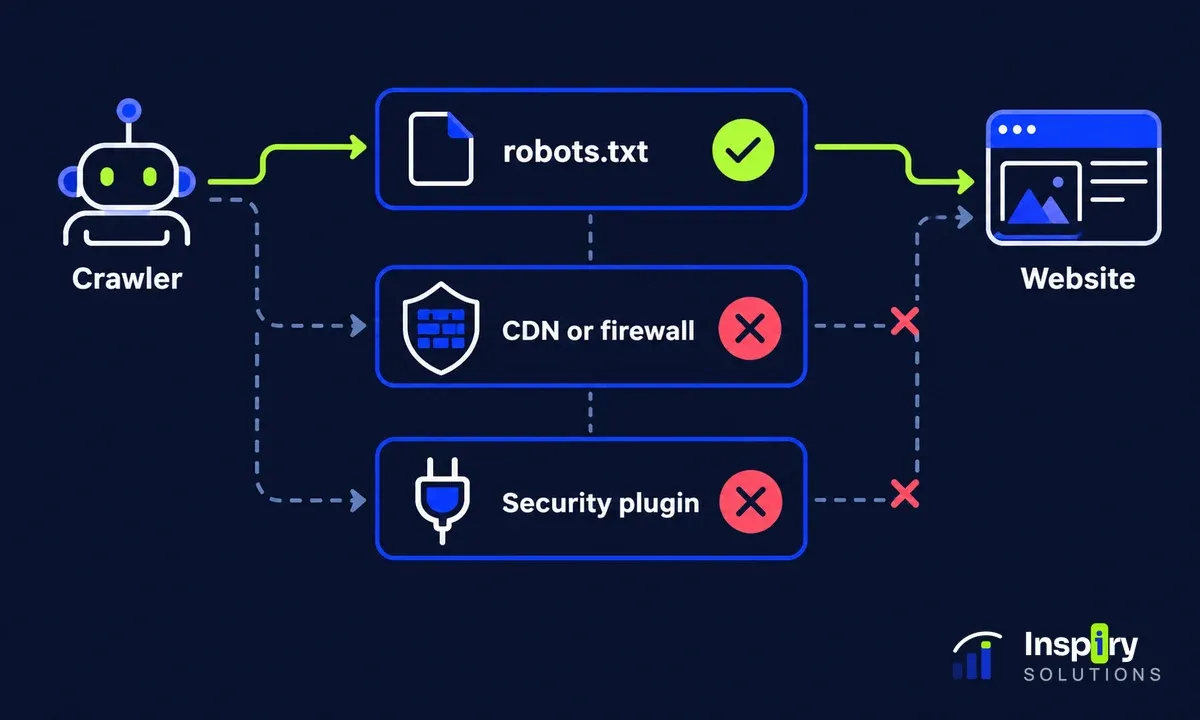
Investigate three layers:
- robots.txt: What instructions apply to each crawler?
- CDN or firewall: Are legitimate crawler requests reaching the website?
- Security plugin: Are application-level rules denying requests?
Compare your intended policy with server responses.
Search logs for documented AI user agents and inspect status codes, URLs, timestamps and source IP addresses.
User-agent strings can be impersonated. Where providers publish IP ranges, use them to verify requests.
Ask your host which automated bot restrictions are active.
Our technical SEO audit can examine access restrictions and other discoverability issues.
Hypothetical example
A law firm’s developer adds a blanket AI bot block through its WordPress security plugin.
The robots.txt file allows everything, so the team assumes search-type AI crawlers have access.
Server logs reveal 403 Forbidden responses. The security plugin is rejecting requests.
The team removes the blanket restriction and keeps a targeted block on one training crawler.
It checks responses again and records the decision.
This hypothetical example illustrates why robots.txt alone does not prove crawler accessibility.
Check the result after any change
After changing rules, confirm the published configuration matches your intentions.
Fetch the live robots.txt file and verify its HTTP response.
Check crawler-specific groups to ensure training restrictions do not accidentally include search agents or Googlebot.
Examine server or CDN logs over the following weeks.
Look for successful requests, denied requests and unusual patterns involving allowed or blocked bots.
An allowed crawler might not visit immediately. Missing log entries do not prove misconfiguration.
For AI visibility, repeat a small set of relevant questions in AI search products.
Choose questions representing customer needs, such as services, locations and specialist expertise.
Record whether your website appears, which sources are cited and whether the information is accurate.
Do not attribute every change to robots.txt. AI answers vary, and crawler access is only one factor.
Use a structured AI visibility audit to organise technical and content findings.
Maintain a change log containing:
- Date and person responsible
- Crawler names and intended permissions
- Previous and updated rules
- CDN, firewall or plugin changes
- Test URLs and server responses
- Next review date
This helps future developers understand the policy and its verification.
Common questions
Does blocking Google-Extended remove my site from AI Overviews?
No. Google documents Google-Extended as separate from Google Search inclusion. AI Overviews are part of Google Search and follow Search controls, including Googlebot crawling, indexing eligibility and snippet restrictions such as noindex and nosnippet. Blocking Google-Extended affects the Gemini-related uses covered by that token, not your eligibility for ordinary Google Search results.
If I block GPTBot, can my site still appear in ChatGPT search?
Yes, potentially. OpenAI documents different crawlers for training and search. GPTBot is associated with model training, while OAI-SearchBot supports ChatGPT search results. Check OpenAI’s official bots page to confirm which user agent covers search before writing rules. Allowing OAI-SearchBot helps preserve search eligibility but does not guarantee that ChatGPT will cite your website.
Is robots.txt enough to stop AI companies using my content?
No. Robots.txt communicates preferences that compliant crawlers honour. It is not an enforcement mechanism or a substitute for keeping content private. Server-level restrictions, authentication and legal terms are separate tools with different purposes. Blocking future crawler access also cannot undo content collection that may already have occurred. Choose the protection appropriate to the material involved.
Will blocking AI crawlers hurt my Google rankings?
Blocking AI-specific user agents or Google-Extended does not automatically block Googlebot or directly change Google Search rankings. However, rules that accidentally prevent Googlebot from accessing important pages can affect Search crawling and indexing. Google-Extended is specifically documented as separate from Search ranking. Always inspect the complete robots.txt configuration and any server restrictions before assuming your Google visibility is unaffected.
How do I know which AI bots visit my site?
Server and CDN access logs can record request timestamps, requested URLs, HTTP status codes, source IP addresses and user-agent strings. Search those records for documented crawler names. Some providers publish IP ranges that help confirm whether requests are genuine. Do not trust the user-agent value alone, because it can be impersonated. Ask your host for log access if necessary.
Make the decision once, then review it
You do not need to change your crawler policy whenever someone warns about AI training.
Choose rules reflecting your business model, document them and verify live responses.
Review the policy approximately every six months or when a provider introduces a crawler or changes guidance.
For service businesses, discoverability often matters more than blanket restrictions. Publishers may prefer stricter controls.
Make each decision deliberately and test what happens.
If you are unsure what your robots.txt, CDN and security plugin are really telling AI crawlers, send your URL for a free audit. Our AI visibility service checks access first and records every decision.
Email hello@inspirysolutions.com with your website address. You will receive a plain-language reply within two working days.