Google not indexing your website usually calls for a page-by-page diagnosis: check discovery, crawl access, indexing directives, canonical selection and useful content. Start with URL Inspection in Search Console. Some exclusions are intentional, and a successful live test only confirms current access; it does not prove the URL is already indexed.

For a business owner, a missing service page can feel like an invisible shopfront. For an agency, the challenge is finding the responsible layer without changing settings at random. The 15 causes below provide a practical order of investigation, from explicit barriers to issues that need content or architecture decisions.
Google not indexing: confirm the exact problem
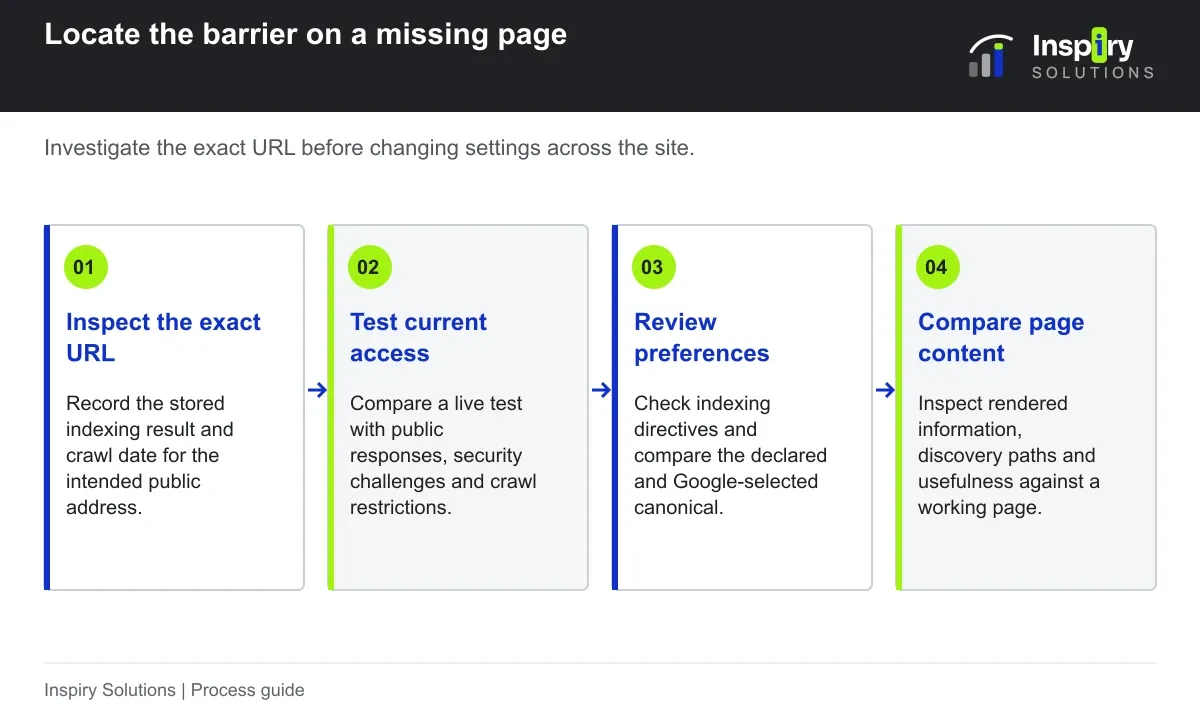
Inspect the precise URL you expect customers to find, including its protocol and path. Compare the indexed information with a live test and note their dates. A recent repair may be visible on the website before Google’s stored information changes.
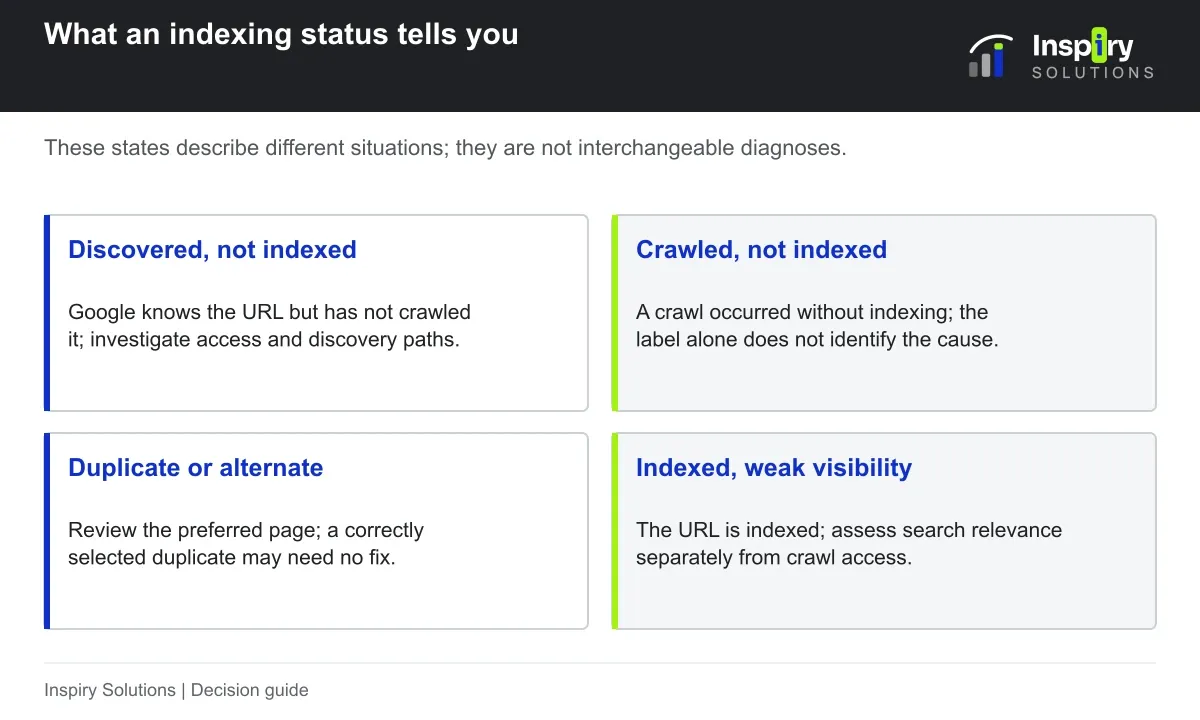
Google’s Page indexing documentation explains why an excluded URL is not automatically an error. “Discovered – currently not indexed” means Google knows the URL but has not crawled it. “Crawled – currently not indexed” means a crawl happened without indexing; that label alone does not establish the underlying reason.
Create a short investigation record: URL, intended purpose, observed status, last deployment and next test. If the URL is indexed but performs poorly for searches, investigate relevance and competition separately. Specialist technical SEO diagnosis is most useful when it connects each recommendation to evidence.
Causes 1-5: access and indexing directives
1. The page contains an unintended noindex directive
An unintended exclusion can explain Google not indexing a public service page. Check the public page’s robots metadata. On WordPress, inspect Reading settings, the page’s SEO settings and content-type defaults. A copied staging configuration is a plausible place to start.
Remove the exclusion only if the page should appear publicly in search. Clear caches and recheck the delivered HTML. Keep deliberately private or redundant pages excluded according to their documented purpose.
2. A response header excludes the page
When investigating Google not indexing a page, a clean-looking source does not rule out an exclusion in the HTTP response. Inspect the X-Robots-Tag header as well. Google’s robots specifications cover both metadata and response-header controls.
Ask the host or developer which rule supplies the header. Check the final response after redirects. A page-level plugin change will not correct an exclusion still added by server configuration or an edge service.
3. Robots.txt blocks necessary crawling
A broad robots.txt restriction can explain Google not indexing a service directory. Compare affected paths with the site’s rules. Ask why the rule exists before changing it.
If the public page should be crawled, remove the unintended restriction and verify access. A crawl block is not a reliable removal method: Google needs to fetch a page to read its indexing directives.
4. Login requirements or security challenges stop access
Login requirements can explain Google not indexing a page that works for an administrator. Open it without a session and inspect the response for authentication prompts, forbidden responses, bot challenges and country restrictions.
Have the security owner review the affected route and confirm genuine crawler access. Preserve necessary protections for administration and private content. Record the precise rule changed so that future security updates can be tested.
5. The server cannot reliably deliver the page
If you see Google not indexing pages across several templates, check whether failures affect the whole site. Examine host logs around the reported crawl time for server errors, timeouts or maintenance responses.
Repair the underlying availability problem before submitting more URLs. For an unstable service template, website performance work should include reliable delivery, not just a faster laboratory score. Retest both the repaired page and other pages using its resources.
Causes 6-10: URL handling and discovery
6. The requested page no longer exists
Google not indexing an obsolete URL may be expected; compare it with the current content inventory. A changed slug, deleted service or malformed link can lead to a genuine error response.
Restore the intended page if removal was accidental. Where a relevant replacement exists, map the old URL to it. If the content has been permanently retired without a replacement, an error response can be appropriate; document that decision instead of redirecting everything to the homepage.
7. The page behaves like an error despite returning success
A page can return a successful response while showing “not found”, an empty template or a failed content module. Search Console may identify this as a soft 404.
Hypothetical example: a consultancy’s service page loads its header but loses its body after a template edit. Restore the substantive service information, then confirm the public output. For a genuinely missing page, correct the response rather than disguising the absence.
8. A redirect prevents the intended URL being used
Trace the complete route. A working redirect normally means the destination is the page to inspect; an old URL need not remain separately indexed. Loops and broken chains require repair.
If a launch is followed by Google not indexing core pages, compare the old and new redirect mappings. Check the final destination against the visitor’s original task. If redirects changed during a migration, compare them with the approved mapping. The redesign SEO checklist provides a useful planning framework for preserving those routes.
9. Google groups the page with another URL
A duplicate preference is another hypothesis when you see Google not indexing a specific service URL. Compare the user-declared and Google-selected canonical in URL Inspection. Open the affected page and the selected destination. Decide whether they genuinely represent the same content.
For intended duplicates, check that the preferred page is the one you want indexed. For distinct services, investigate shared or missing content and inconsistent preferences. Do not assume that changing a tag will make substantially similar pages independently useful.
10. The page has weak discovery paths
Check whether the page appears in the sitemap and is linked from relevant public pages. Weak discovery is worth checking when you see Google not indexing a newly published page.
Add links where readers would expect the next step. Avoid scattering the same destination across unrelated articles. For location pages, connect architecture with a coherent local SEO plan, using locations and services the business actually supports.
Causes 11-15: content, rendering and processing
11. Essential content fails to render
Rendering failures are another possible explanation for Google not indexing a page. Inspect the rendered service description, headings and links. A visually complete page in your own browser can depend on a script or API that fails in another environment.
Google’s JavaScript SEO guidance describes crawling, rendering and indexing as separate processing stages. Give the developer the failed resource and missing content, then test a repaired template. Where appropriate, deliver important information in reliable initial HTML.
12. Content appears only after a special interaction
Check whether meaningful copy is loaded only after scrolling, accepting a prompt or clicking a control. Distinguish content already present in the page from content requested only when a visitor acts.
Ask the developer to make essential information accessible in the initial page or a crawlable rendered state. Review the same pattern across templates. WordPress template development can address the shared dependency instead of patching individual pages.
13. Pages offer little distinct information
If several pages repeat the same service description with only a town or keyword changed, compare what each adds for a customer. A technically accessible page can still lack a clear independent purpose.
Treat content overlap as a hypothesis when investigating Google not indexing distinct services; the status alone does not prove it. Consolidate overlapping pages where appropriate, or add truthful details about scope, eligibility, process and service availability. Do not invent local offices, testimonials or delivery experience to differentiate them.
14. Uncontrolled URL variants complicate the inventory
Review whether parameters, archives, filters or integrations produce large numbers of repetitive URLs. Compare the URLs discovered by your crawl with the business’s intended page list.
Fix the component generating unnecessary variants and agree a consistent policy. Avoid making crawl-budget changes the first response for a small service website. A focused inventory review often reveals a simpler issue, such as copied links pointing to parameter versions.
15. Google has not processed the new or repaired page yet
Google not indexing a recently repaired page can reflect stale information. Check the publication date and last crawl evidence before making another change. If a page was just released or substantially repaired, Google’s stored information may still describe its previous state.
Google’s recrawl guidance says requests do not guarantee indexing, and repeating a request does not accelerate crawling. Submit important repaired URLs where appropriate, maintain useful discovery paths and monitor progress without promising a fixed deadline.
Use a controlled repair workflow
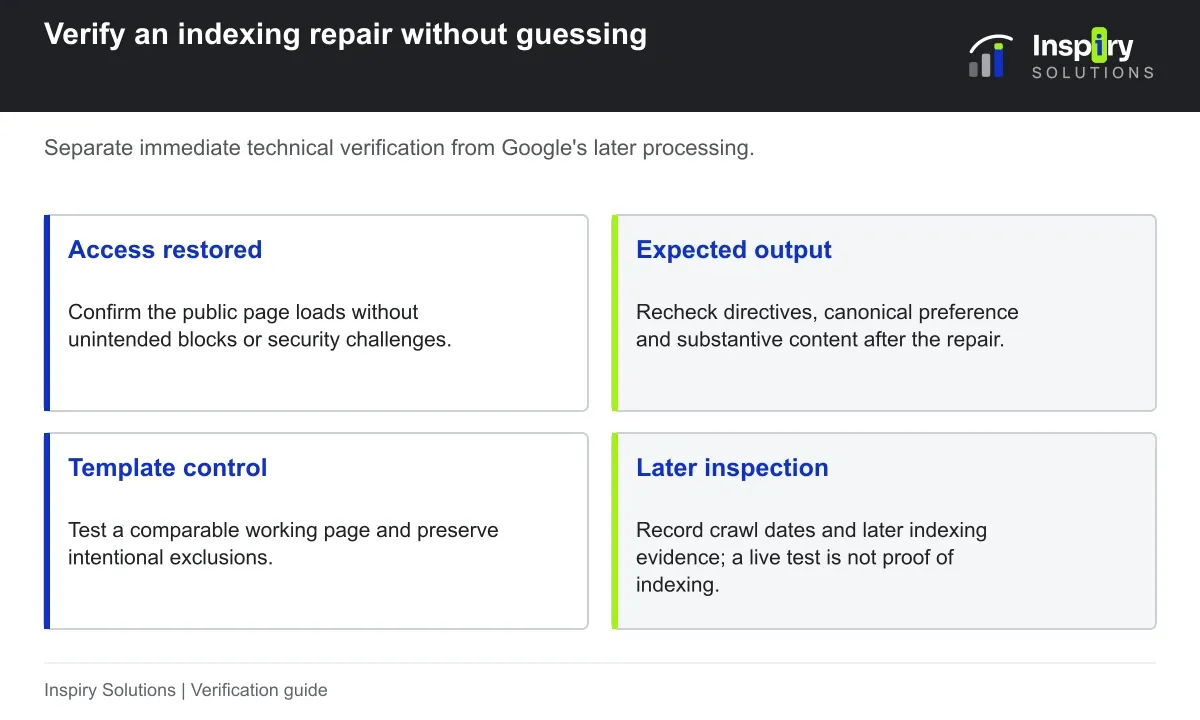
Investigating Google not indexing a service page is easier with a comparison: choose one high-value affected page and one comparable working page. Compare their directives, responses, canonical preferences and content. The technical SEO audit checklist helps structure these comparisons before a site-wide change.
| Stage | Useful record |
|---|---|
| Before repair | Reported status, crawl date and public output |
| Change | Responsible setting or component and deployment time |
| After repair | Successful access and expected content or directives |
| Follow-up | Later inspection result and remaining uncertainty |
Fix the responsible template or rule, retest a representative sample and check that intentionally excluded pages remain correctly configured. Include these acceptance tests in ongoing WordPress maintenance so the next release does not quietly reintroduce the problem.
Frequently asked questions
Is a site search enough to diagnose indexing?
Investigate Google not indexing a URL through Search Console; use a site search only as an initial clue. Record the result and date. A broad search does not explain which technical or content decision needs attention.
Should I resubmit every discovered URL?
First verify access and discovery paths for important pages. Keep the sitemap accurate and investigate repeated patterns. Bulk resubmission without diagnosing the cause creates work without establishing what has changed.
Does crawled but not indexed always mean poor content?
No. The status confirms that a crawl occurred without indexing. Review technical output, duplication and usefulness as separate hypotheses. Avoid rewriting a page before checking for a broken template or unintended exclusion.
How long should indexing take after a fix?
There is no dependable deadline for an individual page. Google’s processing and recrawl timing vary. Confirm the repair immediately, then use later crawl and inspection evidence to assess what Google has processed.
Will a sitemap solve the problem alone?
A sitemap alone does not explain Google not indexing a specific page. It helps expose intended URLs, but cannot remove an exclusion, restore missing content or repair an unavailable server. Use it alongside working pages and useful internal links.
Why is an indexed page still hard to find?
Indexing establishes eligibility, not a particular position for a query. Review whether the page addresses the searcher’s need and whether the business offers a credible, relevant answer. Assess performance separately from technical access.
Respond to Google not indexing with evidence
When you find Google not indexing a priority page, identify the stage where the problem occurs and fix the responsible component. Preserve the before-and-after evidence, make the page useful and discoverable, and monitor later processing. The objective is the right business pages in search, with a repeatable method for diagnosing future exclusions.