Cumulative layout shift happens when visible content moves unexpectedly as a page loads or changes. Common causes include missing image dimensions, late-loading fonts, unreserved embed space and inserted banners. Find the event that changes the layout, reserve appropriate space before it arrives, and test the page throughout a realistic visit.

Cumulative layout shift can frustrate a customer when a button moves, even if the website feels fast. The practical goal is predictable reading and interaction, especially on mobile. This guide explains the metric, seven causes to investigate and a testing process that catches movement after the first screen appears.
Understand cumulative layout shift before fixing it
CLS measures unexpected movement of visible elements. The current metric uses the largest burst of shifts rather than simply adding every movement throughout the visit. A burst groups shifts close together, with a maximum window length of five seconds.
The web.dev CLS documentation recommends 0.1 or less, assessed at the 75th percentile of visits. Scores above 0.25 are poor. CLS is a unitless score, not a duration or a percentage of the page.
Movement shortly after a qualifying click, tap or keypress can be excluded, but scrolling does not provide that same exemption. Content that appears while a visitor scrolls can therefore affect the measurement.
Our Core Web Vitals business guide puts stability alongside loading and responsiveness. Improving one does not automatically solve the others.
Find the trigger behind cumulative layout shift
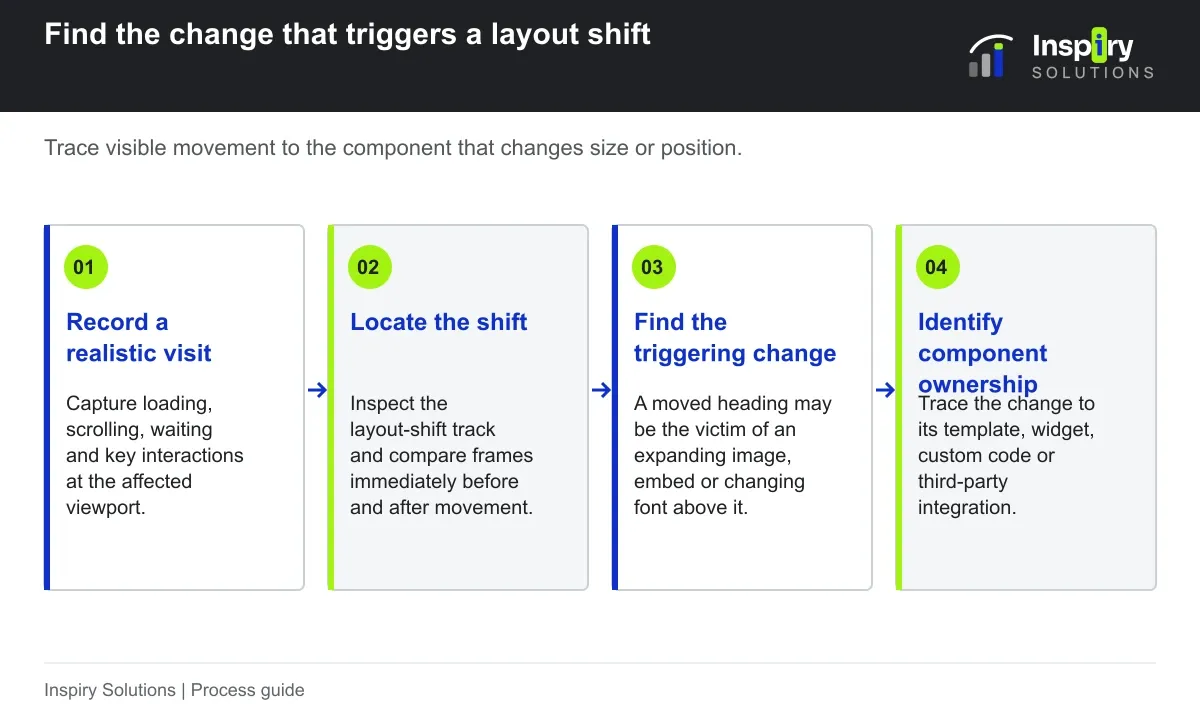
To diagnose cumulative layout shift, record a visit in the browser’s Performance panel and inspect the layout-shift track. Review the frames before and after a shift. The element highlighted as moving may be the victim: a heading can move because an image above it suddenly acquires height.
Chrome’s Layout shift culprits insight offers possible causes, but its suggestions need investigation. Trace the change to the component, template or third-party script responsible.
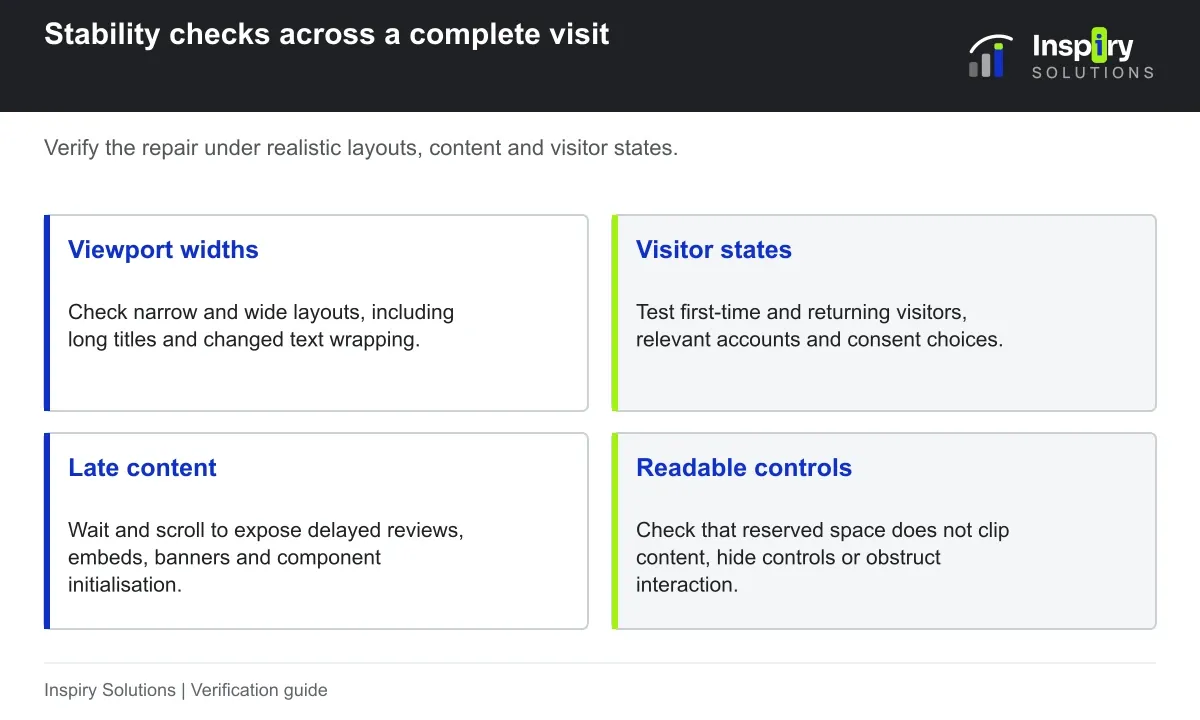
Test with a fresh cache and slower loading conditions to expose dependencies arriving at different times. Scroll, wait, open navigation and use the main form. Repeat at several viewport widths. A successful desktop load does not establish that a narrow screen remains stable.
For a reproducible cumulative layout shift report, record the affected URL, viewport, account state and consent state. Those details help a developer reproduce movement that appears only for first-time visitors or particular content variants.
Seven common CLS problems and practical fixes
1. Images arrive without reserved dimensions
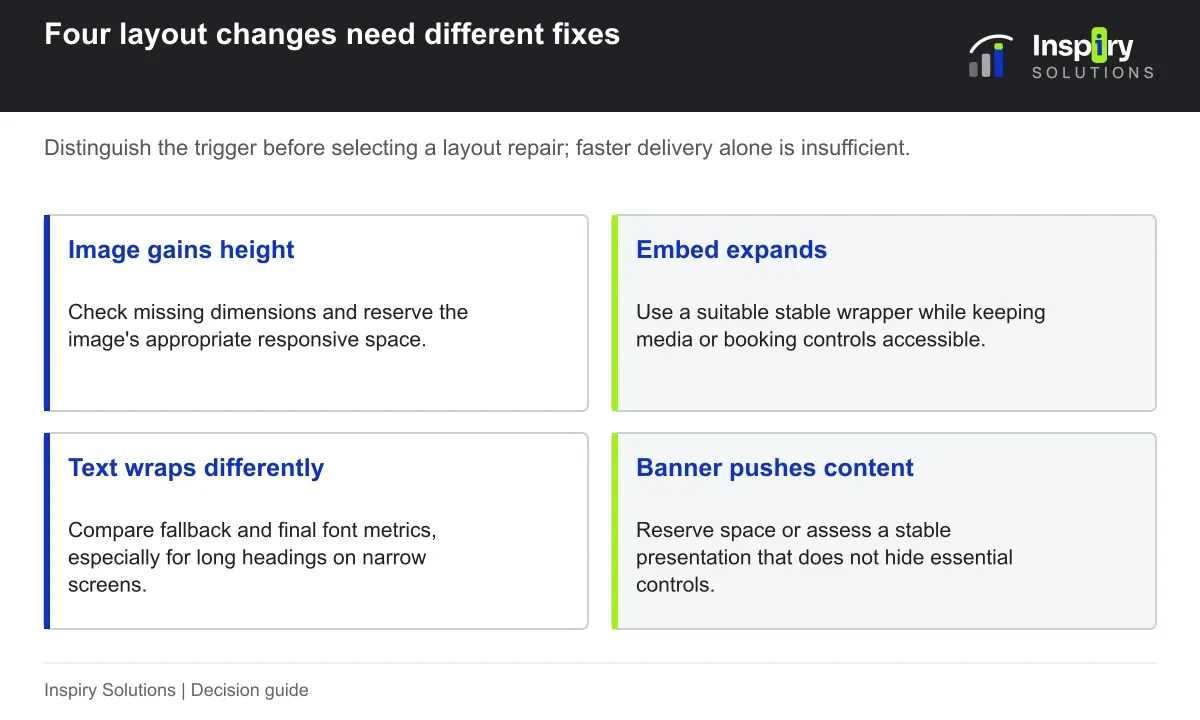
When the browser does not know an image’s shape, it may initially allocate too little space. The surrounding content moves when the file arrives. Check the final HTML for meaningful width and height attributes, then verify that responsive CSS preserves the intended ratio.
A developer can also reserve a suitable box with CSS. MDN documents the aspect-ratio property, which defines a preferred width-to-height relationship. Avoid forcing every image into one shape if product photographs and diagrams genuinely need different proportions.
When checking cumulative layout shift from images, test missing or failed files as well as successful downloads. The layout should remain sensible when an asset cannot be retrieved.
2. Videos, maps and booking embeds expand late
A third-party player or booking tool can cause cumulative layout shift when an empty container becomes a taller interface. Give the component a stable wrapper appropriate to each breakpoint. For media, a proportional box can work; an interactive form may need a different minimum height.
Do not shrink an embed until controls become inaccessible. When testing cumulative layout shift in embeds, check real content, validation errors and expanded states. If the provider cannot offer predictable dimensions, consider a dedicated destination or a user-triggered display that fits the business journey.
For custom wrappers and template work, our WordPress development service provides the appropriate implementation context.
3. Font loading changes text wrapping
Font-related cumulative layout shift can occur because fallback and final fonts have different character widths and line heights. A heading may gain another line, moving everything below it. Compare screenshots during loading rather than checking only the finished page.
Reduce unnecessary font variations and choose a fallback with compatible metrics. A developer can evaluate font-metric adjustments and loading strategy. Avoid preloading every font: prioritisation should follow the fonts actually required by visible content.
Check longer headings, translated text where applicable and narrow layouts. A font change that stabilises one short heading may still produce movement elsewhere.
4. Banners are inserted above existing content
Cumulative layout shift from announcements, delivery messages and consent interfaces can occur when they arrive after the page begins rendering. If they push the document down, visitors may lose their place or miss a control they were about to select.
Render predictable space from the start when a banner belongs in the document flow. Alternatively, assess a fixed presentation that avoids pushing content, while ensuring it does not hide controls or prevent scrolling.
Consent choices need functional testing. A visually stable overlay can still obstruct a form, trap focus or behave differently after a decision. Verify the complete interaction rather than measuring only the banner’s appearance.
5. Dynamic content replaces a differently sized placeholder
Asynchronous reviews, stock messages and personalised offers deserve attention in a cumulative layout shift audit. If the initial placeholder is much shorter than the final component, the update changes the surrounding layout.
Design loading and empty states using representative content sizes. Give a repeated review tile a consistent layout where that remains readable. For content with unpredictable length, consider placing the update where it can expand without displacing the visitor’s current task.
The web.dev CLS optimisation guide discusses reserving space for content that arrives later. Treat placeholders as part of the interface, not merely a decoration during loading.
6. Late styles or scripts change the initial structure
A page can first render with one set of dimensions, then change after delayed CSS or JavaScript applies. Menus may briefly appear expanded, tabs may collapse, or a slider may assign its final height after initialisation.
Investigate critical styling and initial component states. To prevent cumulative layout shift from late styling, represent essential layout before the first useful rendering wherever practical. Avoid relying on a script to correct a layout that the initial HTML and CSS could describe.
Performance plugins that postpone styles or scripts need careful exclusions and testing. Our website performance service is relevant when stability and resource loading must be reviewed together.
For builder-specific layout work, consult the Elementor speed guide when reviewing templates and loading settings.
7. Animation changes surrounding layout
Animating height, margins or positional layout properties can cause cumulative layout shift by moving neighbouring content. Ask whether the effect helps customers understand or complete the task. Removing a nonessential effect may be clearer and easier to maintain than optimising it.
Where motion is appropriate, a developer can assess transform-based animation without changing the space assigned to nearby elements. Respect reduced-motion preferences and verify that the final state remains accessible.
Review shared templates first. A promotional header animation can create movement across many pages. Our theme and template comparison helps clarify where those repeated components should be maintained.
Hypothetical example: a booking button that moves
Imagine a professional-services landing page with a booking button below a testimonial feed. The feed initially has no height. After its reviews arrive, the button moves down while a mobile visitor is reading the introduction.
| Observed event | Likely cause to verify | Proposed test |
|---|---|---|
| Button moves after review arrival | Feed container grows | Use a representative reserved layout |
| Heading gains another line | Font metrics differ | Compare fallback and final wrapping |
| Movement repeats while scrolling | Later components initialise | Record the full scroll journey |
Measure the result after each proposed change. This hypothetical example explains the diagnostic process; it does not claim a client improvement or predict a numerical outcome.
A practical repair workflow for owners and agencies
First, prioritise cumulative layout shift problems near primary actions and widely used templates. A small shift beside a decorative footer may matter less to the immediate journey than a form field moving under a customer’s finger.
Second, identify ownership. The fix may belong to the theme, a builder template, an integration or custom code. Record the component, its initial state, the triggering event and the intended stable behaviour.
Third, implement on staging with realistic content. Include long titles, absent reviews, validation messages and slow third-party responses. Avoid fixed heights that simply clip text and make the score look cleaner.
Fourth, check the repair alongside loading and responsiveness. Reserving a very large empty region may prevent movement but make the page awkward to navigate. The interface still needs to communicate clearly.
Include stability requirements in any website redesign brief so shared layout behaviour is tested before launch.
Validate the complete visit after deployment
Repeat the original cumulative layout shift recording and business journey after clearing the relevant caches. Test first-time and returning visitors, relevant consent states and different screen widths. Inspect both the score and visible behaviour.
Field data and a short laboratory run can differ because real visitors spend longer on pages and encounter different content. Where field data exists, monitor it after the release while remembering that historic visits remain in a rolling reporting window.
Keep a concise regression checklist for new banners, fonts and embeds. Our WordPress maintenance guide explains why content and integration checks belong in ongoing care.
Frequently asked questions
Does a fast-loading website automatically have good CLS?
No. Content can arrive quickly and still change position, creating cumulative layout shift. Measure visual stability separately from loading speed.
Does lazy loading cause layout shift?
It can expose missing reserved space. Lazy-loaded content with an appropriate initial box can arrive without pushing surrounding content around.
Is CLS measured in seconds?
No. Cumulative layout shift is a unitless score based on layout movement. A good threshold is 0.1 or less.
Does all movement after a click count?
No. Shifts shortly after qualifying input can be excluded. Delayed movement may still count, so inspect the timing and behaviour.
Why is the laboratory result better than real-user CLS?
A brief test can miss later banners, scrolling-related loading and personalised content. Reproduce longer visits and the states real customers encounter.
Will installing a cache plugin fix CLS?
Not directly. Cumulative layout shift from missing dimensions and unstable component states still needs layout fixes, even if delivery becomes faster.
Conclusion: make the layout predictable
Cumulative layout shift is best addressed by tracing the event that changes a component’s size or position. Reserve suitable space, stabilise fonts and initial states, and test beyond initial loading. The result should protect reading and interaction while keeping content complete and accessible.