Core Web Vitals measure loading, responsiveness and layout stability: good LCP is at or below 2.5 seconds, INP at or below 200 milliseconds and CLS at or below 0.1. Assess the 75th percentile of visits separately for mobile and desktop. This guide explains what the metrics mean and seven checks for improving the experience without promising rankings.

What Core Web Vitals measure, in plain English
Strip the acronyms away and the three numbers answer three questions any customer would ask: how long until I see the page, does it respond when I tap, and does it hold still?
- LCP, Largest Contentful Paint: how long the largest eligible visible content takes to appear. Good is at or below 2.5 seconds.
- INP, Interaction to Next Paint: how quickly the page visibly responds to interactions. Good is at or below 200 milliseconds.
- CLS, Cumulative Layout Shift: unexpected layout movement over the visit. Good is at or below 0.1.
One detail worth knowing: these come from real visits. Google measures the experience of your actual customers on their actual phones and connections, then holds you to the slower end of them: a page passes when it hits the thresholds for at least 75% of visits. Your site feeling fast on the office Wi-Fi proves nothing.
How to check your Core Web Vitals free in two minutes
Google gives away the tool that reads the report card. Go to PageSpeed Insights (pagespeed.web.dev), paste your homepage address, and wait about thirty seconds. No account, no install, no sales call at the end.
Read the real-user section separately from the lab diagnostics. Check mobile and desktop, and confirm whether the field data describes this URL or a wider origin. If there is insufficient field data, lab tests can identify likely causes, but cannot establish that real-user Core Web Vitals pass or fail.
Use a competitor test as context, not proof of a ranking advantage. Different content, visitor populations and test conditions can affect the comparison. Your priority is the experience of customers using your own important pages.
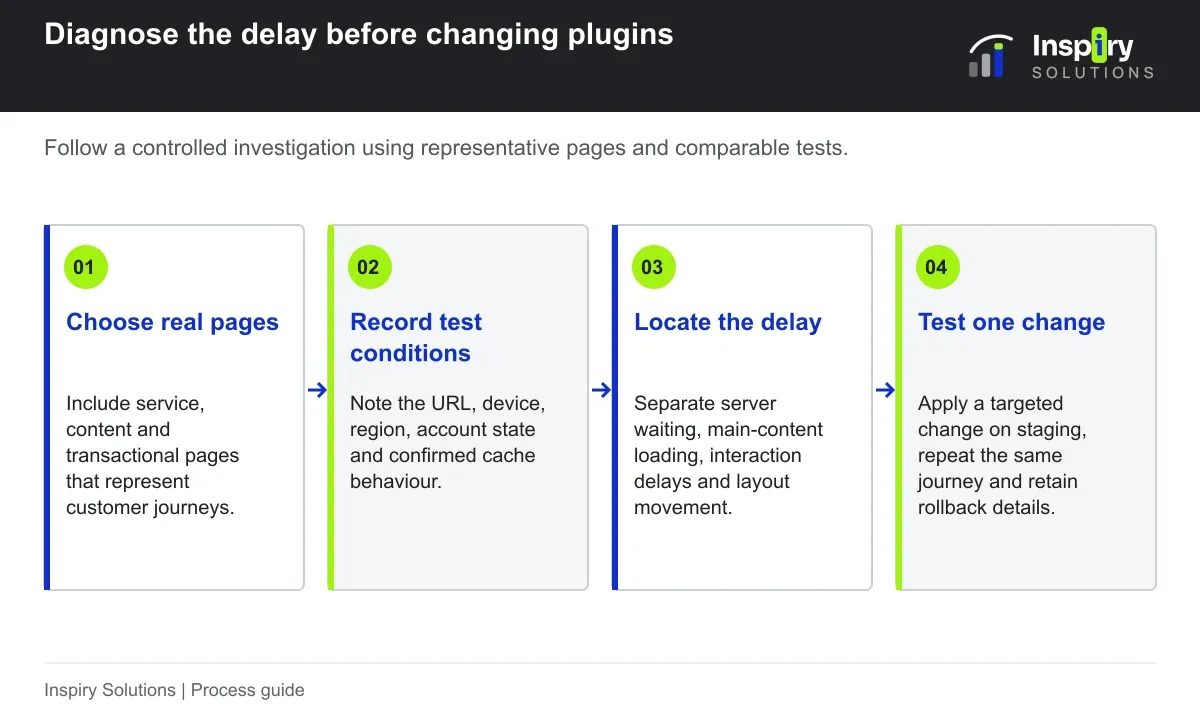
Why business sites fail Core Web Vitals
When we audit a failing site, the causes are boringly consistent:
- Unnecessary theme or builder assets delaying useful rendering.
- Large or late-requested images affecting LCP.
- Long script tasks making interactions sluggish.
- Missing reserved space for images, embeds or banners causing movement.
- Slow server responses consuming part of the loading budget.
These causes can accumulate as a site changes. Identify the affected template and trace the actual delay rather than blaming the theme, hosting or plugin count from the headline score alone.
What fixing Core Web Vitals involves, and when you need a developer
Some of this is genuinely owner-level work. Compress images before uploading, delete the plugins and apps you stopped using, and move off bargain-bin hosting. Those three alone rescue plenty of orange scores, and none requires touching code. The rule of thumb: if PageSpeed Insights names your images or your hosting, you can probably handle it. If it starts talking about render-blocking resources, unused JavaScript, or layout shifts, the fix lives in code you did not write.
Some performance findings require theme or script changes: delayed rendering, long interaction tasks, or layouts that do not reserve space for images and embeds. Diagnose the component responsible before changing settings. Our website performance service treats those checks as part of a scoped investigation, with release evidence rather than a promise of perfect metrics.
Performance can change as content and dependencies change. Agree who reviews the numbers after launch and which repairs are included. Our maintenance plans list performance monitoring from the Active tier, currently from $199 a month. For commerce-specific diagnosis, read how to speed up a slow Shopify store, and verify the buying journey alongside any improvement.
Core Web Vitals are useful evidence, not a ranking guarantee
Google says its ranking systems use Core Web Vitals, but good scores do not guarantee top positions. Its search guidance does not assign a simple fixed weight or describe a universal tiebreaker rule. Improve useful content and real page experience together.
Track business outcomes alongside Core Web Vitals. A faster, steadier page can remove friction, but conversion changes also depend on the offer, audience and journey. Test those outcomes rather than assuming a particular score produces a particular revenue lift.
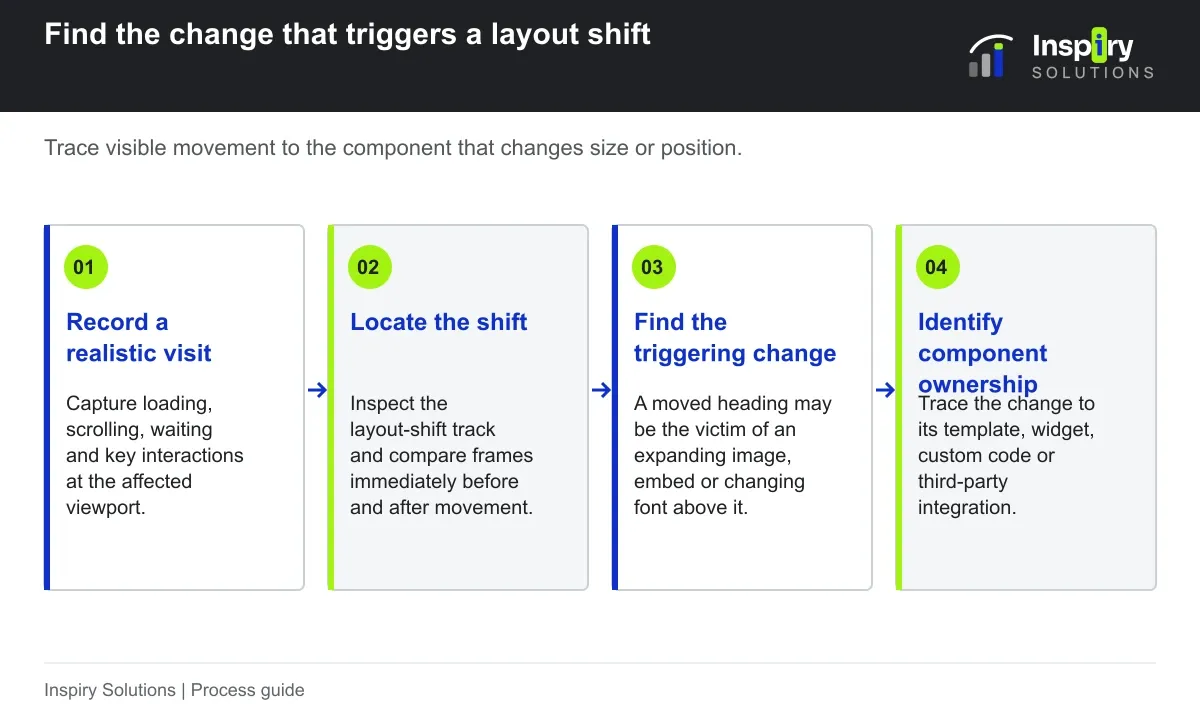
Seven Core Web Vitals checks for a useful review
Keep field evidence, diagnostic tests and customer tasks separate. Together they give a fuller Core Web Vitals picture than a single score screenshot.
- Choose representative templates. Include an important service page, content page and relevant purchase or booking journey. A homepage result may hide other problems.
- Read the data scope. Check whether the field report represents the specific URL or the wider origin. Note insufficient data rather than treating an absent report as a pass.
- Separate devices. Review mobile and desktop populations independently. Different connections, screen sizes and interaction patterns can expose different constraints.
- Locate the LCP element. Identify what actually counts as the largest eligible content. Investigate its server waiting, discovery, download and rendering path.
- Exercise interactions. Test menus, filters and forms. A page can look quick while long tasks delay a tap. A load-only lab test cannot establish real-user INP.
- Observe the complete visit. Scroll, open banners and wait for embeds. Core Web Vitals include behaviour that may not appear in an initial screenshot.
- Verify the release. Repeat comparable diagnostics promptly and review field trends when sufficient new data exists. Test enquiries and sales as well as the metrics.
Turn performance findings into an owned work list
Write each finding with a page, symptom, likely cause and test. For example, a product hero may be requested late because a script creates it. Changing the image format alone would not address that delay. A reserved image box may fix layout movement without changing image weight at all.
Assign one change and repeat the same conditions. Keep the original result and the new result together, noting uncertainty and other changes in the environment. This helps avoid attributing every fluctuation to the most recent optimisation.
When a fix passes, test adjacent templates and relevant visitor states. A logged-in editor, first-time visitor and returning customer may receive different output. Good performance evidence should describe what was tested, not claim every possible visit is now perfect.
If the work requires a broader rebuild, compare the theme implementation options and website budgeting checks. Treat measured performance and maintenance as requirements throughout the project.
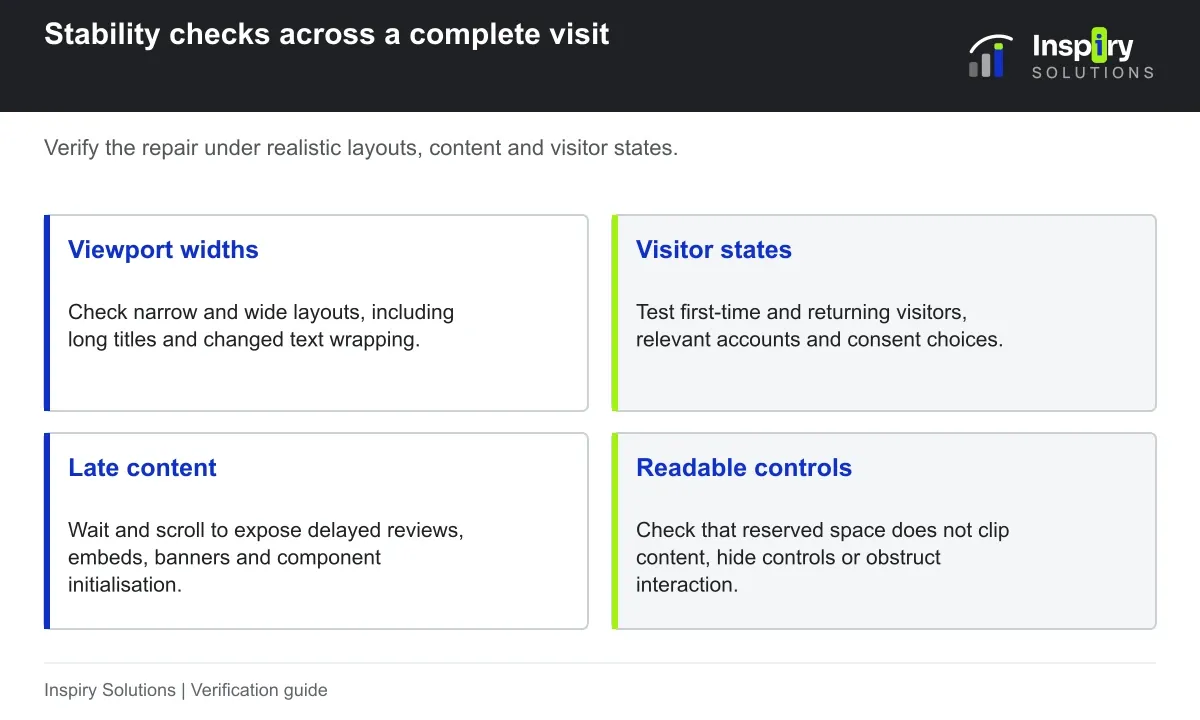
Report performance with honest measurement limits
Include the URL, report date, device category and data source in a performance update. Label a lab result as a lab result. If the field view uses origin-level data, do not present it as a page-specific measurement. If traffic is insufficient, say that rather than turning an absent value into a green result.
For a release, show the diagnosed issue, the change and the comparable follow-up test. Add the relevant customer-journey result. A metric improvement with a broken form is not an acceptable outcome.
Set the next review according to the site’s release pattern. A content-heavy site adding embeds frequently may need different checks from a stable brochure site. The metrics should be one maintained evidence source, not a one-off certificate that exempts future changes from testing.
For a deeper look at individual metrics, see what causes layout shift and how to reduce WordPress server response time.
Common questions
Do Core Web Vitals directly affect my Google ranking?
Google uses Core Web Vitals in its ranking systems, but no metric guarantees a particular position. Page usefulness and other signals still matter. Treat performance work as a way to improve the actual customer experience, with search outcomes monitored separately.
What is a good Core Web Vitals score?
The good thresholds are LCP at or below 2.5 seconds, INP at or below 200 milliseconds and CLS at or below 0.1, assessed at the 75th percentile separately for mobile and desktop. The official Web Vitals guidance explains these thresholds and measurement approaches.
Are Lighthouse scores the same as Core Web Vitals?
No. Lighthouse provides controlled lab diagnostics. Field Core Web Vitals describe real-user experience; a load test does not directly establish INP across visits. Use both sources for their different purposes.
What if my site has no real-user performance data?
Insufficient data is not a pass or a failure. Use repeatable lab tests and appropriate real-user monitoring to investigate likely issues, then report the limitation clearly.
Can I improve performance without a rebuild?
Often a targeted change can help, but diagnose first. Image discovery, script work or missing reserved space may be repairable in the existing implementation. Compare evidence and scope before replacing the foundation.
Do good metrics remove the need for testing?
No. Metrics do not prove forms, accounts or purchases work. Verify relevant customer tasks, content freshness and accessibility alongside performance. Continue monitoring after significant releases.
Your next step
Use Core Web Vitals to improve real visits, not to promise rankings. Establish the affected templates, fix a measured cause and verify both the metrics and the tasks customers came to complete.