WordPress TTFB is the time between starting a page navigation and receiving the first response byte. A slow result can reflect redirects, connection setup, network distance or WordPress processing. Improve it by identifying the delayed stage, testing cached and uncached requests separately, and fixing the cause before changing hosting or installing another plugin.

Visitors experience WordPress TTFB before the main page can begin arriving. Yet a number labelled server response time does not necessarily include everything a real visitor waits through. Understanding the measurement is the first step towards a useful brief for a host or developer.
What WordPress TTFB measures, and what it does not
The browser needs to reach the final destination, establish a connection where necessary and request the page. WordPress may then run PHP, query its database and generate HTML before the response begins. A cached page can avoid much of that generation.
The web.dev definition of TTFB includes stages such as redirects, DNS and connection negotiation. A browser’s request-waiting figure or a server-only diagnostic may cover a narrower interval. Compare equivalent measurements rather than treating different tools’ labels as interchangeable.
TTFB does not measure how long the main image takes to download, whether the navigation responds promptly or whether content jumps around. A fast initial response can still lead to a poor overall journey. Our Core Web Vitals business guide explains those later stages.
For loading delays beyond the initial response, consult the slow WordPress website diagnostic guide to investigate images, scripts and page behaviour.
What counts as a good WordPress TTFB result?
Google’s TTFB optimisation guide suggests 0.8 seconds or less as a rough guide, with values above 1.8 seconds considered poor. These are diagnostic thresholds, not a guarantee of a fast page or search ranking. TTFB itself is not a Core Web Vital.
Assess WordPress TTFB alongside the website’s delivery model and visitors. An informational page served from cache has different constraints from a personalised account dashboard. Both should respond efficiently, but the work behind the request differs.
Record variation as well as a typical result. If WordPress TTFB is usually low but some visits wait several seconds, investigate when and where the slow requests occur. An average can hide the customers most affected by capacity or network problems.
Build a reliable WordPress TTFB test
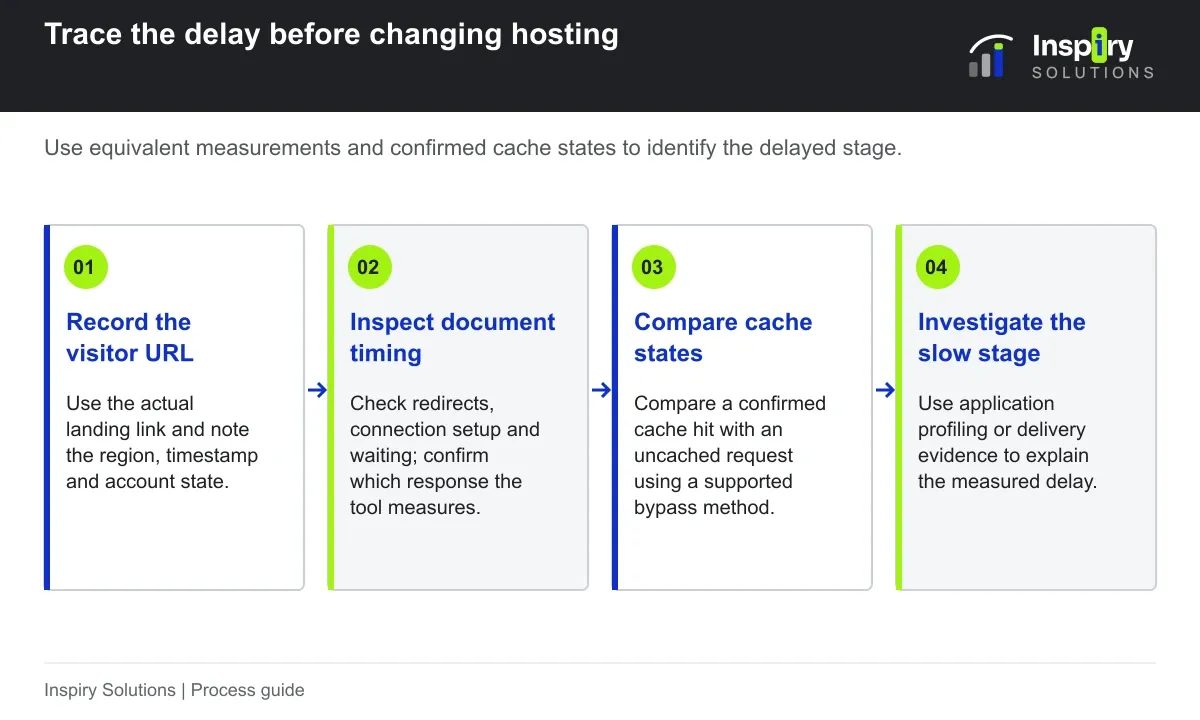
Start WordPress TTFB testing with the exact URLs visitors use, including campaign landing links. Test logged out, then inspect account or administrative requests separately. Note the testing region, timestamp, device and whether a previous request may have warmed the cache.
Inspect the document request in browser developer tools. Record redirects and the connection and waiting stages. Look for your host’s or CDN’s documented cache-status headers; their names and meanings vary between providers.
For WordPress TTFB comparisons, use a confirmed cache hit and an uncached request obtained through a supported bypass method. A private browsing window does not necessarily bypass a server cache. Adding random parameters is also unreliable unless the cache configuration treats them as intended.
If the delivery platform uses 103 Early Hints, ask which response the tool measures. An early informational response can precede the final document response. Record final-response timing too when comparing application processing.
Seven practical fixes for slow responses
1. Remove avoidable redirect chains
Check whether a visitor moves through an old domain, HTTP address, alternative hostname and previous slug before reaching the page. Update internal links and campaign destinations to the final URL where possible.
When improving WordPress TTFB, preserve necessary migration redirects. Removing a redirect without considering old links and indexed URLs can create a different problem. Consolidate controlled chains carefully and verify the final status, destination and page content.
For agencies, include redirect inspection in the technical SEO review so delivery improvements support a coherent URL strategy.
2. Make public page caching effective
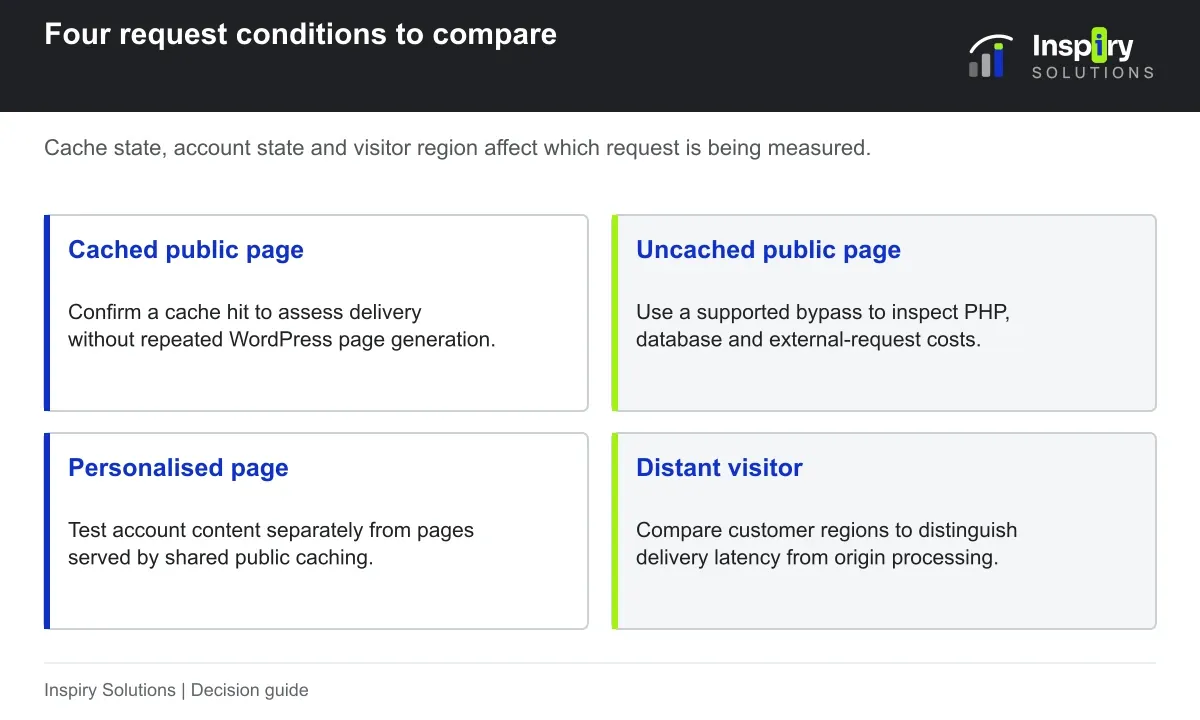
Before adding a page cache to improve WordPress TTFB, check whether the host already provides one. Confirm actual hits on ordinary service and article pages. Review cookies, query strings and rules that exclude more content than intended.
The WordPress caching handbook distinguishes page, browser, object and server caching. Browser caching of images will not remove the PHP work required to generate an uncached HTML response.
Keep shared public caching away from personalised content unless the application and provider support a tested approach. Verify baskets, checkout, member pages and logged-in states rather than applying a global cache rule.
3. Reduce expensive PHP and remote calls
Ask a developer to profile uncached page generation. Look for repeated template work, unnecessary hooks and synchronous calls to external services. An integration that waits for another provider can make local hosting appear slow.
To reduce WordPress TTFB where appropriate, cache reusable remote data or move nonessential processing away from the page request. Define freshness, failure handling and timeouts before making that change. A stock check or payment decision may require different handling from a public testimonial feed.
Use a scoped WordPress development brief when the fix involves application behaviour rather than a host setting.
For builder-specific work, use the Elementor speed guide alongside the investigation into template generation and server processing.
4. Identify slow database queries and settings
Inspect query duration, repetition and the pages that trigger expensive lookups. A large archive or filtered catalogue may do substantially more work than a simple landing page. Compare those page types instead of relying solely on the homepage.
Persistent object caching can help suitable repeated database operations, but confirm that the host supports it and that it is configured correctly. It does not make an inefficient query inherently cheap.
Review unnecessary automatically loaded settings with ownership evidence. Back up before deleting data, and test plugins that depend on it. Database cleanup should follow a retention and recovery plan.
5. Match hosting capacity to uncached demand
Ask the host about PHP worker saturation, CPU usage, memory pressure and storage latency at the time of slow requests. For WordPress TTFB spikes during campaigns, compare uncached demand with ordinary traffic. Cached requests may conceal a capacity problem until more visitors use dynamic pages.
Upgrade when the evidence identifies a genuine resource constraint. Request a repeatable comparison after the change. A plan with more storage does not necessarily provide more processing capacity, and a product name is not a useful performance specification.
Include operational support and recovery in the decision, not just an isolated loading test.
6. Reduce competition from background jobs
Investigate imports, backups, scans and synchronisation jobs that coincide with slow periods. Check failed tasks and retries. A process performing repeated full-catalogue work may need batching or a more suitable schedule.
WordPress documents connecting WP-Cron to a system scheduler. Have the host or developer implement and verify that arrangement before disabling request-triggered scheduling.
Scheduling work separately does not remove its resource cost. Confirm published posts, backups and business emails still run. Include those checks in the WordPress maintenance plan.
7. Improve delivery for customer regions
Measure WordPress TTFB from the regions the business serves. If origin processing is reasonable but distant visitors wait longer, investigate connection latency and delivery. A CDN can bring cacheable responses closer to visitors when configured to serve the relevant content.
Confirm whether the CDN caches HTML or only static assets. Dynamic account and checkout requests may still travel to the origin. Choose the delivery strategy around those real journeys, rather than assuming that adding a CDN resolves every delay.
A website performance assessment can combine regional observations with application profiling to distinguish these causes.
Hypothetical diagnosis: fast articles, slow account pages
Imagine a membership business whose articles respond quickly but whose account pages slow down during an email campaign. The article responses show confirmed cache hits. Account pages bypass the shared cache and call an external entitlement service on each request.
| Finding | Interpretation | Next action |
|---|---|---|
| Fast cached articles | Public delivery works under these conditions | Keep them as a comparison |
| Slow uncached account pages | Dynamic processing needs investigation | Profile application and external calls |
| Slowdown during campaign | Capacity may compound request cost | Check worker and queue measurements |
This hypothetical example does not establish a result for any real site. It shows why testing only the homepage can miss the journey that matters most.
What to send your host or developer
For a WordPress TTFB investigation, supply exact URLs, timestamps, regions, account states and the steps used to reproduce the delay. Include cache-status evidence and a request waterfall. Explain whether the concern affects all pages, only uncached pages or particular periods.
Ask for an explanation tied to measurements, a proposed change and acceptance checks. That makes it easier to distinguish an application fix from a capacity upgrade and to assess whether the intervention worked.
Verify speed and correctness after the change
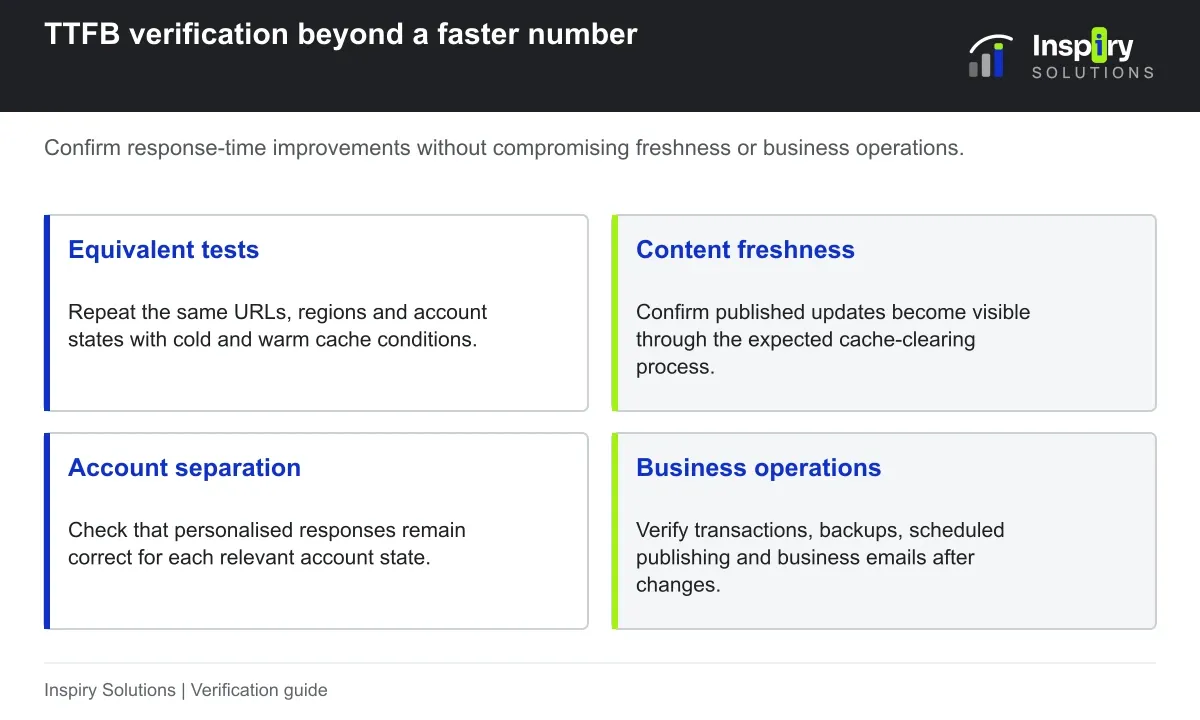
Repeat WordPress TTFB tests after deployment, including cold and warm cache states. Check content freshness, account separation and transactions. Record the configuration and observed result, then monitor busy periods as well as quiet ones.
A rebuild is a larger decision requiring its own evidence. If it becomes necessary, our redesign guide explains the URL and search considerations to preserve.
Frequently asked questions
Does compressing images reduce TTFB?
Usually it improves later resource transfer rather than WordPress TTFB. Investigate the document request when TTFB is the specific concern.
Can one plugin cause high TTFB?
Yes, a plugin can increase WordPress TTFB if it performs expensive work during page generation. Confirm the cost through profiling and controlled tests rather than judging the plugin by its size.
Will any CDN improve WordPress TTFB?
Not necessarily. Its effect depends on location, cache configuration and the response being served. Static-only delivery may leave dynamic HTML processing unchanged.
Does incognito browsing test an uncached page?
No. It changes browser state, but the request can still receive a server or CDN cache hit. Confirm the response’s actual cache behaviour.
Why is WordPress administration slow but the homepage fast?
Administrative requests perform different work and usually bypass public caching. Investigate those requests and background activity separately.
Does reducing TTFB guarantee better rankings?
No. It can help content arrive sooner, but rankings involve many factors. Assess the complete user experience and search fundamentals.
Conclusion: trace the delay to its source
WordPress TTFB becomes actionable when you know which request, cache state and delivery stage produced it. Separate public delivery from dynamic processing, correct the measured bottleneck and verify business functionality. That creates a stronger basis for technical changes than choosing a host or plugin from a single score.