llms.txt is a proposed Markdown file that helps language models find important information on your website, but most business websites do not need one urgently. It is a curated reading guide, not a confirmed ranking signal or a shortcut to appearing in AI answers. For a small service business, fixing crawling problems, improving important pages and making business information consistent usually deserves attention first. If your site has extensive documentation or difficult navigation, a short, maintained file may be useful.
This guide explains what the proposal specifies, what Google documents about AI search eligibility and how to decide whether creating the file is worth your time. You will also get a practical llms.txt file example and three steps for publishing one.
What llms.txt is, in plain English
An llms.txt file is a proposed text document that gives language models and automated assistants a guided introduction to a website.
Jeremy Howard published the original proposal in September 2024. The llms.txt proposal{:target=”_blank” rel=”noopener”} describes a Markdown document containing background information and links to useful resources. It remains a community proposal, not a web standard adopted by a standards body.
Websites contain navigation menus, repeated content and many pages. An automated assistant looking for specific information may benefit from a short guide identifying the most useful resources.
Markdown formats plain text. A hash symbol creates a heading, while square brackets and parentheses create a link. You do not need specialist software to write it.
The site root means the top level of your domain. A conventional business-wide file appears at:
https://example.com/llms.txt
The proposal also allows files within particular paths, such as /docs/llms.txt, describing content beneath that path.
Publishing this guide does not mean every AI provider reads it. It does not replace your pages, correct inaccurate content or create a documented Google ranking signal.
For businesses considering our AI visibility service, we treat llms.txt as optional rather than foundational.
What the proposal actually specifies
The format is designed for people and software. It uses familiar headings, summaries and links instead of a complex technical system.
The proposal describes a content structure, but not every element is mandatory.
The required parts
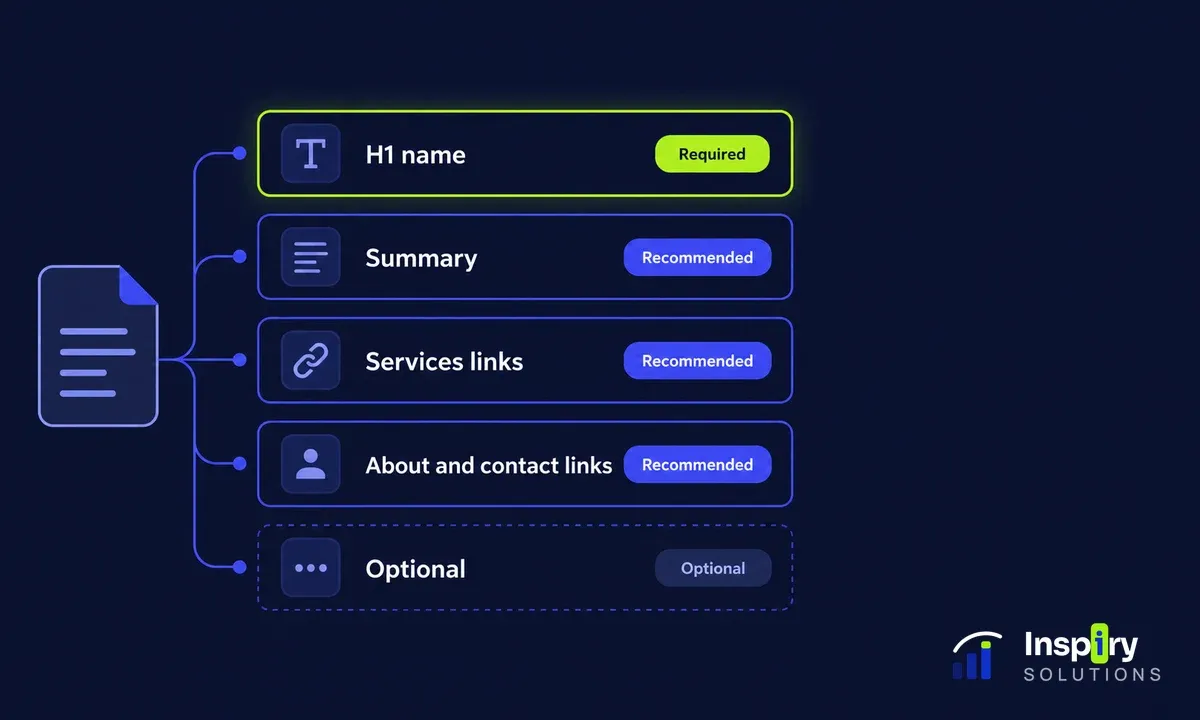
In the proposal, the only required section is an H1 heading containing the project or website name.
In Markdown, an H1 starts with one hash symbol:
# Example Accountancy
This identifies the website or project and should match its public identity.
Although the heading is the only required section, a document containing nothing else provides little practical value.
A useful implementation includes a summary explaining the organisation and its content. The proposal describes this as a Markdown blockquote beginning with >.
Keep the summary factual. Avoid unsupported qualifications, promotional claims or exaggerated descriptions.
The optional parts
The proposal allows additional information after the summary, followed by sections introduced with H2 headings.
These sections contain lists of links, optionally accompanied by explanations. A Services section might identify important service pages, while another provides company information and contact details.
An Optional section can contain secondary references that are less important when an assistant needs a shorter overview.
The proposal also discusses Markdown versions of individual pages. These provide cleaner representations of documentation without requiring an assistant to extract content from HTML.
For example, a documentation page might have a corresponding .md version.
Another related concept is llms-full.txt, sometimes used for a consolidated document containing more extensive information. The main proposal does not make this mandatory.
For an ordinary service website, creating Markdown copies of every page would probably introduce unnecessary maintenance.
llms.txt vs robots.txt vs sitemap.xml
These files serve different purposes. Confusing them leads to poor technical decisions.
A robots.txt file communicates crawling instructions. A sitemap.xml file helps search engines discover URLs. An llms.txt file proposes a curated information guide.
Google’s introduction to robots.txt{:target=”_blank” rel=”noopener”} explains how website owners manage requests from participating crawlers. These instructions are not security controls and do not guarantee removal from search results.
Google’s sitemap documentation{:target=”_blank” rel=”noopener”} explains how sitemaps provide information about pages and other files to support discovery.
Here is the practical comparison.
| File | Where it lives | What it does | What it does not do | Who documents it |
|---|---|---|---|---|
| robots.txt | Usually /robots.txt | Communicates crawling permissions and restrictions to participating user agents | Does not provide secure access control or guarantee removal from search | Google Search Central and the Robots Exclusion Protocol |
| sitemap.xml | Commonly /sitemap.xml, although other paths are possible | Lists selected URLs to support discovery | Does not guarantee crawling, indexing or rankings | Google Search Central and the Sitemap protocol |
| llms.txt | /llms.txt or a relevant subpath | Offers a curated reading guide with background and selected links | Does not control crawling, guarantee AI citations or act as a documented Google ranking signal | The community proposal at llmstxt.org |
| Organization structured data | Usually within the HTML of relevant pages | Provides machine-readable information about an organisation | Does not replace visible content or guarantee enhanced search presentation | Schema.org vocabulary and Google’s structured data guidance |
Organization structured data is included because clear business identity matters for AI visibility. Unlike these separate files, it is normally embedded within webpages.
The essential distinction in llms.txt vs robots.txt is crawling control. The former suggests what to read. The latter expresses which paths participating crawlers may fetch.
A sitemap does not instruct search engines to index every listed page.
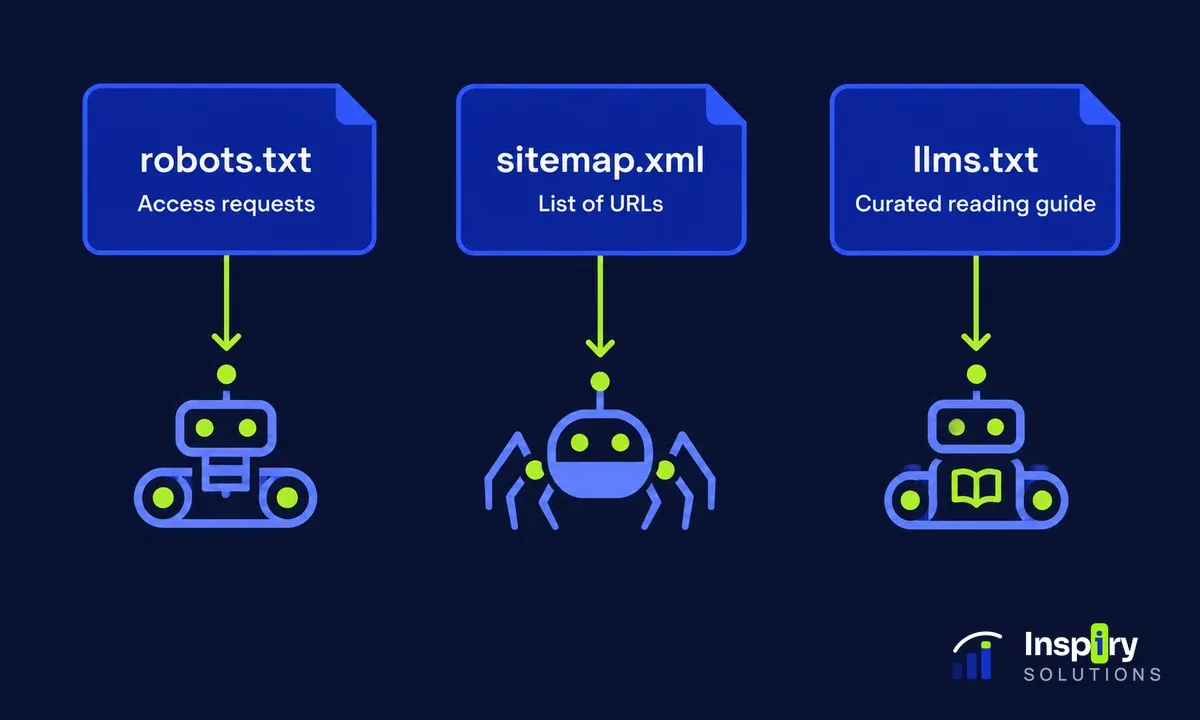
Replacing your sitemap with llms.txt, or using it to block AI crawlers, confuses unrelated functions.
Keep established crawling and discovery mechanisms working first.
Do AI tools and Google use llms.txt?
This question requires separating documented behaviour from expectations.
The proposal explains how automated assistants could use the file. That does not prove universal adoption by AI providers or establish measurable visibility benefits.
Google is specific about its Search products.
Its documentation for AI features in Search{:target=”_blank” rel=”noopener”} explains that pages eligible to appear as supporting links in AI Overviews and AI Mode must be indexed and eligible to appear in Google Search with a snippet.
Google also states that additional machine-readable files, AI text files or special markup are unnecessary for these features.
Therefore, llms.txt is not a documented requirement for Google’s AI search experiences.
Google instead emphasises technical accessibility, helpful content, internal links, readable text and structured data consistent with visible information.
For context, see how AI search changes SEO work.
What about ChatGPT and other assistants?
Do not assume providers handle the proposal identically. Check each provider’s current documentation for crawler behaviour and stated support.
Publishing a file does not prove an assistant consumed it. Missing documentation is not proof that a provider never requests it.
You can investigate through server access logs.
Ask your developer to inspect requests to /llms.txt. Logs may record the request time, response status and user-agent string, identifying the software requesting a resource.
User-agent names can be impersonated, so verify unfamiliar crawlers.
A successful request establishes that the file was fetched. It does not prove the content influenced an AI answer, recommendation or citation.
Logs also cover limited periods. No requests during one week does not establish that the resource will never be accessed.
Treat adoption and results as questions requiring evidence, not assumptions.
When an llms.txt file is worth adding
The useful question is not simply “do I need llms.txt?” It is whether a curated guide solves an information-discovery problem.
Documentation-heavy websites are potential candidates. A software product may have installation guides, API references and troubleshooting instructions spread across hundreds of pages.
A short guide identifying authoritative resources could be useful.
Another possible fit is a website with important information difficult to find through navigation, such as separate technical documents, policies and service resources.
The case is weaker for a small service website.
If its services, about and contact pages are already in the main menu and sitemap, another file largely repeats existing information.
It also creates maintenance obligations. Links to discontinued services or removed pages can mislead readers.
A ten-minute decision test
Before creating anything, answer five questions.
- Are important pages accessible? Check that they load, are intended for indexing and are not accidentally blocked.
- Can visitors find them? Review the main menu, service pages and internal links.
- Is information scattered? Identify resources benefiting from a curated overview.
- Would the guide add value? Highlight authoritative information rather than repeat marketing slogans.
- Who will maintain it? Assign responsibility for updating links when content changes.
If information is scattered, a curated selection adds value and someone owns maintenance, a small implementation may be reasonable.
If the first two checks reveal problems, fix those first.
Hypothetical example: A five-page accountancy website considers llms.txt. Its services, about and contact pages are already in the main menu and the sitemap, so the decision test shows little to gain. The owner adds a six-line file in 20 minutes and puts it on the quarterly content checklist rather than paying for a larger project.
This illustrates a decision, not evidence of improved visibility.
How to write a minimal llms.txt in three steps
You do not need a complicated generator or expensive project to create a basic file.
For a small WordPress business, start with the organisation’s name, a factual summary and links to important pages.
The example below is illustrative. Replace its domain and descriptions with real information.
Write the summary
Open a plain-text editor and begin with the business name as an H1.
Add a short description using the Markdown blockquote format.
Explain who the business is, what it provides and which customers it serves.
For example:
# Example Accountancy

> Example Accountancy provides bookkeeping,
tax preparation and accounting services
for small businesses in the UK.
The description should match your homepage and about page.
Avoid invented qualifications, unsupported awards or promises. Describe service locations accurately.
An assistant should not encounter contradictory information between the guide and website.
Correct inaccurate visible pages before preparing the file.
List the pages that answer customer questions
Identify pages customers need to understand your services, assess your business and make contact.
Start with core services, then company background and contact details.
Here is a minimal llms.txt file example:
# Example Accountancy

> Accounting and bookkeeping services
for small businesses in the UK.

## Services
- [Accounting](https://example.com/accounting/): Accounting services for businesses.
- [Bookkeeping](https://example.com/bookkeeping/): Bookkeeping and financial record services.

## About and contact
- [About](https://example.com/about/): Company background and services.
- [Contact](https://example.com/contact/): Contact details and enquiry information.
This directs readers towards the website rather than duplicating every paragraph.
Use real, working, absolute URLs, including the domain and path.
Choose current, preferred URLs rather than staging addresses, outdated redirects or duplicates.
Do not list pages blocked in robots.txt or marked noindex if highlighting publicly indexable resources.
Descriptions should explain content. “Information about bookkeeping services” is better than unsupported claims about being the best provider.
You do not need every blog article. Select pages based on customer questions.
For extensive documentation, organise resources under headings such as Getting started, Technical reference and Troubleshooting.
The result should resemble a concise contents page, not a keyword list.
Upload and test the URL
Save the document as plain text named exactly llms.txt.
For llms.txt WordPress implementation, upload through your hosting file manager or SFTP, a secure file transfer method.
Find the website’s public document root, sometimes called public_html or htdocs.
Upload the file so it becomes available at:
https://yourdomain.com/llms.txt
A suitable WordPress plugin may also generate it. Check its functionality and avoid competing versions at the same URL.
Open the address in a private browser window.
You should see readable text, not a 404 error, login screen or WordPress page template.
Test every link. Ask your developer to confirm HTTP status 200, indicating a successful response.
Clear relevant caches after updates if your website uses caching or a content delivery network.
Record maintenance ownership and keep a copy with your website documentation.
Do not measure success by immediate AI mentions. Confirm the file loads, follows the intended structure and contains accurate information.
Keep it accurate after launch
An outdated llms.txt file can direct readers towards obsolete information.
Treat it as part of content maintenance rather than a one-off installation.
Whenever you add a service, rename a page or remove a resource, check whether the guide needs updating.
Use a short checklist:
- Add important new services and reference pages.
- Replace outdated URLs with current destinations.
- Remove deleted or irrelevant resources.
- Confirm descriptions match visible content.
- Test the published file after changes.
Redesigns and migrations deserve particular attention.
A migration can change domains, navigation and URL structures. Even when redirects work, the guide should link directly to current canonical URLs.
Include this in our WordPress technical SEO checks alongside redirects, sitemap updates and indexing reviews.
For multilingual websites, describe linked content accurately and avoid suggesting unpublished translations exist.
A quarterly review may suffice for a small site. Frequently changing documentation may justify automated generation, provided the source remains accurate.
The guide must reflect the website rather than contradict visible content.
Common questions
Is llms.txt an official standard?
No. It is a community proposal published at llmstxt.org, not a standard formally adopted by a standards body. The proposal defines a consistent format for presenting website information to language models. Individual AI providers may take different approaches, so check their official documentation for adoption rather than assuming that discussion or popularity establishes support.
Will adding llms.txt get my business mentioned in ChatGPT?
No file can guarantee that ChatGPT will mention, recommend or cite your business. A guide may help an automated system find information if that system supports it, but this does not establish a visibility benefit. Focus first on crawler access, indexable content, accurate service descriptions and a consistent business identity across your website.
Can llms.txt block AI crawlers?
No. It is a reading guide, not an access-control mechanism. Crawling restrictions are expressed through robots.txt rules for specific user agents, and providers document their own crawler names and functions. Participating crawlers may respect these requests, but robots.txt does not securely protect private content. Use proper authentication or other access controls when information must remain private.
Does Google use llms.txt for AI Overviews?
Google’s AI features documentation explains eligibility for AI Overviews and AI Mode through normal Search indexing and snippet requirements. It also states that special AI text files are not necessary for those features. This does not establish a ranking benefit from llms.txt. Check Google’s current published guidance before making future claims because technical requirements and product documentation can change.
How long does it take to create one?
A minimal file for a small website is a short job. If the important pages are already clear, writing the summary, adding links and checking the published URL should be straightforward. The ongoing cost is keeping everything in sync with website changes. Larger documentation websites may require automated generation and more structured maintenance.
Where to spend effort first
Before paying someone to create llms.txt, identify what prevents your website from being found, understood or trusted.
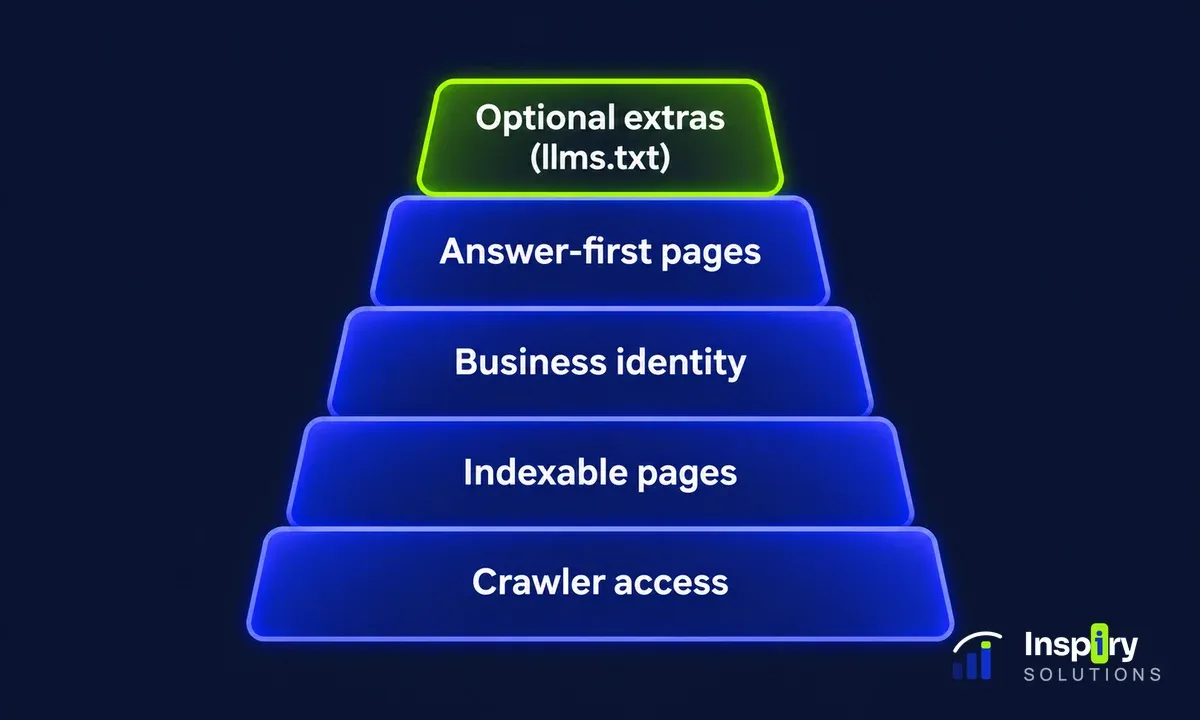
At Inspiry Solutions, we prioritise fundamental technical and content improvements.
First, crawler access. Important pages should be reachable without accidental restrictions from robots.txt, server settings, firewalls or hosting tools.
Second, indexable pages. Check indexing eligibility, canonical URLs and internal links connecting important content.
Third, clear business identity. Keep the organisation name, services, locations and relevant details consistent across visible pages and structured data.
Fourth, answer-first service pages. Explain each service, its customers, relevant processes and how people can enquire. Make important details readable.
Finally, consider optional extras, including llms.txt, where they solve an information-discovery problem.
Before adding another file, start by auditing what AI tools say about you and checking whether those answers reflect your business information.
An audit should distinguish missing content, crawling restrictions, incorrect business details and unverifiable claims.
This produces a useful fix list rather than another speculative optimisation task.
An llms.txt file may help documentation-heavy websites, but it should not distract from pages customers and search systems already depend on.
Not sure whether llms.txt or something more basic is holding your AI visibility back? Send your URL to hello@inspirysolutions.com for a free audit and a plain-language reply within two working days, or see how our AI visibility service checks access, identity and content first.