Canonical tags identify your preferred URL when duplicate or very similar pages are available at different addresses. In WordPress, indexing problems can arise when a tag points to the wrong page, conflicts with other output or names an unsuitable destination. Google treats the preference as a hint, so check the content and surrounding signals too.

For a business owner, the question is which page customers should reach from search. For an agency, it is also which component controls the output. Editor settings for canonical tags are useful evidence, but they do not prove what a public page delivers or what Google has selected.
Understand canonical tags before changing them
A preferred URL and Google’s selected canonical are related but distinct. Google’s canonicalisation explanation describes selection of a representative page from a group of duplicates. Self-referencing canonical tags do not require Google to index every page that uses them.
Start with the customer’s task. If two URLs present the same service information, choose the intended public address. If they explain materially different services, review whether each deserves its own page rather than automatically consolidating them.
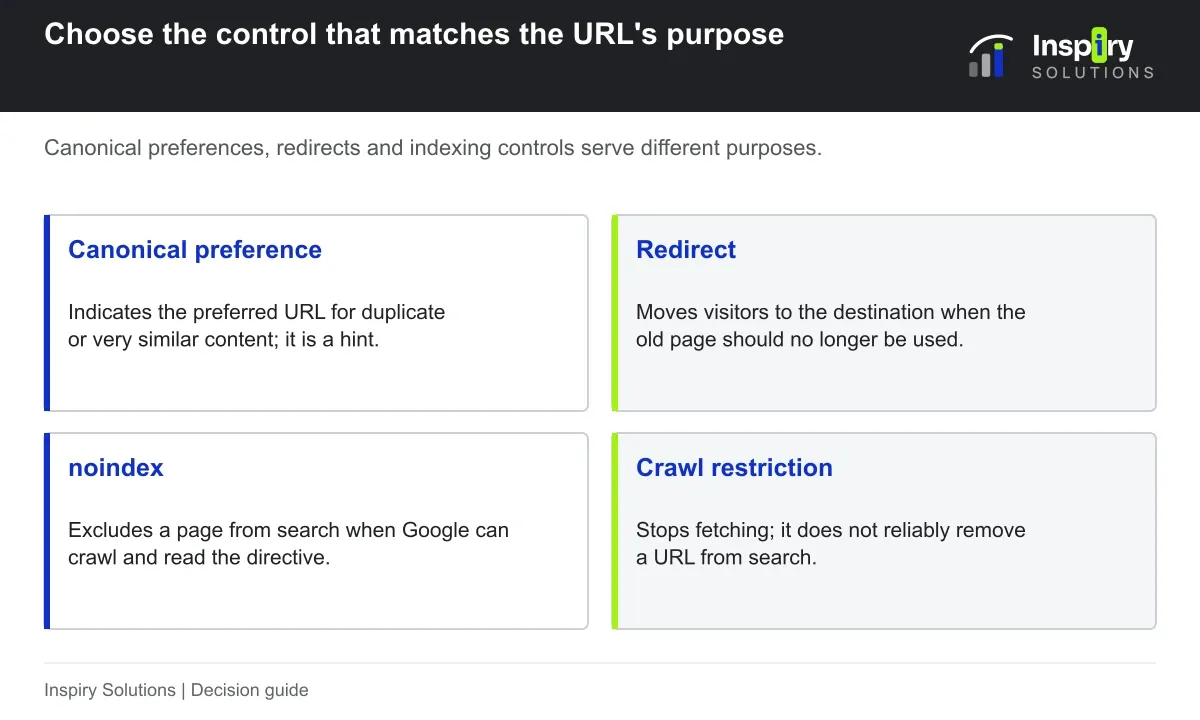
Keep three decisions separate: whether an old URL should redirect visitors, whether a page should be excluded from search, and which URL represents equivalent content. These controls serve different purposes. Changing one without a page-level decision can create a new problem elsewhere.
Hypothetical example: a campaign URL adds a tracking parameter to an existing service page without changing the offer. The business may prefer the clean service URL. That is different from a separate landing page describing a genuinely different service package.
Check the canonical tags WordPress actually delivers
WordPress includes a rel_canonical function for singular queries. SEO plugins, theme code and custom integrations can change how a site produces its final canonical output. Do not assume every archive or custom template follows the same path.
To check canonical tags, inspect the public page while logged out, including the HTML head and relevant response headers. Search for canonical declarations and record their destinations. Compare initial HTML with the rendered page if scripts may modify metadata.
An illustrative declaration for a hypothetical service page is:
<link rel="canonical" href="https://example.com/services/survey/">This is an example of the format, not a snippet to paste across your whole site. The destination must reflect the page being assessed. WordPress development support should identify the output owner before adding another layer of metadata code.
Eight common mistakes with canonical tags
1. Pointing distinct pages to the homepage
A copied template can give every page the same preference. For independent service pages, a homepage destination rarely expresses their actual relationship.
Hypothetical example: a surveyor’s homebuyer survey and commercial inspection pages both name the homepage. Compare the service content, identify the responsible rule and replace the unintended preference with the correct page-level output.
Do not assume a homepage canonical automatically explains a ranking loss. Preserve evidence and check Google’s selected URL. For genuine location pages, use a coherent local SEO architecture rather than treating all locations as interchangeable duplicates.
2. Leaving staging or previous-domain URLs in place
After a migration, inspect canonical tags on representative pages for an old hostname, protocol or path. Check custom fields and global settings as well as generated output. An editor may display the new address while a hard-coded template still supplies the old one.
Correct the source configuration and test the new public pages. Use a specific URL mapping when paths changed; avoid a blind replacement that gives unrelated pages the same destination. Include these checks in your redesign and migration plan before launch.
3. Allowing competing components to emit different preferences
Look for repeated canonical tags or disagreement between HTML and a response header. Two identical declarations indicate unclear ownership; two different destinations require a decision about the intended result.
Identify the theme hook, plugin or integration supplying each declaration. Repair the conflict in staging, then verify public output after deployment and cache clearing. Do not deactivate production components casually to discover which one matters.
The choice between a custom WordPress theme and a template also affects where such behaviour is maintained. Ask for the metadata responsibility to be documented whichever approach is used.
4. Naming a destination that cannot fulfil its role
Test the destinations named in canonical tags, not just the source declaration. A preferred destination that is missing, excluded, blocked or caught in a redirect chain deserves investigation. Record where the request ends and what content appears there.
Hypothetical example: a consultancy renames its audit service but leaves the canonical pointing at a deleted draft. Restore a coherent preference to the intended published page and confirm its access and content. Treat the observed defect as a repair task, not as proof of Google’s past selection.
5. Sending inconsistent signals across the site
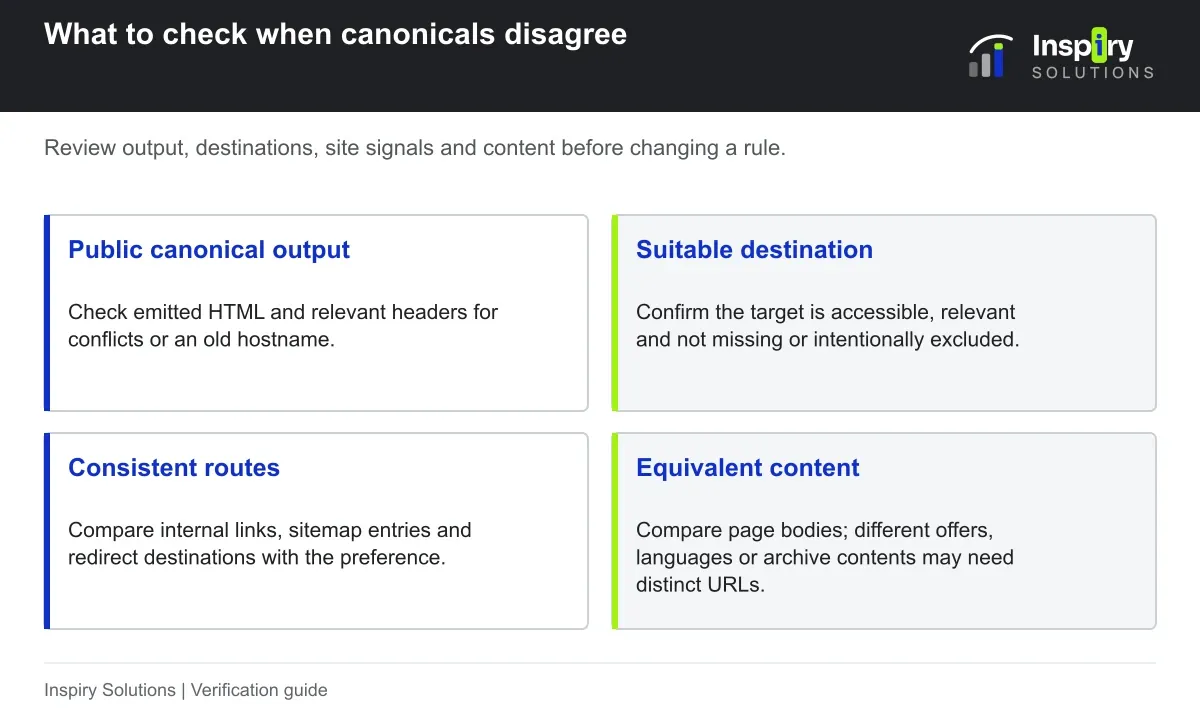
Compare canonical tags with internal links, redirect destinations and sitemap entries for the same page. If the menu repeatedly uses a variant that the metadata does not prefer, the site’s own configuration tells an inconsistent story.
Google’s canonical implementation guidance recommends consistent preferred URLs and explains that redirects, canonical annotations and sitemap inclusion have different strengths. Align the intended destination across the components you control.
Create a small URL convention document covering host, protocol and path format. Apply it to new templates and links so the same disagreement does not reappear next month.
6. Consolidating pages that contain different information
Do not remove parameters or pagination from a preference merely because the resulting address looks cleaner. First compare what the URLs display. A tracking parameter may leave the content unchanged; a category filter may create a useful and distinct selection.
Hypothetical example: an article archive’s second page contains resources absent from page one. Automatically naming page one as representative can misdescribe the content relationship. Review the archive policy and its navigation instead of assuming every numbered page is a duplicate.
For a service business, investigate archive settings separately from core landing pages. Preserve a route to older useful content when changing indexability or template behaviour.
7. Collapsing meaningful language or regional variants
Review translated and regional pages with someone who understands their audience. A fully translated service explanation is different from a page where only the menu changes language. Regional differences in availability or terms can also matter.
Keep the canonical and localisation configuration consistent with the content decision. Avoid a global rule that sends every language version to the English homepage.
Hypothetical example: a consultancy publishes distinct English and French service details. Document the intended audience of each and test their generated metadata separately. Escalate uncertain international configurations before applying a bulk template change.
8. Producing invalid or unstable canonical output
Inspect whether canonical tags appear in the valid HTML head and whether JavaScript changes them after initial delivery. A source page and rendered page naming different destinations make diagnosis harder. Also check whether stale cached output is being compared with a recently changed setting.
Give the developer both versions and a reproducible URL. Choose a consistent output path, then retest a logged-out request. Google’s canonical troubleshooting guidance includes incorrect CMS output and server configuration among issues worth checking.
Verify repairs to canonical tags in stages
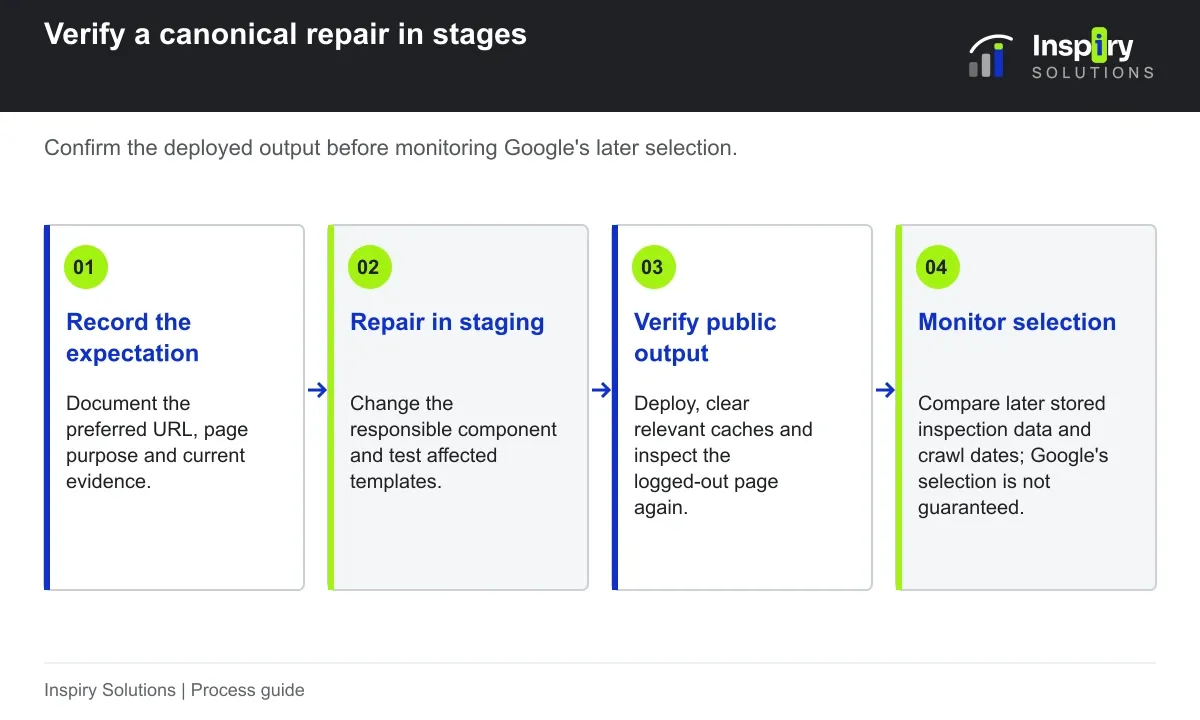
Start with an explicit expected result for the affected URL. Record its purpose, duplicate variants, preferred destination and reason. Inspect the source and destination before making changes so the team can distinguish an observed fault from a suspected one.
| Check | Evidence to keep |
|---|---|
| Public output | Canonical declaration, response and inspection date |
| Destination | Final accessible page and relevant content |
| Consistency | Links, sitemap and redirect mapping |
| Google processing | Stored inspection result and crawl date |
Repair the responsible component in staging, test several page types and deploy the scoped change. Clear relevant caches and inspect public output again. Include a page that should retain its existing behaviour as a control, particularly after modifying a global rule.
Then compare the user-declared and Google-selected canonical in the stored URL Inspection information. A live test helps check current access and rendering but cannot establish Google’s future selection. Request re-evaluation for important repaired pages where appropriate and monitor later processing.
If Google continues to choose another URL, compare the actual content before adding more directives. The pages may be too similar, a target may be unsuitable, or the stored information may precede the repair. The indexing diagnosis guide helps separate canonical selection from other reasons a page is excluded. Technical SEO support should explain which possibility the evidence supports.
Assign ownership so the problem does not return
Name the component that owns canonical tags and the person responsible for changes. Record any page-level exceptions with their rationale. A future editor should know why an exception exists rather than treating it as a mysterious setting to copy.
Add checks of canonical tags to releases involving SEO plugins, templates, URL structures and migration tools. Include them in WordPress maintenance planning. A short documented sampling process can reveal a repeated fault before it spreads to new service pages. Use the WordPress audit checklist to include canonical checks in a wider release review.
Frequently asked questions
Does every page need a self-referencing canonical?
For intended preferred pages, a self-reference can clarify the site’s preference. It does not prove uniqueness or guarantee indexing. Check what the page represents before applying one automatically across custom templates.
Is a canonical tag the same as a redirect?
No. A canonical declaration does not move a visitor to another URL. Use the customer’s expected journey and whether the old page must remain accessible to decide which control fits the situation.
Why might Google select a different canonical?
Investigate content similarity and technical consistency, then compare the stored crawl date with your repair. A declared preference can differ from Google’s selection. Record the evidence rather than assuming a plugin has failed.
Should I manually fill every WordPress canonical field?
For canonical tags, start by inspecting the generated defaults and understanding their owner. Use deliberate overrides for documented exceptions. Filling every field manually creates additional settings to maintain when slugs or domains change.
Should I block duplicates in robots.txt?
Do not use a crawl block as a substitute for a canonical decision. If the objective is to exclude a page from search, choose an indexing control appropriate to that purpose and verify it separately.
Will a corrected tag change search results immediately?
No reliable immediate outcome can be promised. Verify the public repair first, then monitor later crawl and selection evidence. A successful deployment and Google’s eventual processing are different milestones.
Keep canonical tags consistent with the content
Reliable canonical tags express a clear relationship between pages and are maintained by a known component. Choose the appropriate destination, align the site’s supporting configuration and verify the public result. When indexing remains unexpected, investigate the content and Google’s stored evidence instead of layering on untested overrides.