Google AI Overviews SEO starts with a simple fact: Google can generate an answer above traditional search results and link to supporting websites, but no business can guarantee inclusion. Google says eligible pages must be indexed and allowed to appear with a search snippet. Its normal SEO guidance still applies. The useful response is to make your content accessible and genuinely helpful, then measure changes in search traffic and enquiries rather than assuming every lost click was caused by an AI-generated answer.
This guide explains what Google documents about source selection, what remains uncertain and how to investigate the impact using your website data.
What AI Overviews are and where links appear
Google AI Overviews are AI-generated summaries that appear within Google Search for certain queries. They help users understand a topic and may link to websites offering supporting information.
Unlike traditional search results, an AI Overview can address several parts of a question before someone visits another website.
For service businesses, potential customers might compare options or learn about a service without opening a website.
However, not every query produces an AI Overview, and not every visitor stops searching after reading one.
Google also offers AI Mode, a related Search experience designed for detailed questions, comparisons and follow-up exploration. Google says AI Mode and AI Overviews can use different models and techniques, meaning their responses and supporting links may differ.
Links can appear alongside AI-generated answers, but their placement and presentation vary. Screenshots showing one layout should not be treated as permanent rules.
This matters when discussing AI Overviews citations. Appearing as a supporting link is not identical to holding a traditional organic ranking.
The practical question is whether these experiences change visibility, qualified visits and enquiries from important pages.
How Google says sources are chosen
Google’s official documentation on AI features explains eligibility for supporting links in AI Overviews and AI Mode.
A page must be indexed by Google and eligible to appear in ordinary Search with a snippet. A snippet is the short preview Google can display alongside a search result.
Google states that there are no additional technical requirements specifically for appearing in these AI features.
However, eligibility does not mean selection. An indexed page may never appear as a supporting source for a particular question.
Google describes a technique called query fan-out. Its AI features may issue several related searches across subtopics and information sources while developing a response.
For example, someone asking about roof replacement costs might need information about materials, labour, roof condition and pricing factors.
Google may explore these related subjects rather than treating every question as a single search. This does not reveal its complete source-selection process.
Normal Search fundamentals still matter, including accessible content, internal links and useful information.
Google’s guidance on helpful, reliable, people-first content remains relevant. Pages should address readers’ needs rather than exist primarily to manipulate search visibility.
For businesses needing a structured review, our AI visibility work examines technical access, content and commercially relevant queries.
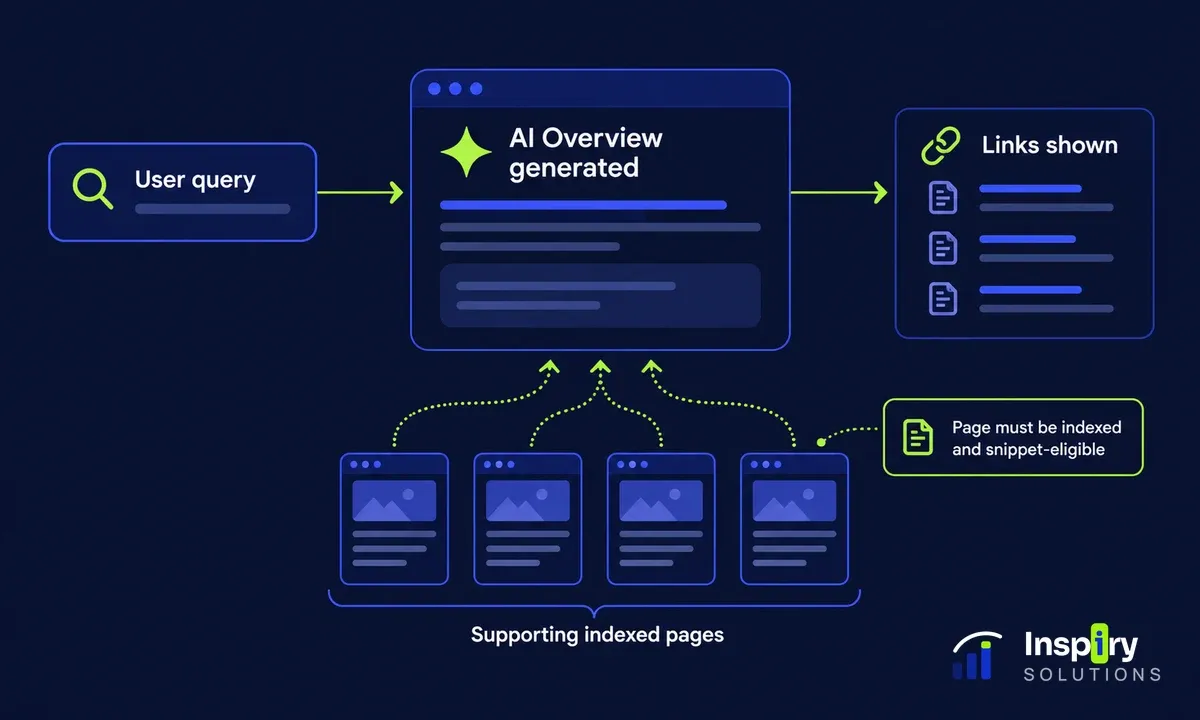
The diagram illustrates eligibility and possible source discovery, not Google’s exact ranking or AI-generation process.
Improving organic visibility and gaining supporting links are related but different objectives.
What Google does not say
The biggest problem with AI Overviews SEO advice is how easily recommendations become presented as confirmed ranking factors.
Google does not document special schema, a standalone AI optimisation file or an application process that guarantees supporting-link inclusion.
It says websites do not need additional machine-readable files, AI text files or special structured data to qualify.
That matters when someone claims you must create an llms.txt file, install an AI SEO plugin or rewrite every article into a prescribed format.
These suggestions may have other uses, but their value should be evaluated separately from claims about Google’s requirements.
Understanding what changes between AI and classic SEO helps distinguish useful improvements from unsupported promises.
Likewise, claims that answers require exactly 50 words, particular headings or a fixed number of FAQs are not documented eligibility rules.
| Google documents this | Often claimed, not documented by Google |
|---|---|
| Supporting pages must be indexed and eligible to appear with a snippet. | Every indexed page will receive an AI citation. |
| No special schema.org markup is required for AI features. | A dedicated AI Overview schema guarantees inclusion. |
| Snippet and indexing controls can limit content shown in Search AI features. | There is a separate guaranteed AI Overview opt-out switch for every page. |
| No additional AI text file or machine-readable file is required. | An llms.txt file is mandatory for Google AI Overviews. |
| AI features traffic is included in Search Console’s Web search reporting. | Search Console provides a complete, separate AI Overview traffic report. |
| No fixed answer length or format is specified as an eligibility requirement. | A particular word count or formatting template is required for citation. |
The left column reflects Google’s documentation. The right identifies claims that are not published requirements.
When considering an SEO recommendation, ask whether it addresses documented requirements, improves content for visitors or relies on an unverified theory.
Google AI Overviews SEO: three things you can influence
Businesses can improve three areas without controlling Google’s source selection: access and indexing, answer clarity, and coverage of related customer questions.
Access and indexing
Check whether Google can access and index the pages customers need to find.
A page blocked by robots.txt, hosting security or an indexing directive has a fundamental visibility problem.
Use Search Console’s URL Inspection tool to examine important service pages, guides and location pages.
Confirm that Google has indexed the intended URL, there are no accidental noindex directives and important content is accessible.
Check whether your CDN, firewall or security plugin blocks legitimate Googlebot requests.
An XML sitemap helps discovery but cannot override blocking rules or guarantee indexing.
If you identify pages Google is not indexing, investigate their status before creating more AI-focused content.
Review internal links too. Important pages should be accessible through relevant navigation and contextual links rather than isolated from the website.
The objective is to remove barriers preventing Google from evaluating existing content.
Answer clarity
Once access is confirmed, examine whether each page answers the question bringing someone to it.
Provide a direct explanation near the start of the relevant section, followed by qualifications and useful detail.
A roof replacement page should explain pricing factors rather than begin with promotional language.
Similarly, a legal services page should distinguish general information from guidance dependent on individual circumstances.
Google recommends making important content available in textual form. Avoid placing essential answers exclusively behind popups, calculators or interactive widgets.
Keep prices, service areas, opening hours and other relevant facts accurate.
Structured data can help Google understand content, but it must reflect visible information. It cannot replace a clear explanation.
Headings, short paragraphs and comparison tables help readers understand information without guaranteeing AI citations.
A useful principle in Google AI Overviews SEO is to improve information customers need before attempting specialised optimisation.
Coverage of follow-up questions
Customers rarely investigate an important purchase through one question.
Someone considering dental treatment might ask about effectiveness, duration, safety, cost and aftercare.
Reviewing these connected questions can reveal gaps in an otherwise useful page.
Start with questions from sales conversations, support requests, enquiries and existing Search Console queries.
Group them by intent. Some deserve short answers within existing pages; others justify dedicated guides.
Avoid producing dozens of thin articles repeating the same information under different headings.
Google’s description of related searches across subtopics supports reviewing broader customer information needs. It does not establish a guaranteed topic-cluster formula.
Identify unanswered questions, outdated information and missing connections between related pages.
These three areas strengthen your website’s foundations. None guarantees inclusion, rankings or traffic.
Controls: limiting what appears
Not every website owner wants all their content available as previews within Google Search.
The official snippet controls documentation explains instructions affecting ordinary snippets and Search AI features.
The main options are:
- noindex: Instructs Google not to include a page in its search index once the directive is discovered and processed.
- nosnippet: Prevents Google from showing a text snippet for the page.
- data-nosnippet: Excludes selected visible text from snippets without restricting the entire page.
- max-snippet: Specifies a maximum text snippet length, although Google determines what is displayed.
These controls differ in scope. Noindex removes indexing eligibility, while data-nosnippet targets particular passages.
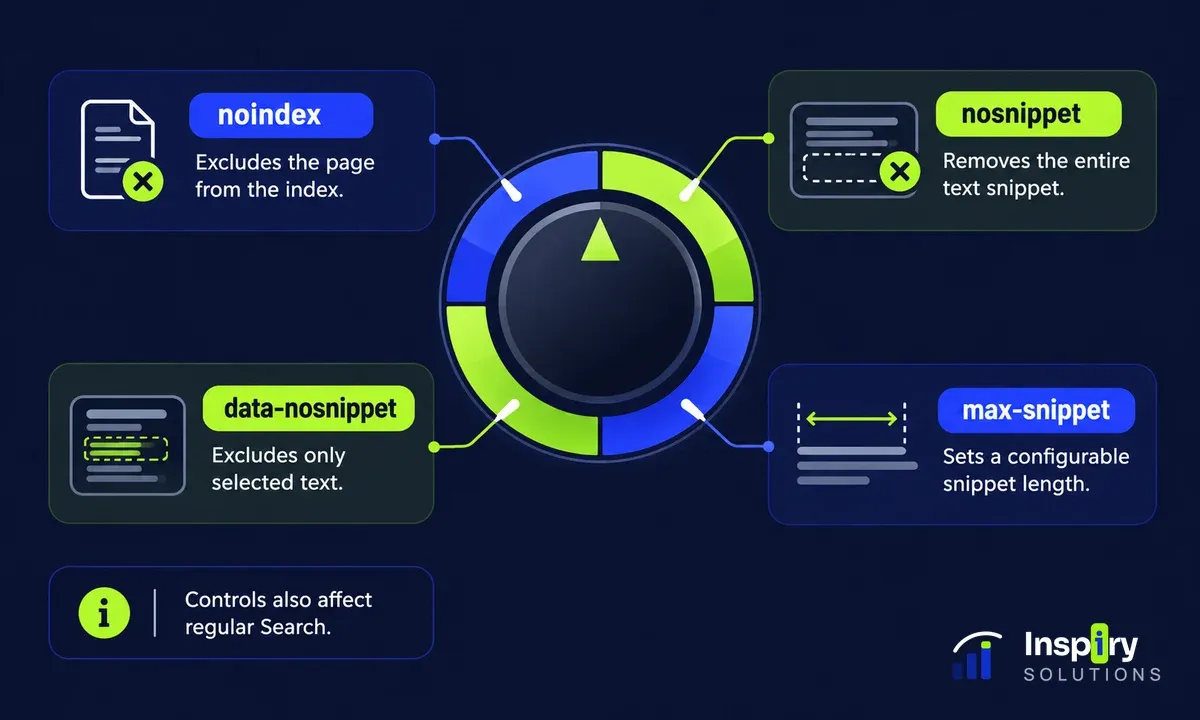
The diagram compares their scope, not a universal order of AI-specific blocking strength. Max-snippet also depends on its chosen limit.
An important trade-off is that snippet controls affect regular Google Search previews too.
Applying nosnippet to a commercial page may restrict information in ordinary results, not just AI Overviews.
Using noindex removes the page from Google’s regular searchable index.
Google-Extended concerns AI training and grounding in certain other Google systems. It does not control inclusion in AI Overviews or AI Mode within Search.
Before deciding to opt out of AI Overviews, establish which content needs protection and why.
If only one passage is sensitive, a targeted restriction may be preferable to excluding an entire page.
Ask your developer to verify the directive, inspect what Googlebot receives and allow for recrawling.
What it means for traffic: measure your own site
The effect of AI Overviews on traffic cannot be established from an industry-wide percentage alone.
Different queries represent different intentions. Someone seeking a factual answer may behave differently from someone ready to book a service.
Google states that AI Overviews and AI Mode traffic is included in the Performance report under the Web search type.
However, that report does not provide a dedicated AI Overview filter. This limits how precisely you can investigate AI Overviews traffic impact.
You can measure search performance and record where AI Overviews appear, but cannot reliably attribute every change to them.
Set up query groups
Open the Performance report in Search Console and select Web as the search type.
Google’s Performance report guidance explains clicks, impressions and click-through rate (CTR).
CTR is the percentage of impressions that produce a click.
Start with commercially meaningful queries. Separate informational questions from service, transactional and branded searches.
For each group, identify relevant landing pages and export impressions, clicks, CTR and average position.
Our guide to using Search Console day to day explains the reporting basics.
Manually sample representative searches to identify whether an AI Overview appears.
Record observations separately because Search Console does not identify individual queries as AI Overview queries.
Use statuses such as observed, not observed and not checked to avoid overstating the evidence.
Compare matched periods
Compare equivalent date ranges, such as consecutive 28-day periods, using the same query groups.
Consider seasonality, website changes and ranking movements before interpreting results.
Steady impressions alongside falling clicks and CTR may justify investigation.
However, these changes do not prove an AI Overview caused the decline. Competing results, search demand and ranking changes can also affect performance.
Compare groups where AI Overviews were observed with relevant queries where they were not.
Keep country and device settings consistent wherever possible.
Treat this as a diagnostic comparison rather than proof of causation.
Check enquiries, not only clicks
Search Console shows search visibility and clicks. It cannot independently establish whether visitors become customers.
Use analytics to review organic landing pages and meaningful conversion events.
These might include enquiry forms, appointment bookings or tracked calls.
Check whether changes in organic clicks coincide with changes in enquiries from affected pages.
Where consent and analytics settings permit, examine conversion rates alongside visitor numbers.
Hypothetical example: A dental practice notices that impressions for “how long does teeth whitening last” remain steady while clicks decline.
A manual check reveals an AI Overview for that query. The practice cannot prove it caused the change, but identifies a page worth reviewing.
The team improves the answer, adds its own accurate aftercare guidance and tracks booking enquiries rather than relying solely on clicks.
This avoids assuming fewer clicks automatically mean fewer customers.
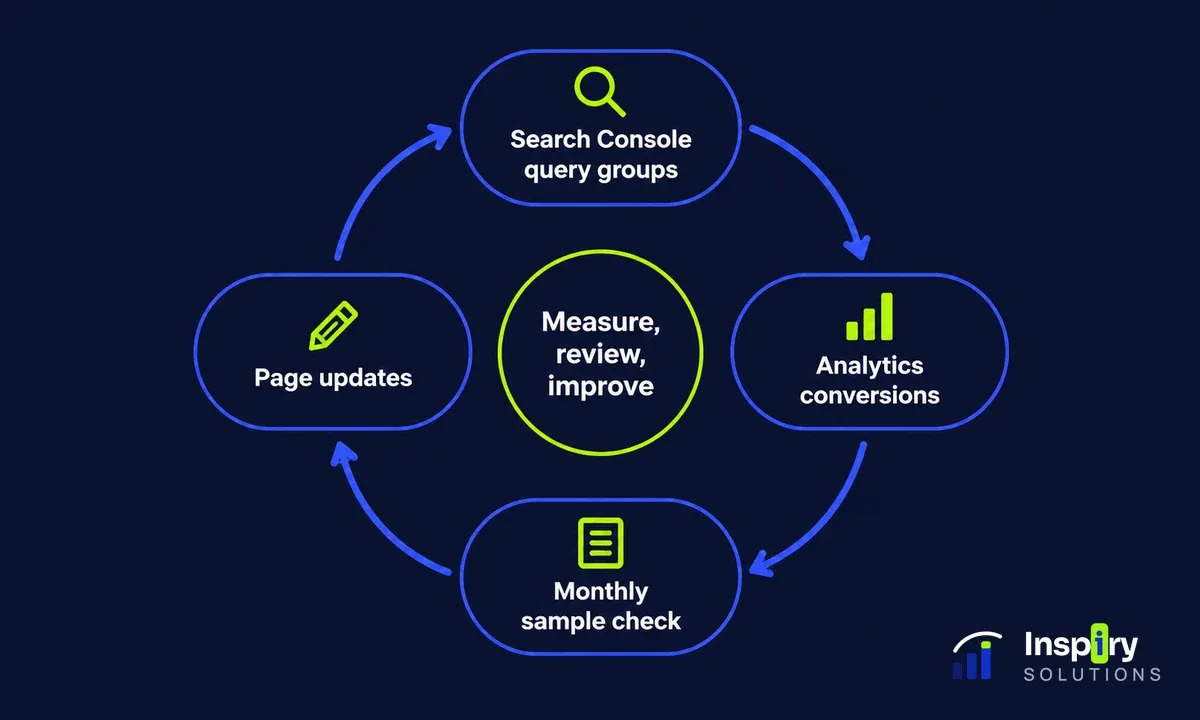
The measurement loop connects search observations, improvements and business outcomes.
For AI Overviews search console analysis, an uncertain conclusion supported by evidence is preferable to an unsupported explanation.
A monthly AI Overviews check
Monitoring does not require searching for your business every day.
Once a month, review a manageable sample of queries connected to your services and customer questions.
Include informational searches that could trigger AI Overviews and commercial queries relevant to enquiries.
Record observations in a spreadsheet with these columns:
- Query and relevant landing page
- Date, country, device and search conditions
- Whether an AI Overview was observed
- Supporting sources or domains displayed
- Your website’s inclusion, if observed
- Search Console clicks, impressions and CTR
- Organic enquiries or relevant conversions
- Recommended action and review date
Keep the sample consistent between months. Document significant changes to your query list.
Search results vary by location, device, time and user context. One manual check cannot establish what every customer sees.
Review the spreadsheet alongside analytics rather than treating it as a substitute.
Look for recurring patterns instead of reacting to one appearance or disappearance.
When a query loses clicks, check indexing, landing page content, average position and enquiries before assuming AI Overviews are responsible.
If a page repeatedly appears as a supporting source, record the observation without assuming permanent placement.
Google AI Mode SEO can be investigated through similar checks, but keep AI Mode observations separate from AI Overviews in normal Search.
A useful monthly review ends with prioritised actions, not dozens of speculative changes.
Common questions
Can I pay or apply to appear in AI Overviews?
Google does not document an application process, paid placement programme or special markup that guarantees inclusion as a supporting source. Eligibility follows normal indexing and snippet requirements. Paid advertising and organic supporting links should not be confused. Meeting Google’s published requirements makes a page eligible, but does not guarantee selection.
Does structured data help me appear in AI Overviews?
Google does not list special schema markup as a requirement for its AI features. Appropriate structured data can still help Google understand information and support eligible Search features. It must accurately match visible page content. Adding schema purely to target AI Overviews citations is not a documented shortcut to inclusion.
How do I opt out of AI Overviews?
Google documents snippet and indexing controls, including nosnippet, data-nosnippet, max-snippet and noindex. These can restrict displayed content or whether a page remains indexed. However, they also affect regular Google Search visibility or snippets. Consider the commercial consequences before restricting important pages, and verify that Google has processed your instructions.
Where do I see AI Overviews traffic in Search Console?
Google states that traffic from its Search AI features is included in the Performance report under the Web search type. It is not separated into a dedicated AI Overviews report. Use query groups, matched date comparisons and manual observations to investigate possible effects. Combine these findings with analytics conversions rather than claiming exact AI Overview attribution.
Do AI Overviews always reduce clicks?
No universal outcome is established for every query or website. Some searchers may obtain enough information from an AI-generated answer, while others visit supporting pages to investigate further. Results differ by topic, intent and business. Review your own impressions, clicks, CTR and enquiries instead of assuming that AI Overviews always reduce traffic.
Turning findings into work
Prioritise pages where evidence suggests a meaningful opportunity or problem.
A useful starting point is a page with steady impressions but declining clicks, where its main answer is unclear or outdated.
Check indexing and technical access first. Then review the answer, related questions and information available to visitors.
If enquiries decline alongside clicks, investigate the landing page and conversion process too.
Do not rewrite an entire website because an automated report claims every page needs AI optimisation.
Prepare a development brief identifying affected URLs, queries, observed changes, suspected issues and verification steps.
Google AI Overviews SEO is only one part of AI search. Businesses should also understand visibility in ChatGPT and other assistants, where discovery and measurement may involve different systems.
Distinguish documented requirements from experimental improvements and unsupported promises.
If AI Overviews are changing your search traffic and you want to know where it matters, send your URL for a free audit. Our AI visibility service measures the effect on your own queries before recommending changes.
Email hello@inspirysolutions.com with your website URL and the pages or searches causing concern. We will provide a plain-language reply within two working days.