If you see a Google Business Profile suspended notice, check the likely policy issue, correct inaccurate details and gather evidence before appealing. Google may suspend a listing when its information or eligibility does not meet its guidelines. Use Google’s official appeal process rather than creating another listing. Reinstatement is possible, but it is not automatic, and a weak appeal can delay resolution.
What a suspension looks like
A Google Business Profile suspension can be confusing because the owner and customers may see different things. Your management dashboard might show a warning while your business no longer appears publicly on Google Search or Maps.
A suspension notice in your dashboard
Sign in with the Google account that manages your business profile. Look for a notification stating that the profile is suspended or disabled, together with any available policy information.
Take a screenshot showing the exact wording. Also check the associated email account for messages from Google.
Do not assume the displayed reason explains every problem. A profile could contain several inaccuracies, even if only one triggered the enforcement decision.
Your profile has disappeared from Google Maps
Search for your exact business name and location using Google Maps and Search.
If the listing is missing, that alone does not prove suspension. Verification issues, duplicate listings, removals and other restrictions can also affect visibility.
Compare the public result with your management dashboard. If the dashboard confirms suspension, follow the appeal process rather than treating this as an ordinary ranking problem.
Do not create a replacement listing
Google explicitly advises owners not to create a new Business Profile for the same business during an appeal.
Common reasons profiles get suspended
Keywords added to the business name
Your Google business name should reflect the name customers recognise, not a collection of search terms.
Adding a service, location or promotional claim to an established name can violate Google’s rules.
For example, changing “Sparkle Cleaning” to “Sparkle Cleaning | Best Office Cleaners London” introduces promotional wording that may not be part of the real business name.
Google’s guidelines for representing your business explain that unnecessary name information can result in suspension.
Virtual offices, PO boxes and inaccurate addresses
Google expects a legitimate business location rather than a rented mailing address used solely to establish a presence in a city.
PO boxes and remote mailboxes are not acceptable business addresses. A virtual office without eligible staffing and operations is also a problem.
An office in a shared workspace may qualify only when it meets Google’s requirements for signage, staffing and receiving customers.
Google provides specific guidance on hiding and managing service-area addresses.
Your website also needs a clear explanation of your location and coverage. See how service-area businesses should present locations for the distinction between service areas and location pages.
Multiple profiles for the same business location
Generally, one business should have one profile for each eligible location.
Creating separate listings for different services at the same address can violate Google’s rules. Legitimate departments, independent practitioners and separately staffed locations may qualify for exceptions.
Sudden or inconsistent profile edits
Changing the business name, primary category, address or other important details can lead to additional checks.
Look for incorrect edits made by staff, an agency or someone responding to a suggested change.
Businesses that are not eligible
Not every activity qualifies for a Google Business Profile.
Online-only businesses without qualifying face-to-face customer contact, lead-generation operations and certain other arrangements may be ineligible.
Confirm that the underlying business model qualifies before preparing an appeal.
Lead-generation operators and agency-created listings
An agency cannot make an ineligible operation legitimate simply by creating a profile.
Problems arise when third parties create listings using invented locations, keyword-heavy names or contact information that does not represent the actual business.
If you cannot confidently identify the cause, our local SEO help with profile problems can assess your website and listing details before you make another change.
Diagnose before you appeal
Do not submit an appeal based only on the assumption that Google made a mistake. Build a short diagnosis supported by the available evidence.
Compare every important field with Google’s guidelines
Record the current profile details before changing anything:
- Business name and trading name
- Physical address and whether it should be public
- Primary and additional categories
- Website URL and telephone number
- Opening hours and service area
- Business description
- Ownership and manager access
Compare these fields with business registration, signage, the website and other genuine operating records.
Review changes and account access
Identify any recent updates to the name, category, address or website. Ask the person responsible why each change was made and what documentation supported it.
If an agency manages the profile, request a summary of its changes.
Also check whether an account restriction is involved.
Fix the issue before appealing
Where editing remains available, correct inaccurate information before submitting the appeal. If editing is blocked, document the required correction and explain it through the available appeal process.
Do not replace a real address with another invented address or rename the business repeatedly hoping a variation will pass.
Use this cause, fix and evidence table to organise your investigation.
| Likely cause | Fix before appealing | Evidence to include |
|---|---|---|
| Keyword in name | Restore the genuine business name | Registration, signage, branded website |
| Virtual office address | Use an eligible operating location | Address documents, staffing and premises evidence |
| Duplicate profile | Identify the legitimate listing and resolve duplication through the appropriate process | Business records, profile URLs, ownership details |
| Home address shown for SAB | Hide the public address where appropriate and define the service area | Registration, legitimate operating address evidence |
| Ineligible business | Check eligibility and correct the underlying arrangement where possible | Genuine proof of eligible operations |
| Suspicious edits | Correct inaccurate information and explain legitimate changes | Previous details, updated registration, supporting records |
Evidence must match the problem. A utility bill does not prove that an online-only lead-generation operation is eligible, and photographs alone do not establish ownership.
Hypothetical example
A cleaning company called Sparkle Cleaning renames its profile “Sparkle Cleaning | Best Office Cleaners London”. A week later, it receives a suspension notice. The owner checks Google’s naming requirements and discovers that the added promotional wording is not part of the company’s real name.
Where permitted, the owner restores “Sparkle Cleaning”, checks the address and category, and gathers business registration and address evidence.
This is a hypothetical example, not a verified client case or a guarantee that changing the name will secure reinstatement.
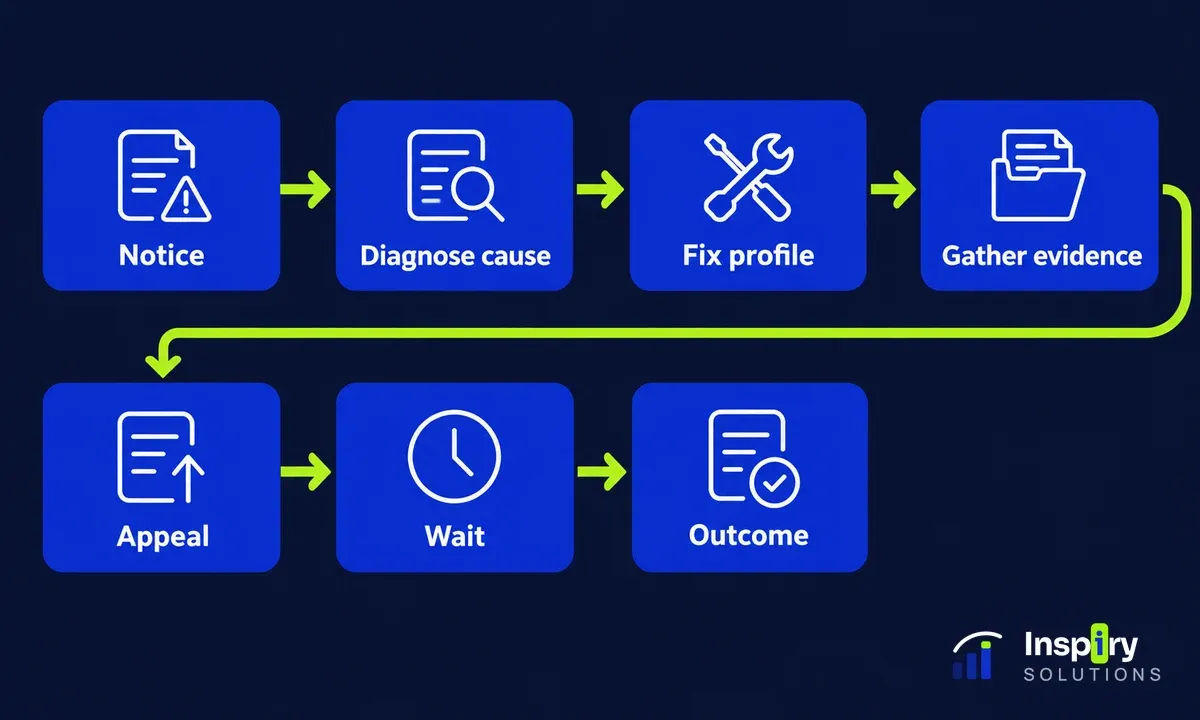
Google Business Profile suspended: how to request reinstatement
Once you have identified and addressed the likely problem, use Google’s official appeal process.
Start with the official Google suspension and appeal guidance. Sign in using the account associated with the affected business profile and follow the link to the appeals tool.
When an appeal is available, follow the displayed steps. Include a concise explanation of the business, the apparent issue, any correction made and the evidence supporting eligibility.
Supporting evidence is optional in Google’s process, but relevant documents can strengthen a legitimate appeal.
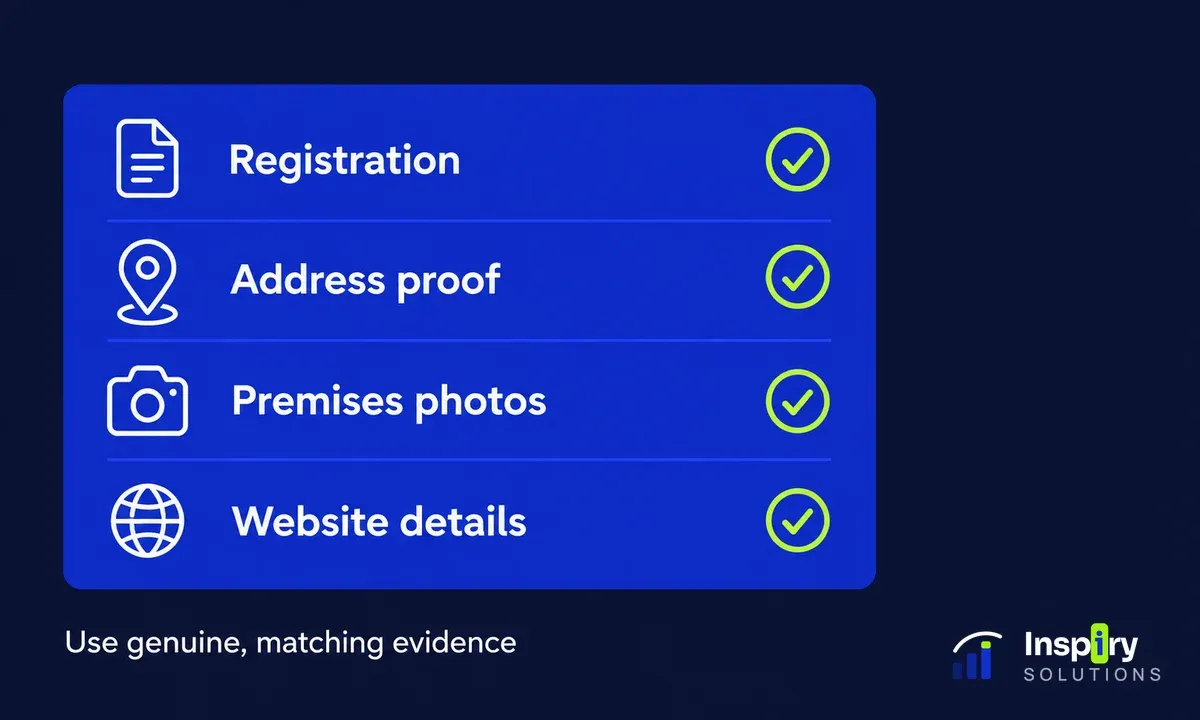
The following four evidence types make a practical preparation checklist. They are not four mandatory documents for every business, and Google does not guarantee approval when they are supplied.
Business registration and licences
Prepare official registration documents showing the business’s legal identity and genuine operating information.
Depending on the business and jurisdiction, useful records may include a company registration certificate, trading registration, business licence or relevant tax certificate.
Check that the names and addresses are consistent with the details being appealed. A genuine registered name can differ from a trading name, but explain that difference when necessary.
Do not modify documents to make them match an inaccurate profile.
Proof of address such as a utility bill
A genuine business utility bill can help support the existence of an operating location.
Google identifies electricity, phone, water and internet bills among the possible supporting records.
Check that the document displays the relevant business name and address. If it does not, investigate the discrepancy rather than submitting it without explanation.
For home-based service-area businesses, distinguish between proving the underlying operating address and publishing that address to customers.
An address used only for mail forwarding is not sufficient evidence that the location meets Google’s eligibility requirements.
Photos of signage and premises where relevant
Photographs can provide useful context when the suspension concerns whether the business genuinely operates at a stated location.
For a storefront, prepare clear images of permanent signage, the entrance and relevant business premises.
These photographs are supplementary evidence, not a substitute for documents requested by Google.
A service-area business working from a private home may not have public-facing signage. Do not invent signage or stage an artificial storefront to support an appeal.
Website showing the same details
Your website should support the profile’s business name, services, telephone number and location information.
Check the homepage, contact page, footer and relevant service pages.
A genuine storefront should not be described as operating somewhere else on the website. Similarly, a service-area company should not claim physical branches where it has no eligible premises.
If the website contains outdated information, correct it before appealing and check that the published pages display the changes.
Submit a clear, evidence-led explanation
Keep the appeal factual. State what the business does, why it is eligible, which information was inaccurate and what has been corrected.
Attach relevant files through the official tool when prompted. Check that the required evidence has been included before final submission because the initial appeal is not something you can repeatedly resubmit.
What happens after you appeal
A submitted appeal starts Google’s review process. It does not mean the listing is already reinstated.
Waiting times vary
There is no reliable fixed reinstatement time for every case. The complexity of the issue, eligibility questions and whether further evidence is necessary can affect the process.
Check the appeals tool and the email account associated with the listing.
Do not submit repeated appeals over a short period or create a new listing to bypass the process.
Possible appeal outcomes
An appeal may produce several outcomes:
- Approved: Google accepts the appeal and restores the relevant profile.
- Not approved: The appeal does not succeed, and the restriction remains.
- Additional information or review: Further evidence or another permitted review process may be necessary.
- Not eligible for appeal: The tool indicates that the selected decision cannot be appealed through that route.
If an appeal is denied, Google’s guidance describes a possible additional review process for eligible denied cases.
What happens to your reviews?
Customer reviews can become unavailable publicly while a suspended listing is not visible.
When the same profile is reinstated, existing reviews generally reappear, but full restoration is not guaranteed.
If Google denies reinstatement
A denied appeal may reflect insufficient evidence, continued inaccuracies or an underlying eligibility issue that cannot be fixed by changing profile fields.
Some profiles cannot be reinstated because the business does not qualify under Google’s rules. In that situation, the appropriate response is to correct the business arrangement, not manufacture evidence.
Preventing a repeat
Reinstatement should lead to better profile management, not simply a return to the same editing habits.
Assign one person responsibility for important edits
Choose an owner or designated manager who approves changes to the business name, address, categories and other sensitive fields.
Other staff may contribute useful information, but they should not independently change important details without understanding the guidelines.
Maintain primary ownership within the actual business. Agencies can manage the listing with appropriate access rather than taking permanent control.
Review users who no longer need access.
Maintain a simple change log
Record the date, field, old value, new value, reason and person responsible whenever an important profile detail changes.
A change log helps distinguish a genuine business change from an accidental edit if another suspension occurs.
Check the guidelines periodically
Google’s eligibility and representation requirements should be reviewed whenever the business changes its location, name, service model or primary activities.
Use a compliant profile set-up checklist to review the main fields and identify inconsistencies.
Keep the website and profile aligned
Your website should accurately describe the business without creating artificial location claims.
When a genuine address or telephone number changes, update the website and profile as part of the same documented task.
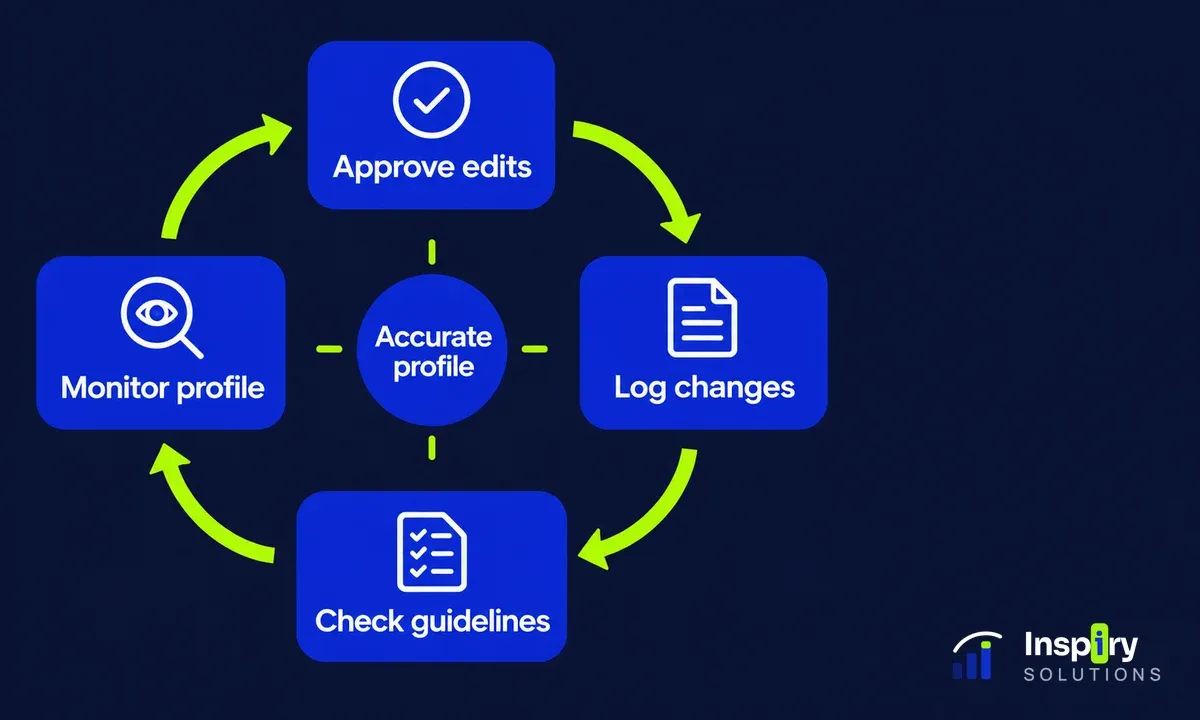
Review your listing regularly
Search for the business by name, check the public address and category information, and look for unexpected changes.
If a legitimate change triggers additional verification, complete the requested process rather than trying to bypass it.
Common questions
How long does a Google Business Profile reinstatement take?
There is no fixed time for Google Business Profile reinstatement. Some cases are straightforward, while others need additional checks or evidence. Correcting inaccurate profile information and providing clear documents can strengthen the appeal, but neither guarantees a quick result. Monitor the official appeals tool and your email. Do not submit repeated appeals over a short period or assume silence means permanent rejection.
Should I create a new profile if mine is suspended?
No. Creating another listing for the same business can introduce a duplicate and make the original suspension harder to resolve. Google specifically advises against creating a replacement profile during the appeals process. Use the existing business profile, investigate the guideline issue and submit the appropriate appeal. A new listing is not a legitimate shortcut around an enforcement decision.
Will I lose my reviews if my profile is suspended?
Reviews are generally hidden from public view when the associated suspended profile is unavailable. If Google reinstates the same listing, those reviews usually reappear, although this is not guaranteed. Do not create a replacement profile expecting the reviews to transfer. After reinstatement, check your review history and use Google’s support process if important content remains missing.
Can a competitor get my profile suspended?
Anyone can suggest changes or report a business profile, including competitors. However, a report does not automatically mean Google will suspend the listing, and a suspension notice alone does not prove competitor interference. Accurate business details, legitimate owner verification and supporting documentation reduce avoidable risks. Monitor suggested edits and unexpected changes, and concentrate on policy compliance rather than guessing who submitted a report.
Can an agency appeal on my behalf?
An agency with appropriate manager access can help prepare and submit an appeal through the available Google process. The evidence must belong to the real business and accurately establish its identity, address or eligibility. The owner should retain primary ownership and access to the relevant account. An agency can organise documents and identify problems, but it cannot guarantee reinstatement or override Google’s decisions.
What to do in the next hour
If your profile has just been suspended, prioritise diagnosis over hurried changes.
Start with these actions:
- Screenshot the exact suspension notice and record any policy reason shown.
- Confirm which Google account manages the affected profile.
- List recent changes to the name, address, categories and website.
- Compare the existing information with the real business and Google’s requirements.
- Gather registration, address and other relevant supporting evidence.
- Identify the correction required before submitting the appeal.
- Prepare a short, factual explanation using the official process.
Do not create a duplicate profile, invent documentation or promise yourself that reinstatement is inevitable.
A good appeal explains an eligible business clearly and supports its claims with real evidence. If the underlying operation does not qualify, paperwork cannot solve that problem.
If your profile is suspended and you are not sure why, send us your website for a free audit and we will reply within two working days. Our local SEO service can help diagnose the cause and prepare the appeal, scoped to your website.