Managed WordPress hosting is worth considering when your business website needs stronger support, reliable backups or resources that basic shared hosting cannot provide. However, moving to a more expensive platform does not automatically make WordPress faster. A slow plugin, inefficient database query or oversized page can remain slow after migration. The right choice depends on what is limiting your website, what the provider includes and who handles maintenance. Test the current site before paying for an upgrade.
If you run a business website on a low-cost plan, this guide will help you separate server problems from WordPress problems. You will learn how to diagnose slow pages, compare hosting services and decide whether switching is worthwhile.
What shared and managed WordPress hosting actually mean
Shared and managed WordPress hosting can run the same website, but their infrastructure, support and responsibilities differ.
Shared servers and resources
With shared hosting, multiple websites use resources on the same physical or virtual server. The provider maintains the infrastructure, while customers generally manage WordPress, plugins, themes and content.
This arrangement keeps costs relatively low. However, accounts may face limits on processing power, memory, concurrent PHP processes or disk activity. PHP is the programming language WordPress uses to generate dynamic pages.
Modern providers can isolate accounts, but overloaded infrastructure or restrictive limits can still affect performance.
What managed WordPress hosting adds
Managed WordPress hosting typically provides WordPress-specific configuration and operational tools. Depending on the package, these may include server-level caching, automatic core updates, platform backups, staging and specialist support.
Caching stores a generated response so the server can reuse it rather than rebuilding the page.
However, “managed” is not a universal specification. Some providers offer extensive operational assistance, while others mainly provide an easier dashboard and automated tools.
The middle ground
A virtual private server (VPS) or cloud server with a control panel may provide greater resource control without a fully managed service.
These options can suit businesses with technical support, but self-managed infrastructure introduces responsibility for server security, monitoring and configuration.
Whichever model you choose, verify that it meets the official WordPress server requirements.
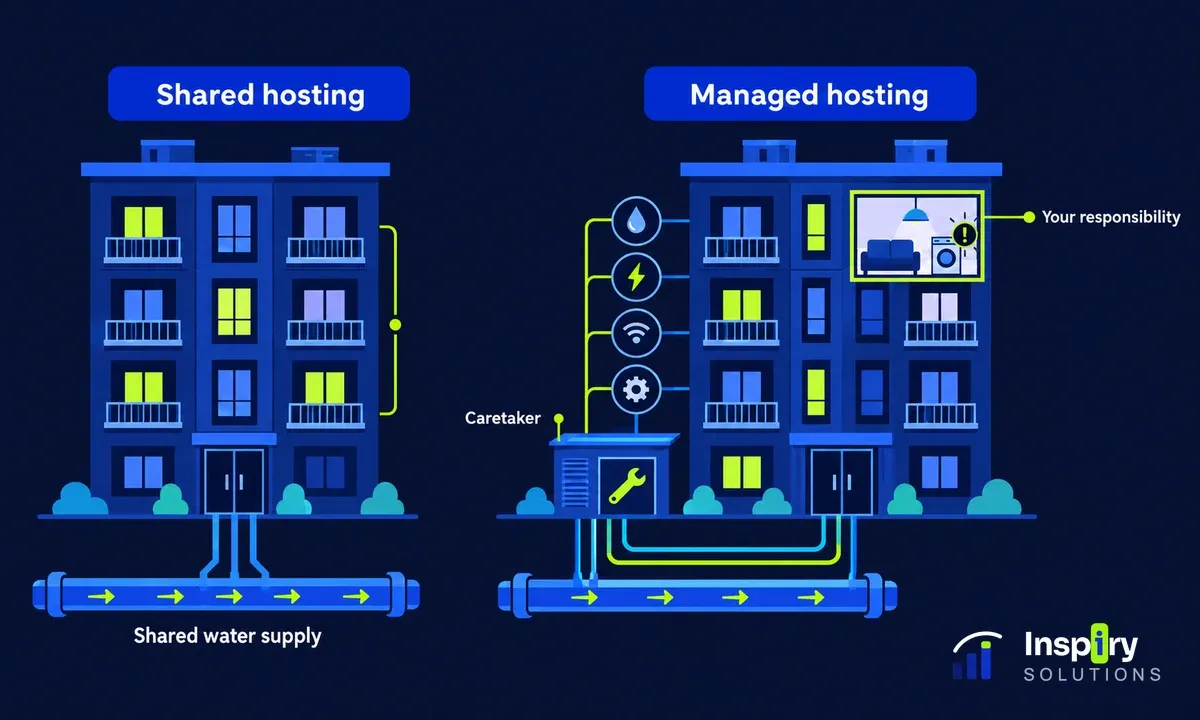
Think of shared infrastructure as an apartment block where multiple flats use one water supply. A managed building may have a specialist caretaker maintaining shared systems. Neither arrangement guarantees somebody will repair faulty appliances inside your flat.
Side-by-side comparison
The table summarises common differences between shared hosting and managed WordPress hosting. Features vary between providers, so confirm what your particular plan includes.
| Factor | Shared hosting | Managed WordPress hosting |
|---|---|---|
| Server resources | Shared infrastructure with account limits | May provide stronger or specialised resources |
| Performance tuning and caching | Basic or customer-configured caching | Often includes WordPress-specific caching |
| Security and isolation | Depends on provider and account configuration | Often includes additional platform protections |
| Backups | May be limited or optional | Usually included, with varying retention |
| Staging | Sometimes unavailable | Commonly included, but not guaranteed |
| PHP version control | Usually through a control panel | Often through a managed dashboard |
| Plugin restrictions | Generally fewer provider-specific restrictions | May restrict certain plugins or processes |
| Support knowledge of WordPress | Varies by provider | Usually more WordPress-focused |
| Who updates plugins and theme | Customer or developer | Usually customer or developer unless included |
| Relative cost | Generally lower | Generally higher |
Compare the features your business actually needs, not the package names.
A small brochure website may benefit little from advanced infrastructure. A busy online shop may need dependable processing capacity for checkout requests that cannot be cached.
Staging can be especially valuable when teams regularly change forms, templates or integrations. It provides a private environment for testing before publishing.
Do not assume managed hosting includes dedicated hardware, unlimited resources or complete website maintenance. Request the specifications and support responsibilities in writing.
What managed hosting does not do for you
A managed package does not mean somebody maintains every part of your WordPress website. Most providers manage their platform, not all application functionality.
Plugins, themes and content
A host may automatically install updates without testing whether your website still works afterwards.
An update can disrupt a booking form, payment gateway, custom template or integration while the server itself remains healthy.
Plugin compatibility testing, theme repairs, content checks and form verification usually remain your responsibility.
This is why maintenance that works on any host matters. Proper maintenance includes checking functionality and preparing for recovery, not simply applying updates.
Platform backups are not enough
Managed services commonly include scheduled backups, but availability and retention depend on the provider.
If your account becomes inaccessible or you leave the platform, obtaining those backups may become difficult.
Keep an independent copy of essential files and the database somewhere you control. The WordPress backup documentation explains why both are important.
Test restoration periodically. A backup file is useful only when it can recover a working website.
Restrictions and responsibility
Some managed providers restrict caching plugins, backup tools or resource-heavy processes to protect their platform.
Check compatibility with your essential plugins and integrations before purchasing.
Also establish who investigates failures after updates. Will the provider troubleshoot WordPress code, or only confirm that its infrastructure works?
Without clear ownership, your developer and host may each direct responsibility towards the other.
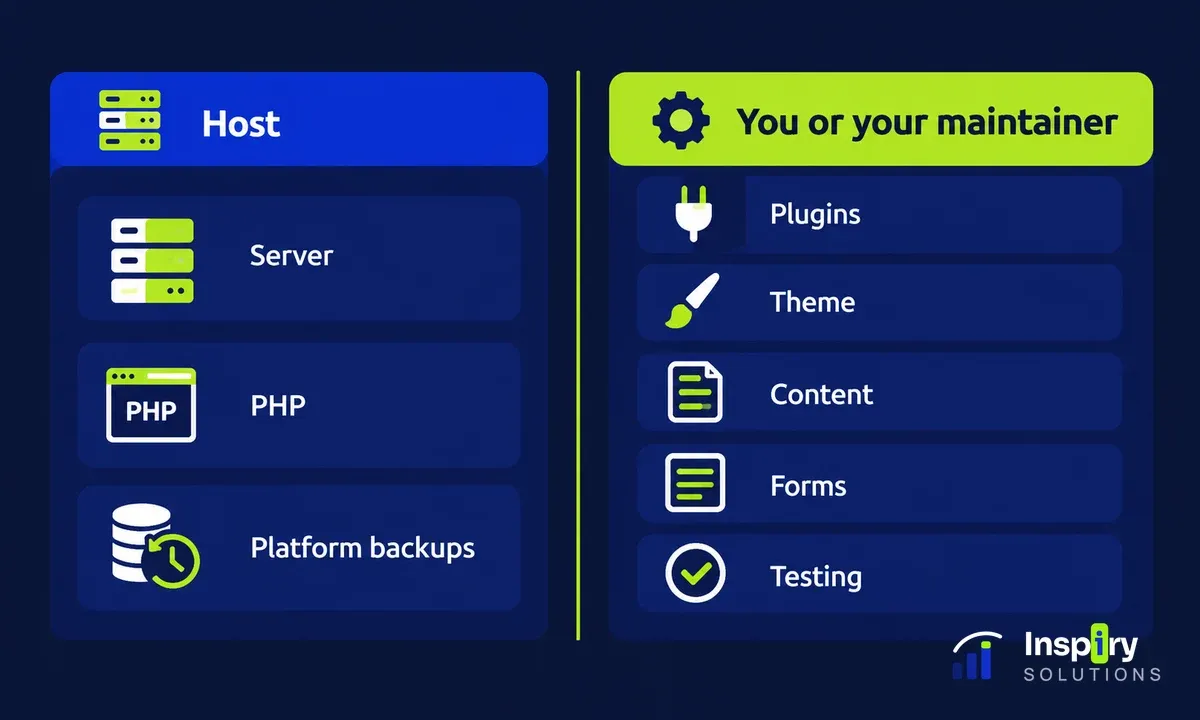
Assign responsibilities in writing. Your host manages infrastructure and agreed platform services. Your developer or maintainer handles WordPress functionality, compatibility and testing. Shared responsibilities need an identified owner.
Is it the hosting or the site? A quick test
A slow website does not prove that the server needs replacing. Start by comparing cached and uncached requests.
Step 1: Measure server response time
Time to First Byte (TTFB) measures how long a request takes before the browser receives the first byte of its response. It includes connection, network and server processing delays.
Google’s guidance on optimising TTFB explains the factors that influence it.
Follow our guide to measuring server response time and record results for a normal public page and a dynamic page.
Repeat tests under comparable conditions instead of relying on one measurement.
Step 2: Compare cached and uncached requests
Cached pages often bypass most WordPress processing. Uncached pages may require PHP execution, database queries and plugin logic.
Look for these patterns:
- Cached and uncached pages both slow: Investigate infrastructure, account capacity, caching configuration and network conditions.
- Cached pages fast, uncached pages slow: Investigate plugins, database queries, PHP workers and theme functions.
- Initial response fast, page still slow: Investigate images, JavaScript, fonts and browser rendering.
These patterns indicate where to investigate, not definitive causes. A cache miss can make a normally cached page slow. An overloaded server can also delay uncached requests.
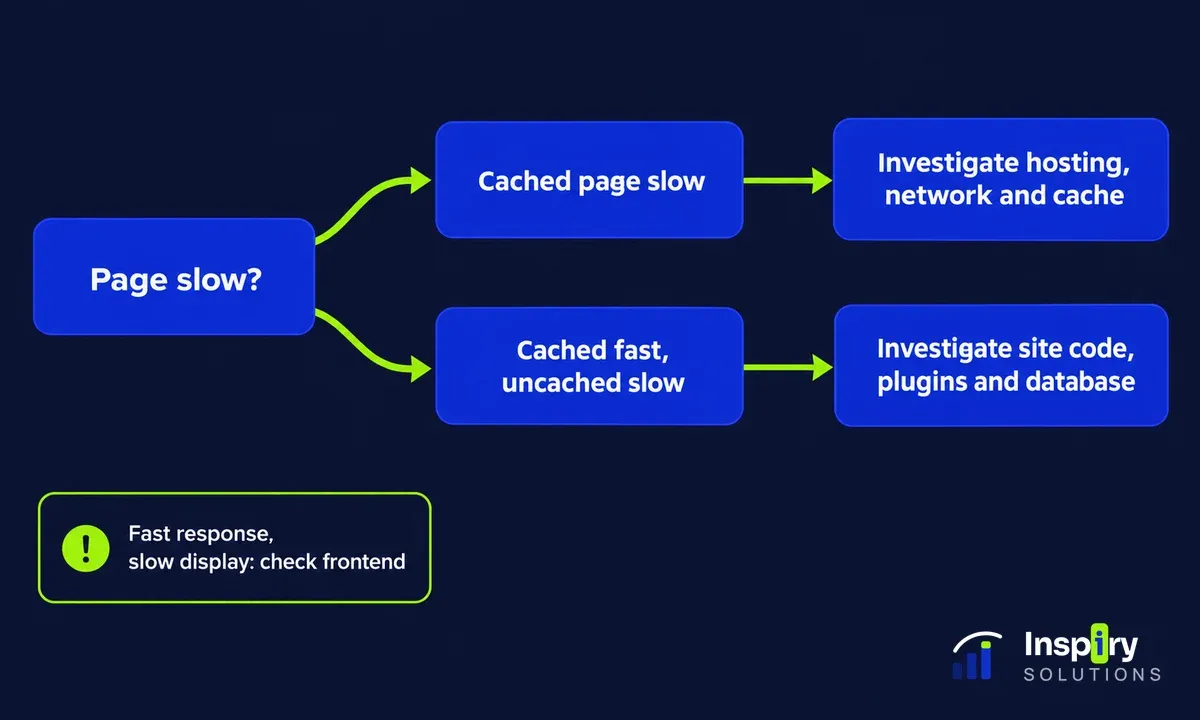
After identifying the likely bottleneck, review the site-level causes of slow WordPress pages before assuming migration is necessary.
Step 3: Check resource limits and errors
Open your provider’s control panel and examine resource usage, PHP errors and account throttling.
Look for memory exhaustion, resource-limit warnings, failed requests or processes waiting for capacity.
Compare their timestamps with periods when visitors experienced problems.
If these details are unavailable, request relevant logs and resource information from support.
Step 4: Test a staging copy
Where possible, create a staging copy and test with a default WordPress theme.
Disable non-essential plugins in controlled groups and repeat the affected operation.
Never run these experiments directly on a busy production website. Disabling plugins could interrupt payments, forms or customer accounts.
If staging improves substantially, investigate the theme or plugins before upgrading infrastructure.
Step 5: Send evidence to your provider
Give support the affected URLs, approximate times, response measurements and relevant error messages.
Explain whether delays affect cached pages, logged-in users or particular features.
Ask specifically whether your account is reaching processor, memory, PHP worker or database limits.
Concrete evidence makes the investigation more useful than simply reporting that the website feels slow.
When shared hosting is fine
Shared hosting for a business website can be reasonable when the website is small, mostly informational and receives predictable traffic.
A brochure site with service pages, contact information and a simple enquiry form has different requirements from an online shop or membership platform.
When public pages are cached effectively, WordPress may need relatively little processing for most visits.
The essential conditions are acceptable performance, suitable security, dependable backups and somebody responsible for maintenance.
Keep websites isolated
Be careful when multiple unrelated websites share one account.
A compromised installation can potentially affect other sites if permissions, credentials and filesystem access are not properly separated.
Separate accounts and credentials reduce this risk and simplify backups, access control and migration.
Agencies managing several customer websites should prioritise isolation over advertised unlimited domain allowances.
Avoid upgrading without evidence
Low cost is not evidence of poor quality.
If your website performs consistently, support meets your needs and recovery tools work, changing providers may add little value.
Document your current performance and review resource usage as traffic and functionality change.
When to move to managed or better hosting
An upgrade becomes more relevant when your website handles critical transactions, regularly reaches resource limits or lacks reliable recovery facilities.
Transactions and logged-in users
WooCommerce shops, membership platforms, booking systems and customer portals frequently generate requests that cannot use a shared public cache.
Shopping carts, account pages and changing availability information require current data.
These operations place additional demands on PHP workers, database queries and background processes.
Managed hosting may help when it supplies appropriate capacity, but inefficient code can still overload a stronger server.
Regular resource errors
Repeated timeouts, capacity warnings or server failures during normal activity justify investigation.
If the application is reasonably optimised but still reaches documented resource limits, upgrading becomes sensible.
Identify the bottleneck first. Additional storage will not solve a shortage of PHP workers.
Missing operational safeguards
A provider without reliable staging, usable backups or responsive support creates unnecessary business risk.
Better hosting can be worthwhile for these safeguards even when the current website loads quickly.
Campaign traffic peaks
Advertising campaigns, product launches and email promotions can cause sudden traffic increases.
Cached pages may handle additional visitors efficiently, while forms, searches and checkout requests still require processing.
Test these dynamic operations under representative demand before major campaigns.
When existing capacity is insufficient, arrange improvements before the expected traffic arrives.
Hypothetical example: slow site, wrong suspect
A recruitment agency runs its WordPress website on a low-cost shared plan.
Job search pages are slow, and a salesperson recommends managed WordPress hosting as the solution. The agency considers migrating immediately.
However, testing reveals that cached service pages respond quickly. Only uncached job searches are consistently slow.
The problem comes from a resource-heavy filtering plugin running inefficient database queries.
Fix the bottleneck first
On staging, the developer investigates the filter configuration, database access and unnecessary processing.
After improving the filtering approach, job searches become substantially more responsive in this hypothetical example.
The original server now handles normal activity without the same delays.
A hosting upgrade might have provided additional capacity, but it would not have corrected the underlying plugin problem.
The agency may still switch later for better staging, backups and specialist support. However, migration is no longer an urgent performance fix.
The lesson is to identify where processing time is spent before replacing the platform.
Six questions to ask any host before you switch
Marketing pages highlight attractive features. Before switching, ask for written answers to these six questions.
How are backups made, stored and restored?
Ask how frequently complete backups run, how long they are retained and whether they include website files and the database.
Confirm whether you can download copies independently and restore them without relying entirely on the provider.
Find out who performs restoration, whether there are additional charges and how recovery can be tested safely.
Do not assume that an included backup feature guarantees recovery after every incident.
Is staging included?
Confirm whether staging is included and whether it supports private testing.
Ask how the staging copy is refreshed and how tested changes return to production.
This distinction matters for websites accepting orders, bookings or registrations.
Replacing the complete live database with an older staging database can overwrite new business records.
The deployment process should distinguish code changes from live customer data.
Which PHP versions can I choose?
Check which supported PHP versions are available and how upgrades are scheduled.
Ask whether you can test compatibility before changing production.
Older plugins or custom integrations may need adjustments when PHP changes.
Confirm which settings you can control and how the provider handles failed upgrades.
Version flexibility is useful, but maintaining outdated software indefinitely creates security and compatibility risks.
How fast does support respond, and how?
Ask about available support channels, service hours and documented response commitments.
Distinguish between an initial acknowledgement and actual technical investigation.
Can support examine WordPress errors, caching behaviour, PHP worker limits and database performance?
A quick reply that redirects every application issue to your developer is not the same as specialist troubleshooting.
Choose the support model your business actually needs.
What are the resource limits?
Request details of processor allocation, memory, PHP workers, storage and concurrent request limits.
Ask what happens when these limits are reached.
Will requests be throttled, errors displayed or an immediate upgrade required?
For dynamic websites, processing capacity matters more than large storage allowances.
Also clarify whether advertised traffic figures represent enforced limits or approximate usage guidance.
Will you help with the migration?
Ask which migration tasks are included.
Will the provider copy files and databases, configure SSL, test redirects, assist with DNS changes and check critical functionality?
Confirm who performs final testing and whether a rollback is possible.
DNS directs visitors to your server, and careless record changes can affect email delivery.
Use a step-by-step hosting move checklist to plan the copy, private testing, DNS switch and post-migration verification.
Compare the answers against your business requirements. A platform with excellent backups but insufficient processing capacity may still be unsuitable.
Likewise, powerful infrastructure without dependable support may create unnecessary work for a small business.
Common questions
Is managed WordPress hosting worth it for a small business?
Often yes, particularly for businesses taking orders, handling bookings or supporting logged-in users. It can also be worthwhile when nobody manages WordPress updates, backups or server-related problems, although website-level maintenance may still be needed. A small brochure site on well-run shared hosting can be perfectly adequate. Decide based on business risk, functionality and the services actually included.
Will managed hosting make my site faster?
It can improve server response time when the existing infrastructure is overloaded, poorly configured or constrained by resource limits. However, it will not automatically fix heavy plugins, large images, inefficient database queries or poor theme code. Compare cached and uncached page performance first. Otherwise, you may pay more while keeping the same underlying bottleneck.
Does managed hosting include maintenance?
Managed plans usually cover server operations, some WordPress core updates and platform backups. The exact agreement varies. Plugin conflict testing, custom theme repairs, content checks and verifying that forms still work generally require your own developer or maintainer. Ask for a written responsibility breakdown because automatic updates alone do not mean your complete website is being maintained.
Can I move hosts without downtime?
Yes, a planned migration can avoid noticeable website downtime. Copy the website to the new environment, test it privately and then switch DNS when everything is ready. Keep the old environment available during the transition where practical. Email records need particular care during DNS changes, and dynamic websites require a plan to prevent new orders or submissions being lost.
Choose hosting based on evidence, not promises
Before upgrading, identify whether your problem comes from infrastructure, WordPress code or missing operational safeguards.
If the current platform performs reliably, remaining there may be reasonable. If resource limits, recovery risks or inadequate support are holding your business back, an upgrade may justify its additional cost.
Whatever platform you choose, assign responsibility for updates, compatibility testing, backups and recovery. A stronger server does not replace ongoing website care.
Not sure if your hosting is the problem? Send your URL to hello@inspirysolutions.com for a free audit and we will reply within two working days. Whatever host you choose, our WordPress maintenance plans from $99/month cover what the host does not.