A Shopify SEO checklist should start with indexing, store settings and collection structure before moving on to product copy, images and meta tags. Shopify handles several technical basics automatically, but it cannot decide which pages deserve search traffic or how shoppers should find them. Start by checking whether Google can access the right pages, whether those pages connect logically and whether their content answers buying questions. Only then should you refine titles and descriptions.
This guide is for store owners and marketing leads who want to improve Shopify SEO without buying another app. It follows our store audit order, separating checks you can complete in admin from those requiring a developer.
What Shopify handles for you and what it does not
Shopify provides a useful technical foundation. It generates an XML sitemap, serves a default robots.txt file, provides hosting and SSL, and most themes include canonical tags identifying preferred URLs.
Shopify also uses fixed URL prefixes: /products/, /collections/, /pages/ and /blogs/. You cannot remove them through standard settings, but that is not a reason to rebuild your store.
The important distinction is between platform features and decisions the owner must make.
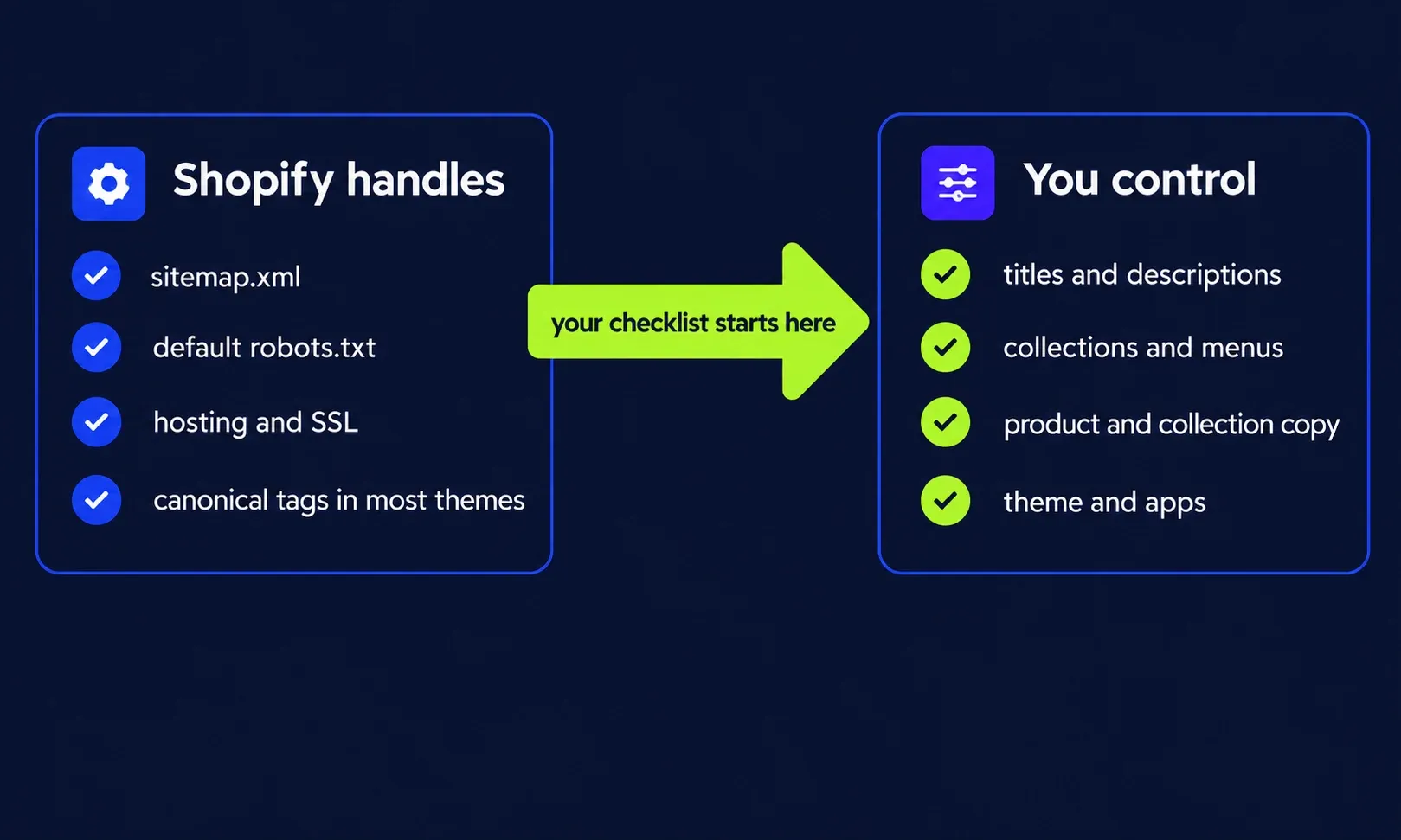
Shopify handles:
- Generating sitemap.xml.
- Providing default robots.txt rules.
- Hosting and SSL certificates.
- Canonical tags in most themes.
You control:
- SEO titles and meta descriptions.
- Collections and navigation menus.
- Product and collection content.
- Images, blog posts and internal links.
- Theme customisations and installed apps.
Shopify’s official SEO guidance explains its built-in features and editing options.
A functioning sitemap does not guarantee organic visibility. It lists URLs but cannot make every page relevant, useful or eligible for indexing.
Our Shopify SEO checklist therefore begins with access and structure rather than keyword suggestions.
For technical changes beyond admin settings, our Shopify development and store audits service covers diagnosis, implementation and prioritised recommendations.
Store settings to check first
Before reviewing products, confirm that the public store is accessible and Google has one consistent domain to crawl.
These Shopify SEO settings are straightforward to inspect, yet mistakes can affect an entire catalogue.
Domain and password
Check that storefront password protection has been removed after launch. Open Online Store > Preferences and inspect the password settings.
A password-protected storefront prevents search engines from accessing normal public product and collection content. Resolve this before other SEO work.
Next, open Settings > Domains. Confirm your intended primary domain and test whether additional connected domains redirect correctly.
Test old domains directly. Do not assume redirects work simply because the current store loads.
If Shopify Markets is enabled, check which regional domains or subfolders are live. Confirm that each intended market has accessible content and sends visitors to the correct version.
Homepage title and description
Open Online Store > Preferences to review the homepage title and meta description.
The title should explain what the business sells, using language customers recognise. The description should summarise the range and give shoppers a reason to visit.
A homeware retailer, for example, could mention its main categories and delivery area rather than relying entirely on its brand name.
Avoid repeating keywords. Google may also generate its own search snippet instead of displaying your submitted description.
Search Console and sitemap
Verify your primary domain in Google Search Console, which reports how Google discovers and indexes website pages.
Submit the Shopify sitemap through the Sitemaps section. Its usual address is:
https://yourstore.com/sitemap.xml
Google’s sitemap submission guidance explains how sitemaps support URL discovery. Submission does not guarantee indexing.
Check that the sitemap opens and represents the intended live storefront.
Stores changing platforms or domains need the SEO checks for a platform move, including URL mapping, redirects and post-launch verification.
Crawl and index controls
Crawling means a search engine requests a URL. Indexing means it retains information about that page for possible appearance in search results.
A page can be crawled without being indexed, and some exclusions are entirely normal.
Start by opening /robots.txt on the primary domain.
Shopify’s default rules already restrict crawling of areas such as the cart, checkout and certain parameter URLs. Read the file before changing it.
Advanced edits use a robots.txt.liquid theme template. Every change needs a documented reason.
Google’s robots.txt guidance explains that robots.txt controls crawling rather than guaranteeing exclusion from search results.
Next, review the Page indexing report in Search Console. Google’s Page indexing report documentation explains the different exclusion statuses.
Look for:
- Important products or collections excluded unexpectedly.
- Duplicate URLs with another canonical selected.
- Internal search or parameter URLs appearing unexpectedly.
- Crawled pages that remain unindexed.
- Pages blocked by access restrictions.
Filtered, sorted and internal search URLs should generally not compete with main product and collection pages for indexing.
Products removed from the Online Store sales channel may disappear from the Shopify sitemap. Confirm that any such removal is intentional.
Use URL Inspection on an important product and collection. Compare the page’s declared canonical with Google’s selected canonical.
Do not attempt to fix every excluded URL. Focus on important pages that should be indexed and record the reported problem before changing anything.
Structure: collections, navigation and internal links
Collections are Shopify’s category pages. They organise products and help shoppers and search engines understand the main ranges.
Plan them around how people shop, not simply how stock is organised internally.
A homeware store might use lighting, storage and tableware rather than supplier names unfamiliar to customers.
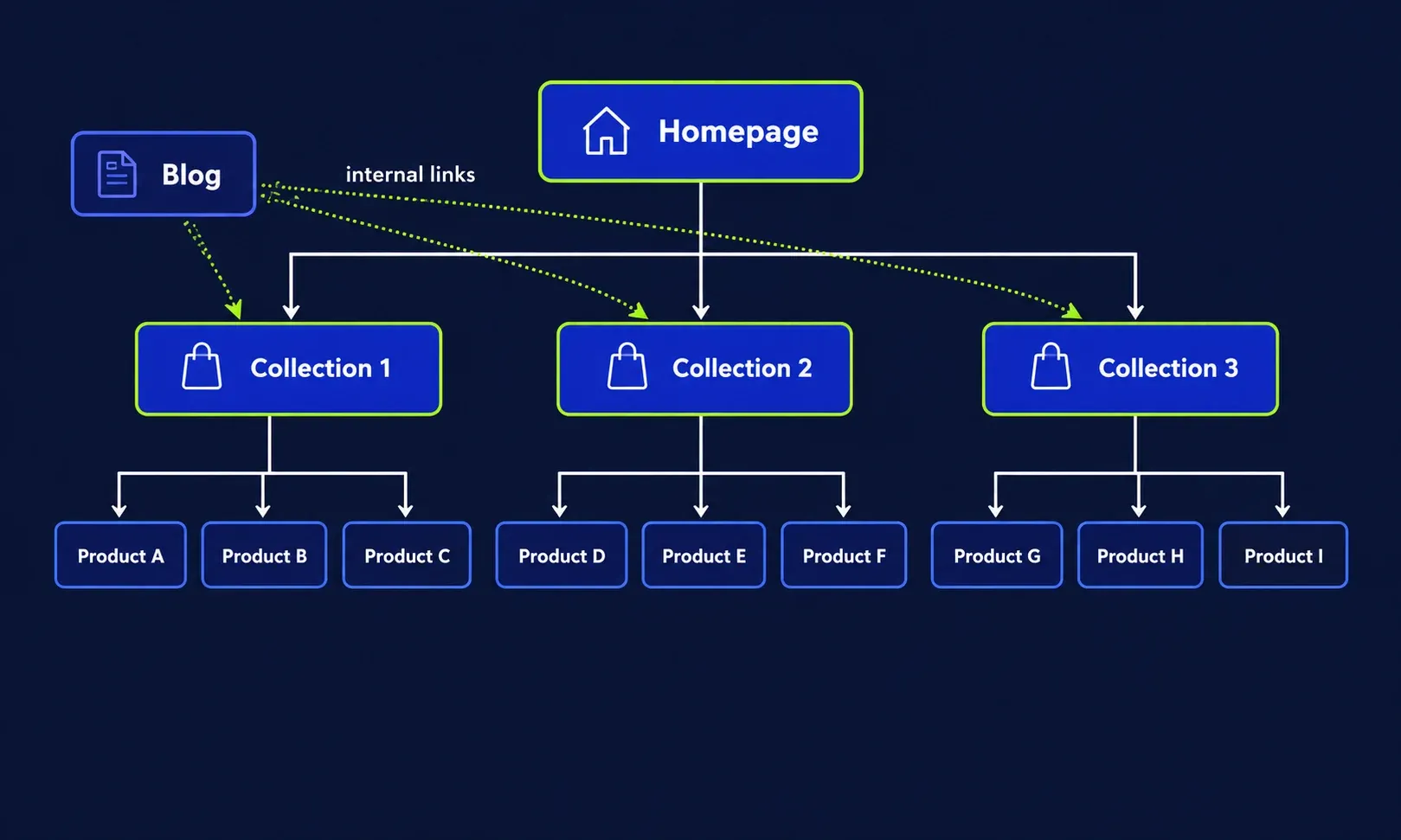
A clear structure connects the homepage to major collections, then collections to products. Blog posts should link to ranges relevant to the questions they answer.
Google’s ecommerce site structure guidance explains the value of crawlable links between category and product pages.
Review the main menu and footer. Important collections should ideally be reachable within one or two clicks from the homepage.
Then inspect product templates. Breadcrumbs or contextual collection links help customers return to relevant ranges and strengthen internal navigation.
Useful Shopify SEO tips include:
- Give important collections clear, descriptive names.
- Avoid overlapping collections serving identical search intentions.
- Make products reachable through ordinary HTML links.
- Link buying guides to relevant collections.
- Avoid depending entirely on filters or JavaScript for product discovery.
Review URL handles before editing them.
Shopify lets you change the final part of product and collection URLs. When changing a handle, select the option to create a redirect from the old address.
Without a redirect, established links may break and previously indexed URLs may stop reaching their intended pages.
Change existing handles only when there is a clear reason, not because shorter URLs appear more attractive.
Content: titles, descriptions and images
Once indexing and structure are sound, review what your important pages communicate.
Good Shopify SEO content explains products accurately, answers buying questions and distinguishes similar ranges.
Start with commercially important collections and products.
Find the Search engine listing section in the product or collection editor. Check the SEO title, meta description and URL handle.
Titles should identify individual products or ranges without repeating generic wording throughout the catalogue.
Meta descriptions should summarise the page and help visitors decide whether it is relevant. They are suggested snippets, not guaranteed ranking improvements.
Next, inspect product descriptions.
Manufacturer descriptions reused across retailers rarely answer every customer question. Add accurate information about materials, sizing, compatibility, care and usage wherever relevant.
Collections need short introductions explaining the range and helping shoppers distinguish available options.
An empty product grid may support browsing but provides little explanation of the category itself.
Keep introductions concise. Avoid placing large blocks of keyword-focused copy above the products.
For images, use readable filenames before uploading and meaningful alt text describing the visible product.
For example, “oak bedside table with two drawers” is more informative than “best furniture online sale”.
Alt text primarily supports accessibility. Do not add unrelated keywords.
Finally, publish buying guides that answer genuine questions about materials, sizes or product uses. Link these articles to appropriate collections.
Useful content should serve customers at different buying stages rather than targeting keyword variations with near-identical posts.
Theme and app checks
Strong content can still be undermined by problems introduced through theme code or apps.
Open the source code of an important product page. Confirm that an appropriate canonical tag identifies its preferred URL.
Inspect Product structured data, the machine-readable information describing the product, price and availability.
Aim for one coherent Product data representation without conflicting duplicates. Several related structured data objects can be legitimate, so conflicting information matters more than simply counting JSON-LD blocks.
Themes and review apps sometimes output overlapping markup. Identify which component should control it.
Review installed apps and theme customisations. Removing an app does not always remove its scripts or modifications.
Our guide to apps that slow a Shopify store explains how to identify unnecessary code.
Test mobile speed on a product page and a collection page, not only the homepage.
These templates may load different images, filters, reviews and third-party scripts. Homepage results alone cannot reveal every template problem.
See how to speed up a slow store for practical performance checks.
Finally, examine heading structure. Product and collection pages should have one clear primary H1 matching the page’s main subject, followed by logical subheadings.
Ask a developer to investigate duplicate headings, conflicting structured data, unexpected scripts or incorrect canonical output before installing another SEO app.
The Shopify SEO checklist in priority order
This Shopify SEO checklist has three priority levels. Their order matters because rewriting descriptions achieves little if important pages cannot be accessed or indexed.
High priority covers access, indexing and core technical issues. Medium priority addresses navigation, content and performance. Low priority covers refinements after the foundation passes.
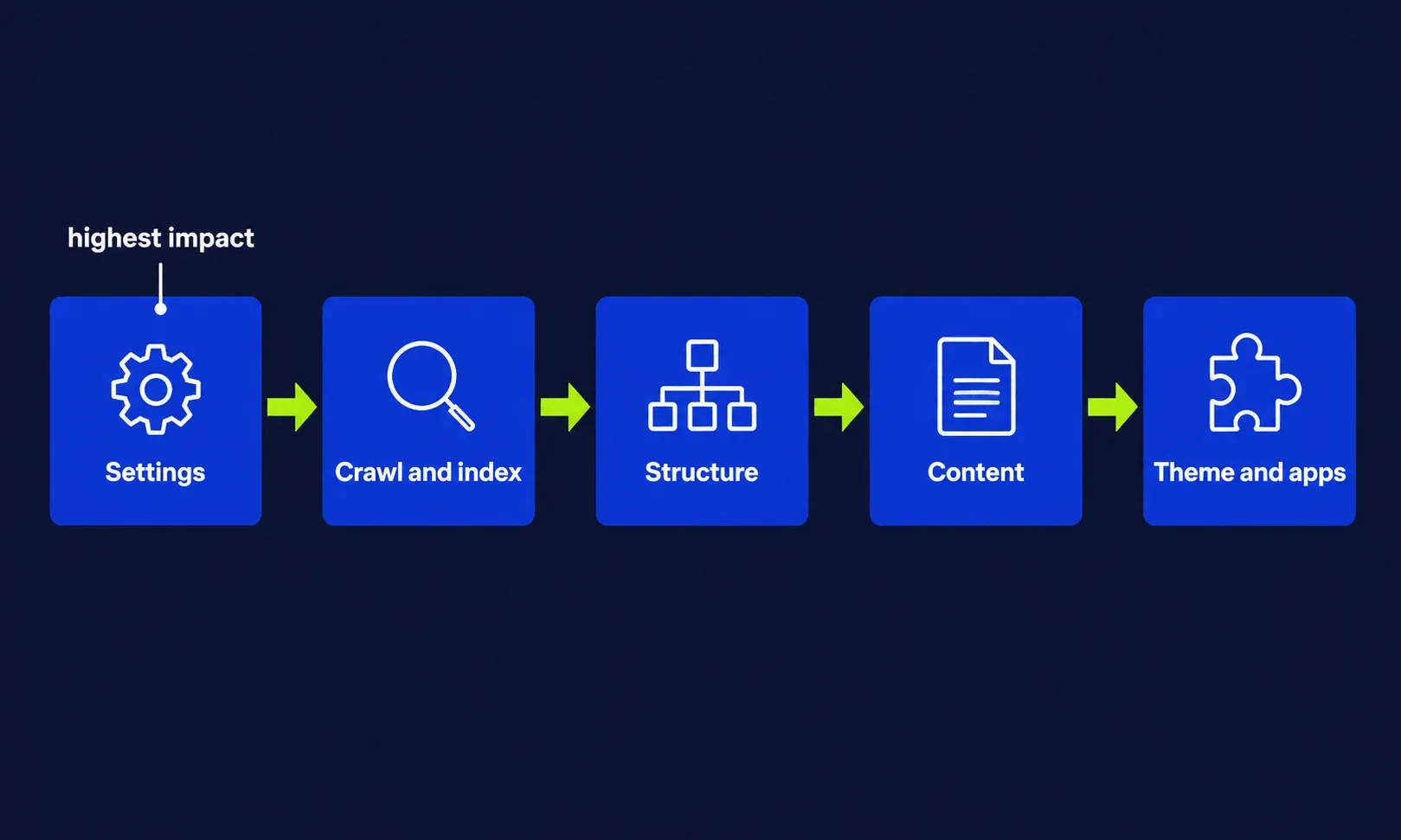
High priority: indexing and settings
Investigate problems that stop Google reaching important pages or understanding which URLs represent the store.
Incorrect domain redirects, restricted access and widespread indexing problems normally deserve attention before metadata rewrites.
However, a Search Console warning is not automatically urgent. Confirm whether it affects a valuable URL and whether the behaviour is unintended.
Medium priority: structure and content
Improve navigation between the homepage, collections and products. Then strengthen content on the pages customers need.
Review collection copy, product information and internal links together.
Concentrate on important templates and categories rather than editing the entire catalogue without identifying the underlying problem.
Low priority: fine tuning
After technical access and structure pass, refine meta descriptions, image filenames and other smaller details.
These improvements can help presentation and usability, but should not displace more significant work.
Choose pages using actual findings rather than applying every possible optimisation everywhere.
Shopify SEO checklist
| Check | Where to find it (admin area or theme file) | What good looks like | Priority | Owner or developer |
|---|---|---|---|---|
| Store password removed | Online Store > Preferences | Public storefront accessible | High | Owner |
| Primary domain and redirects | Settings > Domains | One primary domain; old domains redirect | High | Owner / developer |
| Search Console and sitemap | Search Console; /sitemap.xml | Property verified; sitemap submitted | High | Owner |
| Page indexing report reviewed | Search Console > Pages | Important pages indexed or exclusions understood | High | Owner / developer |
| robots.txt reviewed | /robots.txt; robots.txt.liquid | Defaults retained or edits documented | High | Developer for edits |
| Collection structure | Products > Collections | Categories reflect shopping needs | Medium | Owner |
| Menu depth | Content > Menus | Important collections easily accessible | Medium | Owner |
| Product to collection links | Product theme template | Clear links to relevant collections | Medium | Developer if template changes |
| Handle changes and redirects | Product/collection editor; URL redirects | Old URLs redirect correctly | Medium | Owner |
| Unique SEO titles | Search engine listing fields | Important pages have descriptive titles | Medium | Owner |
| Unique product descriptions | Product editor | Useful, specific content | Medium | Owner |
| Collection introduction copy | Products > Collections | Concise explanation of each range | Medium | Owner |
| Canonical and Product markup | Page source; theme/app code | Correct canonical; no conflicting product data | High | Developer |
| Mobile template speed | Product and collection templates | Tested; significant delays investigated | Medium | Owner / developer |
| Image alt text | Product media editor | Images described accurately | Low | Owner |
| Meta description refinements | Search engine listing fields | Relevant descriptions on priority pages | Low | Owner |
Use the table to document findings rather than merely ticking boxes.
Hypothetical example: A 200-product homeware store has collection pages without introduction text, two old domains that do not redirect to its primary domain, and theme tag pages appearing in the Page indexing report.
The checklist prioritises domain redirects and investigating whether the tag URLs are being indexed unnecessarily. Collection introductions follow, while meta description rewrites come last.
This order demonstrates why a prioritised audit is more useful than generic Shopify SEO tips.
For developer tasks, record the affected URLs, reported issue, expected behaviour and how the fix should be verified.
Common questions
Is Shopify good for SEO?
Yes. Shopify covers important technical basics, including hosting, SSL, an automatic sitemap and canonical tags in most themes. Rankings still depend on factors such as collection structure, content relevance and theme quality, which the owner controls. Fixed URL prefixes such as /products/ are normal platform constraints and are not inherently a ranking problem.
Can you change the URL structure on Shopify?
You can edit a product or collection handle, the final part of its URL. Standard Shopify stores retain prefixes such as /products/ and /collections/. When changing a handle, create a redirect from the previous address. Avoid changing URLs that already receive search traffic without a specific reason and a proper redirect plan.
Do I need an SEO app for Shopify?
Not for the basics. Shopify admin already supports editing SEO titles, meta descriptions and image alt text. Some SEO apps introduce structured data that can duplicate your theme’s markup. Apps may also add scripts that affect performance. Install one only when you have identified a specific requirement that existing Shopify features cannot meet.
Can you edit robots.txt on Shopify?
Yes. Advanced changes are possible through a robots.txt.liquid theme template. Shopify’s default file already restricts crawling of areas such as the cart and checkout. Incorrect edits can block important pages, so document every change and its purpose. Test the resulting rules before keeping them, and avoid editing the file without a clear requirement.
How long do Shopify SEO changes take to show?
Google needs to discover and recrawl updated pages before some changes can appear in search results. This may take days to weeks, depending on the page and the update. Monitor indexing and impressions for affected URLs in Search Console. No one can guarantee a ranking improvement or promise when a particular change will produce results.
Run the checklist, then decide what to fix
Start with the high-priority rows of this Shopify SEO checklist. Record what you find before changing domains, URLs, indexing controls or theme files.
For each issue, note the affected page, observed problem, expected behaviour, responsible person and verification method.
Group related fixes into manageable batches. For example, address domain redirects separately from theme markup so unexpected changes are easier to investigate.
After implementation, test the affected pages and revisit Search Console over the following weeks. Review indexing status, impressions and whether the original issue was resolved.
A successful technical fix does not guarantee more traffic. It removes an obstacle or improves a page, while search performance still depends on relevance, competition and other factors.
A useful audit distinguishes genuine problems from normal platform behaviour and produces a fix list ordered by impact.
If you want the checklist run for you, send your store URL for a free audit, or book a Shopify store audit from $600 that ends with a prioritised fix list we can also implement.
The free audit starts with your store URL and a plain-language reply within two working days.