Shopify migration SEO means preserving valuable content, mapping old URLs to suitable new destinations and testing what search engines and shoppers will receive at launch. Record your current performance, verify redirects and indexing, retain useful internal links and monitor affected pages afterwards. These steps reduce avoidable risk; they cannot guarantee unchanged organic traffic.

Shopify migration SEO extends beyond a successful product import. Search visibility also depends on collections, buying guides, images and links that may never appear in the product CSV. This checklist treats those assets as deliverables, with an owner and acceptance evidence for each.
1. Capture your Shopify migration SEO baseline
Build the Shopify migration SEO baseline from Search Console and analytics exports. Record organic landing pages, search queries, clicks, impressions, orders and revenue where measurement is reliable. Use a representative period and retain comparable seasonal data if the business depends on seasonal demand.
Save the current site’s crawl, page titles, headings, canonical URLs, indexing directives and sitemap. Document existing redirects as well. Use the technical SEO audit checklist to organise URL, canonical and indexing evidence. Without that record, a later traffic change becomes difficult to separate from content removal, measurement faults or normal trading variation.
Choose a priority set of landing pages to check daily after launch. Include both high-volume pages and commercially important pages with fewer visits. If platform selection is still open, review Shopify versus WooCommerce before committing to a migration scope.
2. Inventory assets for Shopify migration SEO
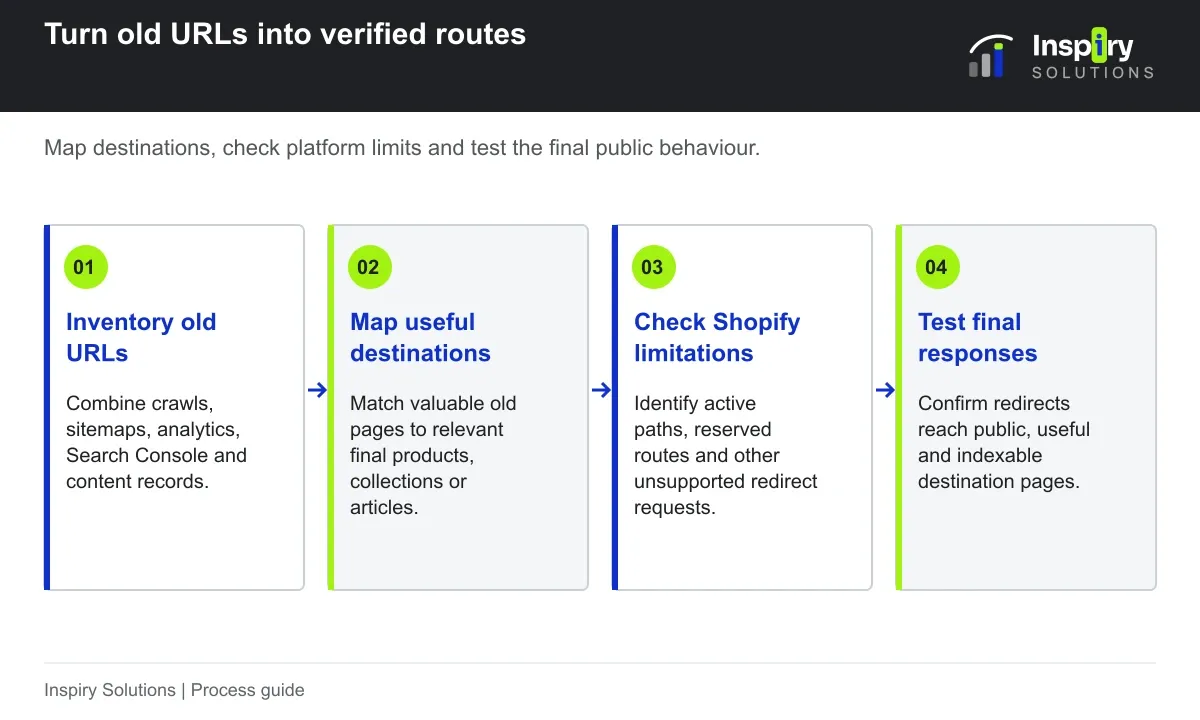
Combine URLs from the crawl, sitemaps, analytics, Search Console and your content system. A crawl may miss orphaned pages that still receive search traffic or external links. Record the sources used so the team understands the inventory’s limits.
The Shopify migration SEO inventory should include products, categories, collections, articles, buying guides, policies, downloads and useful image URLs. Identify content living on subdomains or separate domains. Assign an action to each: retain, move, consolidate or remove with a documented reason.
Do not delete a page merely because its recent traffic is low. It may support another page, serve seasonal demand or answer a question needed before purchase. For migration work tied to a broader rebuild, use the principles in website redesign without losing SEO.
3. Build a URL map before importing redirects
Shopify’s standard storefront uses routes such as /products/, /collections/, /pages/ and /blogs/. Moving from another platform can therefore change paths even when the domain stays the same. Match every valuable old URL to a suitable destination before launch.
Keep the Shopify migration SEO URL map in a versioned spreadsheet or database. Include the old URL, proposed destination, content type, priority, owner and test result. Normalise obvious duplicates carefully, but retain variants that may behave differently, such as trailing slashes or legacy parameters.
Hypothetical example: a small homeware catalogue
| Old path | New destination | Decision |
|---|---|---|
| /catalogue/desk-lamp | /products/desk-lamp | Equivalent product |
| /category/lighting | /collections/lighting | Equivalent category |
| /guides/choosing-a-lamp | /blogs/advice/choosing-a-lamp | Retained buying guide |
| /old-discontinued-item | No equivalent | Review removal or genuine replacement |
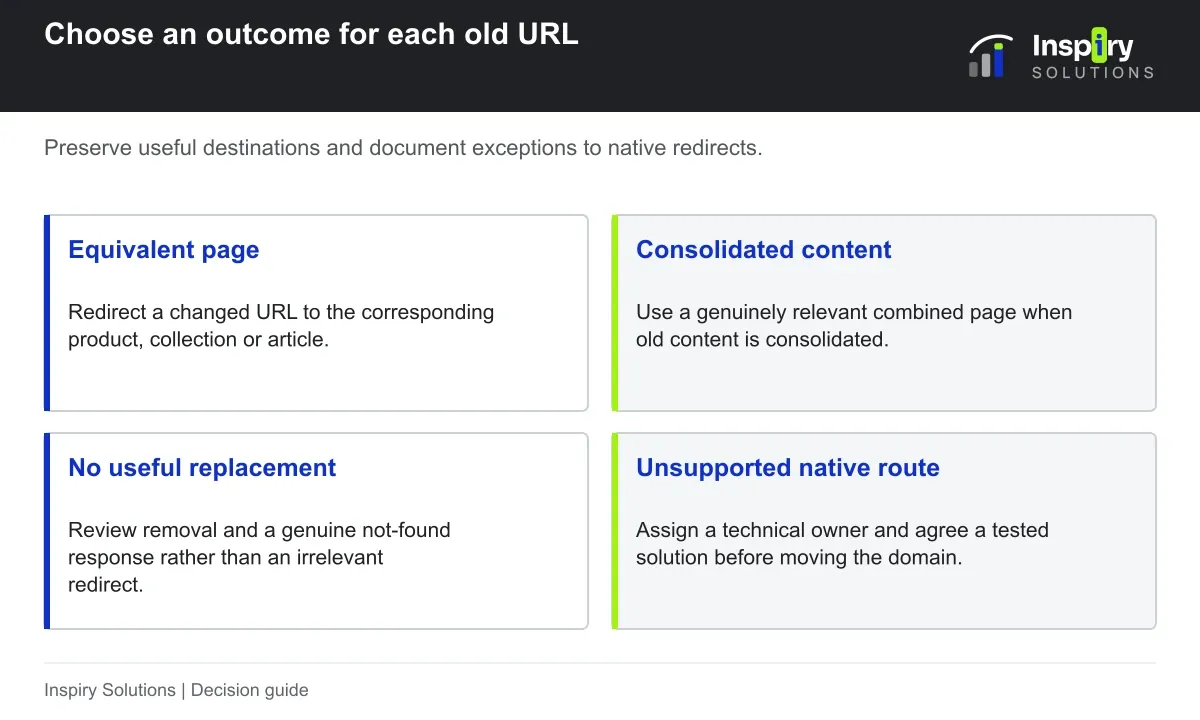
Do not send every discontinued product to the homepage. A destination should answer substantially the same need. Where no replacement exists, a genuine not-found response may be more appropriate than an irrelevant redirect.
Google’s site-move guidance recommends permanent redirects to corresponding destinations and avoiding irrelevant mass redirects. Keep chains short by pointing directly to the final page. Use experienced technical SEO support for complex mappings.
4. Check Shopify migration SEO redirect limitations
According to Shopify’s redirect documentation, native redirects work from broken URLs, rather than paths that still serve valid pages. Some prefixes and fixed paths are also reserved. An imported row is therefore not proof that the requested routing will happen.
Identify conflicting old paths before launch. Check query-string URLs, collection filters and international market paths separately. Do not assume that a redirect app can override a platform-reserved route. Escalate unsupported mappings to a technical owner and agree a tested solution before moving the domain.
Test each redirect’s response and destination, then check that the destination is public, useful and indexable. Retest after catalogue changes; a path becoming active can alter redirect behaviour. Preserve the mapping and its exceptions as an operational record.
5. Preserve the content that earns the visit
Preserve useful product descriptions, collection introductions, specifications, size information, FAQs and buying guides during Shopify migration SEO preparation. Verify rich-text formatting, tables, image captions and downloadable documents. Generic replacement copy can change what a previously useful page answers.
Check product handles and collection organisation after import. Automated collections may include or exclude products differently from the old platform’s categories. Compare a sample manually, including products with variants and unusual availability states.
Retain meaningful page titles and descriptions as a starting point, then improve them deliberately. Avoid rewriting every page during the move if you need to distinguish migration effects from editorial changes. Include search listing fields in the Shopify migration SEO acceptance checks alongside visible product data.
Decide how reviews and customer-generated content will transfer, if they are being retained. Confirm that the new presentation is accurate and that any structured data reflects visible information. Do not add review claims merely to reproduce an old search appearance.
6. Review canonical, indexing and international signals
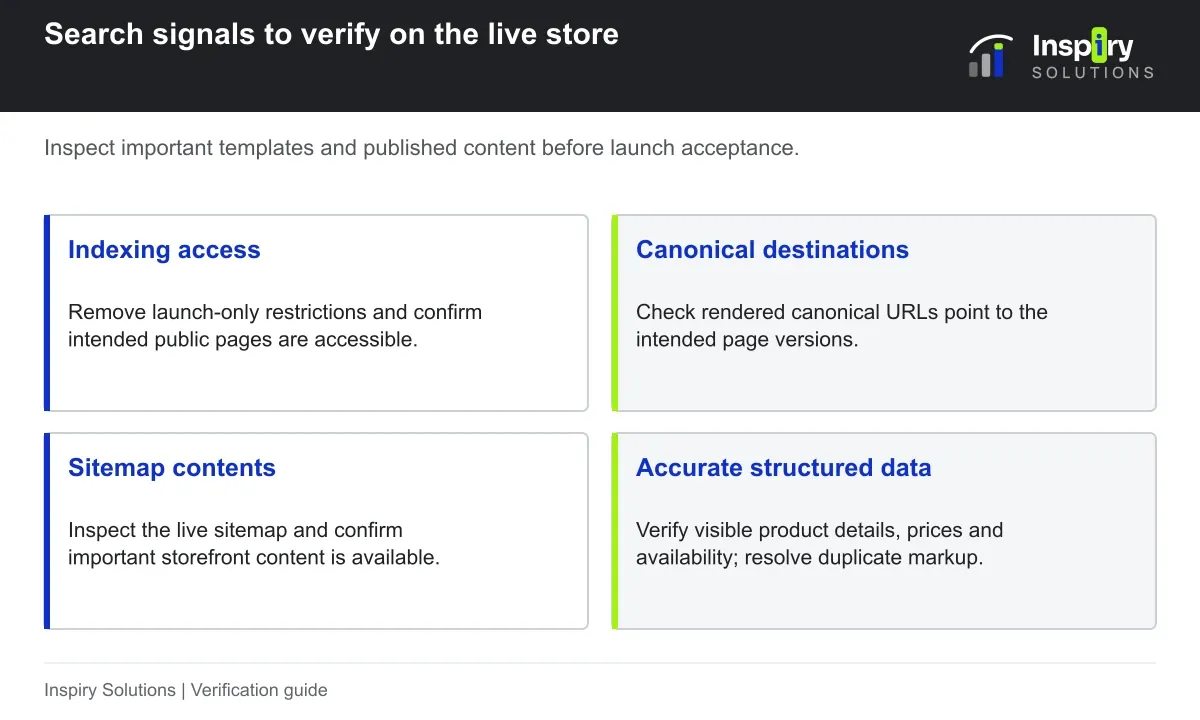
For Shopify migration SEO, inspect the rendered output of important templates. Verify that intended public pages are indexable and that canonical URLs point to the intended versions. Themes and apps can alter output, so assumptions about the platform’s defaults are not enough.
Check robots directives, password protection and staging restrictions. Do not publish the store and leave a launch-only block in place. Review alternate language and market URLs, currency behaviour and any hreflang implementation with someone familiar with the international setup.
Shopify automatically generates sitemap files, as explained in its migration guide. Inspect the sitemap on the live domain and submit it through the appropriate Search Console property. Confirm that important products, collections and editorial pages are actually available on the storefront.
Validate relevant structured data for accurate products, prices and availability. Resolve duplicate implementations from apps and themes. Rich search appearances remain subject to search engine eligibility and display decisions.
7. Rebuild internal navigation and contextual links
Include menus, breadcrumbs, product recommendations and links inside descriptions or articles in the Shopify migration SEO link review. Internal links should point directly to final destinations rather than rely on redirects. Check image links and downloadable resources too.
Review the collection hierarchy from a shopper’s perspective. A category that previously explained a product range should not become a thin page with a confusing selection. Preserve useful routes between buying guides, collections and relevant products. The internal linking architecture guide helps organise those routes by page purpose.
Update controlled external destinations, including advertisements, email templates and social profile links. If the domain changes, include important partner links in the communication plan. Your Shopify development team should receive the approved Shopify migration SEO map before rebuilding navigation.
8. Test mobile performance and buying journeys
Compare representative home, collection, product and editorial pages under consistent test conditions. Check the largest visible content, layout movement and interaction responsiveness. Include products with review widgets, recommendations and other third-party features.
Performance work should follow measured bottlenecks, not a promise that changing platform automatically improves speed. Use the slow Shopify store guide to prioritise investigation, and review custom versus premium Shopify themes when theme decisions affect the scope.
Shopify migration SEO acceptance should include search, filters, stock states, variants, baskets, discounts, shipping and checkout. Confirm analytics events are received once rather than duplicated. Organic visitors need a working purchase journey, and broken measurement can make a successful move appear to have failed.
9. Approve the launch with explicit conditions
Prepare a Shopify migration SEO launch checklist with owners for domain configuration, certificates, catalogue synchronisation, redirects, storefront access and measurement. Take a final export from the old system and record how changes during the switch will be reconciled.
Block launch if valuable pages have unresolved destinations, checkout is unusable or indexing restrictions remain unexplained. Smaller cosmetic issues can be logged separately with owners. Make the decision based on business impact and evidence rather than a deadline alone.
Test the public domain immediately after switching. Check old URLs as well as new ones and verify checkout outside the theme preview. If the domain itself changes, evaluate Google’s Change of Address requirements; moving platforms on the same domain does not by itself require that tool.
Define a recovery plan that accounts for orders placed after launch. Returning DNS to the old store without reconciling new transactions can create a second operational problem.
10. Monitor affected pages and resolve issues
Watch priority landing pages, redirect failures, indexing reports, organic visits and orders. Compare like-for-like periods and segment by page type, country and device. A missing analytics tag, seasonal change and broken collection can produce very different explanations for a traffic drop.
Prioritise sharp or concentrated changes during Shopify migration SEO monitoring. Check the affected URLs directly, compare their content and inspect indexing. Fix clear technical faults promptly. Avoid making many speculative changes before establishing what failed.
Keep redirects operational after launch. Google advises retaining them for at least a year, and useful legacy links may warrant keeping them longer. Hand the map, monitoring record and unresolved exceptions to the person maintaining the store.
Frequently asked questions
Can a Shopify migration guarantee unchanged traffic?
No. Search processing, competition, demand and the scale of changes all affect outcomes. A careful migration reduces preventable mistakes and makes problems easier to diagnose.
Do I need redirects if I keep the domain?
Yes. Shopify migration SEO needs redirects wherever page paths change. Keeping the domain does not preserve a URL when a former category or product uses a different Shopify route.
Should removed products redirect to the homepage?
Usually only a relevant replacement deserves a redirect. Sending unrelated products to one general page can confuse visitors and fail to preserve the original page’s purpose.
Does importing products also transfer SEO content?
It depends on the method and fields supported. Verify descriptions, search listing fields, images and handles, and plan separate transfers for collections, articles and other content.
How quickly will Google process the move?
There is no fixed Shopify migration SEO completion date. Monitor indexing and affected URLs over time. Submitting a sitemap helps discovery but does not guarantee that every page will be indexed.
Who should own migration SEO?
Assign one accountable Shopify migration SEO lead, supported by development, content and store operations. The lead should approve the map and launch evidence, with responsibility for post-launch monitoring clearly assigned.
Protect the destination as well as the redirect
Shopify migration SEO succeeds through accurate mapping, retained usefulness and verified public behaviour. Preserve the evidence from the old store, test platform-specific exceptions and monitor the pages that matter commercially. That creates a controlled transition and a practical basis for resolving issues after launch.