A website brief template helps you get accurate, comparable quotes by defining your goals, pages, functions, integrations, content and project responsibilities. You do not need every technical detail. Explain what the website must achieve, what suppliers should include and what remains uncertain. A useful brief separates confirmed requirements from assumptions, so suppliers estimate the same project.
This guide is for business owners and marketing leads requesting proposals from two or three suppliers. It explains what to include, where estimating mistakes happen and provides a one-page template to copy.
Why vague briefs produce quotes you cannot compare
Imagine asking three suppliers to quote for a “modern website with 12 pages, booking functionality and good SEO”.
One assumes a standard WordPress theme and contact form. Another includes custom designs, appointment scheduling and content migration. A third expects you to supply all copy, photography and hosting.
All three might understand the request, but they are pricing different projects.
When details are missing, suppliers may add contingency for uncertain work or assume the simplest scope and charge for additional requirements later.
Neither approach necessarily indicates dishonesty. However, comparing headline prices without examining scope is misleading.
Suppliers need page types, functions, content responsibilities, integrations and technical risks to estimate accurately.
For pricing context, read what business websites cost in 2026.
A clear website brief reduces questions before development starts because everyone receives the same information.
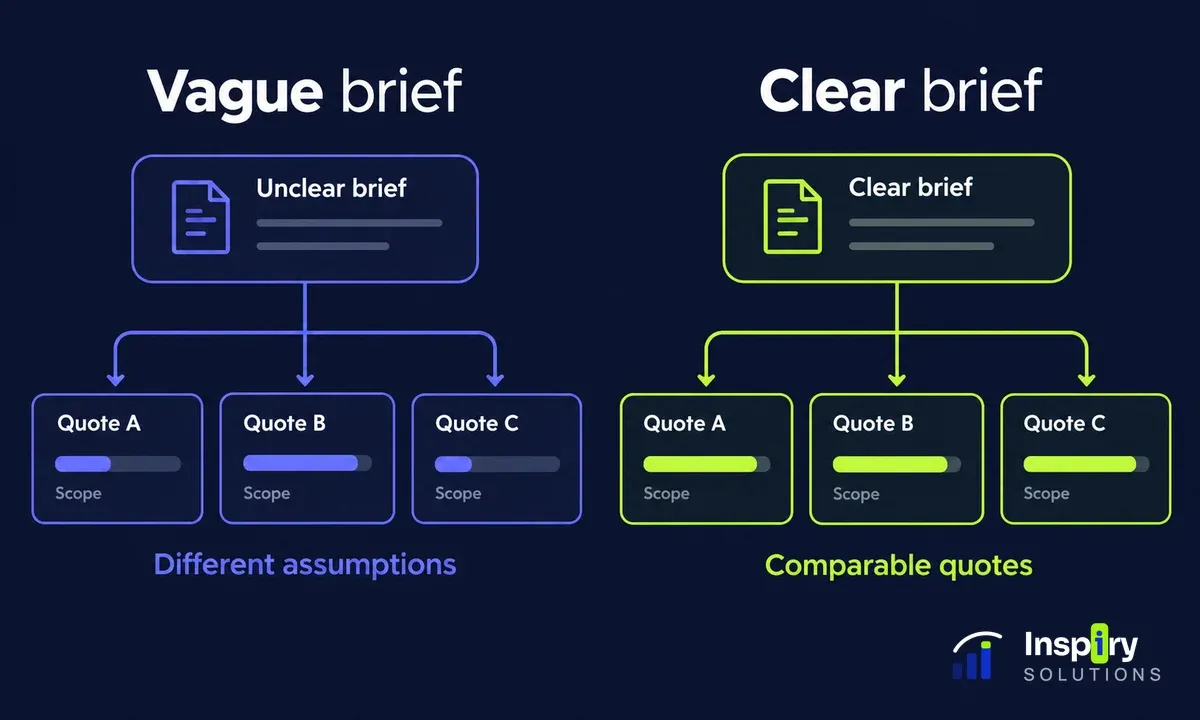
The objective is not to eliminate uncertainty. It is to make assumptions visible and ensure suppliers explain how they have priced them.
The website brief template, section by section
This website brief template has eight sections covering information that affects development time, responsibilities and technical complexity.
Write factual answers. Mark anything uncertain as “unknown” rather than inventing requirements.
Business goal and the one action visitors should take
Start with the business outcome, not the design.
Explain who the website serves and what visitors should do. Choose one primary action, such as requesting a quote, booking an appointment or purchasing a product.
For example:
“Help homeowners in Manchester request cleaning estimates. The primary action is submitting a quote form.”
Mention secondary actions only when relevant.
Why it changes the price: A simple enquiry journey requires different functionality from customer accounts, payments or automated bookings.
A defined goal helps suppliers recommend suitable page structures without unnecessary features.
Pages and templates (count templates, not just pages)
List expected pages by type.
Twelve pages do not necessarily require twelve designs. Reusable layouts are called page templates.
For example:
- Homepage: one unique layout
- Services: six pages using one template
- About and team: two layouts
- Blog: one listing and one article template
- Contact: one layout
Identify pages needing special layouts.
Why it changes the price: Six similar service pages may require less work than six individually designed pages.
Give suppliers both the page count and number of distinct templates.
Functions: forms, booking, payments, search, member areas
Describe what visitors must do, not just the feature name.
“Online booking” is vague. “Visitors select a service and appointment slot, then receive an email confirmation” is more useful.
Consider:
- Contact or multi-step forms
- Appointment booking
- Payments or deposits
- Search and filtering
- Customer login or member areas
- File uploads and downloads
State who receives notifications and what happens after submission.
Why it changes the price: Basic forms, third-party booking tools and custom systems require different development work.
Mark uncertain functionality as optional so suppliers can price it separately.
Integrations: CRM, email, booking or accounting tools
List software the website must communicate with.
A customer relationship management (CRM) system stores customer information and manages enquiries. Integrations can send website submissions directly into that system.
Name existing tools where possible.
For example:
“New enquiries must reach HubSpot, and bookings must appear in our existing calendar.”
Explain which connections are essential, optional or already working.
Why it changes the price: A supported integration may be straightforward. An undocumented system or custom application programming interface (API) may require investigation.
Do not assume two online tools automatically connect.
Content: who writes, who supplies photos, how many pages migrate
Identify who supplies and approves content.
Will you provide finished copy? Does the supplier write it? Are photographs available? How many existing pages need migrating?
For example:
“We will supply approved text for eight pages. The supplier must migrate approximately 20 articles and prepare our photographs.”
Why it changes the price: Writing, formatting, migration and image preparation require time.
Name the content approver. A technically complete website can remain unpublished while waiting for copy.
Existing site, URLs and SEO to protect
If replacing a website, include its address and explain what must remain.
URLs are individual page addresses. If they change, visitors and search engines need routes to the replacements. A redirect sends requests from an old URL to its new destination.
Identify important service pages, articles, downloads and pages generating enquiries.
Share analytics and search reports where available.
Why it changes the price: Migration, URL mapping, redirects and technical SEO checks add work.
Ask what suppliers will preserve, test and monitor after launch.
Hosting, access and who owns which accounts
Record where the website is hosted, where the domain is registered and who controls the accounts.
Hosting provides the server environment. Domain registration controls the website name.
You need not share passwords when requesting quotes. Identify available access and whether temporary accounts can be provided later.
See our guide to access and assets to gather first.
Why it changes the price: Missing access can delay migration, email configuration and launch.
Confirm who owns hosting, domains, licences and administrator accounts after delivery.
Budget range, deadline and who signs off
Provide a realistic budget range in USD.
Mention your preferred launch date and any important business deadline.
Identify who approves designs, content and changes.
For example:
“Budget: $3,000-$5,000. Preferred launch: mid-November. Marketing approves content; the business owner approves expenditure.”
Why it changes the price: Budget determines realistic scope. Deadlines affect scheduling and may require reducing features.
Clear approval responsibilities prevent unnecessary revision cycles.
Brief sections and their effect on your quote
| Brief section | What to write | If you leave it out |
|---|---|---|
| Goal | Audience and main action | Suppliers may propose different journeys |
| Page and template count | Pages and reusable layouts | Design effort becomes unclear |
| Functions | Required visitor actions | Essential features may be excluded |
| Integrations | Existing tools and connections | Integration costs may appear later |
| Content responsibility | Writing, assets and migration ownership | Content work may be omitted |
| Existing URLs and SEO | Pages and URLs to preserve | Redirects and migration may be missed |
| Hosting and access | Providers, ownership and access | Technical dependencies may delay delivery |
| Budget and deadline | Spending range, dates and approvers | Quotes may target different scopes |
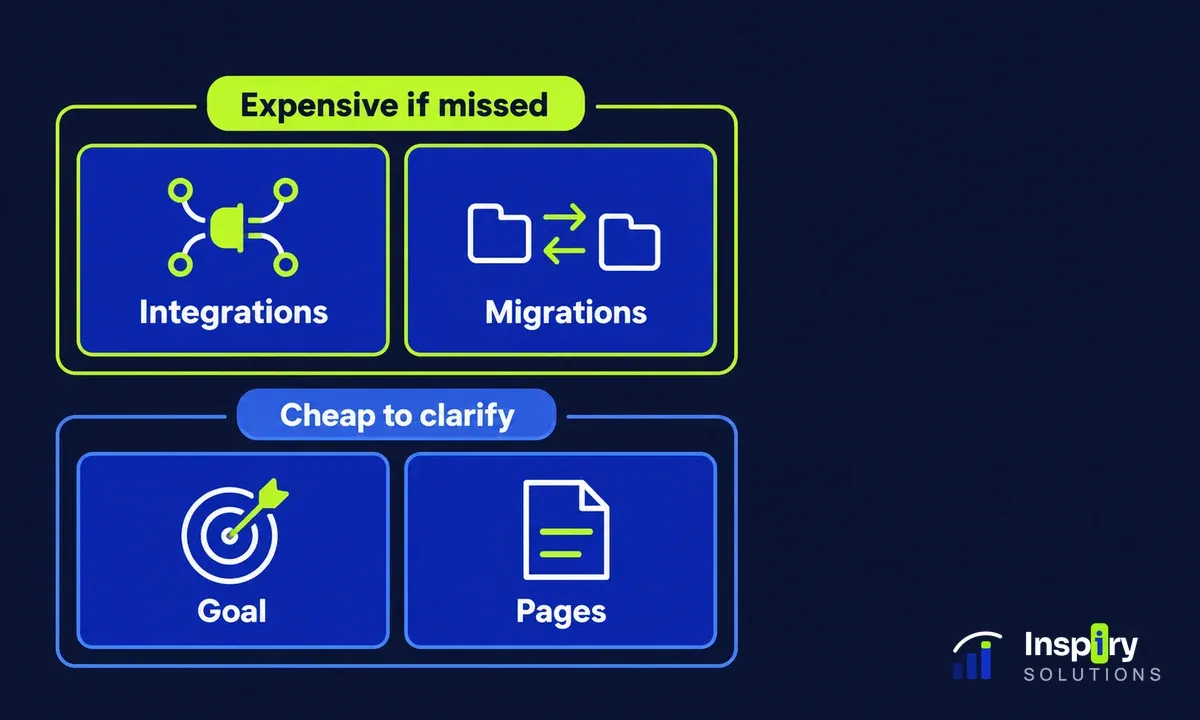
A useful website requirements document identifies pricing decisions and makes missing information visible.
What to leave open on purpose
A website brief should define the problem without dictating every solution.
Business owners often choose colours, plugins and technology before speaking to developers. Those decisions rarely resolve major estimating uncertainties.
Share design references, but explain what you like: navigation, readability, layout or enquiry flow.
Avoid requiring a development method without a business reason.
For example, choosing between a custom theme or premium template should depend on content, budget, performance and maintenance requirements.
Similarly, describe what functions must accomplish rather than selecting WordPress plugins yourself.
Ask suppliers to recommend maintainable solutions and identify recurring software costs.
Every quote should state assumptions. An assumption is something treated as true without confirmation, such as expecting you to supply finished copy.
Do not hide your budget hoping for the lowest price. A realistic range helps suppliers separate essential features from optional improvements.
Keep technical choices open, but define business requirements.
Flag the unknowns instead of guessing them
Some details cannot be established from a short conversation.
Examples include poorly organised legacy content, an old theme containing custom code, undocumented integrations or missing administrator access.
These require investigation, not invented answers.
Use three labels:
- Known: We need to migrate 15 service pages.
- Unknown: We do not know how bookings reach our calendar.
- Needs investigation: The website produces occasional errors.
Ask suppliers how they will investigate each unknown.
A small website may need a short review. A complicated migration might justify separately priced discovery before the full project is quoted.
At Inspiry Solutions, our WordPress development service starts with a free audit. Send your URL for a plain-language reply within two working days.
Where requirements can be established, we then prepare a fixed quote.
Published WordPress development prices start at $1,200 for small sites. Typical business websites cost $2,500-$8,000.
These are ranges, not guaranteed prices. Scope determines the proposal.
A free audit cannot guarantee every hidden issue will be resolved without further investigation.
Identify risks before committing to a price that assumes they do not exist.
Requirements people forget until the invoice arrives
Even a detailed website project brief can overlook work discovered during testing or launch.
Accessibility expectations
Accessibility helps people with different disabilities use a website.
Specify whether the supplier should work towards a particular level of the Web Content Accessibility Guidelines (WCAG), such as WCAG 2.2 Level AA.
Ask what testing and corrections are included. A visual review does not establish compliance.
Redirects and existing URLs
A rebuild may change page addresses even when content remains similar.
Google’s guidance on site moves explains mapping old URLs to replacements and using redirects.
Include URL mapping, implementation and post-launch checks. These reduce migration risks but cannot guarantee unchanged search performance.
Hosting and technical requirements
Ask whether the existing server supports the proposed website.
For WordPress, confirm the host meets the current WordPress hosting requirements.
Clarify whether configuration, backups, security certificates and deployment are included.
Training and handover
Request instructions covering content editing, administrator access and custom features.
Specify whether training sessions or documentation are required.
Post-launch support
Agree how long the supplier will correct launch-related defects, what qualifies as a defect and how additional requests are charged.
Distinguish included corrections from paid maintenance.
Analytics, consent and notifications
List events to measure, such as enquiries, purchases and bookings.
Confirm whether analytics, cookie consent and form notification testing are included.
A form displaying “success” does not prove the enquiry reached the correct inbox or CRM.
Specify how these functions will be tested before launch.
Hypothetical example: one brief, three readings
Consider a fictional cleaning company planning a 12-page service website.
Its brief requests service pages, testimonials, contact information and one feature:
“We need online booking.”
Three suppliers could interpret this differently.
| Supplier | Interpretation | Potential scope |
|---|---|---|
| Supplier A | Booking means an enquiry form | Basic form and email notifications |
| Supplier B | Customers reserve appointments | Paid booking tool with calendar integration |
| Supplier C | Complete scheduling platform | Custom system with availability management |
These are hypothetical interpretations, not actual proposals.
Supplier A might quote less because the assumed function is simpler. Supplier C might estimate more development work.
Neither price establishes which supplier is better.
Rewrite the requirement:
“Customers choose a cleaning service, enter their postcode and select an available time slot. Confirmed bookings must appear in our existing calendar. We do not accept online payments.”
Suppliers now have a common functional target.
They still need to confirm calendar software, availability rules and whether staff approve bookings.
Resolve those questions through discovery or document them as assumptions.
The improved description also helps identify recurring software fees.
This web design brief example shows why describing requirements is more useful than prescribing technology.
For important functions, explain what starts the process, what visitors do, where information goes and what successful completion means.
How to send the brief and compare what comes back
Send the same website brief template, attachments and uncertainties to every supplier.
If one asks a question affecting scope, share the clarification with the others.
Request proposals covering:
- Total price and payment milestones.
- Included pages, templates and functions.
- Content and migration responsibilities.
- Integrations and software costs.
- Assumptions and exclusions.
- Delivery stages and approvals.
- Testing, launch and handover.
- Change-request procedures.
A change request alters agreed scope. Ask how extra costs and scheduling changes are approved before work proceeds.
Compare scope first, then assumptions, exclusions, responsibilities and price.
Read our guide to choosing between an agency and a freelancer when evaluating suppliers.
A quote without written assumptions is incomplete, not automatically cheaper.
If “SEO included” appears, ask whether it covers metadata, redirects, technical checks, content optimisation or ongoing support.
Apply similar scrutiny to “mobile-friendly”, “fully integrated” and “training included”.
Request acceptance criteria: practical checks confirming completion.
For example, a form should validate fields, deliver information to the agreed destination and display confirmation.
Choose the proposal that defines what you will receive most clearly, not simply the lowest headline price.
Common questions
How long should a website brief be?
Two to four pages is usually enough for a business website. Specific answers matter more than length, particularly around functions, integrations and responsibilities. A short brief with flagged unknowns beats a long, vague document. Attach supporting information where necessary, but keep requirements easy to review.
Should I include my budget in a website brief?
Yes. A budget range helps suppliers propose realistic scope. Hiding your budget often produces quotes for different projects, making comparisons harder. A good supplier should explain what fits your range, what does not and which optional features can be postponed without compromising essential requirements.
Do I need to know which plugins or technology to use?
No. Describe what the website must do and let suppliers recommend the technology. Mention existing tools you must retain, such as a CRM or booking system. Ask suppliers to justify their recommendations and explain software licensing, integration and maintenance costs before approving the work.
What if I do not know how my current site was built?
Say so in the brief and list available access, such as hosting, domain registration or WordPress administration. Request an audit or discovery step before agreeing to a fixed price. Inspiry Solutions offers a free initial audit with a plain-language reply within two working days.
Is a website brief the same as a contract or specification?
No. The brief describes needs and helps suppliers estimate. Their proposal turns those requirements into scope, assumptions, exclusions and deliverables. The agreed proposal, contract and approved changes define what the supplier must deliver. Review these carefully before authorising work or payments.
Your next step
You do not need a perfect website brief. You need a consistent starting point separating confirmed requirements from uncertainties.
Copy this template, complete what you know and mark anything else “unknown”. Send the same version to each supplier.
Copyable one-page website brief template
1. Business goal
- Business and website URL:
- Target audience:
- Primary visitor action:
- Main objective:
2. Pages and templates
- Required pages:
- Number of unique templates:
- Special layouts:
3. Functions
- Essential visitor actions:
- Forms, booking, payments or member access:
- Optional features:
4. Integrations
- Existing software:
- Required connections:
- Unknown details:
5. Content
- Who writes and approves text:
- Who supplies images:
- Content to migrate:
6. Existing website and SEO
- Current website URL:
- Important pages and URLs:
- Redirect or SEO requirements:
7. Hosting and access
- Hosting and domain providers:
- Available accounts:
- Ownership and access issues:
8. Budget, deadline and approval
- Budget range:
- Preferred launch date:
- Final decision-maker:
- Outstanding questions:
Supplier response requested: Confirm assumptions, exclusions, deliverables, third-party costs, delivery stages and change-request procedures.
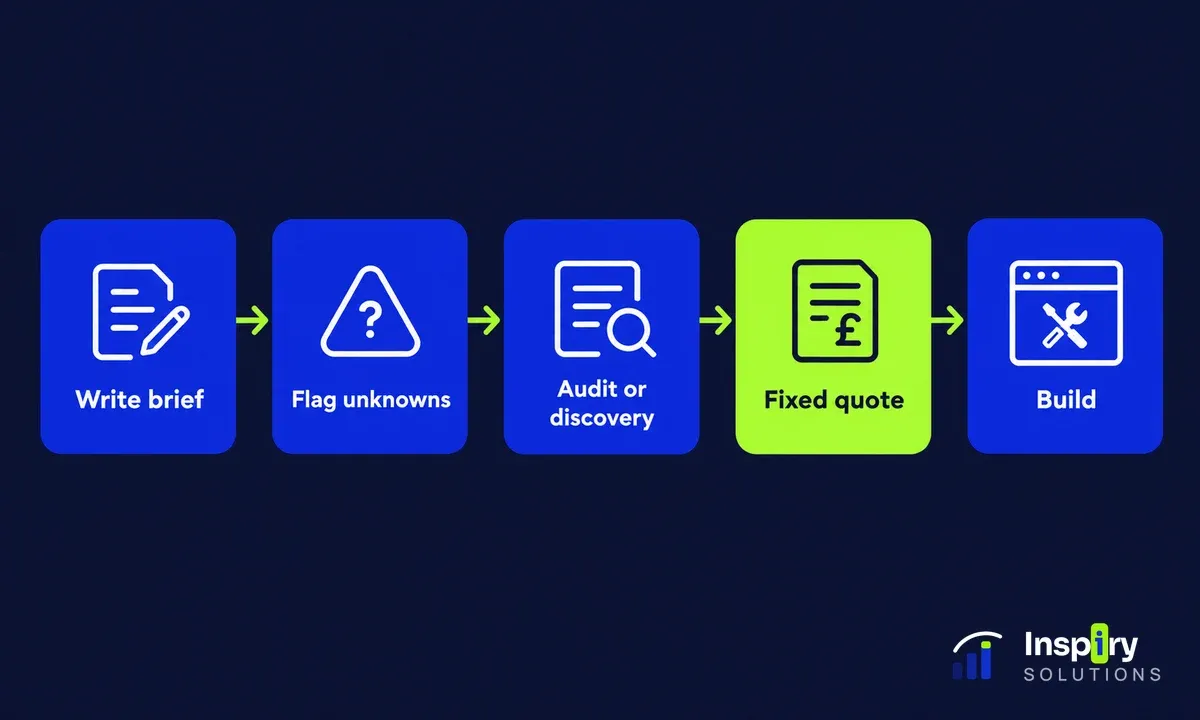
Review the template from a supplier’s perspective. Could someone estimate the work without inventing major requirements? If not, identify what needs investigation.
If parts of your brief still say “not sure”, send us your current site for a free audit and we will reply within two working days with what we found and, where it fits, a fixed quote from our WordPress development team.