XML sitemap best practices start with a simple rule: list only the canonical, indexable pages you want Google to find, and make sure each returns a 200 status. That normally means your important service pages, useful articles and selected category or location pages. It does not mean every URL WordPress creates. Redirects, duplicate URLs, noindexed pages and thin archives should generally stay out. A clean sitemap gives Google a clearer discovery signal and makes indexing problems easier to investigate, although it never guarantees that a page will appear in search results.
If your WordPress SEO plugin automatically creates hundreds of sitemap entries, this guide explains what belongs, what to exclude and how to compare your sitemap with a site crawl and Google’s indexing data.
What an XML sitemap does, and what it cannot do
An XML sitemap is a machine-readable file containing URLs that a website owner wants search engines to discover. Search engines use it to find important pages and understand which URLs the website considers worth indexing.
Think of it as a suggested reading list, not an instruction.
Google may discover a submitted URL, crawl it and still decide not to index it. It may also discover pages through internal links, even when those pages are absent from your sitemap.
Discovery is different from indexing
Crawling means Google requests and examines a URL. Indexing means Google processes its content and may store it in the search index.
A successful crawl does not guarantee indexing. Google considers content quality, duplication, technical accessibility and other factors beyond sitemap inclusion.
Small websites with clear internal linking may be discovered without an XML sitemap. However, submitting one still provides useful reporting through Google Search Console.
A sitemap cannot repair wider SEO problems
Adding a page to your sitemap will not fix broken internal links, weak content, incorrect canonical tags or a noindex directive.
If a page is technically accessible but offers little unique value, repeatedly submitting it is unlikely to resolve the underlying issue.
This is why sitemap reviews belong within a wider technical SEO audit service, rather than being treated as a standalone indexing solution.
The useful question is not simply whether Google can find the sitemap. It is whether the URLs inside it deserve to be indexed.
XML sitemap best practices: which URLs belong
The most important xml sitemap best practices concern URL eligibility.
Each listed page should meet three conditions:
- Return HTTP 200, meaning the server successfully delivers the page.
- Be the preferred canonical version of its content.
- Be indexable, without directives preventing indexing.
These checks establish a clean technical foundation. They do not guarantee that Google will index every included page.
Include pages with genuine search value
For most business websites, suitable URLs include:
- Main service and specialist service pages.
- Location pages containing substantial, location-specific information.
- Helpful blog articles and published guides.
- Important product pages on ecommerce websites.
- Category pages with useful descriptions and distinct content.
- Core business pages intended to appear in search results.
A location page should not qualify merely because its URL contains a town name. Its content should be useful to someone searching in that location.
Likewise, category archives should earn inclusion through their value, rather than appearing automatically because WordPress generated them.
Use the final canonical URL
A canonical URL is the preferred address when multiple URLs contain identical or substantially similar content.
For example, if your website uses HTTPS, excludes www and ends URLs with a trailing slash, the sitemap should consistently list those versions.
Google’s canonical URL guidance explains how sitemap inclusion supports canonical preferences. It is one signal, not an absolute instruction.
For WordPress-specific issues, see canonical tag mistakes in WordPress.
Include or exclude: a practical decision table
| URL type | Include in sitemap? | Reason |
|---|---|---|
| Service pages | Yes | Core pages intended for organic search |
| Blog articles | Yes | Published, useful, canonical content |
| Category pages with unique content | Usually yes | Can serve a distinct search purpose |
| Tag archives | Usually no | Frequently overlap with categories and posts |
| Author archives on single-author sites | No | Often duplicate the main article archive |
| Media attachment pages | No | Usually provide little standalone value |
| Redirected URLs | No | Replace with the final destination URL |
| Noindexed pages | No | Explicitly excluded from indexing |
| Paginated archive pages | No, unless they hold unique content | Include only where separate indexing is justified |
| Thank-you and form confirmation pages | No | Not intended as search landing pages |
These are recommendations, not universal rules. An archive with a clear search purpose and substantial unique content may warrant inclusion.
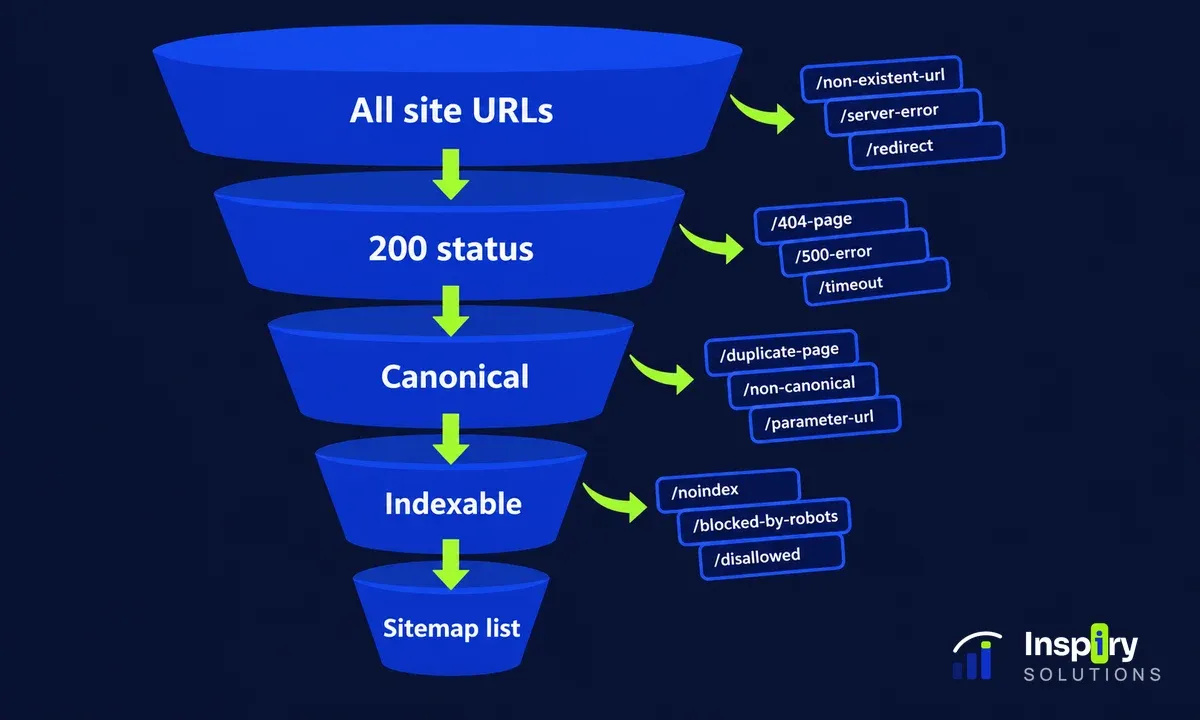
The diagram shows URLs passing through status, canonical and indexability checks before entering the sitemap list.
Content usefulness remains an additional editorial decision. Passing technical checks alone is not enough.
What to leave out
A sitemap should not become an inventory of every address your website can generate.
WordPress creates archives, attachment pages, search results and parameter-based URLs alongside published content. Many support website functionality without needing separate search visibility.
Exclude redirected URLs, missing pages, non-canonical duplicates and pages deliberately set to noindex.
Also exclude staging and development URLs. Your production sitemap should contain only URLs from the intended live website.
Thin archives WordPress creates by default
WordPress can generate category, tag, author and date archives. Depending on your setup, these archives may repeat article excerpts without offering additional value.
Consider a tag archive containing articles already accessible through a well-organised category page. If the tag serves no distinct purpose, listing it adds little value.
Review archives before disabling them. Some category pages are valuable landing pages with useful introductions, relevant links and a clear subject.
A practical approach is to retain useful categories, assess tags individually and exclude unnecessary author or date archives.
Pages that exist only for campaigns or forms
Campaign landing pages, enquiry confirmations, booking completion screens and private resources often require different treatment.
A campaign page may deserve indexing if it provides lasting, useful content. A thank-you page normally does not.
Form confirmation URLs provide no meaningful search landing experience, even though visitors need them after submitting enquiries.
Exclude these pages from the sitemap and apply a noindex directive where indexing is unwanted.
Removing a URL from the sitemap does not prevent indexing. Google may still discover it through links.
Internal search results should also remain outside your sitemap. These URLs come from visitor queries rather than curated website content.
The governing principle is intentional selection, not indiscriminate removal.
How WordPress and SEO plugins build sitemaps
WordPress includes a basic XML sitemap, normally available at:
https://example.com/wp-sitemap.xmlIt can list public content types and taxonomies without a separate plugin.
SEO plugins such as Rank Math and Yoast SEO provide their own sitemap functionality, often using:
https://example.com/sitemap_index.xmlThe exact address depends on your configuration.
Review post types and taxonomies
In Rank Math, look under Rank Math SEO > Sitemap Settings for options covering posts, pages, custom post types and taxonomies.
Yoast SEO manages relevant content visibility and sitemap inclusion through its content type and taxonomy settings.
Check whether your active sitemap includes pages, published articles, service post types, categories, tags and unwanted archives.
Plugin settings vary between versions. Inspect the actual XML output rather than trusting dashboard settings alone.
Use one intended sitemap system
When an SEO plugin manages your sitemap, confirm that the WordPress core sitemap is not being promoted as a competing list of preferred URLs.
Multiple sitemap files are not inherently wrong. Contradictory configurations are the problem, especially when one includes content another deliberately excludes.
Check the active sitemap index, robots.txt references and Search Console submissions.
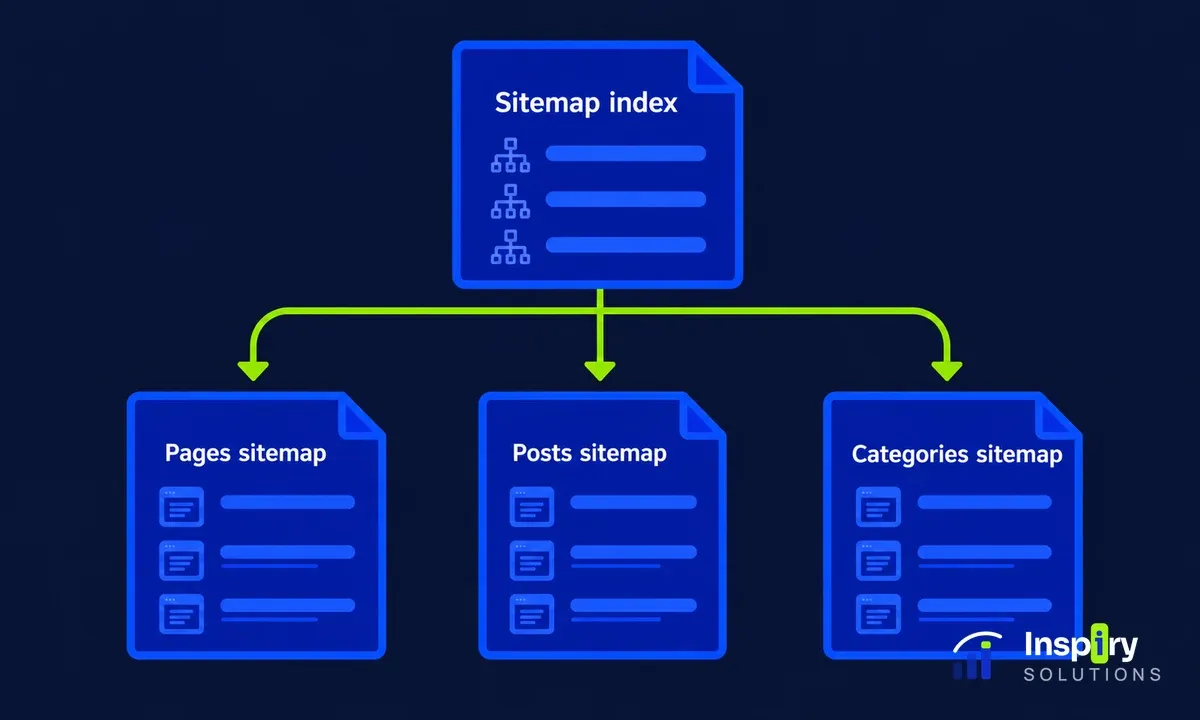
A sitemap index points to child files for pages, posts and eligible categories.
After changing plugin settings, clear relevant caches and inspect the live sitemap to verify the changes.
lastmod, priority and changefreq: which fields matter
XML sitemaps can contain metadata describing individual URLs, but not every field influences Google.
Use accurate modification dates
The sitemap lastmod field indicates when a page was last significantly modified.
Google’s sitemap documentation says it uses lastmod when values are consistently and verifiably accurate.
Meaningful changes may include substantial content revisions, important structured data updates or significant link changes.
Changing a copyright year does not make every page newly updated.
Avoid assigning today’s date to every URL whenever your sitemap regenerates. This weakens the reliability of the information.
Do not optimise ignored fields
Google says it ignores priority and changefreq.
Setting every page to maximum priority will not improve rankings or force Google to crawl more frequently.
Concentrate on accurate URLs, useful content and meaningful modification dates.
Understand sitemap size limits
A single sitemap must not exceed 50,000 URLs or 50 MB uncompressed.
If either limit is reached, divide the URLs into separate sitemap files and reference them through a sitemap index.
Submit and monitor the sitemap in Search Console
Google Search Console lets you submit a sitemap and review whether Google has processed it.
Open your verified property, select Sitemaps and enter the URL of your active sitemap index.
You can also reference the sitemap in robots.txt:
Sitemap: https://example.com/sitemap_index.xmlReplace the example with your actual sitemap URL.
Understand sitemap processing messages
The Sitemaps report commonly shows these outcomes:
- Success: Google fetched and processed the sitemap. This does not mean every URL is indexed.
- Couldn’t fetch: Google could not retrieve or process the sitemap. Check availability, HTTP status and access restrictions.
- Has errors: Google identified problems with the sitemap or its entries. Open the report for details.
If you see “sitemap couldn’t fetch”, open the submitted URL in a browser.
Check that it returns HTTP 200, contains valid XML and is accessible without authentication. Review firewall rules, security plugins and robots.txt restrictions.
Compare submitted pages with indexed pages
The Sitemaps report covers submission and processing. The Page indexing report explains what happened to discovered URLs.
Google’s Page indexing report instructions explain how to filter the report by a submitted sitemap.
This separates intended search pages from other discovered URLs.
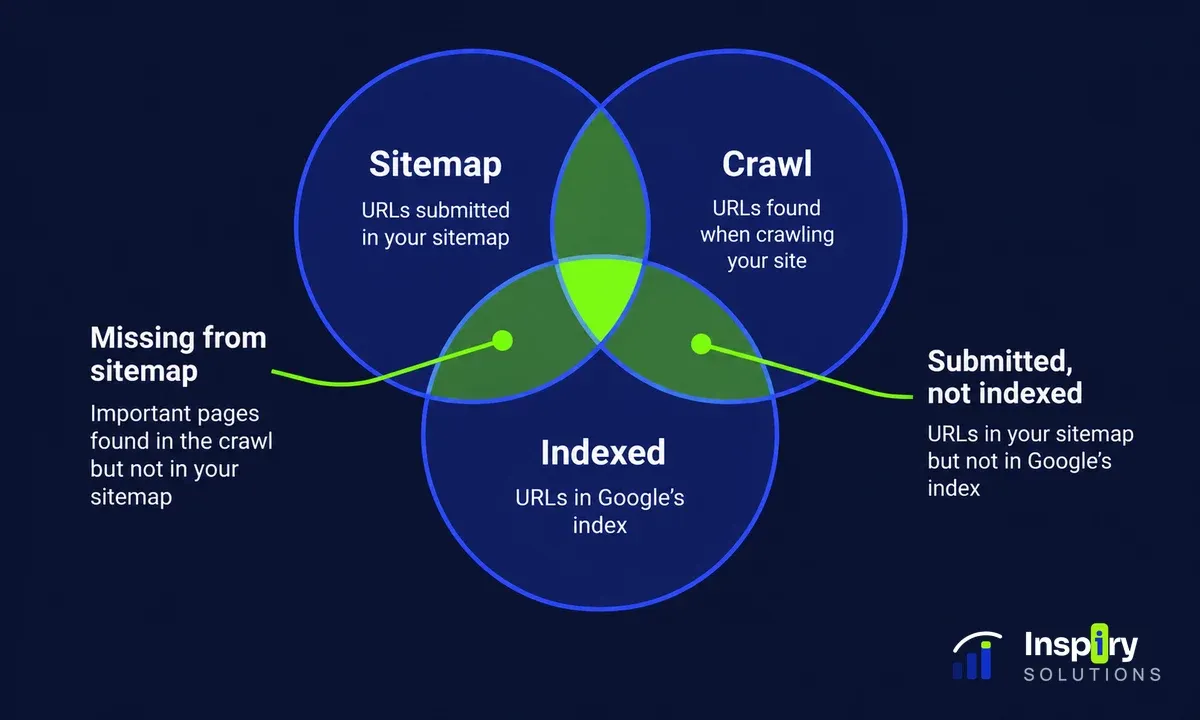
Compare three groups:
- Sitemap URLs: pages you want Google to consider indexing.
- Crawled URLs: pages your crawler can discover or request.
- Indexed URLs: pages Google reports as indexed.
These groups will not perfectly overlap. Your website crawler’s results are not Google’s complete crawl history.
The gaps reveal investigation priorities.
A submitted URL excluded from indexing may have a canonical mismatch, noindex directive or another problem. An important crawled page missing from the sitemap may indicate incorrect plugin settings.
For submitted pages that remain excluded, review the causes of pages not being indexed.
Do not treat every excluded URL as a defect. Investigate important pages first and use URL Inspection for individual indexing details.
Audit your sitemap with 3 checks for every URL
A dependable sitemap audit combines the XML file, a website crawl and Search Console evidence.
Export the sitemap URLs into a spreadsheet and crawl them using your crawler’s list mode.
Run a normal website crawl separately to find important pages missing from the sitemap.
Our WordPress technical audit checklist provides the wider context for reviewing crawling, indexing and redirects.
Complete these three technical checks for every submitted URL.
Does it return a 200 status?
HTTP 200 means the server successfully returned the requested resource.
Your sitemap should not contain redirects, missing pages or server errors.
Check for 301 and 302 redirects, 404 responses, 500-series errors and unexpected access restrictions.
Replace redirected URLs with their final eligible destinations. Remove deleted content unless an appropriate replacement exists.
A 200 response alone does not establish indexing eligibility.
Is it the canonical URL?
Compare the sitemap address with the canonical URL declared on the page.
A self-referencing canonical is normally suitable for a standalone page intended for indexing.
If the submitted URL points to another canonical address, investigate the mismatch.
Common causes include HTTP versus HTTPS, www variations, trailing slashes and duplicate content paths.
Use URL Inspection to compare Google’s selected canonical for important disputed pages.
Fix the underlying configuration rather than editing isolated sitemap entries.
Is it indexable?
Check robots meta directives and relevant X-Robots-Tag HTTP headers.
A URL carrying noindex should normally be removed from the sitemap.
Also confirm that important pages are not blocked from crawling through robots.txt, authentication or security controls.
Use Search Console to verify critical cases where your crawler cannot reproduce Google’s experience.
Finally, compare the sitemap export with the full crawl and identify missing service, article and location pages.
Record each issue, affected URL, proposed correction and verification result. Re-crawl corrected URLs before marking the work complete.
Hypothetical example: a service business sitemap
Hypothetical example: a service business website has a plugin-generated sitemap containing tag archives, media attachment pages and old URLs that now redirect.
A technical review identifies unnecessary archives, attachment URLs without standalone value and redirects pointing to newer pages.
The developer updates the SEO plugin settings, removes unsuitable URLs and replaces redirected addresses where their destinations should be indexed.
The audit also discovers important location pages missing from the sitemap despite being published, canonical and indexable.
After the cleanup, the sitemap reflects a more deliberate selection of useful pages, and the Page indexing report becomes easier to interpret.
This hypothetical example demonstrates improved technical consistency and reporting. It does not imply that cleanup automatically increases rankings, traffic or Google’s indexed page count.
The objective is a reliable list that accurately represents the site’s indexing intentions.
Common questions
Does every website need an XML sitemap?
No. Google says small websites with good internal linking may not need an XML sitemap because search engines can discover pages through normal crawling. However, a sitemap is useful for reporting and troubleshooting in Search Console. It communicates preferred URLs and helps identify indexing gaps. Submission does not guarantee crawling or indexing of every listed page.
Should noindex pages be in my sitemap?
No. A sitemap should normally list pages you want indexed, while a noindex directive tells search engines not to index a page. Including both sends mixed signals and clutters indexing reports with unnecessary URLs. Remove noindexed pages from the sitemap while retaining the noindex instruction wherever those pages should remain accessible but excluded from search results.
Do priority and changefreq affect rankings?
No. Google’s documentation says it ignores the priority and changefreq fields in XML sitemaps. Increasing these values will not improve rankings or force more frequent crawling. Google may use lastmod information only when it is consistently accurate and reflects meaningful changes. Focus on correct URLs and useful content rather than adjusting unsupported sitemap metadata.
Why does Search Console say my sitemap could not be fetched?
First, check that the submitted sitemap URL loads in a browser and returns HTTP 200. Confirm that robots.txt, a firewall, a security plugin or authentication requirements are not blocking access. Inspect the XML and server response for errors. New submissions can sometimes display this status briefly before processing, so recheck after confirming accessibility.
How often should I resubmit my sitemap?
You do not need to resubmit an XML sitemap for routine content updates. Google rereads submitted sitemaps, while a properly configured WordPress plugin updates the files automatically. Review or resubmit after a migration, major URL structure change or replacement of your sitemap system. Confirm that Search Console still references the correct active sitemap address.
Keep the sitemap clean after launch
Review your sitemap after redesigns, migrations, permalink changes and major SEO plugin updates.
These changes can introduce redirects, remove important URLs or unexpectedly enable archives.
Include a sitemap check in monthly website maintenance. Confirm that it loads, valuable pages remain included and unnecessary URLs have not returned.
When asking a developer to fix sitemap problems, provide the sitemap index address, affected URLs, Search Console error details and your intended inclusion rules.
A completed fix should include corrected settings, a fresh crawl and subsequent Search Console verification.
If your sitemap lists hundreds of URLs you did not expect, our technical SEO audit checks it against a full crawl and the indexing report, then gives you a prioritised fix list.
Start with the free audit: send your URL and get a plain-language reply within two working days.