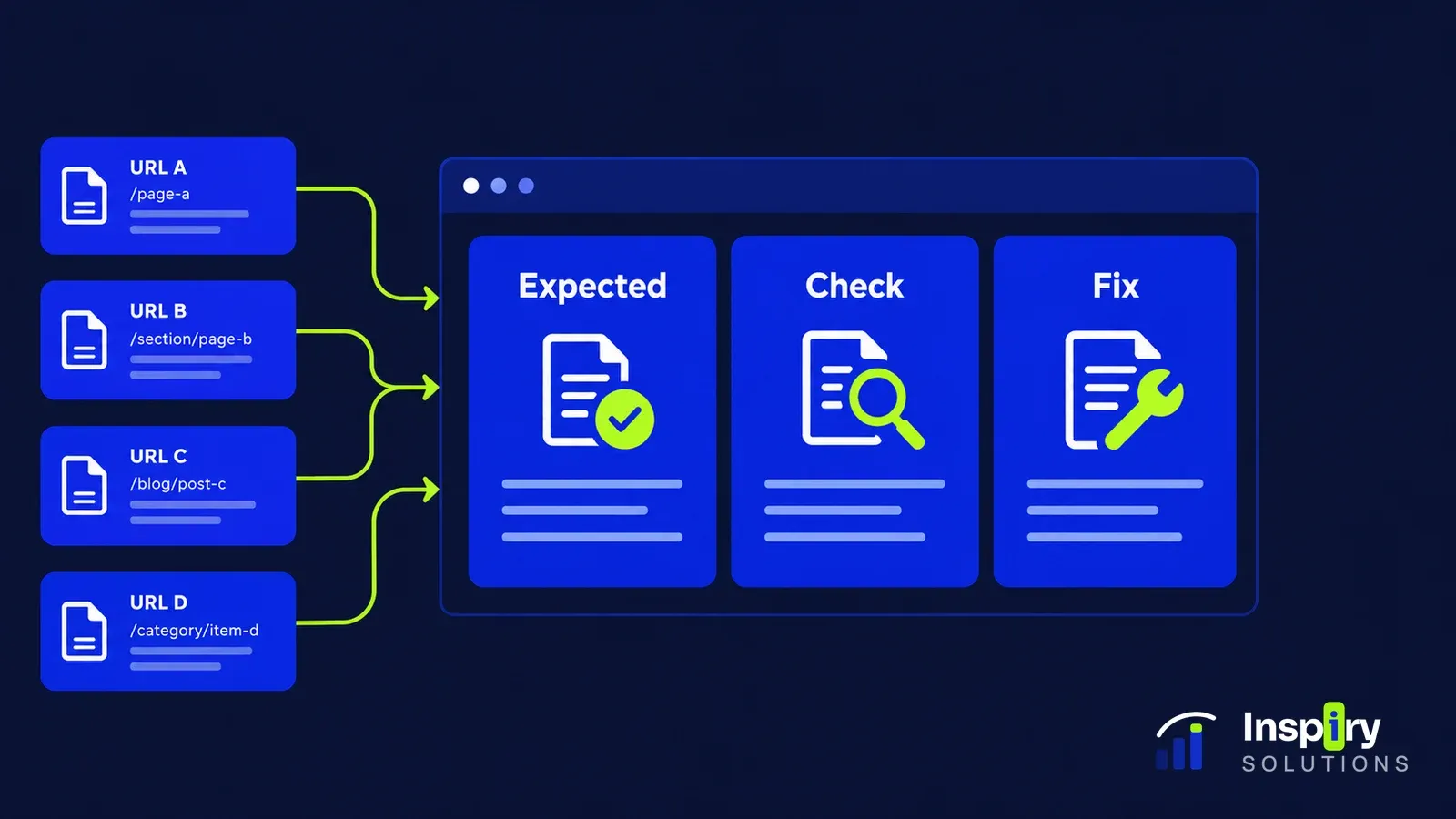
Crawl budget is rarely the reason a small or mid-sized business website struggles to get pages indexed. If your site has a few hundred pages, Google can usually discover and process them without running out of requests. When pages show as “Discovered, currently not indexed”, the more useful questions are whether those pages deserve indexing, whether important pages have clear internal links, and whether duplicate URLs or server problems are getting in the way.
This guide explains when crawl budget genuinely matters, how to interpret Google Search Console, and which fixes are worth making first. It is written for business owners and marketers who want a practical diagnosis rather than an unnecessary technical project.
What crawl budget means
Crawl budget describes the amount of crawling Google can and wants to do on a website within a period. Crawling means Googlebot, Google’s automated crawler, requests a URL and retrieves its content. This is different from indexing, where Google decides whether to store a page in its search index.
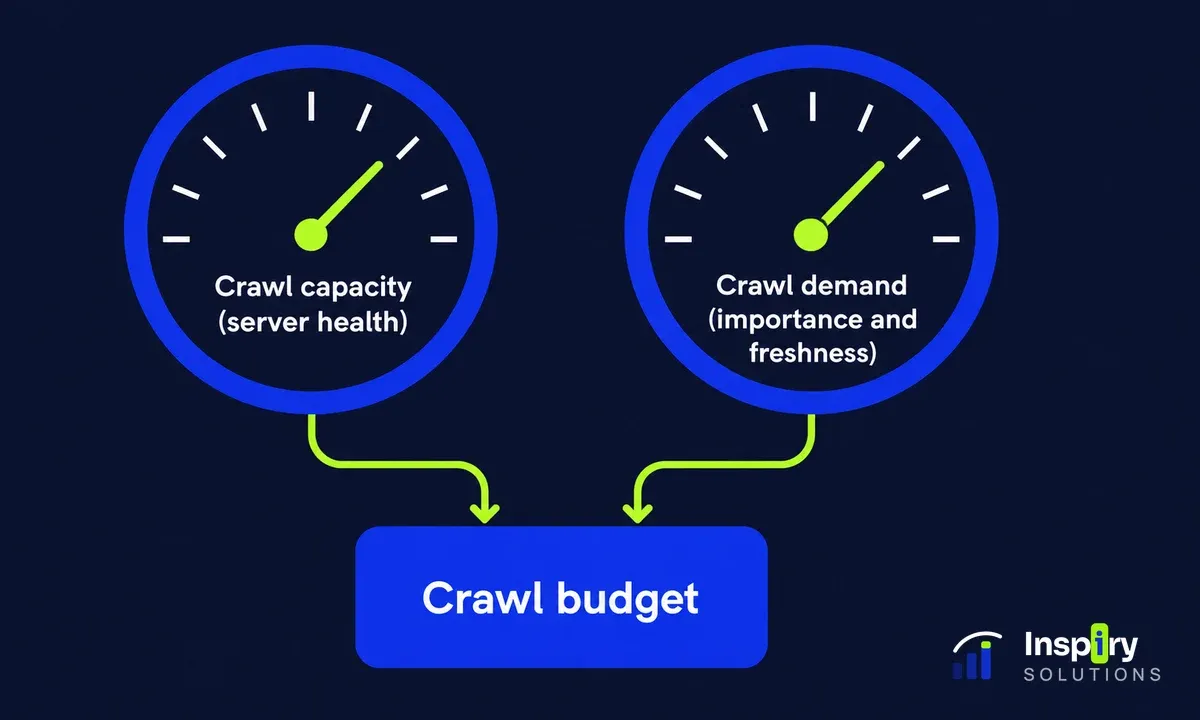
Google describes two main factors in its crawl budget documentation: crawl capacity and crawl demand.
Crawl capacity is about what your website can handle. If your server responds quickly and consistently, Google may be able to request more pages without causing problems. If requests repeatedly fail or take too long, Google may reduce its activity.
Crawl demand is about Google’s interest in revisiting your URLs. Demand is influenced by factors including perceived URL popularity, content freshness and changes Google detects across the site.
A useful first question is therefore not “How do I increase crawl rate?” but “Are important pages actually being prevented from being fetched?”
Who Google says should worry about it
Google’s crawl budget guidance mainly targets very large websites, especially those with extensive URL inventories or large numbers of frequently changing pages. Examples include substantial ecommerce catalogues and websites that publish or update many URLs regularly.
The guide says it is intended primarily for large sites (1 million+ unique pages) with content that changes moderately often, medium or larger sites (10,000+ unique pages) with very rapidly changing content, and sites with a large portion of URLs classified as Discovered, currently not indexed.
It adds that if your pages seem to be crawled the same day they are published, you do not need to read it. An earlier Google Search Central blog post put it plainly: “if a site has fewer than a few thousand URLs, most of the time it will be crawled efficiently.” A typical consultancy, local business or service website with a few hundred useful pages is unlikely to exhaust Google’s ability to request its content.
A business website could have a modest navigation menu but generate thousands of combinations through filters, tracking parameters, searches or archive pages. Google may discover those combinations even when the owner never intended them to become separate landing pages.
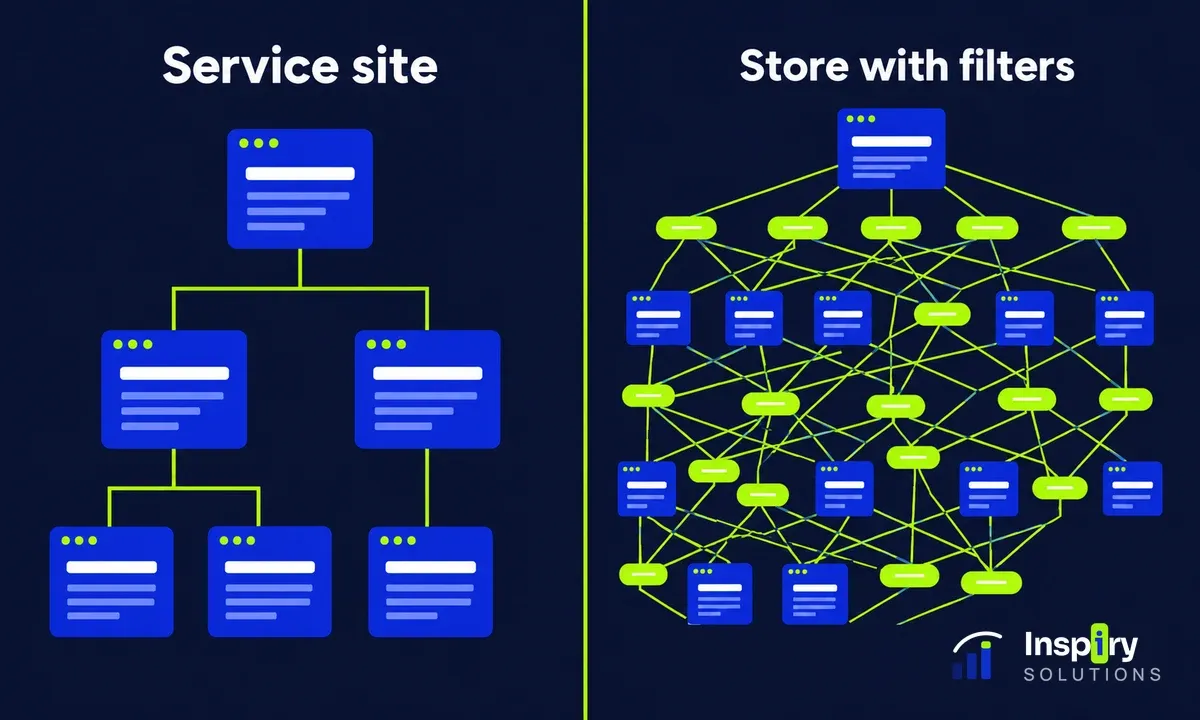
For example, compare a 150-page service website with a clear hierarchy against an online store where filters create thousands of URL variations. The second site may create unnecessary crawling work despite having a manageable number of actual products.
If you are unsure which situation describes your website, a technical SEO diagnosis should establish the real URL inventory before recommending changes.
Signs the real problem is something else
Two Google Search Console statuses frequently lead website owners to assume a crawl budget problem. They sound similar, but describe different stages of Google’s process.
Search Console labels them “Discovered – currently not indexed” and “Crawled – currently not indexed”.
Discovered, currently not indexed means Google knows a URL exists but has not crawled it yet. This can reflect crawl scheduling, server concerns or Google’s assessment of the URL’s importance. On a small site, investigate content usefulness, internal links and duplicate URL patterns before assuming a budget restriction.
Crawled, currently not indexed means Google has already fetched the URL but has not indexed it. That makes a simple shortage of crawl requests a weaker explanation. Duplicate content, limited unique value and other indexing decisions become more relevant.
Google explains these distinctions in its Page indexing status documentation. Our guides to why pages fail to get indexed and what each indexing status means provide further troubleshooting context.
Symptoms and likely causes
| What you see | Likely cause on a small site | First check |
|---|---|---|
| Discovered, currently not indexed | Weak internal links, low-value URLs or crawl scheduling | Check links, content purpose and URL Inspection |
| Crawled, currently not indexed | Duplicate or thin content, or an indexing decision | Compare content, canonical signals and indexability |
| New pages slow to appear | Poor discovery or limited page importance | Check sitemap, internal links and URL Inspection |
| Crawl requests spike | New URL patterns, redirects or site changes | Review request patterns and recent deployments |
| Many 5xx in Crawl Stats | Server instability, failed requests or timeouts | Inspect hosting logs and response failures |
| Thousands of parameter URLs crawled | Filters, search results or other URL combinations | Identify parameter patterns and their sources |
Start by separating important landing pages from URLs that should not be indexed. A missing service page deserves attention. An unused tag archive might not.
If server responses are consistently failing, however, investigate immediately. Googlebot cannot reliably access content when the server repeatedly returns errors.
When crawl budget does matter for smaller sites
A smaller website can create genuine crawl budget problems when it generates far more URLs than it needs. The clearest warning sign is a large and expanding collection of crawlable addresses with little independent value.
Filter and parameter combinations
Faceted navigation allows visitors to filter products by properties such as colour, size, brand and price. Each combination can produce a different URL, even when the underlying products overlap.
Adding sorting options or pagination multiplies those combinations further.
Google specifically discusses this issue in its guidance on managing faceted navigation. Uncontrolled filter URLs can consume requests that would be better directed towards useful content.
Calendars can create similar problems when bots can follow links through unlimited future dates. Session identifiers and internal search results may also produce large numbers of unnecessary URLs.
Large catalogues and product variants
A store may have a reasonable number of products but many more URLs because of variants, collections and filters.
Not every variant requires a separate indexable page. Where variations share the same search purpose, unnecessary duplication can make discovery and indexing harder to manage.
Repeated server failures
A website can also face crawling constraints without excessive URLs.
Frequent timeouts, unavailable servers and repeated 5xx responses can cause Google to reduce requests. Fixing those failures improves accessibility for visitors as well as crawlers.
If these patterns appear alongside delayed discovery of important pages, crawl budget optimisation deserves investigation. Otherwise, avoid treating it as the default explanation.
Read the Crawl Stats report without panic
Google Search Console provides a Crawl Stats report that shows how Google has requested resources from your property. It is particularly useful for finding server issues and unexpected changes in request behaviour.
Open the relevant property, select Settings, then find Crawl stats in the available reports. This is different from the Page indexing report, which focuses on indexing status.
Start with host status
Host status helps identify problems affecting Google’s ability to access the website. Look for availability issues, robots.txt retrieval failures and DNS resolution problems.
If the report indicates a host issue, confirm it through server logs or hosting monitoring before changing technical SEO settings.
Review response codes
Successful 200 responses are expected, but redirect and other response codes can also be normal.
Look for repeated 5xx responses, unusual increases in failed requests or changes following a deployment.
Look at file types and crawl purpose
File-type breakdowns help distinguish HTML documents from resources such as images, JavaScript and CSS. Resource requests are normal because Google may need them to understand or render pages.
Crawl purpose separates discovery requests from refresh requests. Discovery concerns URLs Google is finding, while refresh concerns URLs it has previously encountered.
Compare trends, not individual days
Daily crawl stats naturally fluctuate. A rise in requests is not necessarily good, and a fall is not automatically bad.
Compare a longer period with site changes, publishing activity, migrations and hosting incidents. A sudden change is more meaningful when it corresponds with inaccessible pages or an unexpected rise in duplicate URLs.
Where possible, compare Search Console data with access logs. Logs can confirm exactly which URLs Googlebot requested and what your server returned.
Crawl budget myths to ignore
Myth: Repeated indexing requests force Google to visit sooner.
URL Inspection allows you to request indexing for an individual URL, but repeated submissions do not create a higher crawl allowance. Google determines when to process the request.
Myth: Adding crawl-delay to robots.txt controls Googlebot.
Googlebot does not support the crawl-delay directive in robots.txt. Including it will not slow Google in the way some other crawlers might respond.
Myth: Publishing more pages automatically earns more requests.
Adding URLs does not guarantee increased crawl demand. Large quantities of similar or unhelpful pages can introduce more URLs without improving the site’s overall usefulness.
Myth: Every excluded URL wastes valuable budget.
Some excluded URLs are perfectly normal. Canonical duplicates, redirected addresses and intentionally restricted areas can appear in reports without indicating a technical failure.
5 fixes that help crawling and everything else
These five improvements are useful whether or not crawl budget is the main obstacle.
1. Strengthen internal links to important pages
Google discovers many URLs by following links. A useful page with no meaningful internal links is harder to find and may appear less important within the site’s structure.
Identify pages that should attract search visitors, particularly core services, useful guides and important product categories.
Then add relevant links from pages visitors already use. A service overview might link directly to specialist services, while a related article can provide supporting context.
For practical placement advice, follow our guide to internal linking for service sites.
Check the result: Use Search Console URL Inspection and crawl your own website to confirm priority pages are reachable through normal HTML links.
2. Keep the sitemap to canonical URLs only
An XML sitemap lists URLs you want search engines to discover. It should represent preferred, indexable pages rather than every address your website can generate.
A canonical URL is the preferred version when several addresses contain the same or substantially similar content.
Review the sitemap for redirects, noindex pages, duplicate variants, obsolete archives and URLs that return errors. Remove inappropriate entries and ensure the remaining URLs resolve correctly. The sitemap should also align with canonical signals and internal linking.
Check the result: Submit the updated sitemap in Search Console and inspect whether the listed URLs are valid, canonical and eligible for indexing.
3. Control endless URL patterns
Search your website for parameters created by filters, sorting, internal searches and calendar navigation.
Identify which combinations deserve independent search visibility and which exist only to help visitors interact with the website.
For unnecessary patterns, consider preventing their discovery through internal links, restricting crawling with robots.txt, or changing how filters generate URLs.
Be careful: blocking crawling through robots.txt prevents Google from reading page-level directives, including noindex. It also does not guarantee that an already discovered URL disappears from search results.
Check the result: Review the Crawl Stats report and server logs over time to see whether requests for unwanted patterns decline.
4. Fix server errors and slow responses
A slow or unstable website can restrict how efficiently Googlebot fetches its content.
Start with repeated 5xx errors and timeouts. Look at hosting logs, PHP failures, overloaded processes and unusually expensive requests.
For WordPress websites, plugins, uncached database operations and poorly configured hosting can all contribute to response delays.
Our guide to slow server response times explains how to investigate time to first byte, the delay before the browser receives the initial server response.
Check the result: Confirm successful responses through logs, retest affected URLs and watch for improvement in host status and response times.
5. Remove or consolidate thin and duplicate pages
Thin pages provide little independent value. Examples include empty tag archives, near-identical location pages and automatically generated collections with no meaningful difference.
Review whether each URL answers a distinct question or serves a useful purpose. Where several pages overlap substantially, consolidate useful information into a stronger destination when appropriate. Redirect retired URLs if a genuinely relevant replacement exists.
Avoid deleting large groups of URLs simply because Search Console reports an exclusion. First establish their purpose and whether they receive internal links.
Check the result: Revisit the important pages in URL Inspection and confirm the revised content, links and canonical signals are consistent.
Hypothetical example: 30 Discovered pages on a 120-page site
Hypothetical example: A consultancy has 120 pages. Search Console shows 30 pages as “Discovered, currently not indexed”. The owner believes Google has stopped crawling because the website has exceeded its crawl budget.
A review reveals that the 30 URLs are mostly thin tag archives created automatically by the content management system.
They have little unique information, and no meaningful links point to them from the consultancy’s main pages. They appear in the XML sitemap despite offering limited value as independent search results.
The sensible first step is to classify the archives. Those without a useful search purpose can be removed from the sitemap and handled appropriately through consolidation, redirects or indexing controls.
Any genuinely useful pages should receive stronger content and relevant internal links from the consultancy’s service pages.
No crawl rate setting needs changing.
The objective is not to turn 30 exclusions into zero. It is to ensure valuable pages are discoverable, accessible and suitable for indexing.
Common questions
Does my small website have a crawl budget problem?
Usually not. Google says websites with a few thousand URLs or fewer are generally crawled efficiently. Start by checking content quality, internal links and duplicate URL patterns. If important pages are missing from Google’s index, investigate their individual status before assuming crawl budget is responsible. Excessive generated URLs or server failures are stronger reasons to examine it.
Can I ask Google to crawl my site more?
You can request indexing for individual URLs using URL Inspection in Search Console. However, Google decides the crawl rate and whether to process those requests. A fast, reliable server and useful, discoverable content can support stronger crawl demand over time. Repeatedly submitting an unchanged URL does not guarantee another visit or indexing.
Does site speed affect crawling?
Yes. Faster, reliable server responses allow Googlebot to request more content without placing excessive strain on the website. Frequent server errors, timeouts or sustained response problems can cause Google to slow down. Focus on server reliability and response times rather than assuming a high front-end performance score automatically creates more crawl demand.
Should I noindex pages to save crawl budget?
Not as a crawling control. A noindex directive tells Google not to index a page, but Google still needs to fetch it to discover that instruction. To reduce crawling of unnecessary URL patterns, consider robots.txt restrictions or stop generating links to those URLs. Choose the method carefully because blocking crawling also prevents Google from seeing page-level noindex instructions.
A quick self-check for your site
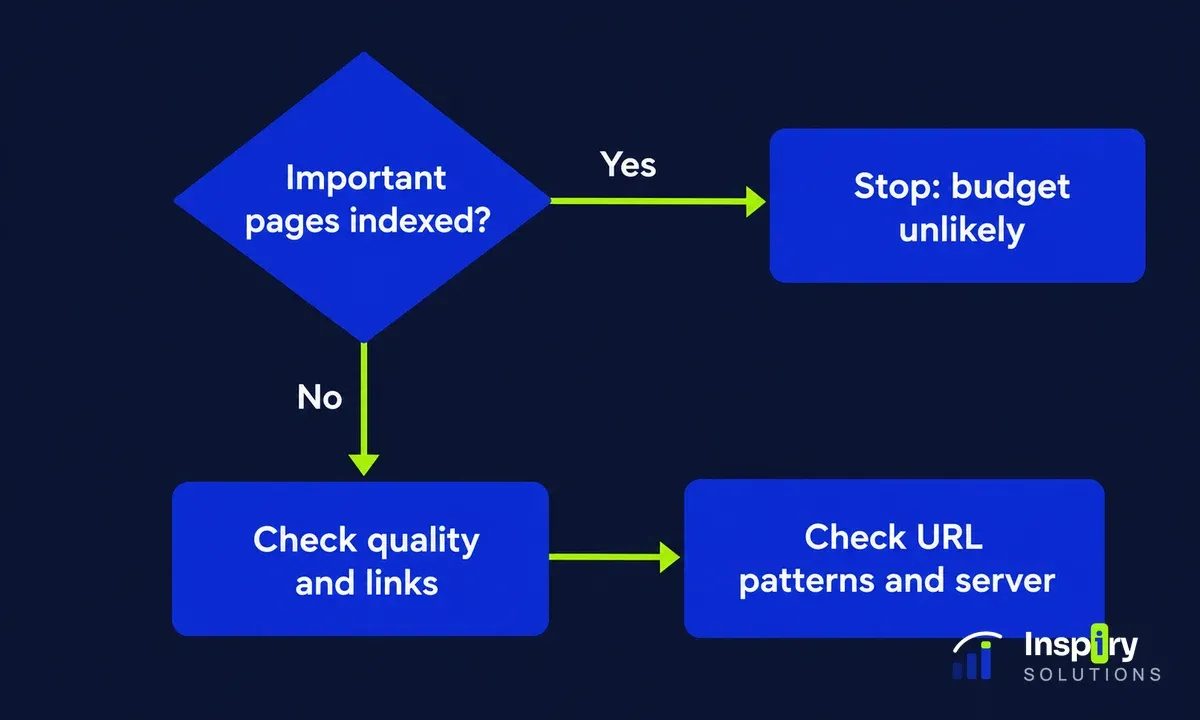
Before investing in specialised crawl budget optimisation, work through this short assessment.
- Count your intended indexable URLs. Use the XML sitemap and website inventory to identify pages that should appear in Google, excluding duplicates and intentionally private or restricted content.
- Compare that inventory with Google’s activity. Review indexed pages, discovered URLs and the request patterns visible in Crawl Stats. These reports measure different things, so do not expect their totals to match exactly.
- Check your important pages individually. If core service pages, products and useful articles are being indexed, crawl budget is unlikely to be the main issue even if other URLs remain excluded.
- Look for an unusually large URL inventory. Thousands of crawlable combinations from filters or parameters on a relatively small website deserve investigation.
- Check server reliability. Repeated 5xx responses, timeouts and host availability problems should be addressed before minor crawl optimisations.
If your intended indexable URLs and Google’s useful crawling activity are broadly aligned, and important pages are indexed, you probably do not have a meaningful crawl budget issue.
If they are not aligned, investigate content quality, internal links, canonical signals and generated URL patterns first. Examine server capacity and crawl behaviour when the evidence points there.
If pages are not being indexed and you are not sure why, our technical SEO audit finds the actual cause before anything is changed, then we fix it. Send your URL for a free audit.