The page indexing report in Google Search Console shows which URLs Google has indexed, which it has not, and why. Its statuses fall into three practical groups: exclusions that are usually expected, reasons that need checking, and problems that normally require fixing. A redirected URL or intentionally noindexed archive is not automatically an SEO issue. A server error affecting an important service page is. The priority is identifying whether Google can index the pages your business actually wants people to find.
This guide explains each status, what to investigate first, and when to take action. It helps business owners, marketers and junior SEOs distinguish harmless exclusions from genuine indexing problems.
How the Page indexing report works
Search Console divides known URLs into Indexed and Not indexed totals, with reasons and example URLs for each category.
Indexed pages are eligible to appear in Google Search, although indexing does not guarantee rankings.
Not indexed pages are excluded for reasons ranging from intentional redirects to technical failures.
Google’s official Page indexing report documentation explains these classifications.
Understand the reporting limits
Data is delayed, not live. Example lists contain no more than 1,000 URLs per issue and may not represent every affected page.
A fixed URL can retain its old status until Google processes it again.
Filter by sitemap first
Select a sitemap to focus on pages you intend Google to discover and potentially index.
This separates important content from incidental URLs.
Our technical SEO audits investigate unexpected exclusions and their underlying causes.
Every page indexing report status in 3 groups
Not every exclusion requires attention. Some reflect normal website behaviour, while others prevent valuable pages from appearing in search results.
The following classification covers 15 common status reasons. It is designed for typical business websites rather than websites where every generated URL has a particular indexing purpose.
Use three priorities:
- Expected: Normally acceptable when the behaviour is intentional.
- Check: Requires inspecting the URL before deciding whether to act.
- Fix: Usually indicates a technical problem when an important public page is affected.
This classification is practical guidance, not Google’s own severity system. A status marked Expected can still indicate a mistake, and a Fix status may be acceptable for deliberately restricted content.
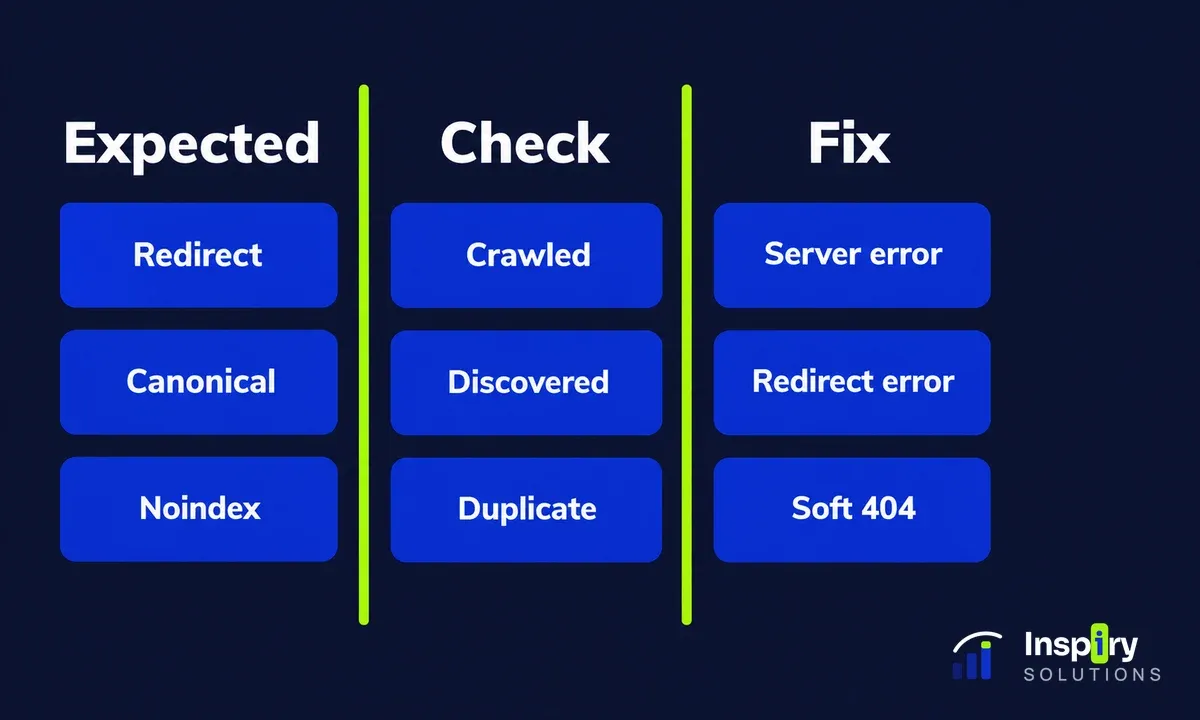
Usually expected
These statuses generally describe URLs that should not appear independently in search results:
Page with redirectAlternate page with proper canonical tagExcluded by 'noindex' tagNot found (404)Blocked by robots.txt
Redirects consolidate old addresses. Canonical signals identify preferred versions. Noindex instructions exclude selected pages. Missing URLs and intentional crawling restrictions can also be normal.
The essential question is whether these behaviours match your website’s intended configuration.
Needs a closer look
These statuses may reveal content, crawling, duplication or accessibility issues:
Crawled - currently not indexedDiscovered - currently not indexedDuplicate without user-selected canonicalDuplicate, Google chose different canonical than userBlocked due to access forbidden (403)
Check whether affected URLs deserve indexing before making changes.
A duplicate archive might be harmless, while an excluded service page could require immediate investigation. Google’s decision not to index a page does not automatically establish a technical fault.
Usually needs fixing
These reasons commonly indicate unsuccessful requests or unreliable indexing signals:
Server error (5xx)Redirect errorSoft 404Blocked due to unauthorized request (401)Indexed, though blocked by robots.txt
Prioritise problems affecting public pages intended for indexing.
The final status appears in the Indexed section. It describes a URL Google has indexed despite a crawling restriction, so the appropriate response depends on whether that URL should remain searchable.
Status reference table
| Status (as shown in Search Console) | What it means | Expected, Check or Fix | First thing to check |
|---|---|---|---|
Page with redirect | URL redirects elsewhere | Expected | Does the destination load? |
Alternate page with proper canonical tag | Another URL is preferred | Expected | Is the preferred URL correct? |
Excluded by 'noindex' tag | Indexing is discouraged | Expected | Was noindex intentional? |
Not found (404) | URL does not exist | Expected | Was the page removed? |
Blocked by robots.txt | Crawling is restricted | Expected | Is the rule intentional? |
Crawled - currently not indexed | Crawled but not indexed | Check | Is the content useful and distinct? |
Discovered - currently not indexed | Known but not crawled | Check | Can Google reach the URL? |
Duplicate without user-selected canonical | Duplicate without declared preference | Check | Which URL should be preferred? |
Duplicate, Google chose different canonical than user | Google selected another URL | Check | Are canonical signals consistent? |
Blocked due to access forbidden (403) | Server refuses access | Check | Is the restriction intentional? |
Server error (5xx) | Server request failed | Fix | Check logs and availability |
Redirect error | Redirect cannot be followed | Fix | Test the complete redirect path |
Soft 404 | Page appears effectively missing | Fix | Does it contain useful content? |
Blocked due to unauthorized request (401) | Authentication is required | Fix | Should the page be public? |
Indexed, though blocked by robots.txt | Indexed despite crawl restriction | Fix | Should it be indexed or excluded? |
The table is a starting point, not a list of automatic corrections. Inspect examples, understand the intended behaviour, and identify common causes before modifying redirects, indexing directives or crawling rules.
A small number of affected service pages can matter more than hundreds of intentionally excluded archive URLs.
The expected statuses in detail
Expected does not mean ignore. It means the status commonly reflects normal technical behaviour.
Verify whether the URL should exist, whether it should be indexed independently, and whether its destination or preferred version works.
Page with redirect
Page with redirect means the URL sends visitors elsewhere. Common examples include old service addresses redirected to replacements.
Check that the destination loads correctly and does not produce another error. Update important internal links to the preferred address.
Google’s redirect documentation explains how redirects influence URL selection.
Alternate page with proper canonical tag
Alternate page with proper canonical tag means Google recognises another URL as the preferred version.
A canonical identifies which address should represent duplicate or substantially similar content.
Check the Google-selected canonical using URL Inspection. If the preferred page is correct and indexable, the alternate URL generally needs no action.
Excluded by noindex tag
Excluded by 'noindex' tag means Google detected an instruction discouraging indexing.
This can be appropriate for internal searches, selected archives and utility pages.
Verify the instruction is intentional. A noindex directive on an important landing page needs correction, while the same instruction on an unwanted archive may be entirely appropriate.
Not found (404)
Not found (404) means the requested URL does not exist.
This is normal for genuinely removed pages without suitable replacements. However, an important page returning 404 needs investigation.
Restore accidentally deleted content, repair incorrect internal links, or redirect to a relevant replacement. Avoid redirecting unrelated missing URLs indiscriminately.
Blocked by robots.txt
Blocked by robots.txt means a rule prevents Googlebot from crawling the URL normally.
Restrictions can be intentional, but robots.txt does not reliably prevent indexing.
Google’s robots.txt guidance explains this distinction.
Check whether the affected page should be crawlable. Use appropriate indexing controls when exclusion from search is the actual objective.
Statuses that need a closer look
These reasons should trigger investigation rather than immediate technical changes.
Google may know about a URL without selecting it for indexing. It may also prefer another address when content overlaps.
Before requesting indexing or changing settings, establish whether the page offers independent value and whether its technical signals agree.
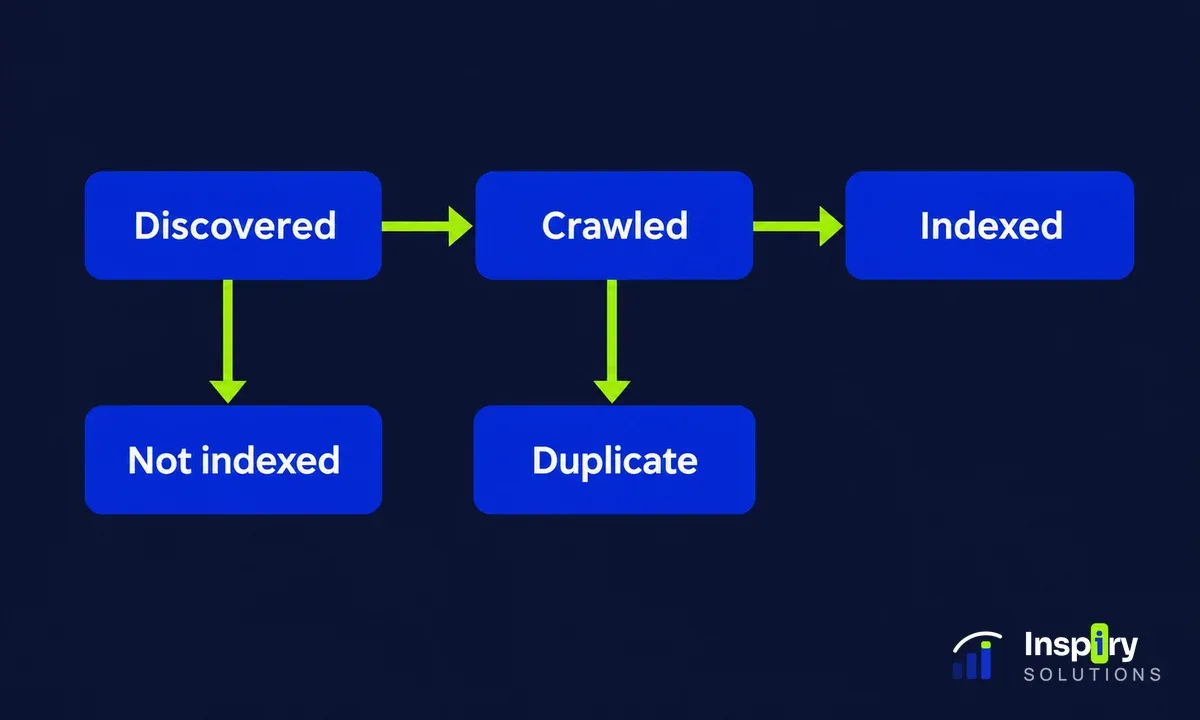
Crawled, currently not indexed
Crawled - currently not indexed means Google fetched the page but has not indexed it for now.
Review content usefulness, duplication, internal links and indexability. Improving weak pages can help, but indexing remains Google’s decision.
For broader investigations, see 15 reasons Google is not indexing a site.
Discovered, currently not indexed
Discovered - currently not indexed means Google knows the URL exists but has not crawled it yet.
Check sitemap inclusion, internal links, server availability and unnecessary URL variations.
Newly published pages may simply need time. Established important pages warrant closer examination, particularly when discovery remains incomplete or server problems affect crawling.
Duplicate without user-selected canonical
Duplicate without user-selected canonical means Google identified duplicate content without a declared preferred version.
Compare the URLs and decide which one should represent the content.
Check internal links, sitemap entries and canonical tags. WordPress archives and parameters can create variations. Our guide covers causes of duplicate pages.
Duplicate, Google chose different canonical than user
Duplicate, Google chose different canonical than user means Google selected another preferred URL despite your declared canonical.
Inspect both addresses and their indexing signals.
Google’s duplicate URL consolidation documentation explains canonical selection.
For practical implementation, see fixing canonical problems in WordPress.
Blocked due to access forbidden (403)
Blocked due to access forbidden (403) means the server refused Google’s request.
Security plugins, firewalls and permissions may cause this response.
A private resource can legitimately deny access. A public service page generally should not. Inspect logs and security settings before changing restrictions, especially when the failure affects Googlebot specifically.
Statuses that usually need fixing
These conditions often prevent Google from accessing or interpreting important pages correctly.
Prioritise errors affecting the homepage, primary services, location pages and valuable articles.
Do not apply blanket fixes across the website. Identify the responsible configuration, reproduce the issue and verify the correction on representative URLs.
Server error (5xx)
Server error (5xx) means a server-side problem prevented a successful request.
Potential causes include application failures, overloaded resources and timeouts.
Check server logs, hosting availability and affected URLs. Establish whether failures are intermittent.
Our guide to slow and failing server responses covers related performance diagnosis.
Redirect error
Redirect error means Google could not follow a redirect successfully.
Possible causes include loops, excessive chains and invalid destinations.
Trace the URL through every redirect until its intended final address. Correct the responsible rule and confirm the destination loads consistently.
Avoid creating additional redirects as an untested workaround.
Soft 404
Soft 404 means Google considers a page effectively missing despite its HTTP response.
Examples include empty listings or pages displaying unavailable-content messages.
Inspect the rendered content and response status. Restore meaningful content when the page should exist, or return an appropriate missing-page response when it has genuinely disappeared.
Blocked due to unauthorized request (401)
Blocked due to unauthorized request (401) means the URL requires authentication.
This may be normal for private resources but problematic for public content.
Check password protection, staging restrictions and security settings. Remove unintended authentication from public pages while retaining protection for genuinely private information and administrative areas.
Indexed, though blocked by robots.txt
Indexed, though blocked by robots.txt means Google indexed a URL despite a crawling restriction.
Decide whether the URL belongs in search.
If it should be crawlable, remove the inappropriate restriction. If it should remain excluded, allow Google to discover an appropriate noindex instruction before restoring the intended crawling restrictions.
Read the example URLs, not the totals
A large Not indexed total can contain mostly harmless URLs. Open examples under each reason and inspect their actual purpose.
Ask whether each page should appear in Google, whether it returns the correct response, and whether its preferred URL is correct.
Group URLs by template
Group similar URLs into tags, attachments, filters, archives and service pages.
Shared patterns often reveal one configuration issue rather than numerous independent failures.
Prioritise business-critical pages
Investigate the homepage, service pages and valuable articles first.
Export relevant examples and record their current responses. A single important exclusion may deserve more attention than hundreds of intentionally excluded URLs.
Hypothetical example: 340 not indexed, 20 that matter
Hypothetical example: A business owner opens Search Console and sees 340 Not indexed pages. The owner assumes hundreds of valuable pages are missing from Google.
Opening the example URLs reveals a different situation.
| URL group | Number | Assessment |
|---|---|---|
| Redirected old URLs | 180 | Expected |
| Tag archives with intentional noindex | 90 | Expected |
| Image attachment pages | 50 | Check intended treatment |
| Real articles under Crawled, currently not indexed | 20 | Investigate |
| Total | 340 |
The 180 old URLs redirect to replacements, while 90 tag archives are deliberately noindexed.
Another 50 are image attachment pages not intended as independent search results. Their exclusion reasons still need confirming.
Only 20 real articles require focused indexing investigation.
The owner can now inspect those articles for duplication, usefulness, internal links and technical restrictions.
The lesson is not that exclusions are always harmless. It is that important excluded pages matter more than the total number of exclusions.
Use Validate fix properly
Validate fix asks Google to verify whether a reported issue has been corrected.
It does not force indexing or guarantee that Google will select the affected pages.
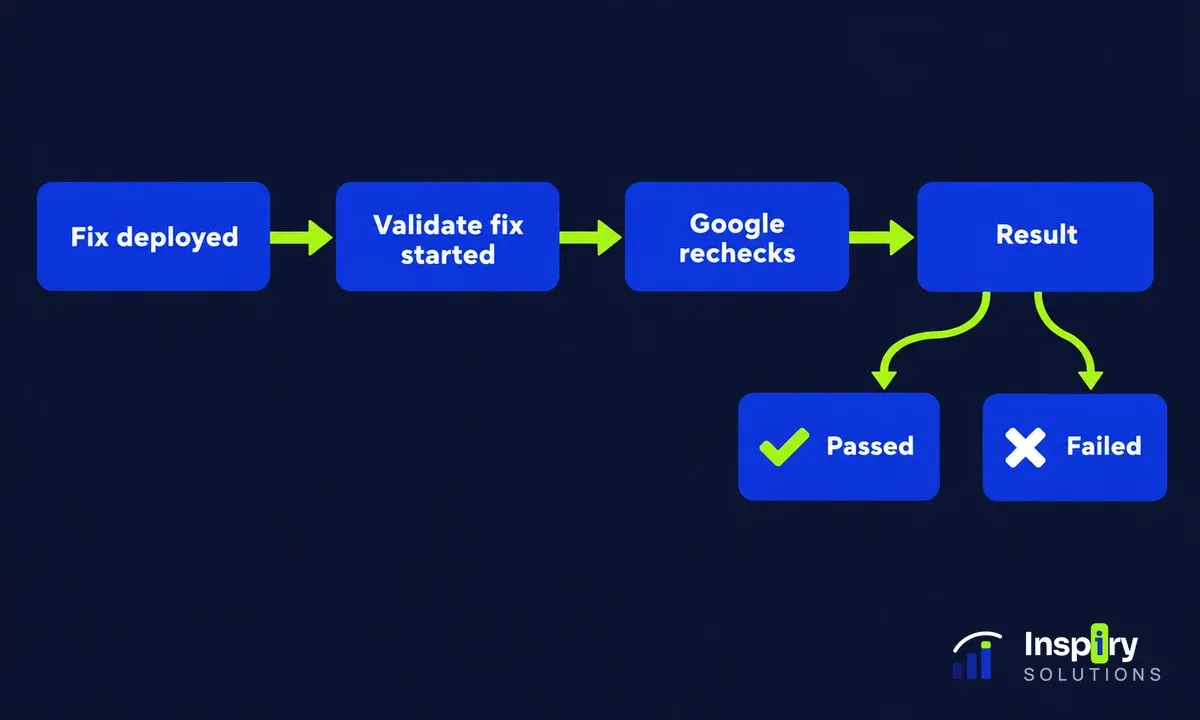
Fix the issue before starting validation
Reproduce the problem, deploy the correction and test the live URLs.
Check representative affected pages, not just one example.
Only start Validate fix after the correction is publicly available.
Understand the validation states
- Not started: Validation has not begun.
- Started: Google has begun checking.
- Looking good: Checked instances have passed so far.
- Passed: Validation completed successfully.
- Failed: Google found an unresolved instance.
Inspect failed examples before attempting another validation.
Allow time for Google to recheck
Validation often takes several weeks, sometimes longer.
Google may recognise corrections through ordinary crawling before validation finishes.
Pages can become indexed while validation remains in progress.
Treat validation as a progress tracker, not an indexing trigger. Repeated requests do not replace correcting the underlying issue.
Common questions
Is it bad to have many not indexed pages?
Not necessarily. Redirects, alternate URLs with appropriate canonical tags and intentional noindex pages are expected on many websites. What matters is whether pages you want indexed appear in the Not indexed section. Inspect the affected examples and their reasons before deciding the total represents a problem.
How do I fix Crawled, currently not indexed?
Google crawled the page and chose not to index it for now. Improve its usefulness, remove unnecessary duplication and strengthen relevant internal links. Check that it is technically indexable and points to the intended canonical. Then use URL Inspection to request indexing for the most important pages and allow time for Google to recrawl them.
What is the difference between Discovered and Crawled, currently not indexed?
Discovered means Google knows the URL exists but has not crawled it yet. Crawled means Google fetched the page and decided not to index it for now. For discovered URLs, examine internal linking, accessibility and server availability. For crawled URLs, also review usefulness, duplication and canonical signals.
How long does Validate fix take?
Validation often takes several weeks, sometimes longer, depending on the issue and Google’s checking process. If validation fails, inspect the remaining affected URLs, correct the issue and then request another check. Start validation only after the fix is live across every affected template, not just one example URL.
Why are pages from my sitemap not indexed?
A sitemap helps Google discover pages but does not guarantee indexing. Check that affected URLs return HTTP 200, are indexable and identify the intended canonical. Filter the report by sitemap and read the reasons for those specific URLs. Remove URLs that redirect, return errors or are noindexed, so the sitemap lists only pages you want indexed.
A monthly routine for the report
Review the page indexing report monthly rather than reacting to every change.
Compare indexed counts for sitemap URLs, identify new statuses and investigate sudden increases affecting important pages.
When reporting an issue to a developer, include the exact status, example URLs, date of first detection and expected behaviour.
For a wider monitoring process, follow a practical Search Console routine.
If the report shows statuses you cannot explain, our technical SEO audit separates expected exclusions from real problems, then helps fix the real ones. Send your website URL for a free audit and receive a plain-language reply within two working days.