Duplicate content SEO problems usually come from multiple URLs showing the same page or separate pages offering almost identical information. Google normally chooses one version rather than penalising a website for ordinary duplication. The practical fix depends on the cause. Technical duplicates usually need redirects or canonical signals, while editorial duplicates often need better content, consolidation or a clearer purpose for each page. The aim is to make the preferred pages obvious to search engines and genuinely useful to visitors.
This guide is for business owners and marketers seeing duplicate warnings in Google Search Console or an SEO audit. You will learn how to identify the cause, choose between four fixes and check whether Google recognises the changes.
Duplicate content SEO: is there a penalty?
A duplicate content penalty is one of the most common misunderstandings in technical SEO. Google does not normally penalise websites simply because similar or identical information appears at several URLs.
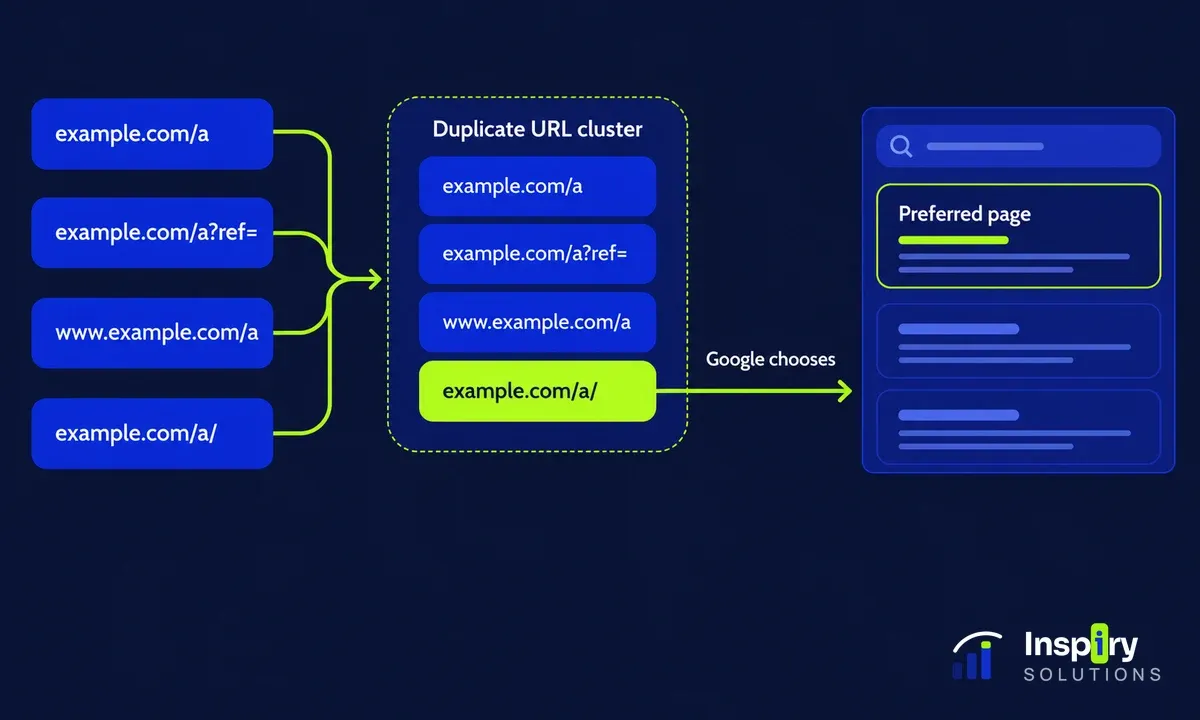
Instead, Google groups duplicate or very similar pages and selects a preferred version, known as the canonical URL, for indexing and search results.
For example, a service page might be accessible through both HTTP and HTTPS addresses. Google may recognise them as duplicates and choose one. This is normal duplicate handling, not evidence of a penalty.
What duplication can actually cost
- Wrong URL selected: Google may display an old URL, parameter version or less useful page instead of your preferred address.
- Signals spread across URLs: Links and other signals may be associated with different versions, making consolidation less predictable.
- Unnecessary crawling: Search engines may spend time visiting repeated URLs rather than discovering useful updates.
- Confusing reports: Analytics and Search Console data become harder to interpret when several URLs represent one page.
- Competing editorial pages: Similar service or location pages may struggle to establish distinct relevance.
Google explains these considerations in its guidance on consolidating duplicate URLs.
Deliberately copying or generating large amounts of content primarily to manipulate rankings is different. Google’s spam policies address practices such as scraping and scaled content abuse.
A warning about a duplicate URL does not, by itself, mean your website has violated those policies.
The starting point is to determine whether you have a genuine indexing problem or an expected duplicate that Google is already handling correctly.
If several important pages are affected, a technical SEO audit and fixes process can separate harmless exclusions from issues requiring changes.
Technical duplicates: one page, several URLs
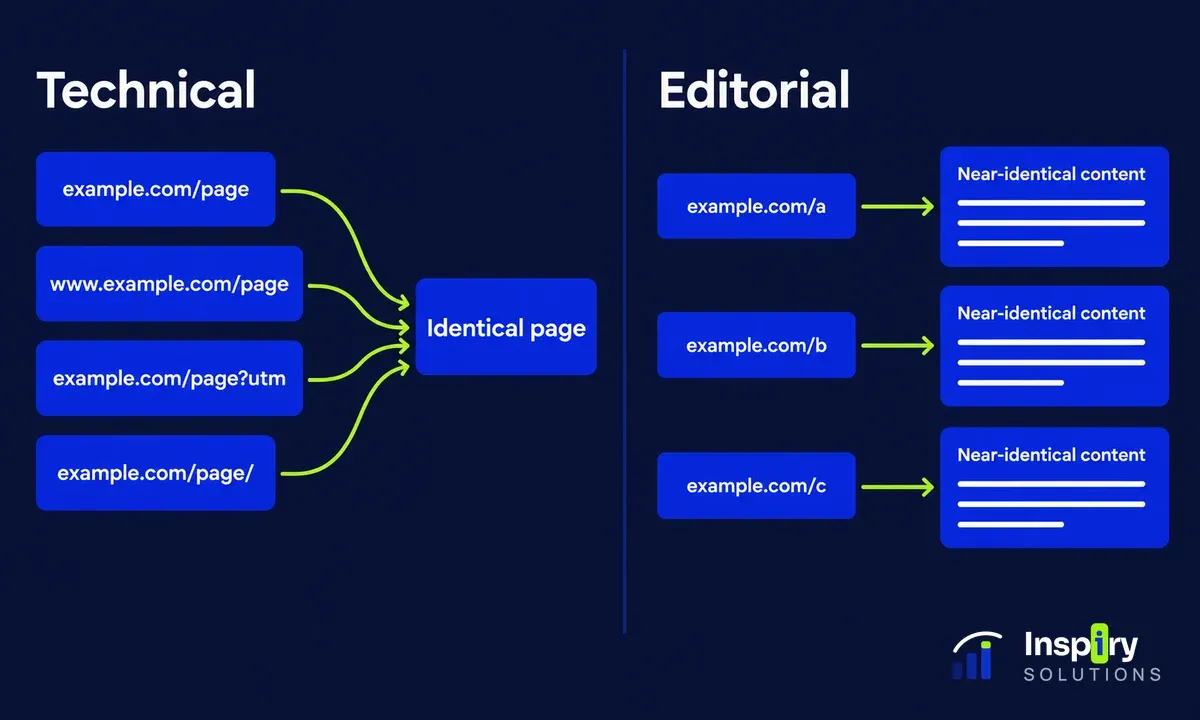
Technical duplicate content appears when substantially the same page is accessible through different addresses.
The underlying content may be perfectly useful. The problem is how the website generates, links to or serves its URLs.
Domain and URL variations
Common examples include:
- HTTP and HTTPS versions of one page.
- Addresses with and without www.
- Trailing slash variations.
- URLs with additional tracking parameters.
- Printer-friendly versions of standard pages.
For instance, https://example.com/services/ and https://example.com/services/?utm_source=email may show identical content.
The second address helps track a marketing campaign, but it usually does not need a separate place in search results.
HTTP, HTTPS and host variations are generally better consolidated through permanent redirects where only one public version should exist.
WordPress archives and attachment pages
WordPress can generate archives for categories, tags, authors and dates.
If categories and tags repeatedly display the same posts, those archive pages may contain substantial duplication.
Do not automatically remove every archive. Some category pages help visitors discover relevant content and deserve indexing.
Review their purpose, content and internal links before changing their visibility.
Technical duplicates usually require URL management, not rewriting otherwise useful text.
Editorial duplicates: several pages, one message
Editorial duplicates are different. They occur when separate pages exist but offer nearly the same information, answers or search intent.
These pages may have different titles, URLs and photographs while repeating substantially the same message.
Repeated location pages
A roofing company might create individual pages for neighbouring towns, changing only the place name in each heading and paragraph.
If those pages contain no meaningful local information, there may be little reason for Google to treat them as distinct resources.
The issue is not that a company serves multiple towns. The issue is whether each page provides useful information specific to the area.
The distinction between service area versus location pages helps businesses decide whether separate local pages are justified.
Overlapping services
Duplicate service pages often appear as a website expands.
A company might publish one page for website maintenance, another for WordPress support and a third for WordPress maintenance services.
These can be legitimate separate services, but only when their intended audiences, deliverables and purposes differ enough.
If every page repeats the same introduction, benefits and call to action, consolidation may be more useful than producing additional text.
Repeated articles and supplied descriptions
Google’s helpful content guidance encourages information that provides original value rather than simply reproducing existing material.
For editorial duplicates, first decide whether the pages answer genuinely different questions. If not, adding a canonical tag without addressing the overlap may only conceal the underlying content problem.
Find duplicates on your site
Before changing anything, check your website for duplicate content using both search data and a site crawl.
Start with Search Console
Open Google Search Console, select your property and visit the Page indexing report.
Look for relevant exclusion reasons:
- Duplicate without user-selected canonical: Google identified a duplicate but your site did not clearly declare its preferred version.
- Duplicate, Google chose different canonical than user: Google selected a different URL from the one you specified.
- Alternate page with proper canonical tag: Google has recognised an alternative version pointing towards a preferred page.
These statuses are described in Google’s Page indexing report documentation.
The last status is often expected. The first two need investigation, especially when important commercial pages are involved.
Export affected URLs and group them by pattern before making changes.
Crawl titles and page content
Use a website crawler to compare indexable URLs, page titles, main headings and content similarity.
Look particularly for:
- Multiple indexable URLs showing identical main content.
- Service pages targeting the same customer need.
- Town pages with repeated descriptions.
- Archives duplicating other landing pages.
- Internal links pointing to inconsistent URL versions.
Record the preferred URL for each group and the reason it should remain accessible.
Choose the right fix: 4 options
How to fix duplicate content depends on whether the problem involves URL variations or genuinely separate pages.
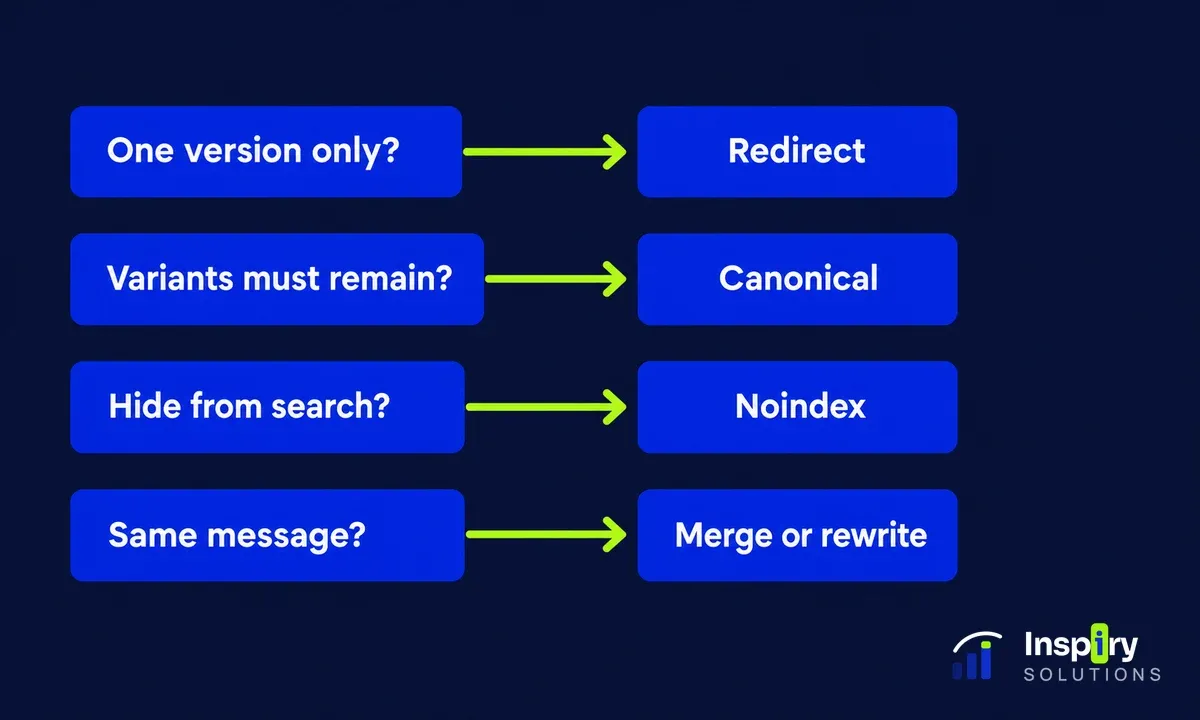
A redirect removes an unnecessary address from the visitor journey. A canonical signal identifies a preferred version while leaving alternatives accessible. Noindex excludes a page from search, while merging or rewriting addresses editorial overlap.
1. Redirect
Use a permanent 301 redirect when only one version of a page should exist for visitors.
Typical cases include HTTP addresses moving to HTTPS, unwanted www variations, retired articles and duplicate pages consolidated into a stronger replacement.
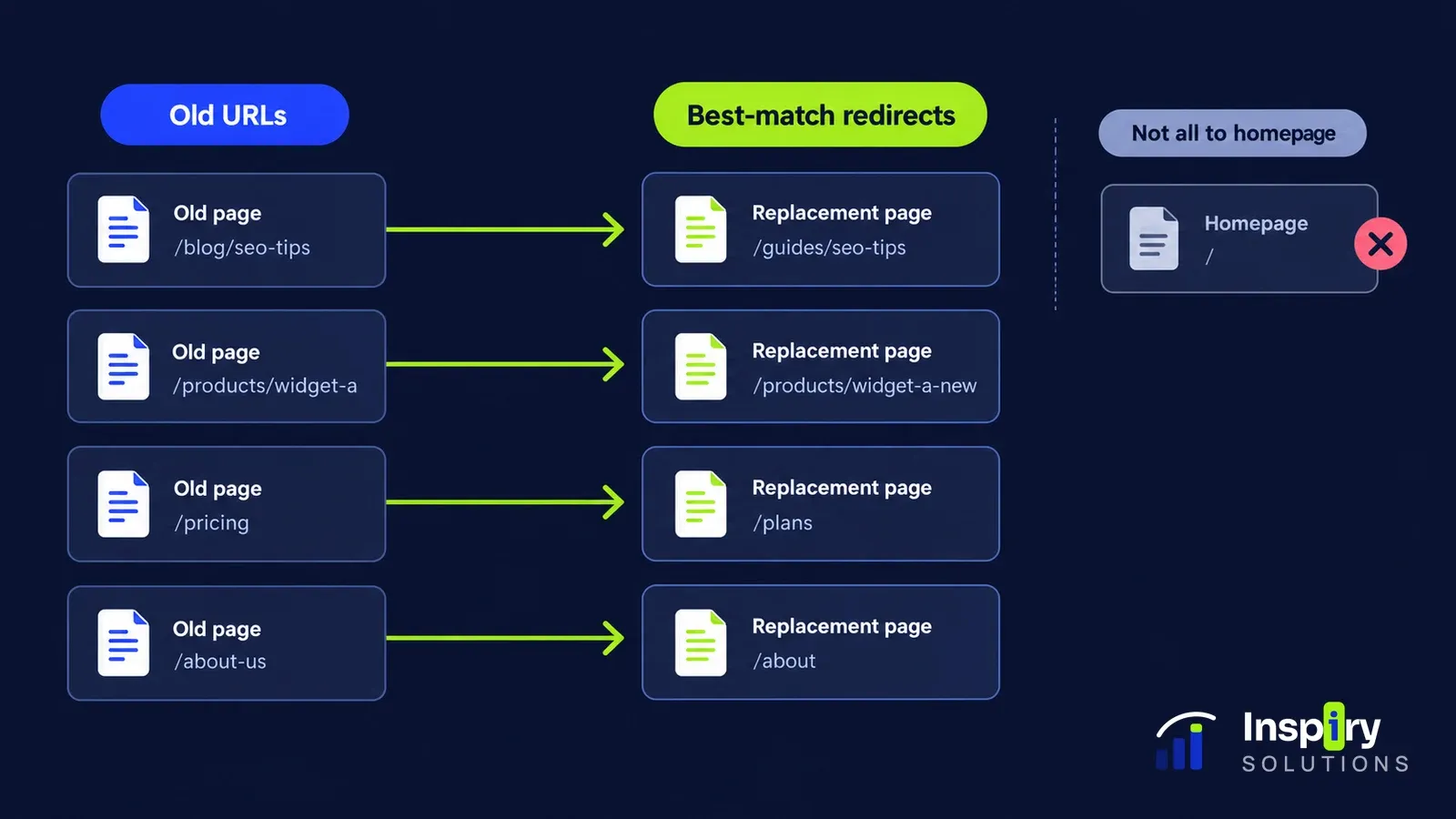
The redirect should point directly to the most relevant final destination, rather than sending every retired URL to the homepage.
Before implementation, identify internal links and update them to use the destination URL.
Follow the practical steps for planning 301 redirects when consolidating important pages.
After deployment, confirm that the old URL redirects correctly and that the destination loads successfully.
2. Canonical
A canonical signal tells search engines which URL you prefer when several similar versions must remain accessible.
A typical example is a tracking parameter URL that visitors or campaigns still use, while the clean page remains the preferred search result.
Google treats canonical annotations as strong signals, but not absolute commands. It may select another version when other signals disagree.
A canonical does not redirect visitors or guarantee that a specific page will be indexed.
For implementation details and common errors, read canonical tags in WordPress.
3. Noindex
Use noindex when a page is useful to visitors but does not need to appear in search results.
Examples may include certain utility pages, internal search result pages or low-value archives that users still need for navigation.
Noindex is an instruction to exclude a page from search, not a way to combine ranking signals from duplicate URLs.
Therefore, it should not be the default replacement for canonical handling.
A page must be crawlable for Google to discover its noindex instruction. Blocking it through robots.txt can prevent that instruction from being seen.
4. Merge or rewrite
Merge or rewrite when separate pages provide essentially the same answer.
For two overlapping service pages, decide whether one comprehensive page would serve visitors better. If so, consolidate the useful material, redirect the retired URL and update internal links.
If both pages have distinct purposes, rewrite them around those differences.
For example, installation and emergency repair services might share company information but need separate processes, customer questions and service details.
The following table connects common duplicate content causes to suitable actions.
| Cause | Technical or editorial | Recommended fix | How to verify |
|---|---|---|---|
| HTTP and HTTPS both load | Technical | 301 redirect HTTP to HTTPS | Test redirects and inspect the preferred URL |
| www and non-www both load | Technical | 301 redirect to the selected host | Confirm one final URL and consistent internal links |
| Tracking parameters | Technical | Canonical to the clean URL | Inspect declared and Google-selected canonicals |
| Tag archives duplicating categories | Technical and editorial | Noindex redundant archives, or consolidate their purpose | Check indexing and archive navigation |
| Attachment pages | Technical | Redirect unnecessary pages to relevant media or content destinations | Test redirects and crawl remaining attachment URLs |
| Near-identical location pages | Editorial | Merge or rewrite with genuine local information | Review page distinctiveness and indexing |
| Overlapping service pages | Editorial | Merge or rewrite around separate services | Compare content and internal links |
| Old and new posts on the same topic | Editorial | Merge useful material and redirect the retired post | Test redirect and inspect the retained article |
| Staging site indexed | Technical | Restrict staging access, remove exposure and request removal where appropriate | Check access restrictions and search visibility |
The table is a starting point, not an automatic rule. In particular, do not noindex useful archives or redirect location pages without checking whether they serve distinct purposes.
Duplicate content on location and service pages
Location and service pages deserve particular attention because they often represent important commercial opportunities.
A business serving several areas may legitimately need multiple landing pages. However, publishing near duplicate pages with only the location changed is rarely a convincing long-term strategy.
What makes a location page useful?
A strong local page might include:
- Services available in that location.
- Genuine completed work or relevant examples.
- The team responsible for serving the area.
- Local response arrangements and practical limitations.
- Photographs and information specific to the location.
- Questions customers in that area commonly ask.
For a structured approach, see location pages that are not duplicates.
When fewer pages are better
If a business cannot provide meaningful local detail for every town, regional pages may offer a clearer structure.
One regional page can explain coverage, available services and response arrangements without repeating the same message across numerous weak town pages.
Likewise, service pages should be separated when customers have different needs, processes or questions.
A canonical tag is not a substitute for useful editorial decisions. If pages are effectively interchangeable, decide which ones deserve to exist.
Hypothetical example: 25 town pages with one text
Hypothetical example: A plumbing company creates 25 town pages. Each contains the same 600 words, with only the town name replaced.
The business assumes that having one page per town will make it visible for more local searches.
However, Search Console reports many pages as “Duplicate, Google chose different canonical than user”.
This suggests Google is grouping some pages because their content is too similar, although the precise cause still requires inspection.
The company examines its service coverage and discovers it can describe five meaningful regional areas.
Instead of maintaining all 25 near-identical town pages, it creates five regional pages with accurate details about local jobs, responsible team members, response arrangements and the services available.
It then maps the retired town URLs to the most relevant regional pages using permanent redirects.
Internal links and the XML sitemap are updated to reference the retained pages.
The business checks that regional pages are distinct, useful and accessible, then monitors Search Console.
This example illustrates a consolidation approach, not a guaranteed ranking improvement. Reducing page count is not automatically beneficial.
The real improvement is a clearer relationship between each page, its intended audience and the information it provides.
Verify the fix in Search Console
Implementing redirects, canonical signals or rewritten content is only the first part of duplicate content SEO.
You must check whether the changes work technically and whether Google eventually recognises them.
Inspect representative URLs
Open URL Inspection in Search Console and enter an affected address.
Compare the user-declared canonical with the Google-selected canonical where this information is available.
Check whether the URL is indexed, excluded or redirected as expected.
For technical duplicates, confirm that Google identifies the intended main version. For editorial changes, inspect the retained pages and verify that they remain eligible for indexing.
Check the website directly
Test redirects in a browser and with an HTTP response checker.
Confirm that retained pages return successful responses, unnecessary URL variants resolve appropriately and internal links no longer point towards retired pages.
Check canonical declarations and the XML sitemap for contradictory signals.
Common questions
Will Google penalise my site for duplicate content?
Not for normal duplication. Google generally identifies similar pages and picks one version for search results. A duplicate warning is not automatically a penalty. However, Google’s spam policies apply to practices such as scraped content or deliberately copied and scaled content intended to manipulate results. The important distinction is between ordinary URL duplication and publishing content primarily to exploit search rankings.
How much duplicate content is too much?
Google does not publish a universal percentage that determines how much duplication is acceptable. Shared navigation, legal information and standard service descriptions can appear across multiple pages. The more useful test is whether each indexable page offers information or value that the others do not. If visitors would gain nothing from visiting a second page, reconsider whether both need indexing.
Is a canonical tag or a redirect better?
Use a redirect when only one version should exist for visitors, such as an obsolete URL replaced by a new address. Use a canonical when multiple versions must remain accessible, including certain parameter URLs. A canonical is a signal rather than an instruction Google must follow, so Google can ignore your preference. Redirects are normally clearer when a duplicate URL is being permanently retired.
Can I use the same text on several location pages?
Yes. Small amounts of shared boilerplate, including company introductions and standard service information, are reasonable. However, each indexable location page should contain genuinely local and useful detail, not simply a substituted town name. Include accurate service coverage, relevant work and practical arrangements. If the pages cannot offer meaningful differences, merging them into stronger regional content may be more useful.
Does content syndicated elsewhere count as duplicate?
Yes, syndicated content can appear at several websites, and Google may choose to show another publisher’s copy instead of yours. Ask the republishing site to link back to the original article and, where possible, use an appropriate canonical or noindex instruction. These arrangements require publisher cooperation and do not guarantee which version Google will display in search results.
Next step
Duplicate warnings are usually a mix of technical and editorial causes. Fixing them properly means identifying which URLs are genuinely duplicated, which pages lack unique value and which exclusions are simply normal search engine behaviour.
Our technical SEO audit separates these issues, recommends the appropriate fix for each and includes implementation rather than just a list of recommendations.
Start with a free audit of your site. Send us your website URL and receive a plain-language reply within two working days.