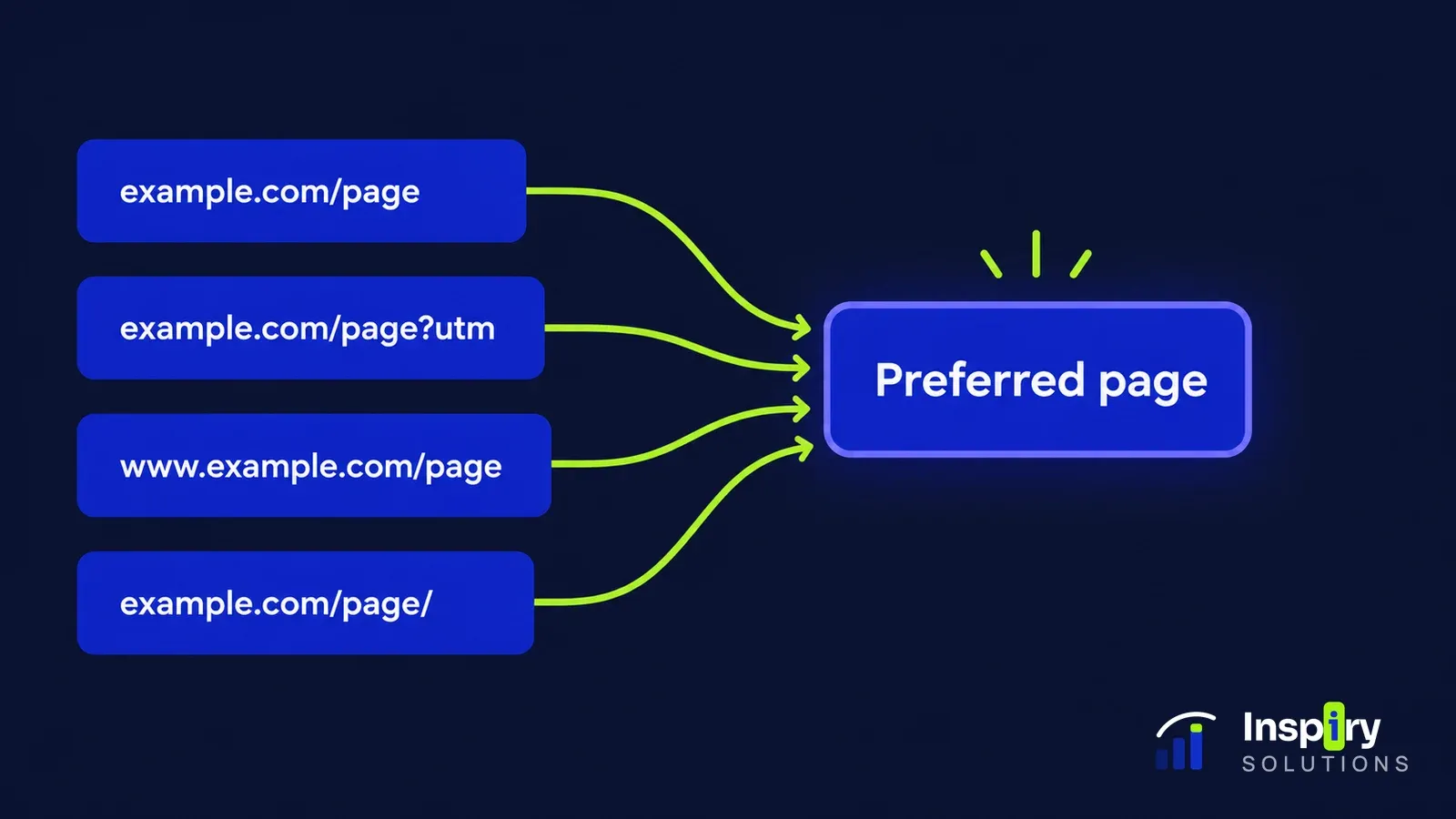
Shopify duplicate content is usually manageable because canonical tags tell Google which product URL you prefer, but internal links can send mixed signals. The same product may appear at a direct product URL, inside several collections and with variant parameters. Most stores do not need to remove every alternative URL. They need to verify which version Google recognises, check whether their theme links consistently to that version and address genuinely unnecessary indexed pages.
If Google Search Console shows duplicate statuses or you have spotted product addresses containing /collections/.../products/, this guide explains what deserves attention.
Where Shopify duplicate content comes from
Shopify duplicate content often starts with normal catalogue behaviour rather than an SEO mistake.
The important distinction is between alternative URLs for one product and separate pages that genuinely compete. The broader principles of duplicate content on any site apply, but Shopify has particular URL patterns worth checking.
Direct and collection-scoped product URLs
Consider a product with the handle blue-shirt.
https://example.com/products/blue-shirtThe same product could also be accessible through:
https://example.com/collections/shirts/products/blue-shirtIf it appears in a summer collection, another route might be:
https://example.com/collections/summer/products/blue-shirtThese are examples of Shopify duplicate product URLs.
Shopify uses fixed URL structures for products and collections.
Variants, tags and collection parameters
Product variants can introduce addresses such as:
/products/blue-shirt?variant=123456The parameter identifies a particular variant, such as a size or colour.
Collection tags can produce paths such as /collections/shirts/blue, while filters and sorting controls may append parameters including ?filter.v.option.color=Blue or ?sort_by=price-ascending.
Pagination can add /collections/shirts?page=2.
Shopify Markets and repeated product pages
International selling adds another layer. Markets may use separate domains or language and market subfolders, such as /en-gb/, with similar English product content.
These pages may serve different customers through currency, shipping or regional availability. They should not automatically be consolidated into one address, and their language or regional (hreflang) annotations may also need review.
Another source is creating separate products for every colour when those items could reasonably be variants of one product.
A catalogue with repeated titles and descriptions is not necessarily broken, but the structure should reflect meaningful purchasing differences.
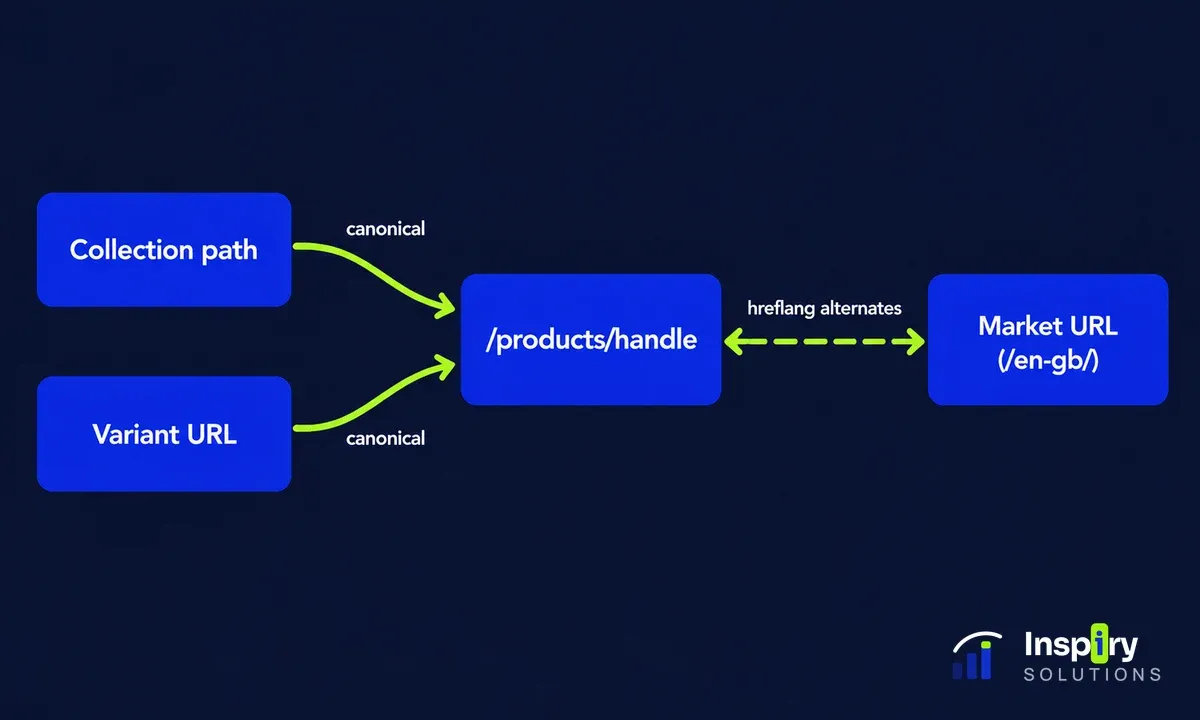
The diagram illustrates several routes to a product and the preferred direct URL.
What Shopify’s canonical tags already handle
A canonical tag identifies the URL a site owner prefers Google to treat as the main version of substantially similar content.
It appears in the page’s HTML and commonly looks like this:
<link rel="canonical" href="https://example.com/products/blue-shirt">This tells Google that the direct product URL should represent the content, even if a customer reached it through a collection.
However, Google treats canonicalisation as a preference supported by other signals, not an instruction it must obey. Its guidance on consolidating duplicate URLs explains why consistent linking, redirects and sitemap references matter.
The same principle applies to common canonical tag mistakes across different platforms.
What most Shopify themes do
Many Shopify themes output a canonical pointing towards /products/handle for collection-scoped product addresses.
Variant URLs also commonly identify the direct product URL as preferred.
But do not assume every theme behaves correctly.
Custom Liquid code, third-party apps, headless implementations and previous SEO changes can alter canonical output.
Check the actual HTML rather than relying on an article describing Shopify defaults.
What a canonical cannot do
A canonical tag does not prevent Google from discovering or crawling alternative addresses.
It also does not guarantee that Google will choose your specified address.
The distinction matters when reviewing duplicate URLs in Search Console.
An excluded collection-scoped address can be evidence that canonicalisation is working correctly, not evidence that the store needs urgent repairs.
The goal is a consistent preferred URL, not an empty duplicate report.
The real problem: internal links to non-canonical URLs
One of the more actionable Shopify SEO issues is a disagreement between the canonical tag and the links generated by the storefront.
A theme may show a product card within a collection and link that card to:
/collections/shirts/products/blue-shirtYet the product page’s canonical points to:
/products/blue-shirtThe canonical recommends one address while internal links repeatedly introduce another.
Internal links help search engines discover pages and understand their relationships.
This is usually more useful to investigate than simply counting excluded duplicate URLs.
How to recognise the pattern
Open a collection and inspect several product cards.
If those links contain /collections/collection-name/products/product-name, inspect the corresponding product’s canonical.
Repeat the check across featured products, search results, recommendations and related-product sections.
A collection-scoped URL is not automatically harmful.
Changing product card links
A developer can often adjust theme Liquid so product cards use the direct product URL instead of a collection-dependent address.
For example, the theme may use collection-specific URL logic where a simpler product URL reference would be appropriate.
This is a small-looking change with potentially broad effects.
Use a duplicate theme, test representative templates and confirm product variants still work before publishing.
For implementation support, see our Shopify theme fixes.
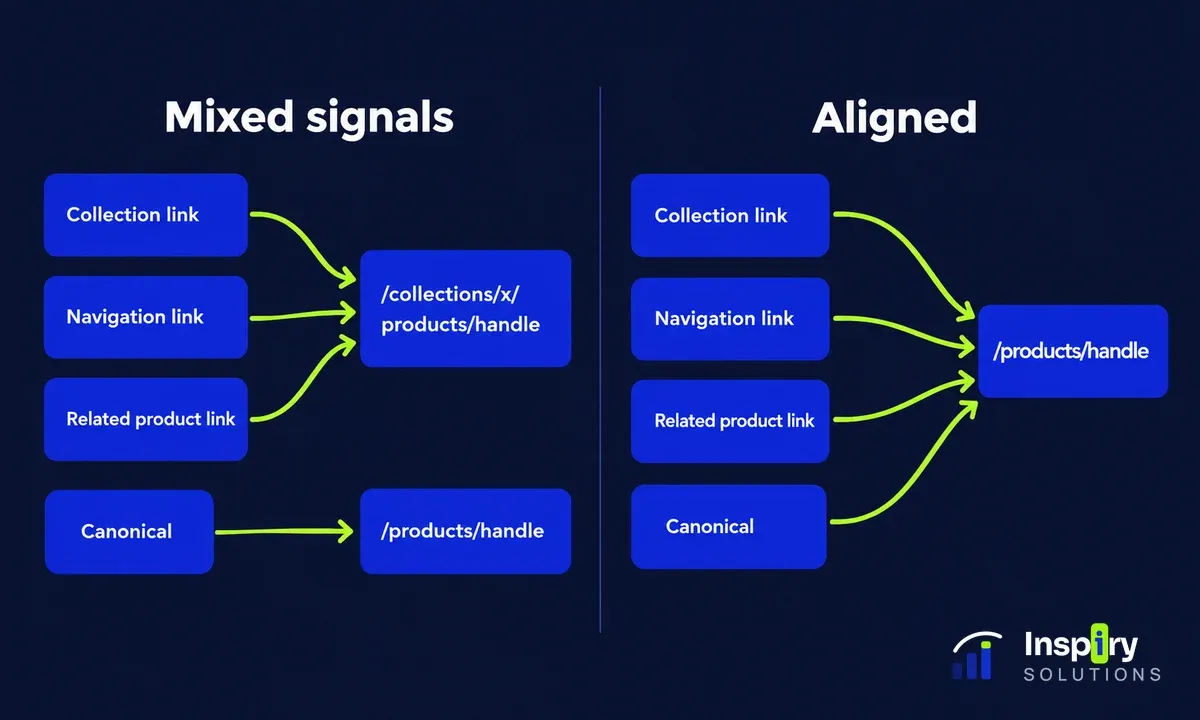
The objective is alignment.
Tag, filter and sort pages
Shopify tag pages and filtering controls can create many variations of a collection.
For example, a tag URL showing blue shirts might contain very little unique information beyond the original shirts collection.
That does not automatically make the page harmful.
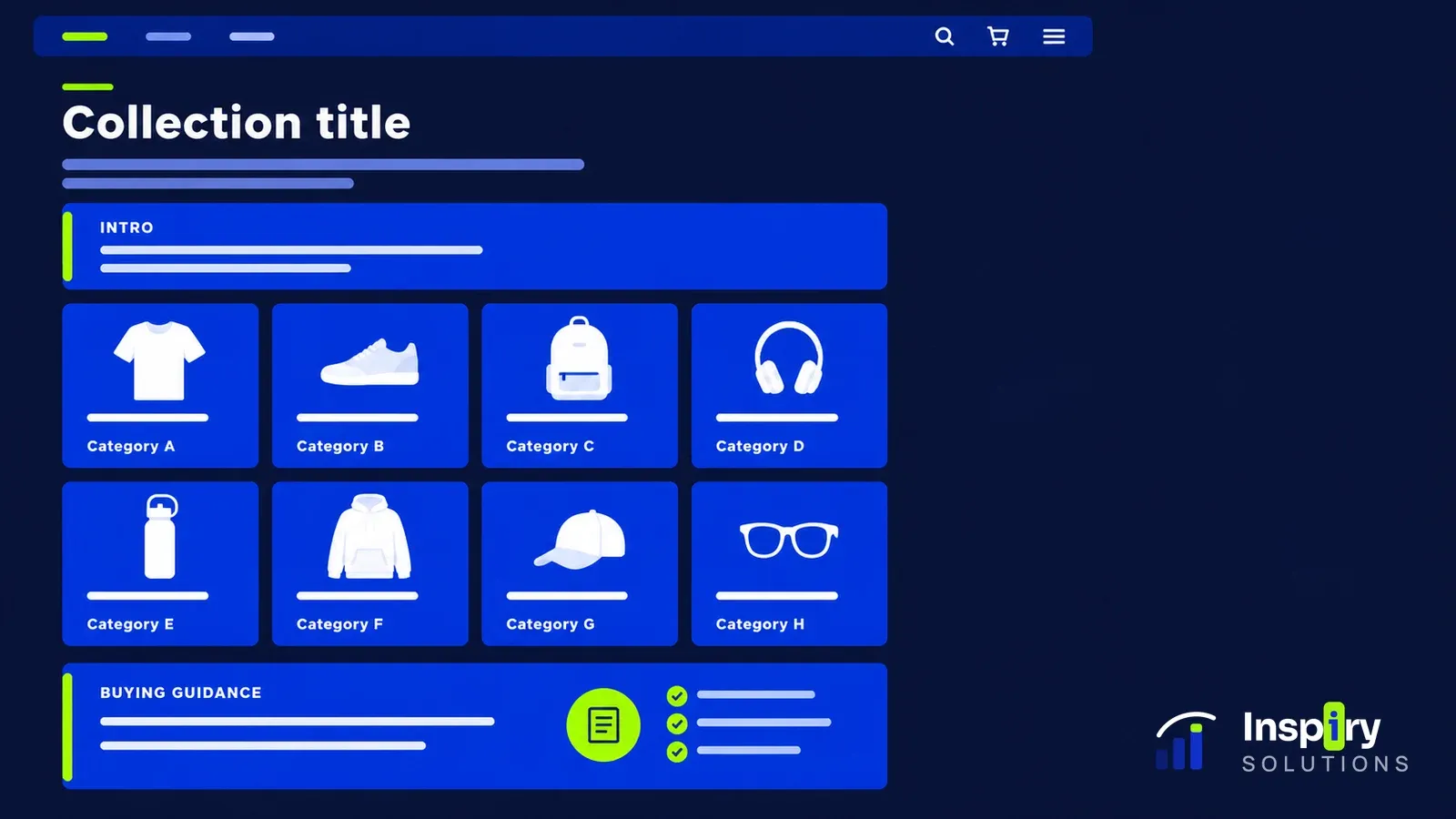
If a specific collection addresses a valuable search need, consider building one of your collections that work as landing pages instead of relying on accidental parameter combinations.
Check existing crawl restrictions first
Shopify normally generates robots.txt rules that restrict crawling of various storefront URL patterns, including certain filtered and sorted routes.
However, default rules can vary by route and change over time.
Read your live /robots.txt before adding anything.
Google’s guidance on faceted navigation explains why numerous filter combinations can consume crawling resources without providing valuable landing pages.
Your decision should depend on whether the page deserves indexing, whether it is already indexed and whether search engines can crawl it.
Three possible approaches
Leave the page as it is. This may be appropriate when existing canonical signals and crawl controls work, or when a useful filtered page supports genuine search demand.
Apply noindex. A robots meta noindex instruction tells a search engine not to include that page in search results after it crawls the page.
Restrict crawling with robots.txt.liquid. This can help limit unnecessary crawling of large groups of parameters, but it does not directly remove indexed URLs or guarantee they cannot appear in search.
Google’s robots.txt documentation distinguishes crawling restrictions from indexing controls.
Do not block a URL in robots.txt if you are relying on Google discovering its noindex instruction.
Also avoid automatically canonicalising every filtered or paginated page to the first collection page.
Choose a policy for each URL family rather than applying one rule to every collection parameter.
Duplicate product copy across products and stores
Not all Shopify duplicate content comes from URL structure.
Manufacturer-provided descriptions are a common example.
That similarity does not automatically mean a penalty.
Manufacturer descriptions
Retain accurate technical details where customers need them, but add useful original information.
A strong product opening can explain who the item suits, how it differs from nearby options or what a buyer should check before ordering.
Size guidance, compatibility information and practical usage notes may be more valuable than rewriting every specification with different adjectives.
Do not invent product benefits merely to create uniqueness.
Separate colours and sizes
If the only difference between two product pages is colour or size, consider whether variants within one product would better represent the catalogue.
This can simplify management and reduce near-duplicate pages, but it is not universally the right decision.
Different models, product attributes or search intent may justify separate pages.
Review these differences before merging products.
Wholesale and regional catalogues
Businesses sometimes operate separate wholesale, retail or country-specific stores containing much of the same catalogue.
The appropriate solution depends on whether those stores serve meaningfully different audiences and whether their product content changes by market.
Separate pricing, fulfilment, language and availability may justify separate pages.
Do not impose a single cross-domain canonical without reviewing international targeting and business requirements.
Focus on accurate product information, clear market distinctions and consistent technical signals rather than artificial wording changes.
How to check your store in an afternoon
You can investigate Shopify duplicate content without purchasing an expensive audit or immediately installing another SEO app.
Start with a small sample of products, collections and URL patterns.
Use the following four checks in order.
1. View the source of one product, one collection and one tag URL
Open a direct product URL in your browser.
Record the full canonical destination.
Repeat this with a collection-scoped version of the same product, a collection page and a tag page.
For each URL, ask whether the canonical points to itself, the direct product or another page.
Also check whether the page is blocked from crawling or contains a noindex instruction.
If the source differs unexpectedly between examples, investigate the template, application or theme customisation responsible.
A single correct product canonical does not prove every template is configured correctly.
2. Read the page indexing report for duplicate statuses
Open Google Search Console, select your property and visit the Page indexing report.
Look at statuses including “Duplicate, Google chose different canonical than user” and “Alternate page with proper canonical tag”.
Google’s Page indexing report documentation explains these classifications and the purpose of the report.
Export examples where possible and group them by URL pattern.
Pay particular attention to important product pages that are not indexed, rather than assuming every excluded URL requires action.
Some exclusions are legitimate. The wider reasons Google skips pages can help distinguish duplication from other indexing issues.
Remember that Search Console’s example lists may not include every affected URL.
3. Inspect a collection-scoped product URL in Search Console
Choose a collection-scoped product address from your sample and enter it into Search Console’s URL Inspection tool.
Check the user-declared canonical and Google-selected canonical where available.
If Google selected the intended /products/handle address, the alternative may be correctly consolidated.
If Google chose a different URL, compare the content, canonical tags, internal links and redirects before deciding what to change.
Inspect the direct product URL separately as well.
The inspection result describes Google’s available information about a URL.
4. Crawl a sample of the store and list internal links to non-canonical URLs
Use a site crawler, a limited free crawl allowance or manual inspection of a representative group of pages.
Include collections, product pages, navigation, related products and promotional sections.
Export or record internal links pointing to collection-scoped product URLs and other non-canonical addresses.
For each destination, identify the source page and the declared canonical.
Prioritise patterns repeated across product cards or global templates.
Once you have an evidence-based list, prepare the smallest theme change that corrects the repeated pattern.
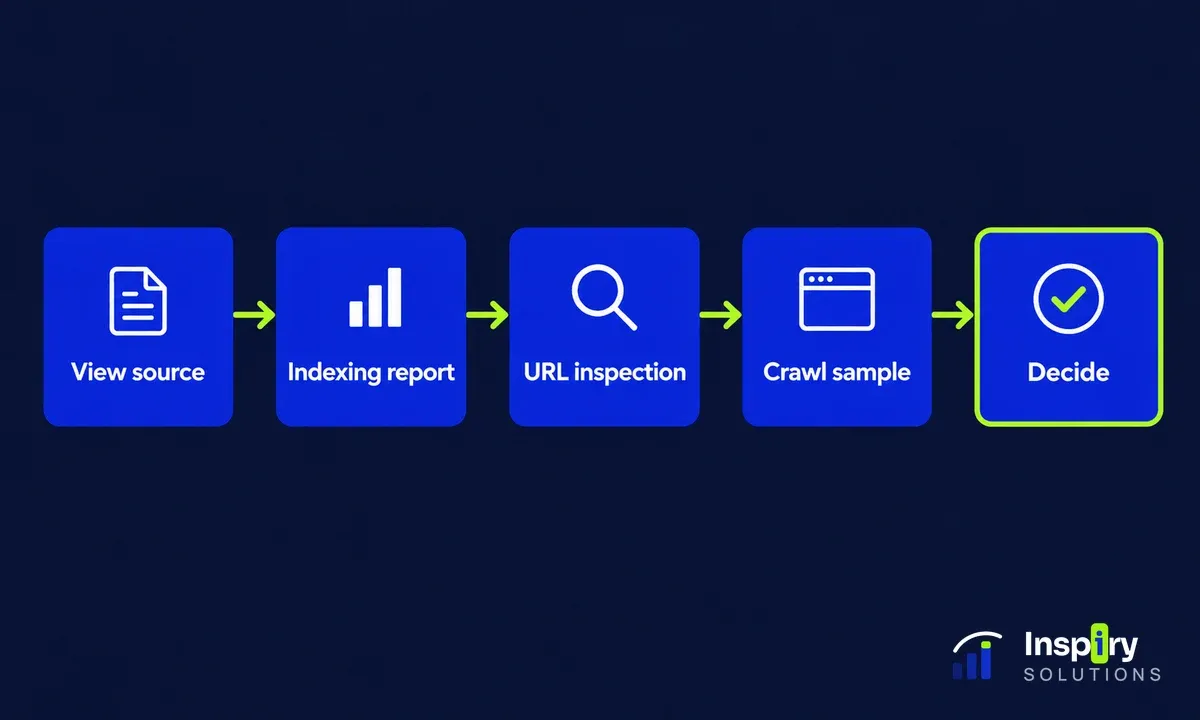
The process ends with a decision, not an automatic fix.
Hypothetical example: A store sees 300 URLs under “Duplicate, Google chose different canonical than user”.
The owner initially assumes that all 300 pages need repairing.
Inspection shows that Google selected the intended /products/ URLs in most cases. Those exclusions are left alone.
However, a sample crawl reveals that the theme repeatedly links product cards to /collections/.../products/ addresses.
The practical fix is to update those product card links and test the result, rather than trying to force every excluded URL into Google’s index.
This is an illustrative scenario, not a reported client result.
What to fix and what to leave alone
The right response to Shopify duplicate content depends on the URL pattern, the actual HTML and Google’s observed behaviour.
Use this table to decide what deserves a closer look.
| URL pattern | Example | Default behaviour to verify | Action |
|---|---|---|---|
| /products/handle | /products/blue-shirt | Usually the preferred product URL | Check self-referencing canonical and internal links |
| /collections/x/products/handle | /collections/shirts/products/blue-shirt | Often canonicalises to direct product URL | Align product card links where practical |
| ?variant= | /products/blue-shirt?variant=123 | Often canonicalises to base product | Confirm selected variants and canonical output |
| /collections/x/tag | /collections/shirts/blue | Tag handling depends on template and rules | Keep useful pages; review thin indexed pages |
| ?filter. parameters | ?filter.v.option.color=Blue | Some patterns may be crawl-restricted | Review indexing need and robots.txt |
| ?sort_by= | ?sort_by=price-ascending | Often restricted by default robots.txt rules | Verify live restrictions; avoid unnecessary indexing |
| ?page=2 | /collections/shirts?page=2 | Represents a different product listing | Check crawlability, pagination and canonical |
| Market subfolder | /en-gb/products/blue-shirt | Market-specific signals may apply | Review localisation and regional targeting |
| Duplicate colour products | /products/shirt-blue | Separate product with similar content | Consider variants or genuinely distinct content |
Leave working canonicalisation alone
If Google excludes an alternative URL and indexes the direct product version you want, there may be no problem to solve.
Changing tags merely to reduce an exclusion count can make the situation worse.
Instead, check whether internal links are consistent and whether the intended product page is accessible, indexable and represented correctly in the sitemap.
Fix signals that contradict each other
Prioritise incorrect canonicals, important pages excluded unexpectedly and repeated internal links to non-preferred product addresses.
Review indexed filter or tag pages when you did not deliberately create them as landing pages.
If a store is changing platforms or domains, include canonical checks during a migration so old and new URL signals do not conflict.
Document every decision in a simple record: URL pattern, current behaviour, desired behaviour, implementation location and verification result.
This becomes particularly useful when a theme update, app installation or redesign changes templates later.
Common questions
Does Shopify have a duplicate content problem?
Shopify creates several URLs for the same product through collection routes, variant parameters and other storefront features. Most themes handle common product duplicates with canonical tags pointing towards /products/handle. The more common actionable issue is internal links pointing at the non-canonical version. Check whether Google has already consolidated those addresses before treating them as a problem.
Should I remove /collections/ from product URLs on Shopify?
You cannot change Shopify’s underlying product URL structure to remove these routes altogether, but you can change which URL your theme links to. Linking product cards directly to /products/handle helps align internal links with the preferred canonical. Test the change on a duplicate theme first, particularly where collection breadcrumbs or variant selection depend on existing navigation.
Should I noindex Shopify tag pages?
Only consider noindex when tag pages are indexed and you did not choose them as useful search landing pages. Applying noindex usually needs a theme code change, with rules tailored to the affected templates. A page blocked in robots.txt cannot show Google its noindex tag. Review existing crawling restrictions before implementing either approach.
Is “Duplicate, Google chose different canonical than user” an error?
It is a Search Console status, not automatically an error requiring repair. It matters when Google selects a URL you do not want to represent that content in search results. Use URL Inspection to examine Google’s selected canonical and compare it with your declared preference. If Google chose the desired direct product URL, exclusion may be expected.
Will duplicate content get my store penalised?
Duplicate URLs within your own store are not a penalty issue in themselves. They can produce confusing signals or unnecessary crawling, but normal alternative product URLs are not evidence of spam. Copying, scraping or mass-producing content without adding value is a different issue. Google’s spam policies explain the practices that may lead to enforcement.
Fix the signals, not just the tags
A good Shopify duplicate content review should finish with a short, prioritised action list, not a collection of frightening Search Console screenshots.
The strongest approach is to align the main signals around the URL you genuinely want indexed.
Check that the canonical identifies that URL, important internal links point to it, sitemap entries support it and redirects do not contradict the destination.
Keep separate product or regional URLs when they have a legitimate purpose.
After a theme change, inspect the rendered links and page source again.
Then review Search Console after Google has had an opportunity to recrawl the affected pages.
The useful result is not zero duplicate URLs.
Send your store URL for a free audit and we will tell you which duplicate patterns matter on your store, or book Shopify development time to align the theme’s links and canonicals.