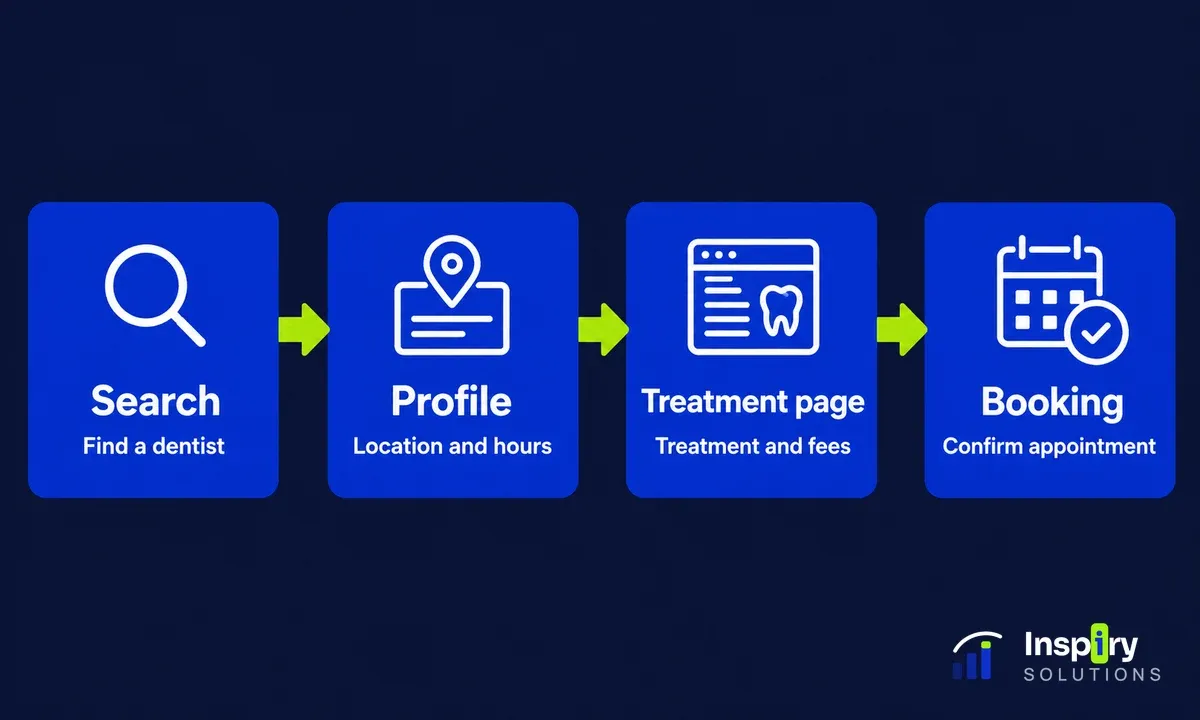
Dental SEO helps practices attract new patients by making treatment information, fees, availability and booking options easy to find in local search. A useful strategy connects your Google Business Profile, treatment pages and booking system, so someone searching for a dentist nearby can decide whether your practice meets their needs.
This guide is for owners and managers of independent dental practices and small groups in the UK and US. It explains which website pages, profile details and tracking checks matter most, with practical steps that your team can maintain.
Five things a new patient checks before booking
Someone searching for a dentist is often comparing several nearby practices. They may already know which treatment they want, or they may simply need an appointment and a clear explanation of their options.
Whether you accept new patients
The first question is straightforward: can this practice actually see me?
If you currently accept new patients, say so clearly on the homepage, contact page and relevant booking pages. If availability depends on the treatment, explain that distinction.
Presenting all appointments as available creates unnecessary calls and disappointed visitors.
Use a clear message such as “Currently accepting new private patients” only when your team can confirm it remains accurate.
NHS, private or insurance
Patients need to understand how they can access and pay for care before choosing a practice.
For UK practices, explain whether you provide NHS treatment, private treatment or both. If NHS registrations or appointments are unavailable, avoid language that suggests otherwise.
For US practices, identify participating insurance arrangements where appropriate. Explain that coverage and patient contributions depend on individual plans and eligibility.
If your dental practice offers membership plans or payment options, describe how they work without implying that every treatment is included.
Treatments and fees
A patient considering implants, Invisalign, whitening or routine dentistry wants to know whether you provide the service and what the likely costs involve.
Start with a treatment page that explains the procedure, who may be suitable, how assessment works and what happens afterwards.
Show practice-approved fee guidance where possible. A starting price or indicative range may help, provided the limitations and what is included are clear.
Location, parking and access
Convenience can influence whether someone contacts your practice.
Your contact and location pages should contain the full address, postcode or ZIP code, practical travel information and parking arrangements.
Mention accessible entrances, lifts or step-free access only where those facilities genuinely exist.
Keep the same core address details on your website and Business Profile.
How to book
Once someone has chosen your practice, booking should require as little effort as practical.
Show a clearly labelled “Book an appointment” action on mobile and desktop. Make it obvious whether the action opens live appointment availability, requests a callback or submits an enquiry.
Provide a telephone alternative and clear guidance for urgent dental problems.
The following table turns these patient questions into specific improvements.
| Patient question | Where it should be answered | What to include |
|---|---|---|
| Taking new patients? | Homepage, new patient page | Current availability, appointment types, next action |
| NHS or private / insurance? | Fees page, patient information page | NHS or private status, accepted insurance, eligibility limitations |
| Cost of treatment? | Individual treatment pages | Indicative fees, inclusions, assessment requirements |
| How far and parking? | Contact page, practice location page | Full address, directions, parking, accessibility |
| Emergency appointments? | Emergency dentistry page, booking information | Availability, contact method, out-of-hours arrangements |
| Can I book online? | Homepage, treatment pages, Business Profile | Working booking link, supported appointment types |
Once these basics are accurate, local SEO for dental practices can connect patient-focused website improvements with local search visibility and measurable enquiries.
Treatment pages that answer patient questions
A single “Treatments” page rarely provides enough detail for someone comparing specific procedures. It may list everything the practice offers without answering the questions that influence a booking.
For dental treatment pages SEO, start with the principal services that patients actually search for and your clinicians genuinely provide.
A practical treatment page should explain:
- What the treatment involves, using plain language.
- Which concerns or conditions it may address.
- Who may be suitable, subject to clinical assessment.
- What happens during consultation and treatment.
- What recovery or aftercare may involve.
- Indicative fees and factors affecting the final cost.
- How to arrange an appropriate appointment.
Show who provides the care
Dental care involves clinical decisions, so patients need reliable information about the people providing it.
Add clinician profiles with names, roles, relevant qualifications and professional registration details. For UK practitioners, check applicable General Dental Council requirements. US practices should follow their relevant state and professional requirements.
Link treatment pages to relevant clinician profiles where the association is genuine. Do not imply that every clinician provides every treatment.
Make clinical information trustworthy
Avoid unsupported promises such as guaranteed pain-free treatment, permanent results or universal suitability.
Explain that recommendations, treatment plans and costs depend on clinical assessment.
Review clinical content with a suitably qualified practitioner before publication, especially where procedures, risks or expected outcomes are described.
Hypothetical example
A private practice offers implants and Invisalign, but its website contains only one general “Treatments” page and no fee guidance.
The improvement plan creates separate implant and Invisalign pages, each explaining consultations, suitability, aftercare and fee ranges approved by the practice.
The Google Business Profile links to a suitable online booking page. Google Analytics 4 (GA4), a website measurement tool, records completed booking actions as key events.
The practice then checks which pages contribute to confirmed appointments, rather than assuming higher search traffic means more patients.
Dental SEO for your Business Profile
Your Google Business Profile is often one of the first places potential patients encounter your practice in Search or Maps.
For a typical general dental practice, “Dentist” is an appropriate primary category. Add relevant secondary categories only when they accurately describe services provided.
Check the details patients rely on
A practical dentist Google Business Profile review should cover:
- The real-world business name, without extra promotional keywords.
- The accurate practice address and map location.
- A telephone number reaching the appropriate practice.
- Regular and special opening hours.
- Relevant services and treatment descriptions.
- A working website and booking link.
- Recent, accurate photographs of the premises.
Opening hours deserve particular attention. Explain emergency arrangements on your website, including what patients should do when the practice is closed.
Follow our guide to setting up the practice profile fully when checking individual fields.
Connect the profile to the right action
A profile should lead people towards the information they need.
Link the main website field to the appropriate practice page, and use the booking option where supported and appropriate.
A patient selecting an appointment link should not be sent to a general contact page unless that page genuinely handles bookings.
Practitioner profiles and eligibility
That does not mean every dentist working in a practice automatically needs an individual listing.
For a small practice, one clearly managed practice profile is usually simpler for patients and staff. Separate practitioner profiles should be considered only when eligibility and operational needs justify them.
Review Google’s guidelines for representing businesses and individual practitioners before adding listings.
Reviews and patient privacy
Reviews can help people understand aspects of the patient experience, but dental practices must treat privacy and professional responsibilities as more important than marketing.
A suitable approach starts with consistent, voluntary review requests.
Do not offer discounts, gifts or treatment benefits in exchange for reviews. Do not request only positive feedback or pressure patients to publish comments.
Read Google’s review and contributed content rules before establishing a request process.
Reply without confirming patient relationships
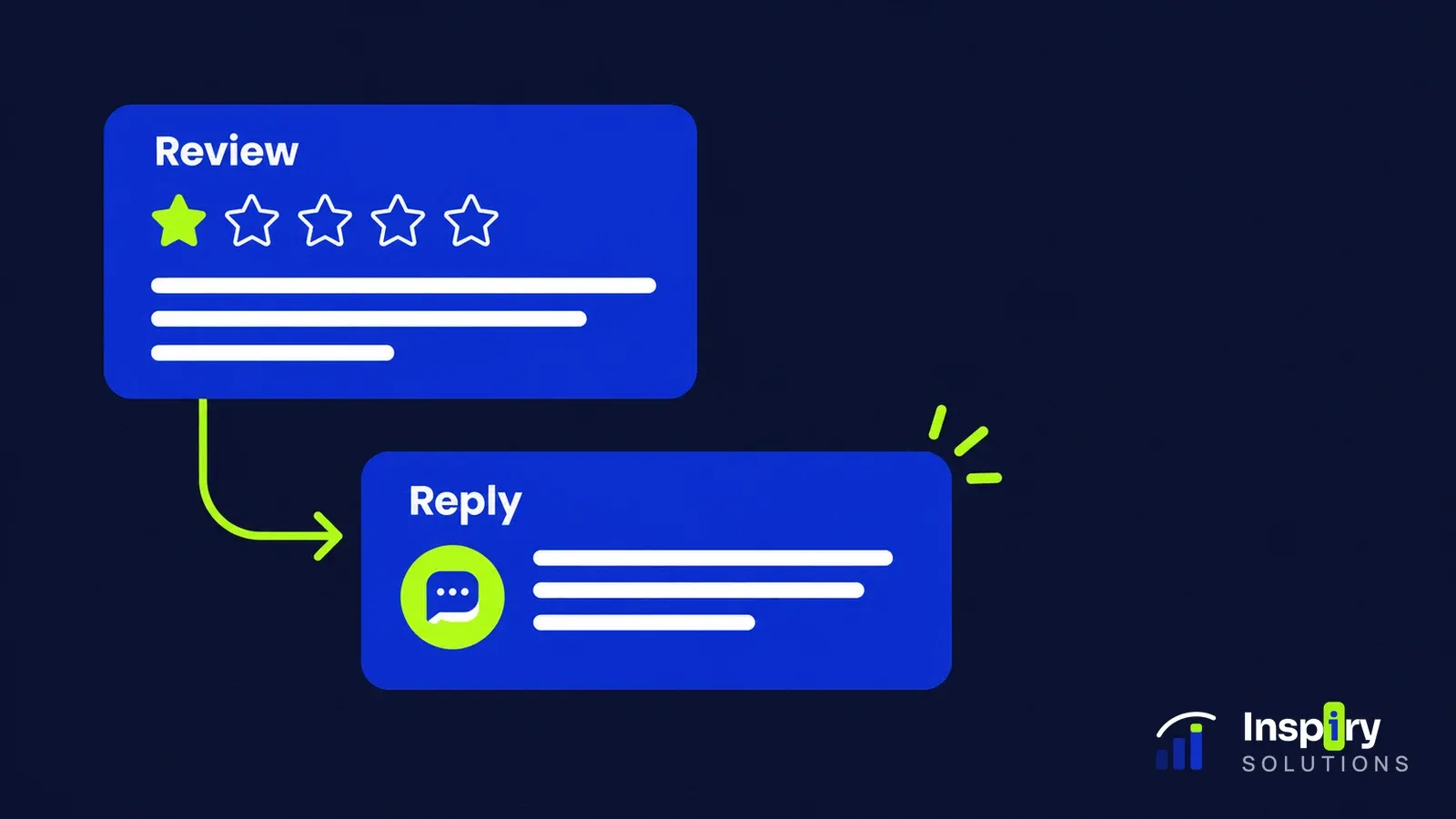
A public review response must not reveal confidential information.
Even if someone describes their treatment publicly, the practice should not confirm that they attended, identify their clinician or discuss clinical records.
Keep replies courteous and general.
For positive feedback, a simple expression of appreciation is enough. For complaints, acknowledge the concern without investigating the case in public.
An appropriate general response could be:
“Thank you for sharing your feedback. We take concerns seriously and welcome the opportunity to discuss them privately. Please contact our practice team.”
For more examples, see example replies to patient reviews.
Treat complaints as operational information
A repeated complaint about telephone access, unclear fees or confusing booking instructions may indicate a process worth investigating.
Review the underlying issue privately and correct any published information that creates misleading expectations.
Multi-practice groups
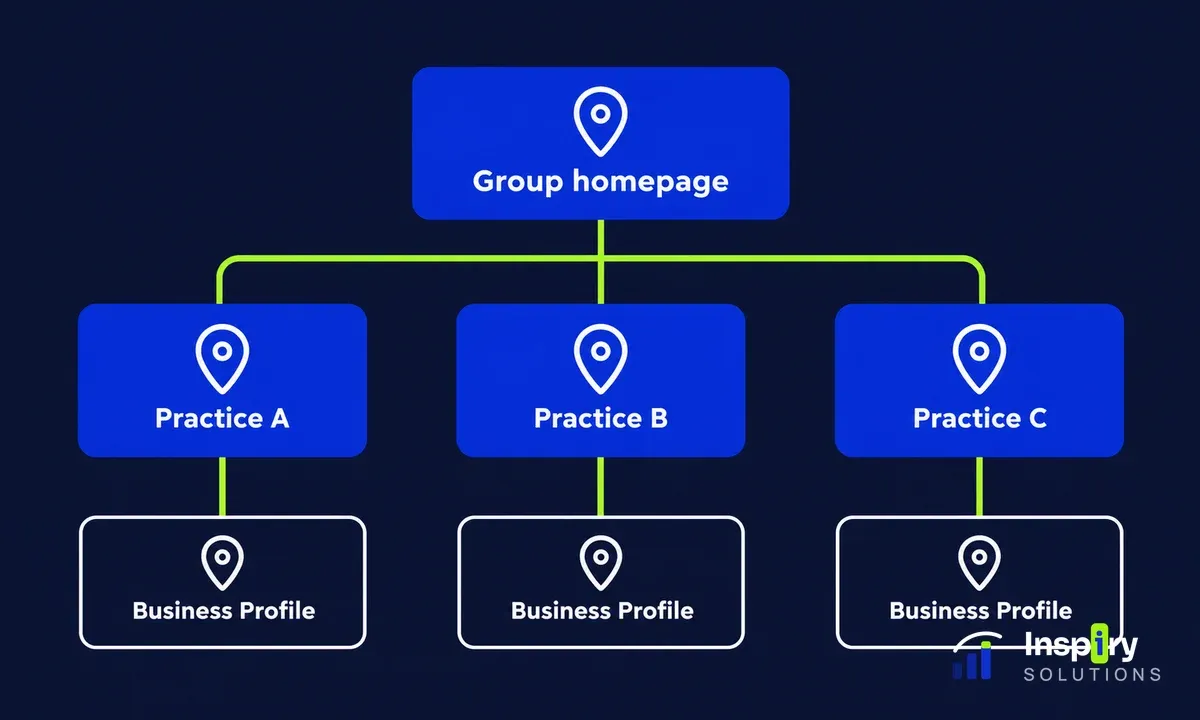
A group operating several dental practices needs a clear distinction between the organisation and its individual locations.
Each genuine, eligible practice location should have its own website page and appropriately managed Business Profile.
Each location page needs information specific to that site, including:
- Correct practice name, address and contact details.
- Opening hours and local booking options.
- Clinicians who actually work at that location.
- Treatments available at that practice.
- Parking, accessibility and facility details.
- Accurate photography of the premises.
Avoid copying an identical location page and changing only the town name.
Our guide to pages for each practice in a group explains how to organise location-specific information.
Keep location responsibilities clear
Local practice managers should verify operational details such as hours, clinician availability and appointment arrangements.
When a clinician moves, a practice closes temporarily or a booking system changes, update the relevant location rather than assuming a group-wide edit will be correct.
Tracking new patient enquiries
Search visibility has commercial value only when it contributes to meaningful enquiries and appointments.
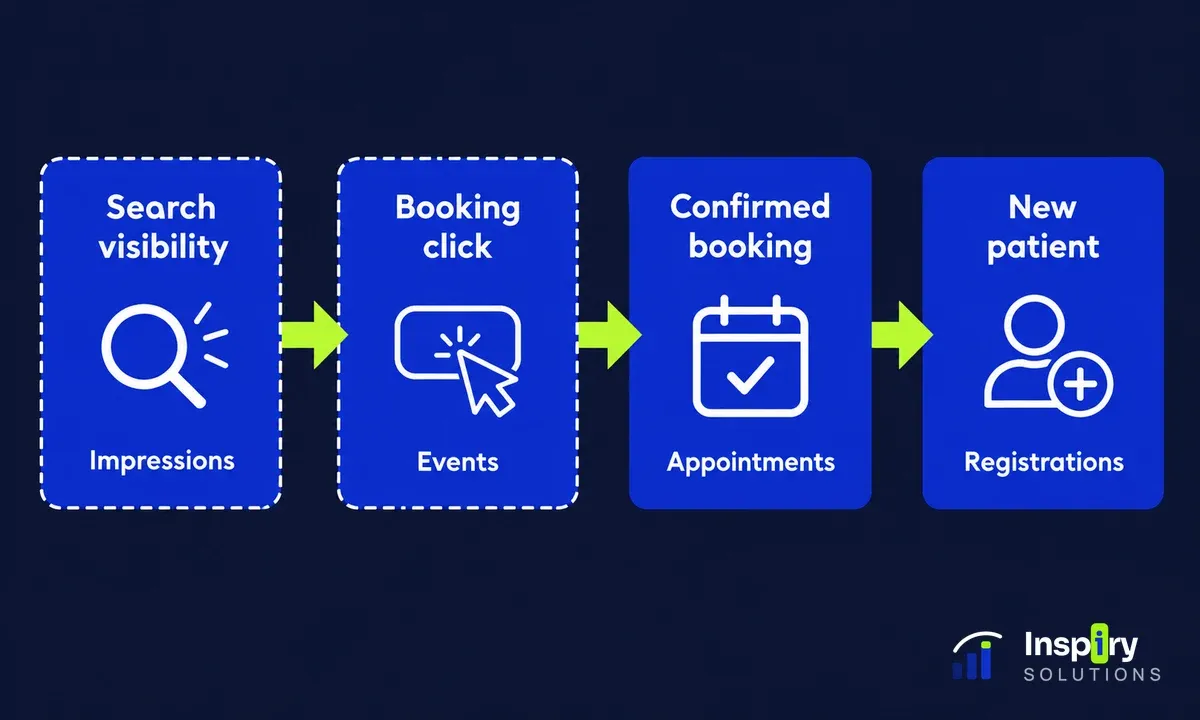
A dental practice should distinguish between people viewing pages, clicking booking buttons, requesting appointments and completing bookings.
These are different stages, and counting all of them as new patients would overstate results.
Measure online booking actions
GA4 can record website interactions as events. Events that represent important business outcomes can be marked as key events.
For online bookings, useful measurements include:
- Booking button clicks.
- Booking form starts.
- Successful appointment requests.
- Confirmed online bookings, where integration permits.
Prefer completed bookings as the main outcome where reliable confirmation data is available.
If an external booking provider does not pass completion information back to your website, button clicks should be labelled as booking intent rather than completed appointments.
Use Google Analytics guidance when configuring and verifying event measurement.
Track Business Profile enquiries
Review the interactions available in your Business Profile performance reporting, including calls and website clicks where provided.
Compare profile activity with reception records where practical.
Avoid collecting personal or clinical details in analytics events, tracking URLs or advertising reports.
If using call-tracking software, confirm it is suitable for healthcare communication and applicable privacy requirements.
Ask how patients found you
A simple question during registration can add context that analytics misses.
Ask new patients how they first heard about the practice. Offer clear choices such as Google Search, Google Maps, recommendation or another source.
Treat answers as self-reported information rather than perfect attribution.
Build a useful monthly review
A practical report should separate visibility, enquiries and confirmed patient outcomes.
| Measure | What it tells you | Main limitation |
|---|---|---|
| Search impressions | How often pages appeared | Not evidence of bookings |
| Profile calls | Call interactions from the profile | Not necessarily completed calls |
| Booking starts | Interest in making an appointment | Not a completed booking |
| Confirmed bookings | Recorded appointment outcomes | May include existing patients |
| New patient registrations | Actual new patient activity | Source attribution may be incomplete |
That provides more meaningful information than celebrating a ranking change while the reception team receives no additional suitable enquiries.
Technical basics for practice websites
Technical improvements help search engines understand your pages and make the booking journey easier for visitors.
For WordPress websites, focus first on page structure, mobile performance, accessibility and structured data.
Add accurate Dentist structured data
Structured data is information added to a page in a standard format to describe its content to search engines.
Schema.org includes a Dentist type suitable for describing a dental practice.
For eligible practice pages, include accurate details such as name, address, telephone number and opening hours in the relevant structured data.
Use Google’s LocalBusiness structured data documentation to understand the supported implementation and validation process.
Markup must agree with information visible to visitors. It does not guarantee enhanced search appearances or improved rankings.
Prioritise mobile booking speed
Someone trying to arrange a dental appointment may be using a phone with an unreliable connection.
Slow-loading booking pages, oversized photographs and unnecessary scripts can interrupt that process.
Test the homepage, principal treatment pages and booking journey on mobile devices.
Review loading speed, layout movement and response to taps. These are related to Google’s Core Web Vitals, which describe aspects of real-world page experience.
Start with page speed basics for practice sites before changing caching or script settings.
Make forms accessible and dependable
Appointment forms should have clearly identified fields, visible labels and helpful error messages.
Check that visitors can navigate the form using a keyboard, understand required fields and complete the process on a small screen.
Verify form delivery, confirmation messages and booking redirects after updates.
The final technical test should always be whether a person can complete the intended action successfully.
Common questions
How long does dental SEO take to show results?
There is no guaranteed timeline. Business Profile corrections and website page improvements can be implemented relatively quickly, but stronger local prominence generally develops over months and depends on competition, relevance and other factors. Measure qualified enquiries, completed bookings and new patient registrations alongside search visibility.
Should each dentist at the practice have a Google Business Profile?
Google allows individual practitioner profiles in some circumstances, including eligible healthcare professionals. However, separate profiles are not automatically appropriate for every clinician. For many small practices, one accurate practice profile is clearer and simpler to maintain. Check Google’s practitioner guidelines before creating additional listings, particularly when several clinicians share the same location and reception arrangements.
Can I show treatment prices on my website?
Yes. Clear fee guidance helps patients understand whether a treatment might suit their budget before contacting the practice. Show accurate starting prices or indicative ranges where appropriate, and explain what affects final costs. Keep prices updated, distinguish estimates from confirmed treatment plans and ensure every statement follows the advertising and fee guidance of your relevant professional regulator.
How should a dental practice reply to reviews?
Keep public replies professional, brief and general. Never confirm that a reviewer is a patient or reveal treatment details, appointment history or other confidential information. Thank people for their feedback where appropriate and invite anyone raising a concern to contact the practice privately. Investigate complaints through approved internal procedures rather than attempting to resolve clinical issues in public.
What does dental local SEO cost with Inspiry?
Inspiry Solutions does not publish a fixed local SEO price because the work is scoped to your website. The required changes depend on your existing practice pages, Google Business Profile, technical issues and booking setup. Start with a free audit by sending your website URL. You will receive a plain-language reply within two working days.
Three things to fix first
You do not need to rebuild your entire website before improving how potential patients find and choose your practice.
Begin with three changes that remove common obstacles to booking:
- State new patient availability clearly. Check the homepage and booking pages. Confirm that the wording reflects current practice capacity and distinguishes appointment types where necessary.
- Add useful treatment fee guidance. Review important treatment pages and publish accurate, practice-approved information about starting prices, indicative ranges or how costs are assessed.
- Check the Business Profile booking link. Open it on a mobile phone, complete a test journey and confirm that the destination handles the expected appointment type.
If new patients struggle to find or choose your practice online, our local SEO service fixes the pages, profile and tracking together, scoped to your website. Start with a free audit and a plain-language reply within two working days.