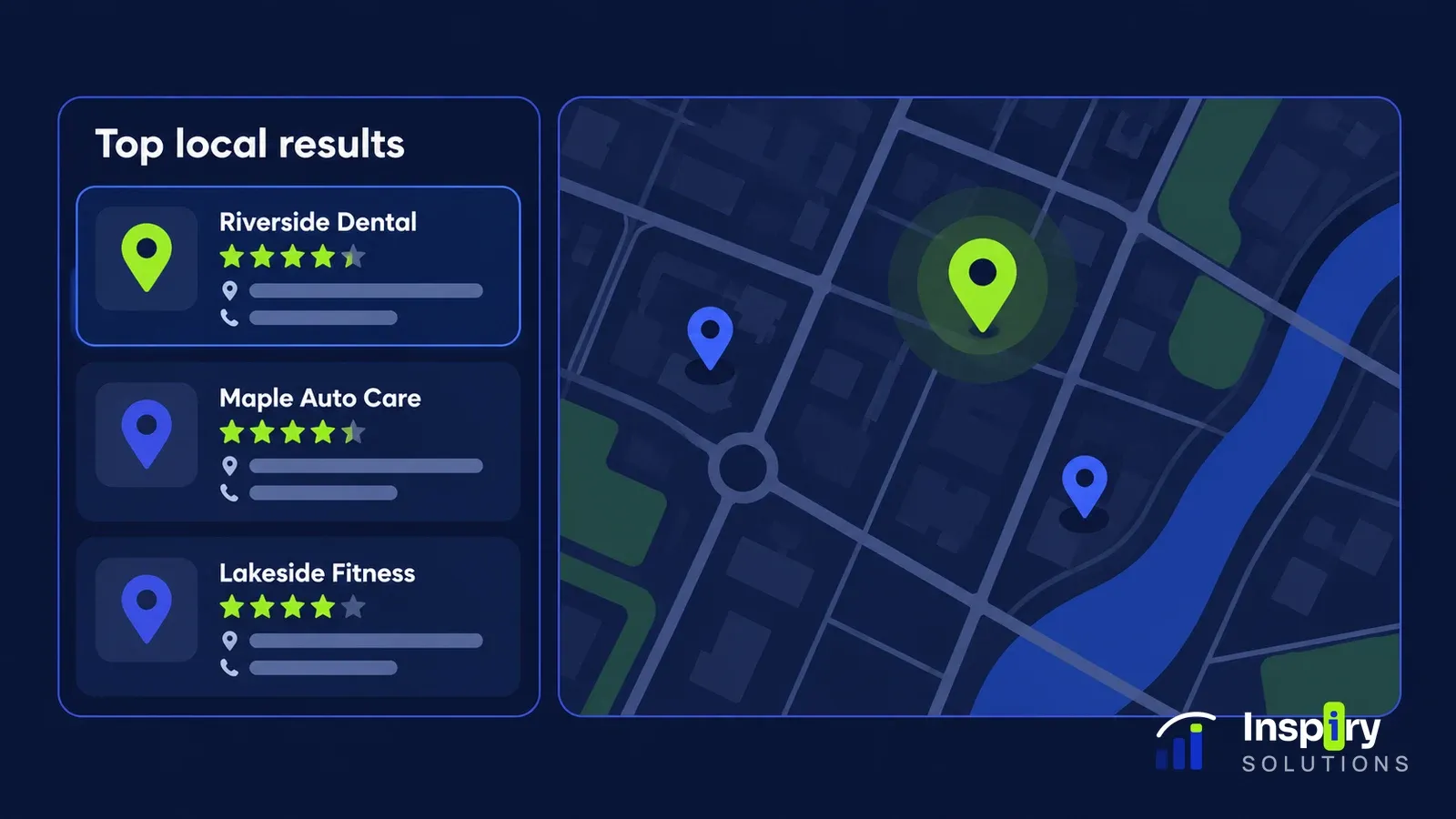
Google Business Profile posts can help customers choose you, but getting your services list right is usually a better first use of your time. For most service businesses, accurate business information, clear service descriptions and useful photos deserve attention before a weekly publishing schedule. Products can help explain clearly priced packages, while posts are best reserved for genuine updates, offers and events. None of these features guarantees higher rankings. The practical approach is to complete the essentials, maintain what customers actually need and use a short monthly routine rather than creating content for the sake of activity.
If you manage a Business Profile alongside customer enquiries, bookings and website updates, this guide will help you decide what deserves attention. You will learn how each feature works, which activities offer the most practical value and how to maintain your profile in approximately 20 minutes a month.
Insert Rank Math Table of Contents block here.
What posts, products and services each do
A Google Business Profile gives potential customers information about your organisation directly in Google Search and Maps. The basic details include your business name, category, opening hours, contact information and website.
Posts: timely information for customers
Posts are short announcements published through your profile. Google supports three main types: updates, offers and events.
You can include relevant images, descriptions and, where supported, buttons linking to your website.
Google’s official guidance on creating Business Profile posts explains the available formats and publishing process.
The important distinction is that posts communicate timely information. They are not a replacement for permanent details about your business.
Services: what your business actually provides
The services list explains the work customers can request from you. Depending on your category and available profile features, you can select suggested services or add custom entries with descriptions.
For example, a roofing company might list roof repairs, roof inspections and roof replacement as separate services.
These entries help customers identify whether the company offers the specific work they need.
Unlike a temporary announcement, a services list remains useful throughout the year. Once correctly configured, it normally requires attention only when your offering changes.
Products: visible items and defined packages
Products are designed to present individual offerings using information such as a name, image, description and price.
A fixed-price inspection or consultation package could be easier to understand when displayed as a distinct offering. However, product features vary between profiles, so do not assume every service business has access to the same product tools.
Which features deserve attention first?
A complete profile should start with correct business details. Then check the services list, photos and any genuinely useful product entries before committing to regular posts.
For a broader review, use the full profile optimisation list.
The feature comparison below ranks activities by practical effort and customer usefulness, not by a claimed ranking advantage.
| Feature | Set-up effort | Upkeep | Main benefit | Priority for service businesses |
|---|---|---|---|---|
| Services list | Low to medium | Low | Explains available work | High |
| Products | Medium | Low to medium | Presents defined offerings | Medium, where available |
| Update posts | Low | As needed | Communicates timely news | Medium |
| Offer posts | Low to medium | When promotions run | Explains current offers | Medium, if relevant |
| Event posts | Low to medium | When events occur | Promotes dated activities | Low unless events matter |
| Q and A (if available) | Low | Occasional | Addresses customer questions | Medium |
| Photos | Low to medium | Occasional | Shows real work and premises | High |
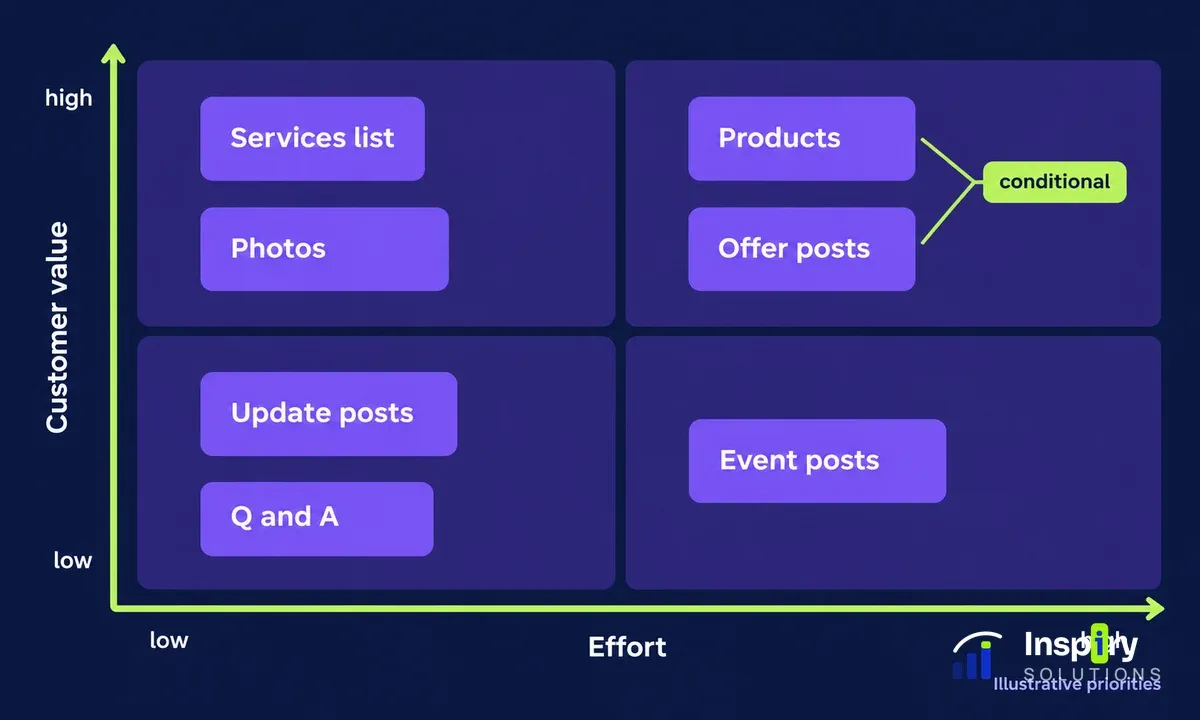
The effort-versus-value diagram illustrates why permanent profile information usually deserves attention before frequent announcements.
Do Google Business Profile posts help rankings?
There is no reliable basis for promising that publishing Google Business Profile posts every week will improve your local rankings.
Google explains that local results are mainly based on relevance, distance and prominence. Relevance concerns how well a business matches the search, distance concerns location, and prominence reflects how well known the business is.
Its official explanation of local ranking does not identify posting frequency as a direct ranking factor. A new post might make your profile more useful, but you cannot conclude that it caused a ranking change simply because the two happened around the same time.
That distinction matters because advice about profile activity often turns into an unsupported requirement to publish continuously.
What posts can realistically improve
A useful update gives someone who has already discovered your business another reason to contact you.
Those are customer communication benefits. They should not be confused with guaranteed search visibility.
Google’s emphasis on accurate information also supports prioritising a complete profile over unnecessary publishing.
For a fuller explanation, read what influences local rankings.
What you cannot confidently measure
Business Profile performance reporting can help you review customer actions and interactions, but it cannot reliably isolate the effect of one post on your ranking.
Search demand, competitors, location, reviews and changes to your website may affect results during the same period.
A rise in enquiries after publishing an update is worth investigating. It is not proof that the update produced the increase.
If you need someone to prioritise these activities against the rest of your website, ongoing local SEO support can address them within a plan scoped to your website.
The sensible question is not whether you have posted enough times this month. It is whether the profile gives customers the information needed to make a decision.
Services: the list worth getting right first
For a service business, the services list is one of the most useful sections to review because it describes what customers can actually buy or book.
Start by comparing your profile with the main service pages on your website.
A broad label such as “Heating” may describe your industry but does not explain the difference between these activities.
Match your service names to your website
Open your primary website navigation and identify the pages that describe your individual services.
Create a short list using the terminology customers are likely to understand.
You do not need an identical word-for-word description everywhere. You need consistent meaning.
For example, “Website maintenance” and “WordPress maintenance” might refer to the same offering, but the wording should not create doubt about what is included.
It also helps to review service pages your profile can point to, particularly when the website combines several unrelated offerings on one page.
Write descriptions for people, not algorithms
A good service description answers three practical questions:
- What work does the service include?
- Who is it intended for?
- What should the customer understand before making an enquiry?
Keep the language direct. Explain the offering without repeating the service name or location unnecessarily.
Avoid unsupported claims such as guaranteed results, fastest service or the lowest prices.
Google’s business representation guidelines emphasise accurate information and consistent presentation.
Check your service categories and coverage
Before adding numerous entries, check the primary business category. It should accurately represent the organisation’s main activity.
Additional categories should describe genuine areas of business, not every search phrase you want to target.
Also verify your service area and address details. A service-area business should not display an unsuitable public address simply to appear in another location.
These fundamentals matter more than adding every possible variation of a service name.
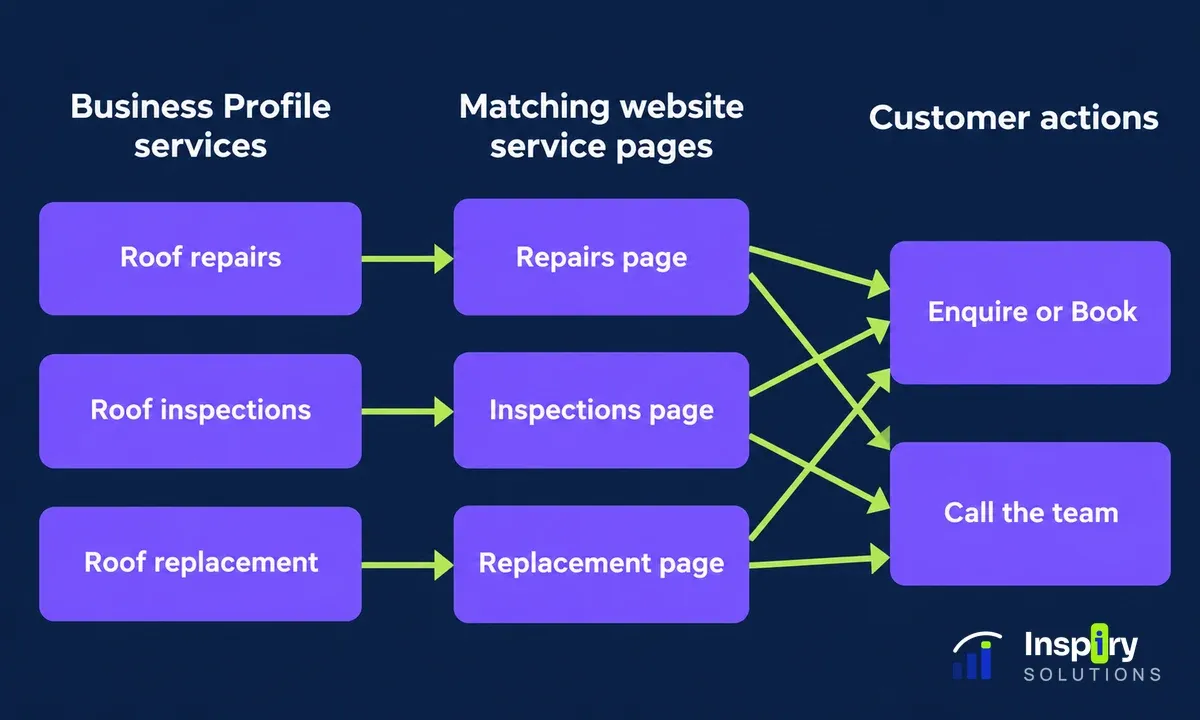
A useful service page should explain what is included, where the work is available and how to request a quotation or booking.
Review gaps before adding new content
Once the lists are aligned, identify anything that customers might misunderstand.
Fix these issues before creating another post.
This work has a clear completion point. You can confirm that the information is correct without making assumptions about future search rankings.
Products for service businesses
Google Business Profile products can make defined offerings easier to compare, but they are not equally useful or available for every business category.
For service providers, the strongest potential use is presenting something with a clear scope, understandable deliverables and a genuine price.
Examples of suitable package concepts include an initial site inspection, a fixed-price assessment or a standard maintenance package.
Choose offerings customers can understand
A good candidate has a recognisable name and a description that makes its boundaries clear.
Customers should understand what they receive without first arranging a detailed consultation.
If an offering involves numerous variables, the services list and a proper website page are usually better places to explain it.
Do not duplicate every service in a product catalogue merely to occupy more profile space.
Use real prices and accurate descriptions
Never invent a starting price to make a package appear more attractive.
If the available product interface requires pricing that does not suit your offering, skip that entry.
Use a relevant, genuine image and a short description covering the included work.
Avoid adding unrelated keywords or claims that cannot be supported.
Connect products to useful destinations
Where your profile allows a product link, send visitors directly to its corresponding page.
Keep availability, scope and pricing consistent between the two locations.
If the package changes, update both. An outdated price can create more customer frustration than having no product entry at all.
For businesses without suitable product functionality, a clear services list and well-structured website remain perfectly reasonable alternatives.
What to post and how often
If you are wondering what to post on Google Business Profile, start with information that would genuinely help someone considering your business.
There is no obligation to invent a weekly topic.
The three supported post types serve different purposes, and understanding those distinctions prevents unnecessary content production.
Updates: useful changes and recent activity
Update posts work well for information that remains useful without being a formal promotion.
Suitable subjects include newly available seasonal services, revised appointment arrangements or a meaningful change to how customers book. A short description and a relevant photo can be enough.
If operating hours change, edit the dedicated hours fields as well. A post alone does not correct the permanent business information.
A project update should describe the work shown, with appropriate permission to share images. Avoid including private customer details.
Offers: genuine promotions with clear conditions
Offer posts are suitable when there is an actual time-limited promotion.
Make the terms easy to understand.
If the offer applies only to a specific service, location or customer group, state that clearly.
Do not advertise a discount that does not exist or continue promoting an expired arrangement.
A business that rarely runs promotions does not need to create artificial ones just to use the offer feature.
Events: activities with real dates
Event posts are intended for scheduled activities such as workshops, open days, demonstrations or community events.
They require meaningful date information so customers know when the activity happens.
An ordinary service appointment that customers can book throughout the year is not automatically an event.
Use the event format when the date itself is important to the customer’s decision.
For many trades and professional service businesses, events will be an occasional feature rather than a recurring marketing activity.
How often should you publish?
For most small service businesses, one or two useful monthly posts are a reasonable starting point, not a Google requirement.
Some months may justify several announcements. Other months may have nothing worth publishing.
That is acceptable.
The priority is accuracy and usefulness, not maintaining an arbitrary publication streak.
A rushed post that repeats the same generic message every week offers little information to the person reading it.
Why posts get rejected
A submitted post may appear as pending, live or not approved. Google reviews content against its policies before making it visible.
Common issues include prohibited content, questionable links and phone numbers in the post text that Google cannot verify as associated with the business. Other concerns include inappropriate material, misleading promotions and content involving restricted industries.
Do not assume rejection always means a technical fault. Sometimes the content itself is unsuitable.
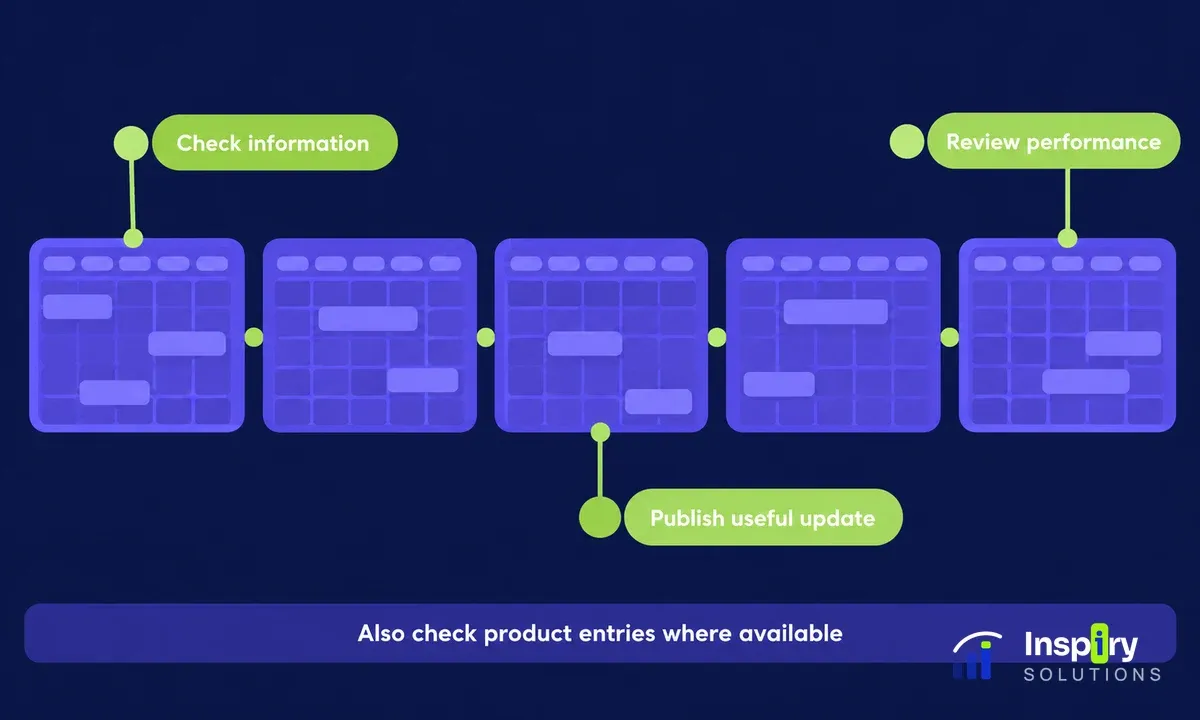
A 20 minute monthly routine in four steps
A sustainable process matters more than an ambitious schedule that gets abandoned after a few weeks.
Assign one person responsibility for the business profile. That might be the owner, an office administrator or a marketing assistant.
1. Check the services list
Time allowance: 5 minutes
Compare the current services list with the website’s live offering.
Check for services that have been added, renamed or discontinued since the previous review.
Read the descriptions of your most important entries and confirm they remain accurate.
If you discover a major mismatch, record it for a separate correction task rather than rushing the work.
You should also check for unexpected changes to business hours or contact details while the profile is open.
The objective is to confirm that someone discovering your organisation receives current information.
2. Update one product
Time allowance: 4 minutes
If your profile supports suitable products, choose one existing entry and inspect its image, description, availability, price and destination link.
Correct anything that is no longer accurate. If product functionality is unavailable or inappropriate, use this time to review one important photo or an additional service description instead.
That substitution makes the routine useful for businesses that do not have catalogue-style packages.
3. Publish one or two useful posts
Time allowance: 7 minutes
Look for a genuine announcement from the previous month or something relevant to the coming weeks.
Choose one subject that helps a customer understand availability, recent work, a current offer or an upcoming event.
Check the text for accuracy, then publish and confirm its status.
If there is no worthwhile announcement, do not manufacture one.
Record “No useful update this month” and spend the remaining time improving another area of the profile.
4. Review the performance data
Time allowance: 4 minutes
Open the available Business Profile performance reporting and review the customer interactions relevant to your goals.
Depending on the available information, this may include calls, website clicks, direction requests or other actions.
Compare the figures with a sensible previous period. Look for unusual changes worth investigating, rather than treating every fluctuation as meaningful.
Record a brief observation and one possible follow-up if necessary.
For more detail, see reading your profile performance data.
Do not claim a post caused a particular outcome without sufficient evidence.
This process produces a monthly record of maintenance and observations, not an invented return-on-investment figure.
The total planned time is 20 minutes: five for services, four for products, seven for posts and four for performance.
Common questions
How often should I post on Google Business Profile?
There is no required frequency for Google Business Profile posts. Post when there is something useful to say, such as a genuine offer, relevant business update or upcoming event. A light monthly routine is sustainable for most service businesses. Regular publishing can support customer communication, but Google does not establish weekly posting as a requirement for better local rankings.
Do Google posts expire?
Older posts move down or become less visible over time. Google’s current guidance says posts older than six months are archived unless a date range is set. Event and offer posts are tied to their dates, so their usefulness changes when those dates pass. Check Google’s current help page for details, as the presentation and availability of posts can change.
Why was my Google post rejected?
Posts must follow Google’s content policies. Phone numbers in post text that cannot be verified as associated with the business and prohibited content are common causes of rejection. Misleading information or links to unsafe destinations can also create problems. Review the post’s status, identify the reported issue and correct it before submitting again.
Should my services list match my website?
Yes. Consistent service names help customers understand your offering and support a clear, relevant description of the business. You do not need to duplicate every sentence, but the actual services and their scope should agree. Link to the matching page where possible, and make sure that page explains the work and the next step for customers.
Set up your services list this week
Before planning another month of Google Business Profile updates, compare the services listed on your profile with the primary service pages on your website.
Then review any suitable products and recent photos.
Only after those basics are correct should you decide whether there is something worth announcing through posts.
This sequence avoids spending time maintaining a publishing schedule while customers are still missing essential information.
If keeping your profile current keeps slipping down the list, our local SEO service can handle it as part of a scoped plan for your website. Start with a free audit and a reply within two working days.