Local SEO for tradesmen works best when your Google Business Profile, job pages, phone number and proof of completed work match how customers actually hire tradespeople. A homeowner with a leaking pipe wants to call immediately. Someone planning a new roof wants photographs, credentials and a way to request a quote.
This guide is for plumbers, electricians, roofers and builders who already get work through recommendations but want more enquiries from Google. It explains which changes to make first, what evidence to show and how to measure whether local visibility is producing genuine jobs.
Emergency jobs vs planned work
Not every local search represents the same type of customer. Understanding the difference between an urgent call-out and a planned project should shape your website, Business Profile and enquiry process.
A homeowner searching for an emergency plumber may contact the first suitable business that answers. Someone researching a loft conversion might compare several builders before requesting a site visit.
Urgent searches want a phone number and availability
Urgent searches often contain phrases such as “emergency plumber near me”, “electrician power failure” or “roof leak repair”.
The visitor usually needs three answers:
- Can you handle this particular problem?
- Do you cover my location?
- Can I speak to someone now?
Put the telephone number near the top of the relevant page. Make it tappable on mobile and explain your actual call-out availability.
If you answer emergency calls during limited hours, state those hours. Advertising round-the-clock availability when nobody answers damages trust and wastes enquiries.
Planned work wants photos, accreditations and quotes
A homeowner researching a bathroom installation, rewire or roof replacement is making a more considered decision.
They want evidence of workmanship, the type of jobs you accept, appropriate qualifications and a sensible quoting process.
A planned-work page should explain what is included, show relevant completed projects and make requesting an estimate straightforward.
Trade by priority
| Trade | Typical urgent searches | Typical planned searches | Proof that matters |
|---|---|---|---|
| Plumber | Burst pipe, blocked drain, leaking radiator | Boiler replacement, bathroom plumbing | Relevant qualifications, repair photos, recent reviews |
| Electrician | Power fault, tripping circuit, unsafe socket | Rewiring, consumer unit replacement, EV charger installation | Electrical credentials, completed work, safety information |
| Roofer | Roof leak, storm damage, missing tiles | New roof, flat roof installation, roof replacement | Before and after photos, materials, workmanship guarantees |
| Builder | Dangerous structural damage, urgent repairs | Extensions, renovations, conversions | Project galleries, relevant experience, insurance and references |
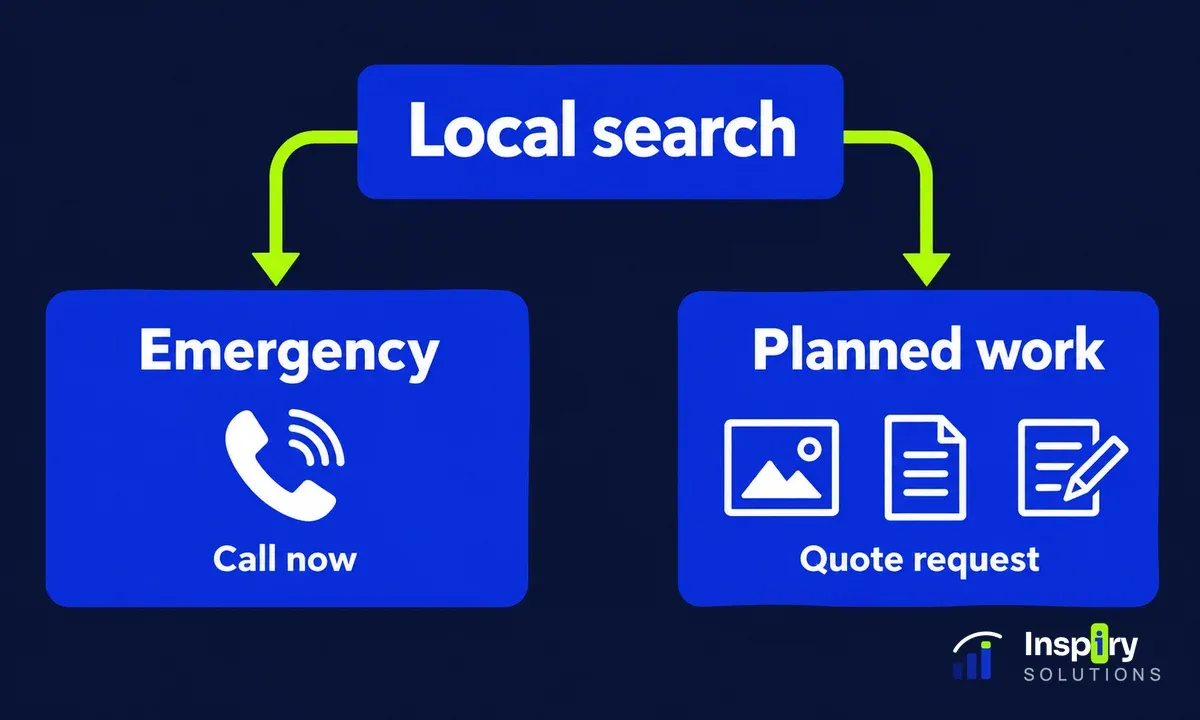
Start by separating emergency work from planned work. Then make sure each journey has an appropriate destination, whether that is a phone-first repair page or a detailed project page.
Setting up your profile as a service-area business
For many trades, the company visits customers rather than receiving them at an office or shop. Google calls this a service-area business.
Hide your home address when customers do not visit
If your business operates from home and customers do not visit that address, do not display it publicly.
Google’s service-area business guidance explains that businesses serving customers at their locations should remove the public address and specify the areas they cover.
Your real address is still required for verification, even when it is hidden from customers.
Do not enter a rented mailbox, virtual office or unrelated address to appear closer to another town.
A business that genuinely receives customers at a staffed, eligible location may qualify for a different profile arrangement.
Choose realistic service areas
Add the towns, districts or postcodes where you genuinely accept work.
Google limits how many service areas a profile can include, so the list should match the areas you genuinely serve.
Think about your travel costs, workforce, emergency response times and whether smaller jobs are economically practical.
Listing a town does not guarantee visibility there. Google’s local ranking guidance identifies relevance, distance and prominence as key factors.
Choose the right primary category
Select the category that best represents your main trade. A plumbing firm should not choose a general contractor category because it occasionally does other building work.
Secondary categories can describe additional services you genuinely provide, not every possible keyword. Keep the listed services and description consistent with your website.
Set honest opening and call-out hours
Your opening hours should describe when customers can genuinely contact your business.
If you provide emergency cover outside ordinary hours, use the appropriate available profile settings and explain the arrangement clearly on the website.
Make sure voicemail messages, phone routing and contact forms also match those expectations.
Test the phone number from a mobile device. A profile that appears accurate but sends customers to an unanswered number can still lose valuable work.
For a broader review, use the rest of the profile settings.
Once the listing is accurate, local SEO for trades businesses should connect that profile with useful service pages and measurable enquiries.
Local SEO for tradesmen: four page fixes that win calls
Your website does not need hundreds of pages. It needs clear destinations for the work you want and evidence that helps visitors make contact.
One page per main job type
A single page listing plumbing, heating, drainage and bathrooms gives visitors little detail about any individual service.
Create a separate page for each main job type where there is enough genuine information to make it useful.
For plumber SEO, suitable pages might cover emergency plumbing, leak repairs and bathroom plumbing.
For roofing SEO, useful distinctions could include pitched roof repairs, flat roof installations and guttering.
Electrician local SEO might focus on fault finding, rewiring and consumer unit replacements. SEO for builders could separate extensions, renovations and structural alterations.
Each page should include:
- A clear heading naming the job.
- A short explanation of what the service covers.
- The locations where the work is available.
- Relevant photographs or practical examples.
- Qualifications and guarantees where applicable.
- A prominent call or quote action.
Do not create multiple pages that merely replace one town or service keyword while keeping the same generic text.
A click-to-call button visible on mobile
A small telephone number buried in the footer creates unnecessary effort for someone dealing with a leak or electrical fault.
Show a prominent call button near the beginning of urgent service pages. On mobile, use a proper telephone link so tapping it opens the dialler.
Use straightforward labels such as “Call for a roof repair” or “Speak to an electrician”.
For planned work, pair the telephone option with a short quote form. Ask for details that help you assess the project, such as postcode, job type and a brief description.
Test both contact routes on actual mobile devices. Confirm that the correct number opens, the form submits and enquiries reach the intended inbox.
Photos from real local jobs
Use images of genuine completed work, with permission from the customer or property owner where needed.
Show the problem, the work being carried out and the finished result where appropriate. Add a short caption explaining the job and its location at town level.
A roof repair page should show repairs, not unrelated new-build photographs.
Follow Google’s image SEO recommendations by placing photographs near relevant text, using descriptive filenames and writing useful alternative text.
Avoid publishing private addresses, identifiable belongings or sensitive site details.
Area pages only where you have work to show
Some trade businesses cover several nearby towns. That does not automatically justify a separate page for every place.
A page that simply swaps “Plumber in Town A” for “Plumber in Town B” adds little value.
Review when to build area pages before expanding your location content.
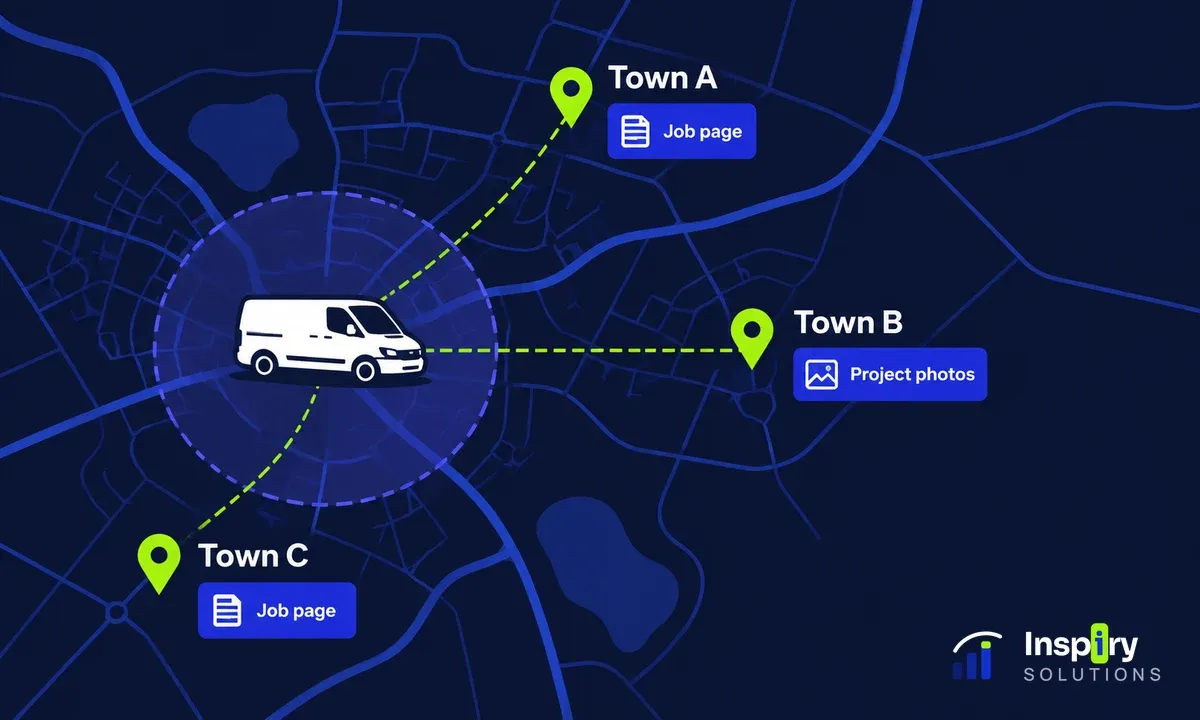
Start with your genuine working area. Prioritise towns where you already have customers, photographs or projects that demonstrate experience.
Do not use made-up local addresses to create an impression of separate branches.
Finally, improve linking job pages together so customers can move between related services, nearby areas and relevant project examples. Clear internal links also help search engines discover the pages on your site.
Proof that homeowners look for
Show completed work with context
Before and after photographs are particularly useful for roofing, building and renovation projects.
For each suitable project, briefly describe the original problem, the work completed and any relevant materials or practical constraints.
Keep location references broad enough to protect customer privacy. Get appropriate permission before publishing identifiable properties.
Make credentials easy to verify
Display relevant qualifications, trade memberships, registrations and insurance information where appropriate.
Check verification pages when an official public record is available.
Only display credentials you genuinely hold and keep them current.
For electrical, heating and other regulated work, distinguish between a qualification and any registration or authorisation required for particular activities.
Do not imply that a membership guarantees the quality of every job.
Explain guarantees accurately
If your company provides a workmanship guarantee, explain what it covers, how long it applies and any relevant exclusions.
Distinguish your own workmanship terms from a manufacturer’s product warranty.
Avoid blanket claims such as “everything guaranteed” unless the business can genuinely honour them.
Reviews for trades
The important distinction is between collecting genuine customer feedback and trying to manufacture a perfect rating.
Ask when the job is signed off
The simplest time to request a review is after the work has been completed and the customer has had an opportunity to assess it.
Include a direct Google review link in your job completion message, invoice follow-up or customer email.
Keep the request brief and neutral. Ask for an honest account of the experience, regardless of whether it was positive or negative.
Do not offer discounts, gifts or other incentives in exchange for a rating. Google’s review contribution policies prohibit incentivised or manipulated reviews.
For a repeatable process, follow the guidance on asking for reviews at sign-off.
Encourage useful detail without scripting
A review that naturally mentions the job completed helps the next homeowner more than a generic compliment. Invite customers to describe their experience, but never tell them to include keywords, towns or favourable statements, and never write the review for them.
Assess trade directories separately
Trade directories and specialist review platforms can bring direct enquiries and reviews of their own, but a listing does not automatically improve your Google rankings. Judge paid platforms on the enquiries and jobs they produce, and keep your business details consistent with your profile.
Tracking calls and quote requests
More website visits are not necessarily more business.
For trades that depend on phone enquiries, measurement should connect Google activity to conversations, quotations and completed jobs wherever practical.
Measure calls from the Business Profile
Google Business Profile performance reporting can show certain customer interactions, including call-button clicks where available.
Track website contact actions
Set up website analytics events for click-to-call links and successfully submitted quote forms.
Track completed form submissions rather than every tap on the submit button, since validation errors can prevent a message from being sent.
A telephone click indicates intent, but it does not prove the person connected, requested a quotation or became a customer.
Test tracking after installation and after website updates.
Record where jobs originate
Ask new customers how they found the business and record the answer in a simple enquiry log.
Use a tagged website link in your Business Profile. Tracking tags, commonly called UTM parameters, help analytics distinguish visits from that profile.
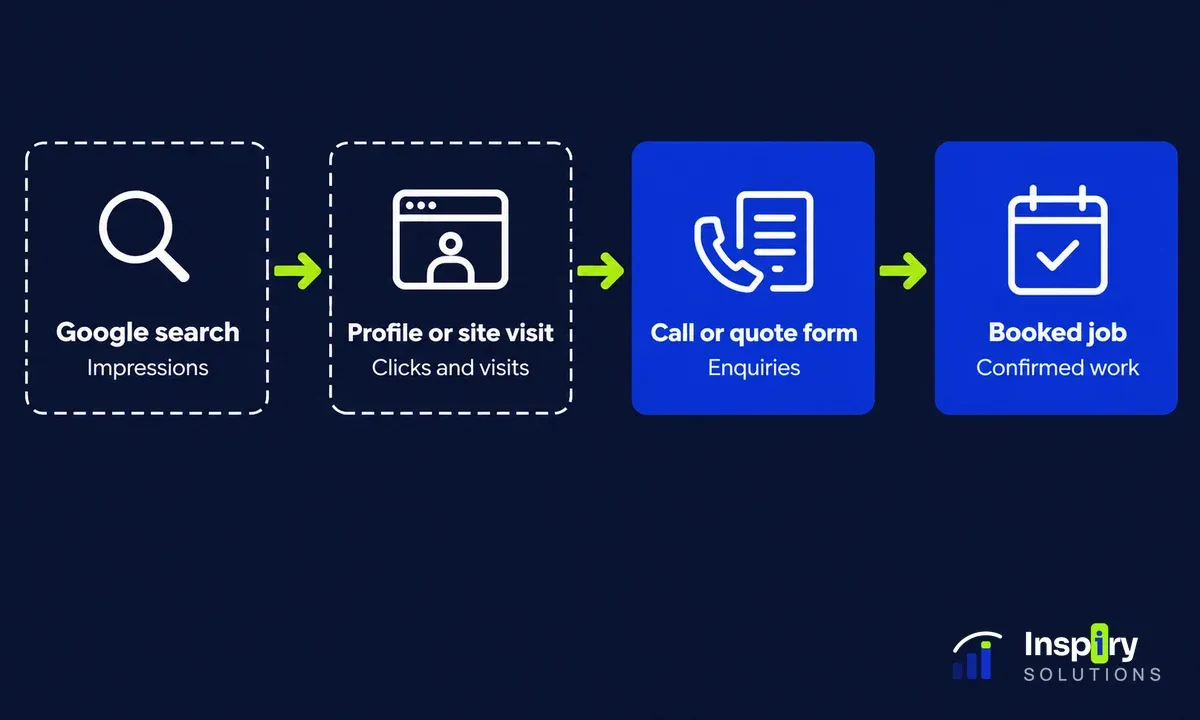
Review these records regularly. A job page producing fewer but better-qualified enquiries may be more valuable than one attracting many irrelevant visitors.
Hypothetical example: a roofer covering three towns
Hypothetical example: A roofing company serves three neighbouring towns and relies mainly on word of mouth.
Its website has one generic homepage, a list of services and a contact form. There are no dedicated job pages, few photographs and no obvious mobile call button.
The company receives some enquiries, but cannot identify which searches or services generated them.
The owner wants more roof repair enquiries without losing opportunities for larger planned projects.
First, correct the Business Profile
The roofer checks that the primary category describes the business accurately.
The company hides its home address because customers are served at their properties.
It lists the three towns it genuinely covers and checks that the telephone number, website address and operating hours are correct.
The owner also adds a tagged Business Profile website link to distinguish website visits from that listing in analytics.
This does not guarantee greater visibility in all three towns.
Next, build the important job pages
The website gains three specific service pages:
- Flat roof installation and repair.
- Pitched roof repairs.
- Guttering repairs and replacement.
Each page explains the service, identifies relevant customer problems and includes photographs from genuine local jobs.
A visible telephone number supports urgent enquiries. A straightforward quote form supports homeowners planning more substantial work.
The company checks how these pages appear on mobile before considering further expansion.
Then, add credible project evidence
The roofer organises completed project photographs by service rather than putting everything into one gallery.
Where permission exists, each example includes a town, a brief explanation and the type of work performed.
The site presents relevant insurance information, genuine credentials and accurate guarantee terms.
It does not claim separate offices in the three towns or create interchangeable location pages without useful evidence.
Finally, measure enquiries and improve
The business records calls, quote form submissions and the source customers report.
The tagged profile link helps identify visits to the website, while call tracking events show when visitors attempt to telephone.
Actual enquiries and booked work are recorded separately.
After reviewing the information, the roofer can decide whether to improve an existing job page, publish a useful local project page or adjust the contact process.
The example illustrates a practical build order, not a prediction of rankings, enquiries or revenue.
Common questions
Do tradesmen need a website if they have a Google Business Profile?
A Google Business Profile can generate calls directly from Search and Maps, so it remains important. However, a website provides room for detailed job pages, real project photographs, credentials and quote forms. The profile can link customers to those pages when they want more information. Using both gives urgent and planned-work customers suitable ways to enquire.
Should I list my home address on Google?
No, not publicly if customers do not visit your home for business purposes. Set the profile up as a service-area business, hide the address and select the towns or postcodes you genuinely serve. Google still requires your real address for verification. Hiding it protects your privacy while allowing the profile to describe where you work.
Are trade directories worth paying for?
Some trade directories generate direct enquiries and provide useful customer reviews, but their value varies by trade and location. Judge a paid listing by genuine leads, quotations and booked jobs rather than promises of better SEO rankings. Keep your business name, phone number, website and other details consistent with your Google Business Profile, and review the cost regularly.
How many areas should I list on my profile?
List only the areas you genuinely serve, taking account of travel time, job size and your ability to respond. Google limits how many service areas a profile can include, but that is a ceiling rather than a target. Listing a wide territory does not mean your company will appear across all of it. Accurate coverage is more useful than claiming distant towns.
What does local SEO for a trades business cost with Inspiry?
Inspiry Solutions does not publish a fixed price for local SEO because the work is scoped to your website. The starting point depends on your current Business Profile, service pages, mobile contact experience and tracking. Send your website URL for a free audit. You will receive a plain-language reply within two working days identifying the main issues and suitable next steps.
A weekend’s worth of fixes
You do not need to rebuild the entire website before improving how customers find and contact you.
Start with three manageable actions:
- Check the primary Business Profile category. Confirm that it matches your main trade, then review the public address setting, service areas, hours and telephone number.
- Improve one important job page. Choose a service you genuinely want more enquiries for. Add a clear explanation, real project photographs, relevant proof and an obvious mobile call button.
- Add a review link to your sign-off message. Give every eligible customer a straightforward opportunity to leave honest feedback without incentives or suggested wording.
If the phone is not ringing from Google as often as it should, our local SEO service sets up the profile, job pages and tracking together, scoped to your website. Send your URL for a free audit and a reply within two working days.