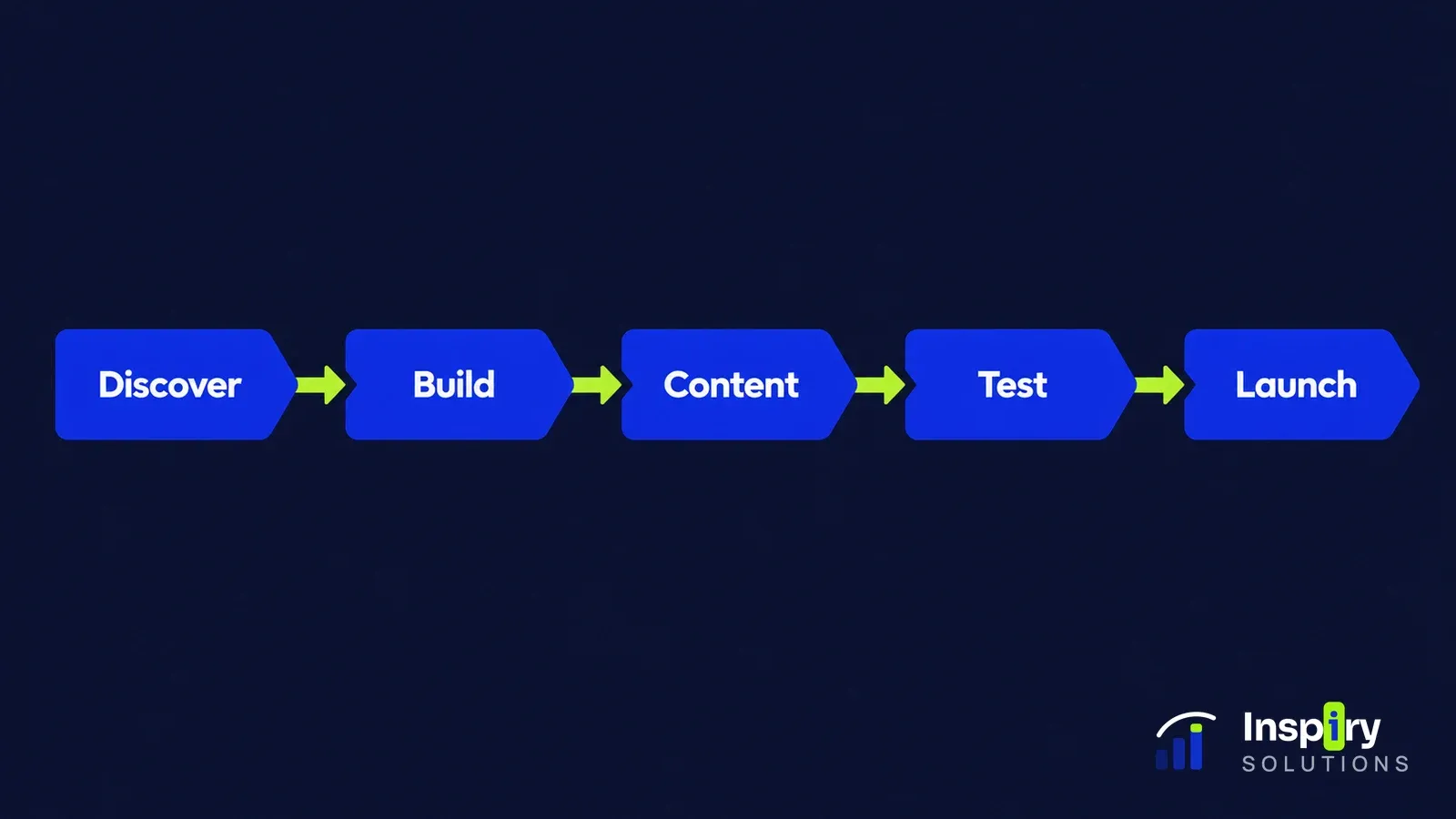
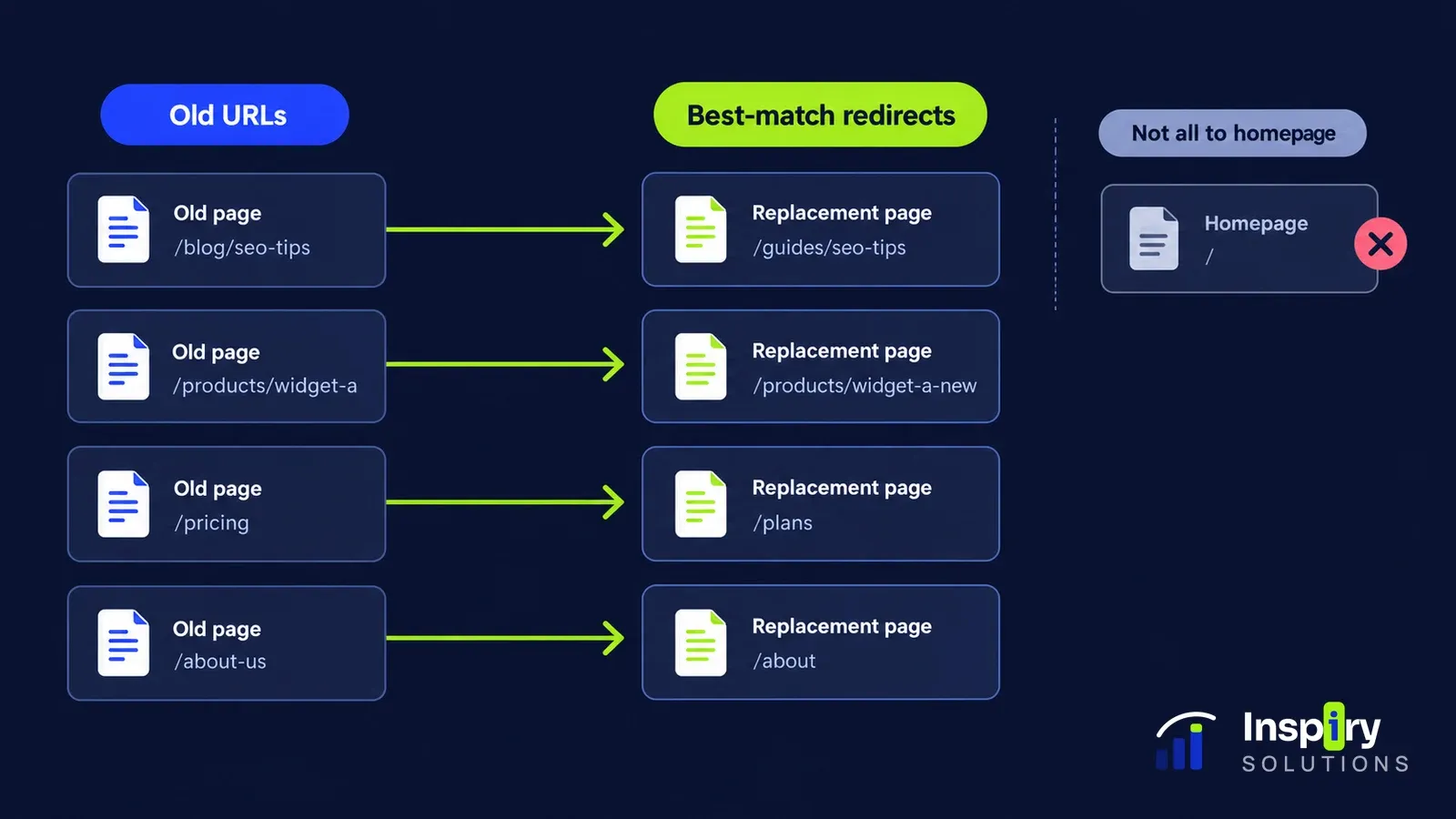
An SEO friendly URL structure uses short, descriptive slugs, logical folders and consistent formatting to help people understand where a link leads. For a new website, choose clear URLs before publishing and keep the structure simple. For an existing website, do not change working URLs merely to make them look better. A change is worthwhile only when its benefit justifies the redirects, internal link updates and monitoring required. If you need to change URLs, map every old address to its replacement, use permanent redirects and check the results in Google Search Console.
What makes a URL SEO-friendly
A good URL tells visitors what a page covers without making them decode a long string of characters.
Google’s URL structure guidance recommends simple, descriptive addresses that people and search engines can interpret.
A practical starting point is to use:
- Readable words that describe the page.
- Lowercase letters for consistency.
- Hyphens between separate words.
- Short paths without unnecessary filler.
- Logical folders for related content.
- Stable addresses that do not need frequent changes.
Understand the parts of a URL
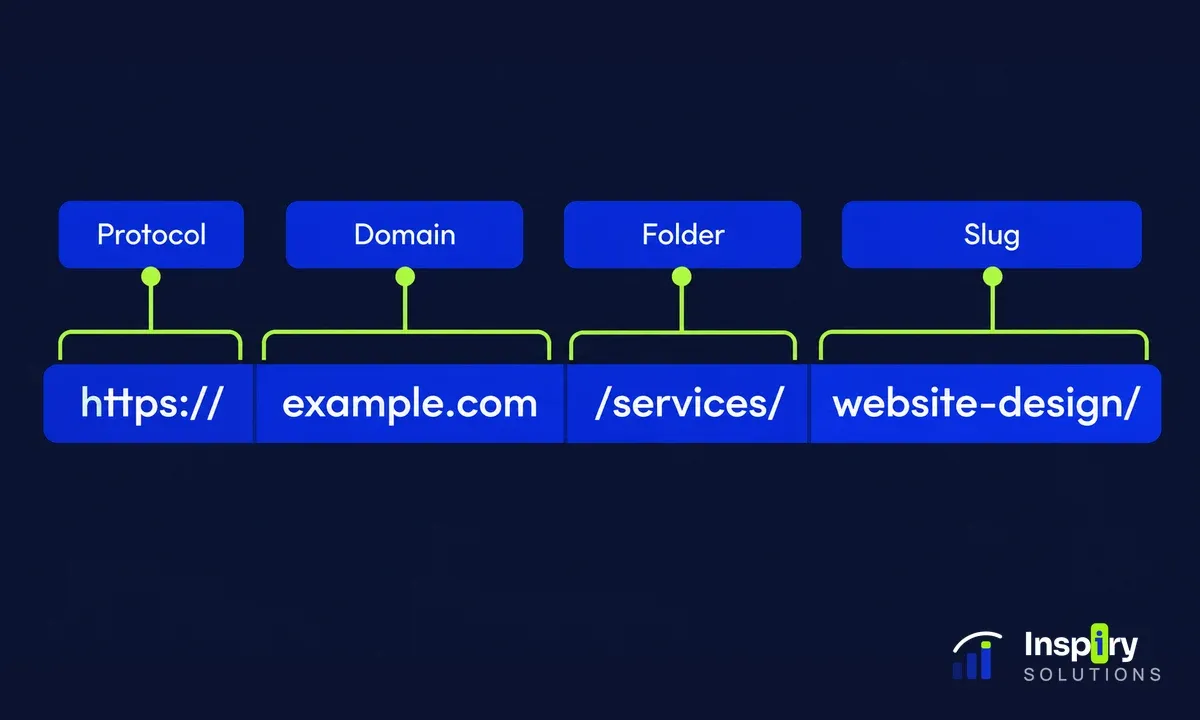
Consider this fictional business website:
The URL contains four useful components:
- Protocol:
https://, which specifies the connection scheme. - Domain:
example.com, which identifies the website. - Folder:
/services/, which groups related content. - Slug:
website-design/, which identifies the individual page.
Avoid unnecessary parameters
Parameters appear after a question mark in a URL.
Writing good slugs
Good slugs describe the main subject in ordinary language.
Use the main topic and remove filler
Start with the page’s primary subject.
For example:
/how-to-choose-the-best-website-design-agency-for-your-business/can become/choosing-web-design-agency/./our-complete-guide-to-wordpress-maintenance-services/can become/wordpress-maintenance/./everything-you-need-to-know-about-technical-seo/can become/technical-seo-guide/.
Use hyphens and lowercase letters
For hyphens vs underscores in URLs, Google’s recommendation is clear: use hyphens to separate words.
Avoid unnecessary dates
For evergreen articles, dates often make slugs age poorly.
Good versus poor URL examples
The following table shows how to simplify new URLs.
| Poor URL | Problem | Better URL |
|---|---|---|
/?p=123 | No descriptive page name | /services/website-design/ |
/2019/04/12/our-new-service/ | Unnecessary date and vague title | /services/roof-repairs/ |
/services/Web_Design_Services_London_Best/ | Capitals, underscores and keyword stuffing | /services/web-design/ |
/page-2-copy/ | Unclear duplicate-style name | /about/ |
/services/services/seo/ | Repeated folder | /services/seo/ |
/category/blog/uncategorised/post-title/ | Redundant and unclear folders | /insights/post-title/ |
Folders: when hierarchy helps
Folders organise related pages into recognisable groups.
Google’s SEO Starter Guide discusses using directories to group similar pages. However, folders alone do not replace good navigation or internal linking.
Use folders for meaningful groups
Useful folders might include:
/services/for what the business offers./locations/for genuine service areas./insights/for educational content./industries/for distinct industry-specific services, where justified.
Keep the structure reasonably shallow
Deep nesting is not automatically an SEO problem, but it can make addresses unnecessarily complicated.
Use location folders carefully
Location folders make sense when a business genuinely serves identifiable places and the pages provide meaningful local information.
If you are planning a larger restructure, technical SEO planning can identify which folder changes are useful and which create unnecessary migration work.
An SEO friendly URL structure for a service business
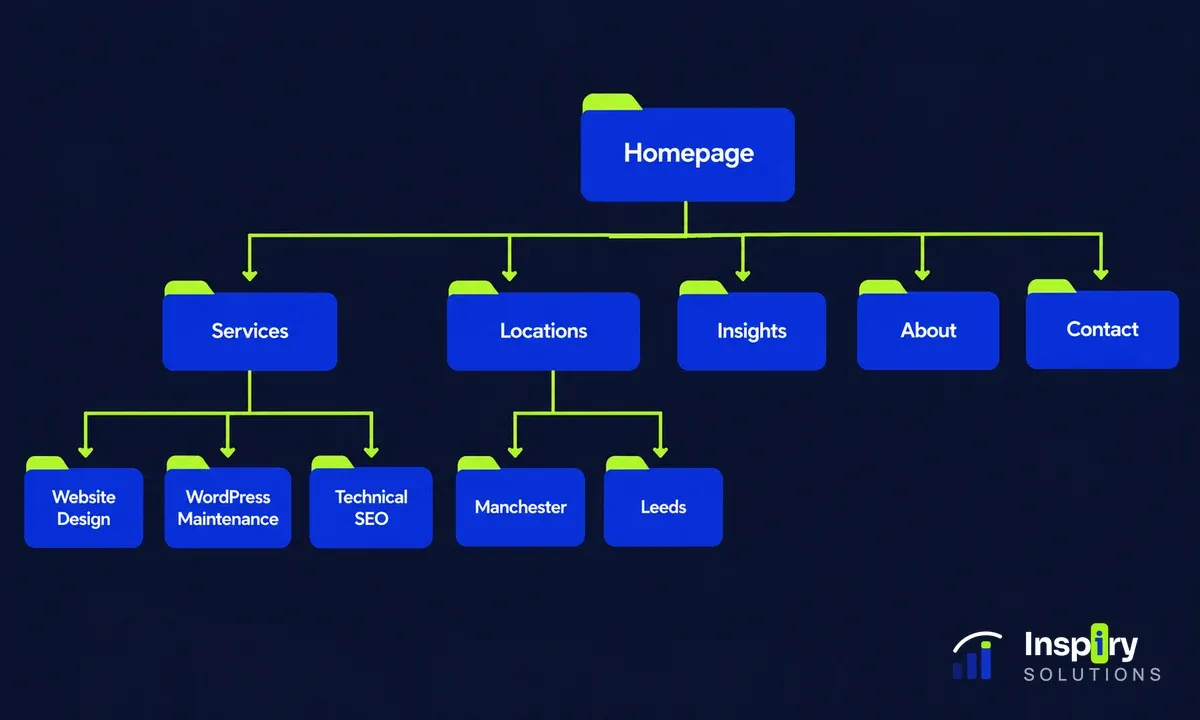
Consider a fictional company offering web design, website maintenance and technical SEO to businesses in several cities.
Example website structure
The homepage sits at /.
The main pages could follow this plan:
- Homepage:
/ - Services overview:
/services/ - Website design:
/services/website-design/ - WordPress maintenance:
/services/wordpress-maintenance/ - Technical SEO:
/services/technical-seo/ - Website redesign:
/services/website-design/redesign/ - Locations overview:
/locations/ - Manchester location:
/locations/manchester/ - Leeds location:
/locations/leeds/ - Insights overview:
/insights/ - Individual article:
/insights/website-maintenance-guide/ - About:
/about/ - Contact:
/contact/
Match URLs with navigation
A clear URL plan becomes more useful when it matches the website’s navigation.
The relationship between page hierarchy and contextual links is covered further in site architecture for service businesses.
Establish rules for future content
A good website structure needs a repeatable publishing process.
WordPress permalinks and common traps
WordPress lets site owners control the format of many public URLs through permalink settings.
In the WordPress dashboard, go to Settings > Permalinks to review the available structure.
For a new business website, the Post name option is commonly a sensible starting point because it avoids unnecessary publication dates.
Post name versus date-based URLs
A post-name permalink could be:
/website-maintenance-guide/A date-based version might be:
/2024/05/website-maintenance-guide/Both can work technically.
For evergreen content, post-name URLs are usually easier to maintain.
Some websites use custom permalink structures to place articles inside /insights/.
Understand category URLs
WordPress commonly creates category archive URLs such as:
/category/website-tips/These are different from the URLs of individual articles.
A category archive may be useful when it provides visitors with a curated collection of relevant posts.
The /category/ base can be adjusted, but changing it on an established website changes the archive addresses and may require redirects.
Do not remove category paths solely because they appear longer.
Beware of site-wide permalink changes
Changing the permalink setting can affect every post URL using that structure.
This is not the same as editing the slug of one unpublished page.
A site-wide change needs an inventory, tested redirects and checks for custom content types, archives and existing internal links.
Never assume WordPress will automatically produce every redirect your website needs.
Before changing the setting, check the current structure, take a backup and confirm how redirects will be implemented and verified.
Should you change existing URLs?
Most functioning URLs should be left alone unless there is a clear, practical benefit to changing them.
A shorter address is not automatically worth the disruption.
An established page may already receive organic visits, appear in search results and have links pointing to it from other websites.
Changing its address introduces work and potential risk, even with a carefully managed redirect.
When a change may be justified
Consider changing URLs when:
- A slug seriously misrepresents the page’s current topic.
- A website migration requires a different structure.
- Several overlapping pages are being consolidated.
- Old date-based paths create a genuine maintenance problem.
- A new content architecture delivers a clear organisational benefit.
- Legacy URLs contain problematic parameters or inconsistent routing.
Even in these cases, assess the likely benefit before making the change.
When leaving URLs alone is better
Keep the current address if the only argument is that a shorter or more fashionable slug looks better.
For example, /services/professional-website-design/ may not be your preferred format, but if the page performs well and the address is understandable, changing it to /services/web-design/ may offer little practical value.
Review the complete situation: traffic, indexed pages, backlinks, conversions and the number of affected internal links.
The broader considerations are covered in changing a site without losing SEO.
Hypothetical example: A site uses date-based permalinks for its blog. Switching to post-name URLs would change 200 URLs at once.
Because the posts receive steady traffic, the change is made only with a full redirect map, internal link updates and a four-week watch in Google Search Console.
That four-week period is an initial monitoring window, not a guarantee that search results will have fully settled.
The team also checks whether all redirects lead to relevant destinations and whether any old paths return errors.
This is a hypothetical example, not a client case study or performance claim.
Account for the hidden work
A URL change affects more than the address bar.
It can require updates to menus, buttons, breadcrumbs, related-post links, XML sitemaps, canonical tags, campaign landing pages and external references.
A redirect also needs to remain in place for an appropriate period, rather than being removed immediately after the new address appears in search results.
The more URLs involved, the more important a complete inventory becomes.
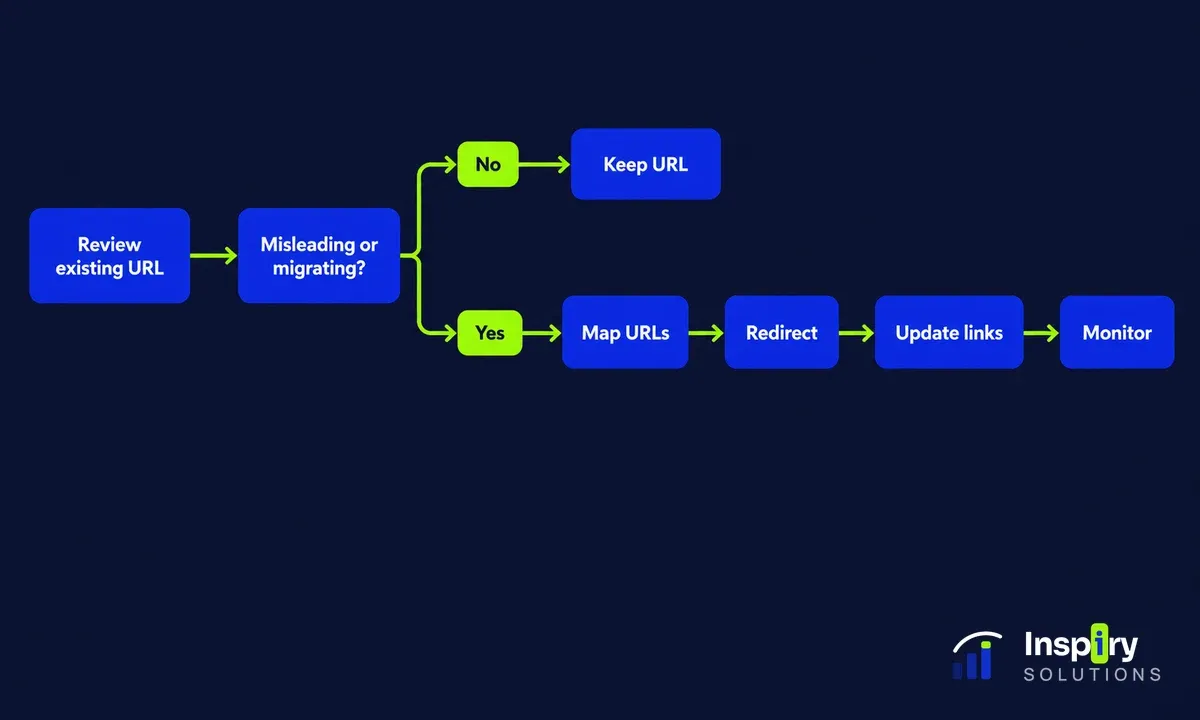
How to change URLs safely in six steps
When changing URLs is necessary, treat the work as a controlled migration rather than a quick editing task.
Google’s site move guidance explains the importance of mapping old URLs, applying permanent redirects and monitoring the transition.
Work through the following six steps in order.
1. Map every old URL to its new URL
Begin with a complete inventory of URLs affected by the migration.
Use a site crawl, XML sitemap, Search Console data and other available records to identify important addresses.
Create a spreadsheet containing:
- Old URL.
- New URL.
- Page purpose.
- Current response status.
- Redirect requirement.
- Implementation status.
- Verification result.
Each existing URL needs a deliberate outcome.
If a page has a direct replacement, map it there.
Do not redirect every removed page to the homepage by default.
For a practical inventory approach, see building a redirect map.
2. Add 301 redirects
A 301 redirect tells browsers and search engines that an address has moved permanently.
For a permanent URL migration, it is generally the appropriate redirect type.
For example:
Old: /services/old-web-design/
New: /services/website-design/
The old URL should send visitors directly to its relevant new destination.
Where possible, avoid chains such as old URL to intermediate URL to final URL.
Test the actual HTTP response, not just what appears in the browser.
Confirm the old address returns the expected redirect and the destination returns a successful response.
Keep the redirect rules documented, including whether they are managed at server level or through WordPress.
3. Update internal links
Redirects protect visitors who use old addresses, but your own website should link directly to the new ones.
Update menus, buttons, service pages, blog articles and footer links.
Also check breadcrumb links, image links where relevant and any templates generating internal URLs.
Search the content database or use an appropriate crawl to locate references to the old paths.
Do not assume WordPress automatically updates every manually inserted URL after a slug change.
After updating the links, crawl the website again to identify missed references.
The objective is to remove unnecessary redirect hops from normal navigation.
4. Update canonicals and the XML sitemap
A canonical tag identifies the preferred address for a page when duplicate or similar URLs exist.
After a migration, the new page should normally point its canonical tag to the intended new URL, assuming it is the canonical version.
Check that the old URL is not still being declared as preferred.
Next, update the XML sitemap so it contains the appropriate new indexable URLs rather than outdated addresses.
An XML sitemap is a file that helps search engines discover the pages you want them to consider.
Check that new pages are crawlable, not accidentally marked noindex and not blocked by an incorrect robots.txt rule.
Submit the updated sitemap in Google Search Console and verify that it can be fetched.
5. Change in batches
For a small set of independent page changes, batches can make problems easier to identify.
For example, update one service section, test its redirects and internal links, then move to the next section.
Keep a dated change log showing what was implemented and verified.
However, batching is not appropriate for every migration.
A domain move or closely connected URL restructure may need a coordinated release to avoid temporarily broken navigation or inconsistent routing.
Before implementation, choose a release strategy based on dependencies, operational risk and the ability to test.
Test representative URLs on staging where possible, while remembering that live redirects must also be checked after deployment.
6. Watch Search Console and keep the redirects
After release, monitor Search Console for indexing changes, crawl errors and unexpected drops in visibility.
Inspect affected pages and compare their performance against a useful pre-change baseline.
Check server logs or analytics where available to identify visits to old URLs and unexpected destination errors.
Confirm that important old addresses still redirect correctly.
Do not remove redirects simply because the new URLs have appeared in Google.
Google recommends keeping redirects for as long as practical, generally at least one year for site moves.
Some fluctuation during migration is possible.
Document what was resolved so the next website update does not repeat the problem.
Common questions
Do keywords in URLs help rankings?
Descriptive words in URLs help people understand what a link leads to before opening it. Keywords can also provide context to search engines, but any direct ranking effect is small. Use the main topic naturally rather than repeating variations of the same phrase. A clear slug is more valuable for usability than an address packed with search terms.
Hyphens or underscores in URLs?
Google recommends hyphens to separate words in URLs. Underscores can join words together conceptually, making separation less clear. For a new page, choose /website-design/ rather than /website_design/. However, do not change an established, functioning URL merely to replace underscores unless there is a worthwhile broader reason and a proper redirect plan.
Should I remove dates from my blog URLs?
Remove dates only when the benefit outweighs the work involved in redirects, internal link updates and monitoring. A date-based address can function perfectly well, even for an evergreen article. For new sites, starting without dates usually provides greater flexibility for future updates. On established sites, evaluate the existing traffic and the number of affected posts first.
Does URL length matter?
There is no fixed URL length target that every website should aim for in SEO. Shorter, readable URLs are generally easier to share, remember and understand. Unnecessarily long paths can create maintenance problems, but shortening an existing address is not automatically a ranking improvement. Use enough words to identify the page clearly without adding redundant folders or promotional phrases.
Should I use trailing slashes?
Either /services/website-design/ or /services/website-design can work. Consistency matters more than which version you choose. Select one format and make the alternative redirect to the preferred address where appropriate. Internal links, canonical tags and XML sitemap entries should use the selected format. Avoid leaving two equivalent versions accessible as separate indexable URLs.
Agree the structure before building
The least risky URL migration is often the one you avoid by planning the structure properly before launch.
Include a URL plan in the website brief alongside the sitemap, navigation and content requirements.
Before a new page is approved, confirm its purpose, parent folder, proposed slug and relationship with existing pages.
Define ownership and approval
The business should know who has authority to approve permanent URL changes.
A practical process is:
- The content owner proposes the page and its purpose.
- The SEO reviewer checks overlap, search intent and existing links.
- The developer confirms the path is technically suitable.
- The responsible project owner approves the final URL.
- The publisher records the live address in the content inventory.
For new builds, our WordPress development work can include defining the permalink approach, page hierarchy and navigation before content is published.
Also decide what happens when a service is renamed or a page is removed. A written policy helps prevent casual slug edits during routine content updates.
Make URL planning part of delivery
Add URL approval to the build schedule, preferably before templates, navigation and internal links are finalised.
The guide to how a WordPress build is scheduled explains how planning and development stages fit together.
Before launch, test the real published URLs, verify navigation and confirm that any legacy addresses have suitable outcomes.
A clean structure is useful, but stability matters just as much. Make changes deliberately, record them and verify the results.
Planning a new site or a URL clean-up? We will tell you which URLs are worth changing and handle the redirects and monitoring as part of our technical SEO work. Send your URL for a free audit.