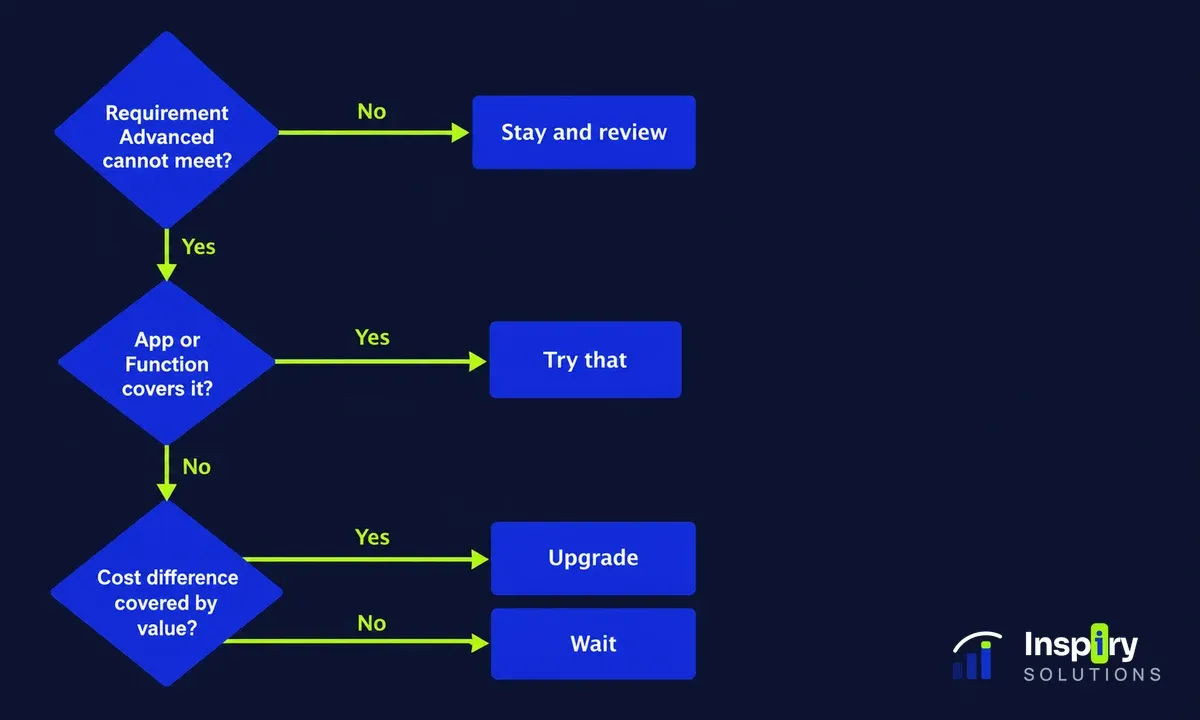
Shopify Plus vs Advanced comes down to whether your store needs capabilities Advanced cannot provide, and whether their financial value covers the extra cost. Shopify Plus can make sense when you need deeper checkout customisation, more complex B2B operations, multiple stores or greater organisational control. But higher sales alone do not justify upgrading. If your requirements can be met through Advanced, Shopify Markets, existing apps or Shopify Functions, staying where you are may be the better business decision.
This guide is for store owners and operations leads already using the Shopify Advanced plan who want to assess an upgrade without relying on a sales pitch.
What Advanced already gives you
According to Shopify’s current plan comparison, Advanced includes a full online store, reporting and analytics, staff accounts, international selling tools and access to Shopify’s app ecosystem.
- Reporting and analytics: Access to detailed sales, customer and operational reporting, including custom analytics.
- Staff accounts: Multiple team members can access the store with assigned permissions, subject to plan limits.
- Payment processing: Advanced has its own processing rates, which should be compared with any Plus proposal.
- International selling: Shopify Markets supports regional selling arrangements, including localisation tools.
- Shipping: Third-party calculated shipping rates and configurable shipping options support more complex fulfilment.
- Apps and integrations: External services can extend inventory, marketing, promotions and other workflows.
Advanced is not just for small stores
A store with several employees, international customers, regular promotions and substantial order volume may still operate effectively on Advanced.
For example, a brand selling into the UK and US might need different currencies, regional product availability and translated content.
Likewise, a merchant needing unusual discount conditions may find an appropriate app rather than commission a complete checkout customisation.
Start with your existing store and write down the operational problems you cannot solve.
What Shopify Plus adds
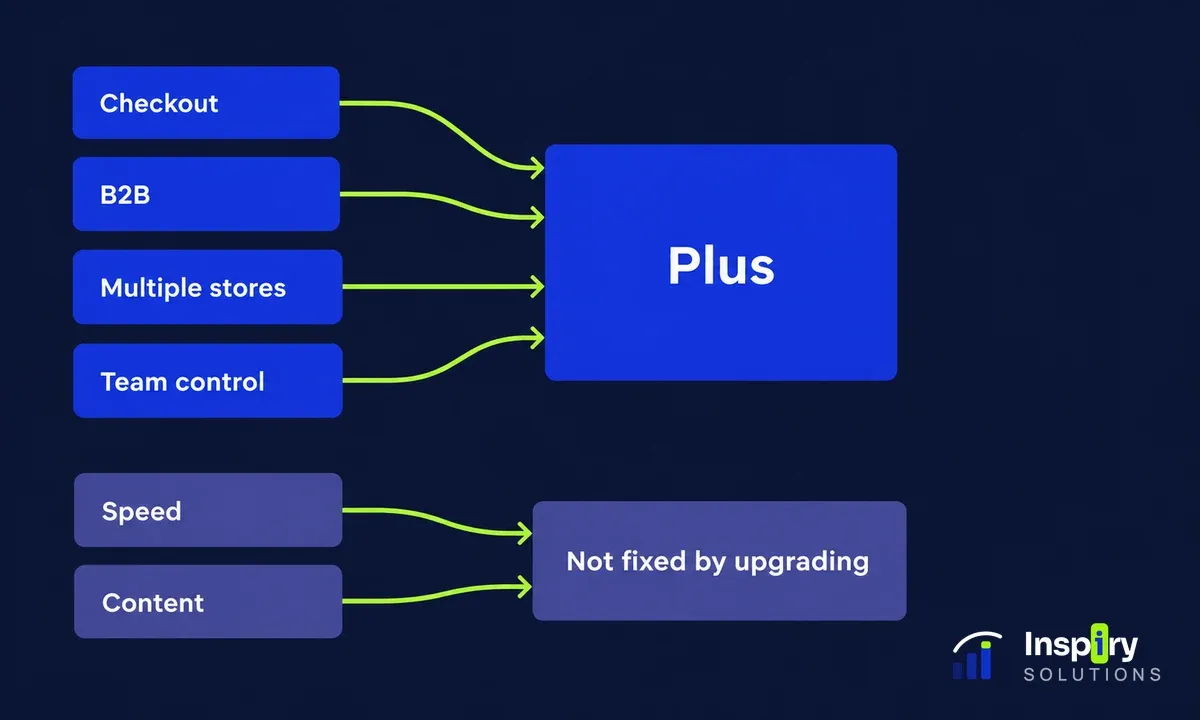
Shopify Plus is intended for businesses that need greater control across checkout, B2B selling, administration and larger operations.
The Shopify Plus platform provides capabilities beyond the standard plans, although exact entitlements and limits can change.
Greater checkout customisation
Checkout UI extensions are app-based components that can display information, collect permitted customer inputs or provide additional functionality inside checkout.
Shopify’s checkout development documentation explains the extension framework and available customisation options.
Advanced stores can still use various checkout-related capabilities, including eligible Functions-based apps and supported post-purchase extensions.
The distinction matters when you need a specific customer-facing component at a particular checkout step, rather than a rule that can run behind the scenes.
More extensive B2B operations
Wholesale operations may require negotiated pricing, customer-specific catalogues, company purchasing processes and specialised payment arrangements.
Some of these needs are now supported on Advanced, so the question is whether your requirements exceed its current allowances or available functionality.
Do not assume a single wholesale customer makes Plus necessary.
Expansion stores and organisational control
This can be useful when separate brands or regional operations genuinely need independent storefronts, while management wants a more coordinated administrative arrangement.
Plus also offers greater staff capacity, custom user groups, higher API limits on supported interfaces and additional capabilities for larger operational teams.
Shopify lists higher-volume checkout features, bot protection and more extensive integration capabilities among its Plus-specific options.
Automation is also part of the picture, but ordinary workflow automation is not exclusive to Plus.
A different commercial commitment
Advanced is purchased through Shopify’s standard subscription arrangements.
That means you are evaluating both technology and a longer-term financial commitment.
Shopify changes plan entitlements over time.
If you need help defining the technical differences, our Shopify development for growing stores service can assess what is possible on your existing plan before proposing new development.
The real cost comparison
Shopify Plus pricing is only part of the upgrade calculation.
A business can pay more for its subscription while reducing payment processing fees, removing applications or saving administrative time.
Build a complete comparison rather than looking at the subscription difference alone.
Start with the plan commitment
Check billing terms, minimum commitment, included stores, additional charges and what happens when the contract ends.
Do not compare a monthly Advanced payment with an annualised Plus commitment without accounting for the full period.
The relevant cost is what your business will actually be contractually responsible for.
Calculate payment processing on your volume
Use your store’s actual orders, payment methods, countries and transaction values.
For each plan, calculate:
Payment processing cost = Transaction volume at each applicable rate + Relevant per-transaction charges + Other applicable payment fees.
Compare the resulting totals using the payment arrangements available to your business.
Do not apply a headline card rate to every transaction.
Include applications and development
Identify which subscriptions could genuinely be removed after upgrading.
Next, calculate developer time for checkout extensions, integrations, configuration, migration and testing.
A Plus feature does not become useful merely because your account has access to it.
Our guide to honest website and store costs explains why implementation and ongoing work belong in the budget, not just the platform subscription.
Compare the complete cost stack
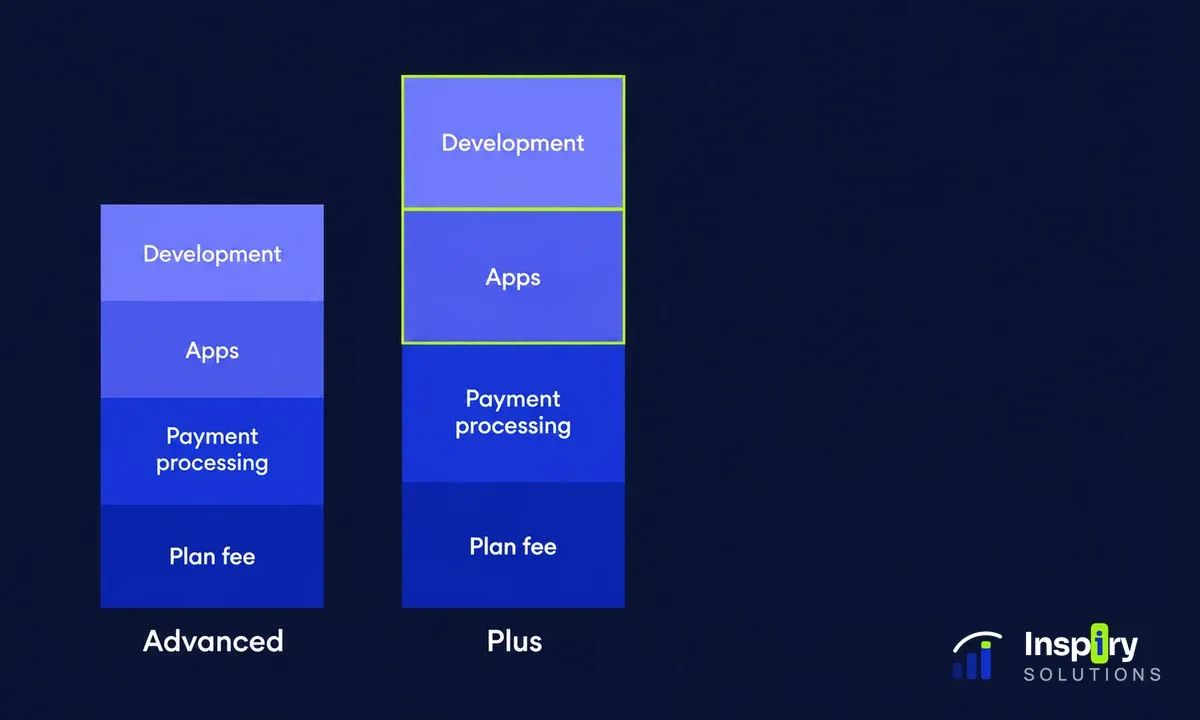
| Cost category | Advanced | Plus |
|---|---|---|
| Plan fee | Existing subscription | Quoted contractual cost |
| Payment processing | Actual current fees | Fees under proposed terms |
| Applications | Existing required apps | Apps still required after upgrading |
| Development | Current and planned work | Plus implementation and maintenance |
| Administration | Existing operating effort | Expected operating effort |
| Contract exposure | Current subscription obligations | Proposed minimum commitment |
Use contribution margin rather than total revenue when estimating the value of additional orders.
There is no universal sales threshold at which Shopify Plus becomes financially worthwhile.
Signs upgrading pays off
The strongest argument for Plus is a business requirement that creates measurable value and cannot reasonably be delivered on Advanced.
Checkout requirements outside Advanced’s limits
If the requirement depends on a checkout UI extension that is restricted to Plus, an upgrade may be justified.
First confirm that the feature is technically supported.
Ask your developer to specify the required extension target and explain why an Advanced-compatible method is insufficient.
B2B requirements beyond the existing allowance
Because Advanced now supports native B2B capabilities, examine the precise limit you are reaching.
Plus becomes more relevant where the number of catalogues, organisational requirements or other Plus-specific B2B functions exceed what your present setup supports.
A large wholesale programme may justify Plus.
Multiple brands or independent regional stores
However, Shopify Markets can often manage different markets within one store.
Separate storefronts become more compelling when regions require significantly different catalogues, operations, integrations or branding.
Compare the management and technical benefits with the complexity of maintaining separate storefronts.
More demanding operational control
High-volume promotions may also justify evaluating Plus-only checkout capacity or bot protection.
But ordinary seasonal sales are not proof that Advanced cannot cope.
Establish the actual bottleneck using operational evidence, support history and your expected campaign requirements.
Requirement checklist
| Requirement | Possible on Advanced? | Possible on Plus? | Question to ask before upgrading |
|---|---|---|---|
| Custom checkout steps | Limited UI customisation; some extensions and Functions available | Broader UI extensions across checkout steps | Which exact checkout interaction requires Plus? |
| B2B price lists | Yes, within current native B2B allowances or suitable apps | Yes, with expanded B2B capabilities | Does our wholesale model exceed Advanced’s limits? |
| Multiple storefronts | Yes, through separately subscribed stores | Yes, with eligible expansion stores | Do we need independent stores or just Markets? |
| International selling | Yes, through Shopify Markets | Yes, with additional organisational options | Which regional requirement cannot be handled today? |
| Custom discount rules | Many rules possible through apps and Functions | Yes, with broader customisation options | Can an existing app implement the rule? |
| Staff permissions | Yes, within available account and role limits | Yes, with expanded staff and group controls | Have we reached a real permissions limitation? |
| Automation | Yes, through supported workflows and apps | Yes, with additional enterprise capabilities | Which specific workflow is blocked? |
| High-volume sale events | Yes, for ordinary campaigns | Additional high-volume and protection capabilities | What measured operational risk requires Plus? |
Signs you should wait
Not every growing store should move to Shopify Plus.
An application already solves the problem
Shopify Functions allows supported applications to customise parts of the platform’s business logic.
For example, a delivery rule might be achievable without adding a visual checkout component.
An existing solution that meets the requirement reliably can be more economical than changing plans.
Your real problem is store performance
If product pages load slowly, identify the actual cause before purchasing a more expensive subscription.
Review Core Web Vitals, app scripts, template structure and mobile performance.
A plan upgrade is not a substitute for optimisation.
Conversion problems remain unresolved
Before assuming Plus will improve conversion, inspect the complete buying journey.
Look at where visitors abandon product pages, carts or checkout, then determine whether the cause is something your current plan can change.
The right fix might be clearer copy or better merchandising rather than checkout development.
Nobody owns the implementation
Ask who will manage wholesale catalogues, test checkout extensions, maintain integrations and monitor new workflows.
An upgrade without an implementation owner creates a larger bill, not a better operation.
You should also review how Shopify fits your operation if fundamental workflow limitations, rather than individual Plus features, are causing problems.
Alternatives to try before upgrading
Before approving Plus, test the least disruptive way of achieving your requirements.
This is particularly important when the requirement is narrow and the wider store already operates effectively.
Use apps and Shopify Functions
Shopify Functions can support discount, payment, delivery and other business-rule customisation through eligible apps.
The availability of a particular Function capability depends on the function type, application and plan restrictions.
Evaluate whether a maintained application can satisfy the requirement without custom development.
Check reliability, support, compatibility, subscription cost and how the rule behaves with other promotions.
Our guide to apps that support a growing store can help you decide which extensions are worth retaining as your business expands.
Use Shopify Markets for international selling
Selling into several countries does not automatically require a Plus expansion store.
Markets provides tools for regional selling, including country-specific settings and localisation capabilities.
You still need to plan currencies, domains, translations, shipping arrangements and regional search visibility carefully.
Read our guide to UK and US selling with Markets before creating separate regional stores.
An international strategy should drive the technical structure, not the availability of an additional subscription tier.
Improve your existing theme and branding
A theme improvement may solve problems that appear to be platform limitations.
Review product-page templates, navigation, responsive design, cart messaging and permitted checkout branding.
Advanced supports meaningful storefront customisation even where deeper checkout UI changes remain restricted.
Test a focused improvement against the original business requirement before deciding that it is insufficient.
Use another standard store temporarily
A second brand can operate on a separate standard Shopify subscription.
This may be a practical option if the brands do not yet require the organisational features of Plus.
However, independent stores can introduce duplicated subscriptions, applications, catalogues, reporting processes and administrative work.
Compare those ongoing costs with the Plus expansion-store arrangement available under your proposed contract.
Treat separate stores as a considered architecture choice, not an automatically cheaper workaround.
Decide Shopify Plus vs Advanced with your own numbers
A practical Shopify Plus vs Advanced decision should produce a written recommendation supported by technical requirements and financial evidence.
Use these four steps before accepting a sales proposal.
1. List requirements Advanced cannot meet
Write down each requirement in enough detail for a developer to assess it.
Avoid descriptions such as “better checkout” or “more advanced wholesale”.
Instead, describe the specific behaviour, who needs it and why the current setup fails.
Record:
- The customer or operational problem.
- The exact functionality required.
- The current workaround and its limitations.
- The consequence of leaving the problem unresolved.
- Evidence that Advanced cannot meet it.
Separate mandatory requirements from preferences.
If none is truly blocked, you probably do not need Plus yet.
2. Price the alternatives
For each blocked requirement, compare available apps, Functions-based solutions, theme work, operational changes and separate stores.
Request implementation estimates where necessary.
Include setup, maintenance, subscriptions and internal staff time.
Assess whether an alternative fully meets the requirement or merely hides the problem.
If a modest existing-plan solution works reliably, it deserves serious consideration even when Plus offers a more integrated approach.
3. Calculate the cost difference on your volume
Build a comparison covering the same contract period.
Use your actual transaction data and payment mix, then add plan fees, application costs, development and operational expenses.
A useful working formula is:
Net additional cost of Plus = Total Plus operating cost – Total Advanced operating cost.
Then estimate the financial value of the specific capabilities you intend to use.
Count demonstrable savings and realistic incremental contribution margin, not speculative revenue.
Where benefits are uncertain, test conservative assumptions and document the risk.
Hypothetical example: A UK tea brand on Advanced wants wholesale pricing for cafés and a custom delivery rule.
A Functions-based app can handle the delivery rule, so that feature alone does not justify Plus.
The brand also wants separate wholesale price lists within the same store. Advanced now offers native B2B catalogues, so the first task is checking whether those requirements fit its available limits.
If the wholesale operation exceeds those limits and needs Plus-specific functionality, the business compares the full upgrade cost with its expected wholesale contribution margin before proceeding.
This avoids treating every new operational request as a reason to upgrade.
4. Decide and set a review date
Approve an upgrade only when the evidence supports it.
Your written decision should identify the requirement, the chosen solution, total commitment, responsible owner and expected operational benefit.
If Advanced meets your needs, document the alternatives selected and schedule another review in six months.
If Plus is justified, create an implementation plan covering configuration, testing, app changes, checkout behaviour and staff training.
Agree on a fallback approach before signing, particularly where Plus-only functions could be difficult to replace.
The review date matters because platform features, business volume and operating requirements change. A decision to remain on Advanced today is not a permanent rejection of Plus.
It is a decision to spend money when the additional capability is genuinely needed.
Common questions
How much does Shopify Plus cost?
Shopify Plus pricing is set by Shopify and can depend on the contract, sales volume and commercial arrangements. Check the current Shopify Plus page and Shopify pricing comparison for the latest figures. Compare the total cost across the proposed commitment, including payment processing, applications, development, support requirements and any services your business will continue to purchase.
Is Shopify Plus worth it for a small store?
Usually only when there is a specific requirement the Shopify Advanced plan cannot meet and the value justifies the additional cost. Most speed, content and conversion problems are not fixed by upgrading. Try suitable apps, Shopify Functions and targeted development first. Store size matters less than the operational capability you genuinely need.
Can I downgrade from Shopify Plus?
A downgrade may be possible, but Plus usually involves contractual commitments, so check the agreement and available exit conditions first. Plus-only capabilities, including checkout UI extensions across all checkout steps, may stop working on a lower plan. Prepare replacements, test affected workflows and establish a fallback before committing to the upgrade.
Does Shopify Plus help SEO?
Shopify Plus does not directly change how Google ranks your store. SEO still depends on factors such as site structure, content, technical accessibility and theme quality, regardless of the subscription. Some Plus capabilities, including expansion stores, can affect international architecture. Those decisions require careful planning, but purchasing Plus alone does not deliver better search rankings.
Decide on one requirement, not a feature list
The sensible Shopify Plus vs Advanced decision starts with a specific business limitation, not a catalogue of additional features.
If no individual requirement genuinely needs Plus, remain on Advanced, improve what you already have and review the decision in six months.
If a requirement does need Plus, calculate its value, confirm the contractual commitment and plan the implementation before upgrading.
Do not purchase a more expensive plan in the hope that unused features will somehow improve your store.
If you are weighing an upgrade, send your store URL for a free audit and we will tell you plainly whether a requirement needs Plus, or ask about Shopify development to build what you need on either plan.