Shopify product page SEO should start with choosing which products deserve attention, not rewriting every listing in your catalogue. Use Google Search Console and sales data to separate products into three groups: earning, close to earning and not yet visible. Then prioritise fixes that help shoppers understand the product and make a buying decision. Improve titles, descriptions, images, stock information and the area around the buy button before adding more apps or rewriting hundreds of listings.
This guide is for merchants managing dozens or hundreds of products who need a practical starting point. You will learn how to select ten pages, identify their problems, make targeted changes and measure whether those changes helped.
Diagnose first: which product pages matter
Start in Google Search Console. Open Performance, select Search results, choose a useful recent reporting period and switch to the Pages tab. Filter for your product URL structure where practical. Export the URLs with impressions, clicks and click-through rates.
Choose ten products for your first review. Include meaningful sellers, products with search impressions but few clicks, and selected products with little visibility.
Earning: clicks and sales
Check whether the product title accurately describes the item, whether the main image loads promptly and whether the buying information is clear.
Record the existing numbers before editing. If a product performs well, small improvements with measurable outcomes are safer than a complete redesign.
Close to earning: impressions, few clicks
These products appear in search results but attract relatively few visits. Start by examining their queries, ranking positions and search intent.
If people arrive but rarely add the item to their basket, examine price presentation, compatibility information, imagery, delivery and returns.
No visibility yet
A product with no impressions needs diagnosis before a copywriting budget.
Some products have little individual search demand. Others compete against a broader category page that better matches the query.
Check internal links from relevant collections and ensure the product is not unintentionally excluded from indexing.
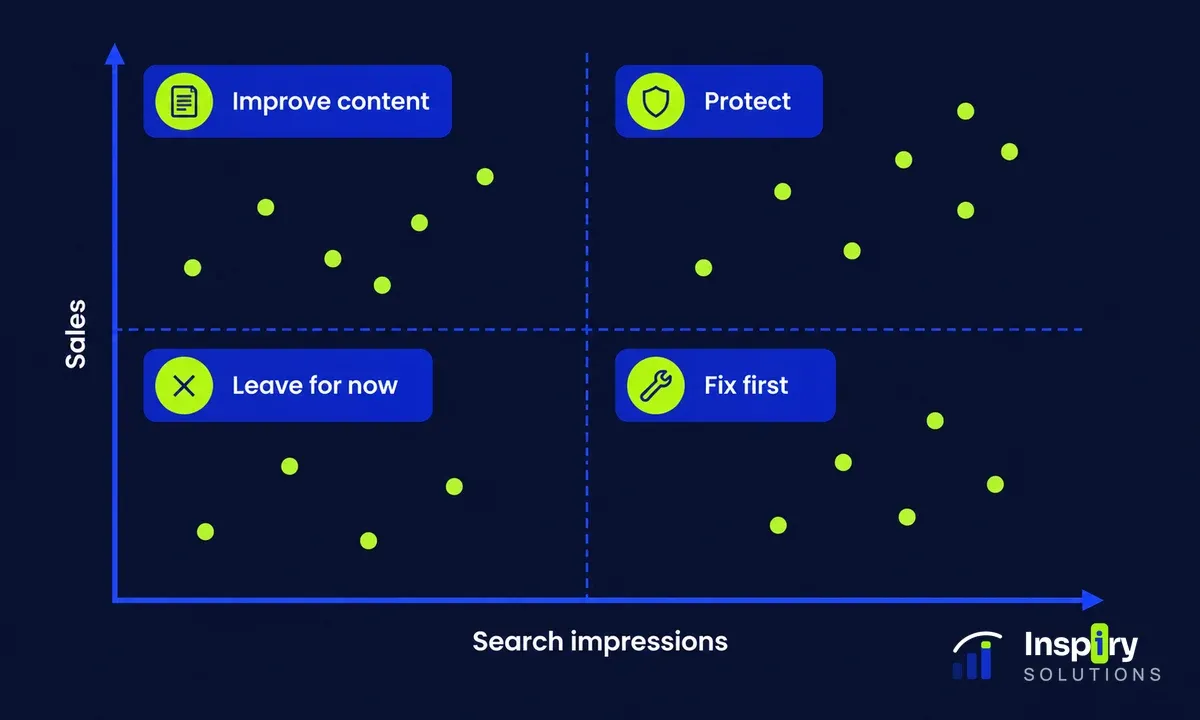
A practical grouping is:
- Protect: Products with useful search traffic and sales.
- Fix first: Products with meaningful impressions but weak clicks or buying activity.
- Investigate: Products with little visibility, starting with indexing and demand.
This gives your first ten products a reason for being selected rather than simply choosing the oldest listings.
Shopify product page SEO titles and product names
Shopify provides two important title fields. The product title generally supplies the visible on-page H1 in a standard theme. The search engine listing title is a separate SEO field.
Both should accurately identify what is being sold.
A consistent naming pattern makes large catalogues easier to manage:
Product type + key attribute + brand or model when relevant
For example, a useful descriptive name might be “Ceramic Coffee Mug, 350 ml, Blue”. If the brand or model is a common search term, include it naturally.
For Shopify product title SEO, inspect the actual queries in Search Console before editing. A product-specific query may justify a model number, while a broader query may benefit from a clearly stated product type.
You can edit SEO titles and meta descriptions in Shopify’s search engine listing settings. Follow the relevant steps in the official Shopify SEO guidance.
Keep the store name out of repeated title text unless it adds meaningful identification. Some themes or SEO apps append branding automatically, so inspect the rendered title rather than assuming the admin field is the entire output.
The goal is accurate identification, not the maximum possible keyword count.
Descriptions that answer buying questions
A useful Shopify product description explains what the item is, who it suits and what someone needs to know before buying.
Manufacturer descriptions are convenient, especially when adding many products. The problem is that other retailers may use identical text.
Start by reviewing customer questions, support enquiries, reviews and product specifications.
Common buying questions include:
- What size is the item, and how does it fit?
- Which materials or ingredients does it contain?
- Is it compatible with an existing product or device?
- How should it be used, cleaned or maintained?
- What is included in the package?
- When can it be delivered, and how are returns handled?
Use metafields for repeatable specifications
Shopify metafields store structured information such as dimensions, materials, ingredients, care instructions or compatibility details.
When a theme supports dynamic sources, these fields can populate consistent specification sections across multiple products.
For example, every clothing listing could display material, fit, care and sizing in the same order. Building this into the theme is part of Shopify product template development, so specifications display consistently without manual formatting.
Make the opening description useful
A practical description structure is:
- A short explanation of the product and its primary use.
- Important benefits supported by actual product characteristics.
- Size, materials, compatibility or ingredients.
- Care, usage and included items.
- Delivery, returns and other buying information.
For Shopify product description SEO, there is no universal word count. A straightforward replacement part may need relatively little explanation. A technical product might require detailed compatibility guidance.
Do not add paragraphs simply to repeat keywords.
Hypothetical example: A skincare store with 150 products discovers that 12 receive most of its search impressions but use descriptions supplied by the manufacturer.
The store rewrites those 12 listings to explain ingredients, suitable skin types and practical usage. It moves delivery details next to the buy button and removes a second reviews widget that duplicates structured markup.
These are illustrative changes, not reported results. The store would still need to measure search clicks, buying behaviour and sales to understand their effect.
Images, video and alt text
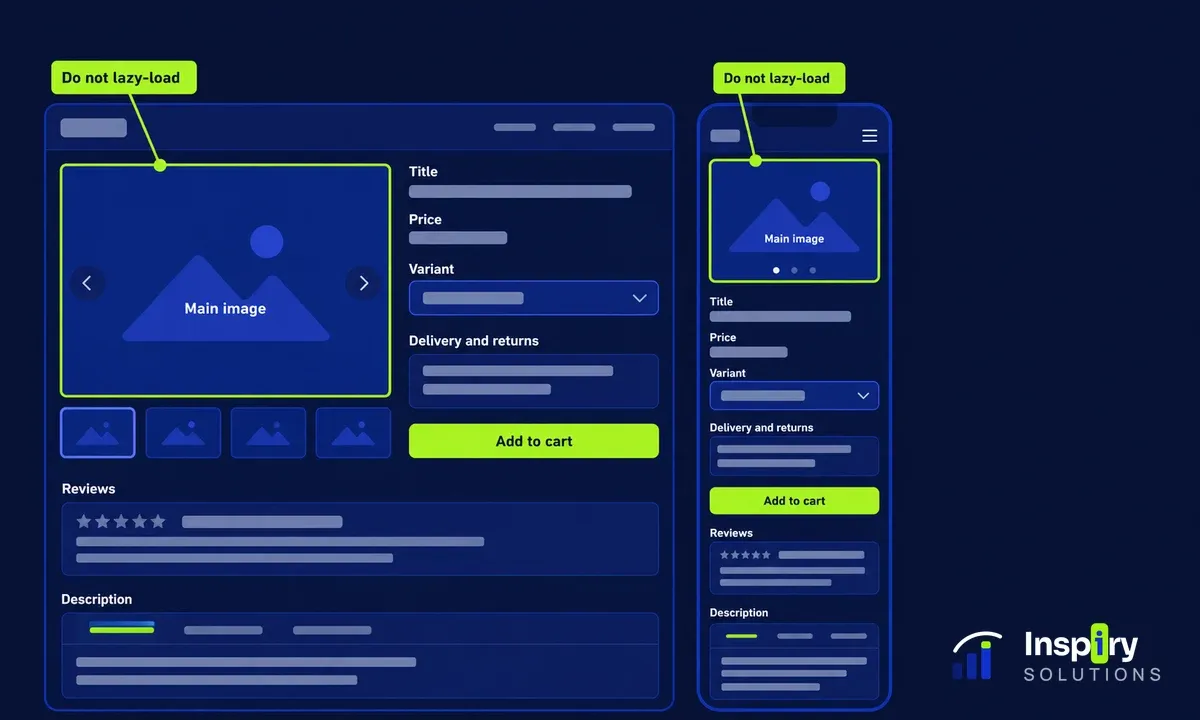
Product imagery affects both search presentation and buyer confidence. It can also be a major contributor to page loading time.
Prioritise the main product image
The main image is often the largest visible element on a mobile product page.
Google’s LCP optimisation guidance explains why priority resources should be discovered and loaded early.
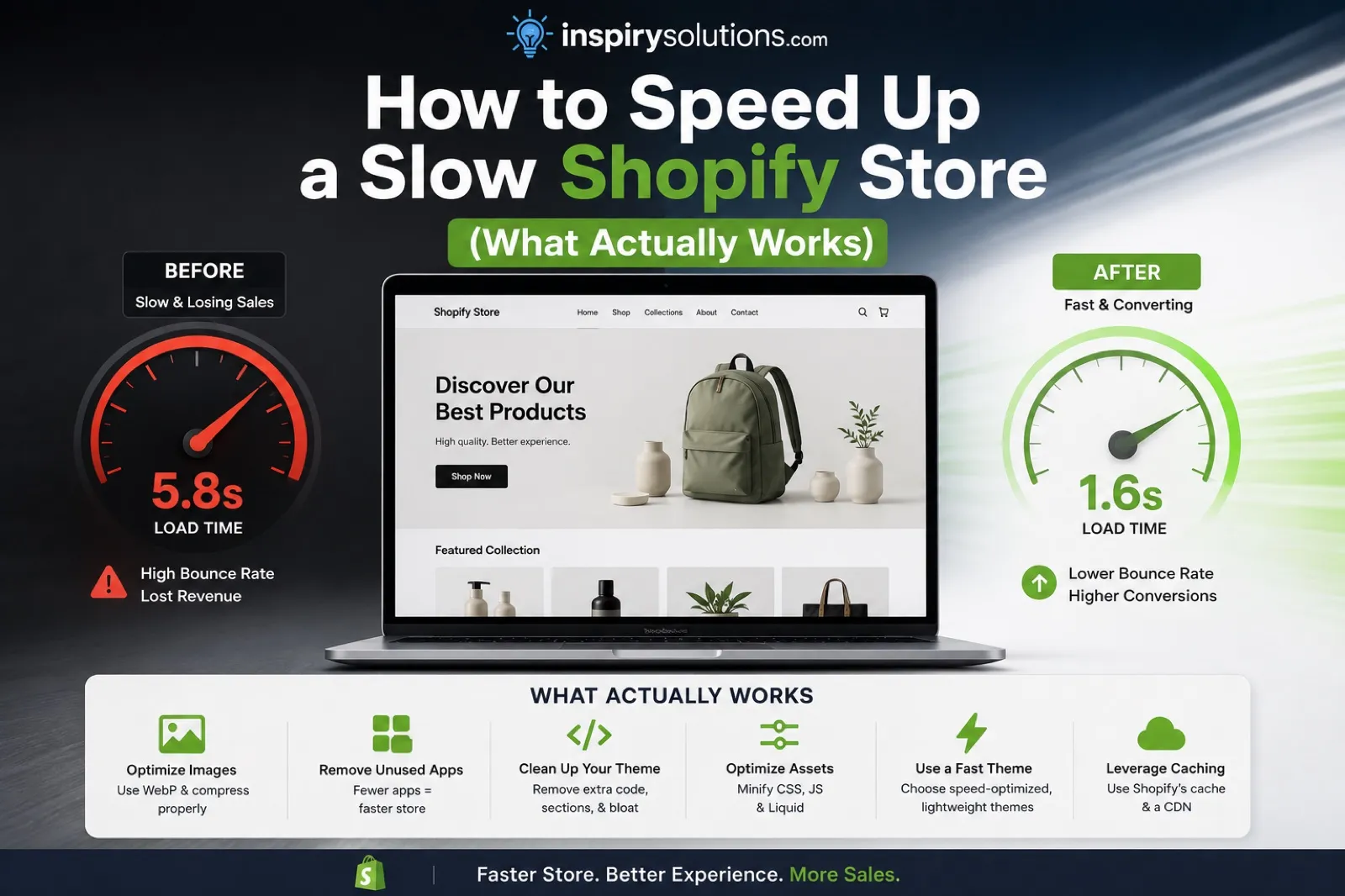
If image loading remains weak, follow the order to fix Shopify speed issues before making unrelated design changes.
Write accurate image alt text
Good Shopify product image alt text describes the actual item shown.
For example:
Useful: “Blue ceramic coffee mug with curved handle, side view”
Weak: “Best coffee mug ceramic mug buy coffee mug online”
For product variants, describe the displayed colour, finish or other visually distinguishable attribute when relevant.
Google’s image SEO best practices explain the importance of descriptive text, image quality and accessible image implementation.
Add media only when it answers questions
However, both introduce additional loading considerations.
For a clearer explanation of loading, responsiveness and visual stability, read Core Web Vitals in plain English.
Variants, stock and discontinued products
Variants allow a single Shopify product to offer choices such as size, colour or material.
When a shopper selects a variant, Shopify commonly adds a ?variant= parameter to the product URL.
This does not mean every variant should become a separate indexed page.
Check the canonical URL
A canonical tag identifies the preferred URL when multiple addresses display substantially similar content.
For a standard product with variant parameters, the canonical should generally point to the main product URL without the variant parameter.
Inspect the page source on a variant URL and look for the canonical link element. Confirm that it points to the intended main product.
Keep temporarily unavailable products useful
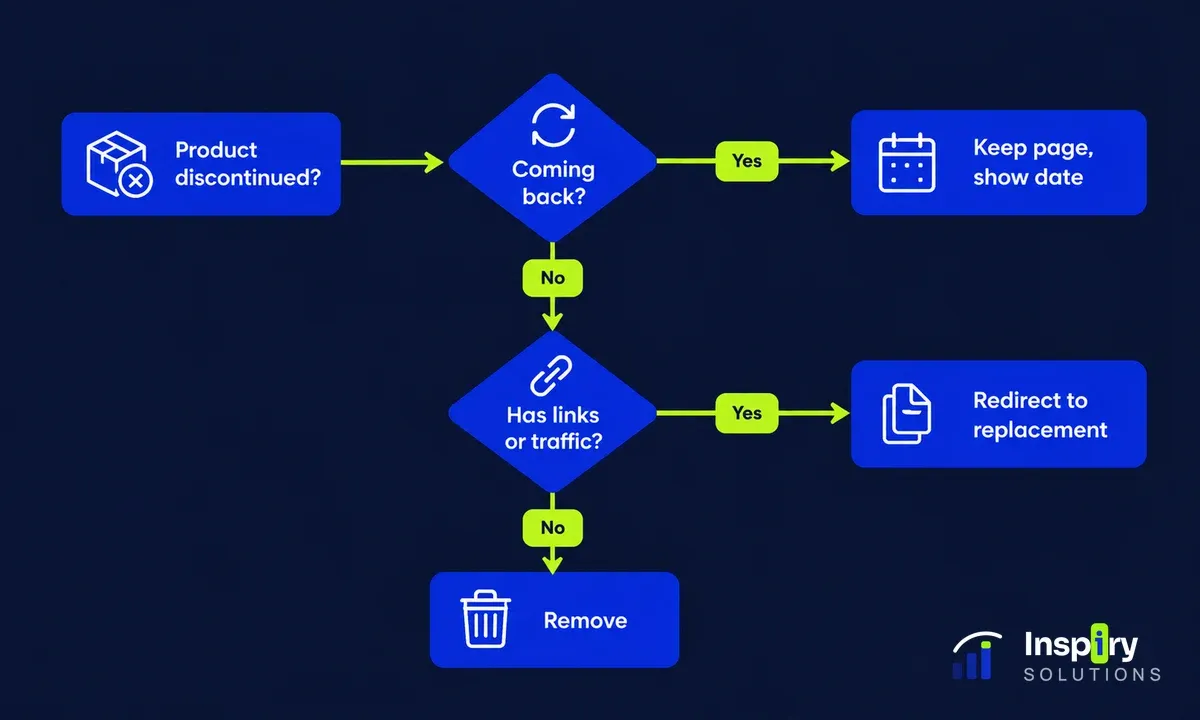
For out-of-stock Shopify products, the first question is whether the product will return.
If it will, keeping the product page live generally preserves a useful destination for customers and search visitors.
Never invent an expected restock date.
Handle discontinued products deliberately
Products permanently removed from sale require a different approach.
Check whether the existing URL receives traffic or has inbound links before deciding what happens next.
If there is a close replacement, redirect to that product. A relevant collection can work when there is no direct substitute.
Avoid redirecting every discontinued product to the homepage. A destination unrelated to the original item is less useful to visitors.
When no appropriate replacement exists, removing the page and allowing an appropriate not-found or gone response can be reasonable.
Stock handling is part of maintaining a useful product catalogue, not merely hiding unavailable buy buttons.
Trust and conversion elements near the buy button
Search visibility creates an opportunity. The product page must still help someone decide whether to purchase.
Look at the page on a mobile phone and identify what is visible before scrolling.
Can the shopper recognise the product, understand the price, select an available variant and find the add-to-cart button?
If not, correcting that experience may deserve attention before writing another description.
Put buying information where decisions happen
Useful information near the purchase area includes:
- Clear price and any relevant tax explanation.
- Availability for the selected variant.
- Delivery costs, estimates or a straightforward way to calculate them.
- A short returns summary linked to the full policy.
- Authentic customer reviews, where available.
- Size guidance or compatibility information.
Do not bury essential delivery information several interactions away.
If delivery charges depend on location, explain that clearly rather than presenting an inaccurate fixed figure.
For products where sizing is important, a guide near the variant selector can reduce uncertainty. Clear compatibility information is similarly valuable for electronics and replacement parts.
These improvements may also reduce avoidable support questions and mistaken orders, although the effect must be measured.
Check what apps add to the page
Reviews, upsells, subscriptions, wishlists and delivery estimators can each add scripts and interface elements.
More widgets do not automatically mean more conversions.
Before installing an app, identify the specific problem it solves. Check whether the current theme already provides that functionality.
Measure page performance before and after installation. If the widget provides little value while adding substantial loading work, consider removing it.
Our guide to too many apps on a store explains how to review overlapping functionality and unnecessary scripts.
Also inspect whether uninstalling an app leaves inactive code or theme integrations behind.
Test the actual buying journey
Open the product page on a phone, choose a variant and add it to the basket.
Confirm that the correct variant and price reach the cart. Check that promotional messages do not obscure the add-to-cart button.
Inspect sticky purchase bars, review widgets and delivery calculators for overlapping elements.
A technically functional product page can still be confusing.
Evaluate conversion changes using add-to-cart activity, completed purchases and feedback. Do not treat a higher click count on a button as proof of additional sales.
Product structured data checks
Structured data is machine-readable information that helps search engines understand a page.
Many Shopify themes already output Product structured data. This commonly describes the item and its commercial offer, including price and availability.
Problems can arise when an SEO app, review app or theme extension adds overlapping markup without coordinating with the existing output.
Duplicate Product objects are not automatically errors. The concern is conflicting or inaccurate information.
Inspect the rendered page using a suitable structured data validator. Check which Product objects are present and whether they describe the correct item.
Pay particular attention to:
- Product name and selected offer.
- Currency and visible price.
- Availability and stock status.
- Product images.
- Review information, if genuinely supported.
- Errors or warnings affecting eligible search features.
The price and availability in structured data must agree with the information customers see. Follow Google’s Product structured data documentation when checking these values.
When variants use different prices, verify that the markup represents offers correctly rather than displaying a misleading fixed value.
Do not install another schema app merely because a tool displays a warning. Determine whether the theme already produces valid markup and whether an actual correction is required.
Structured data can help search engines interpret an item, but valid markup does not guarantee rich results.
Common questions
How long should a Shopify product description be?
Long enough to answer the questions shoppers ask before buying. There is no ideal word count for ranking. A simple item might need a short explanation, while technical products require more detail. Specs in a consistent format often help more than extra paragraphs. Prioritise useful information, accuracy and readability over length.
Should I delete out-of-stock products on Shopify?
Not if they will return. Keep the page live and say when the item is expected back, if you have a reliable date. For discontinued products with traffic or links, redirect to the closest relevant alternative. Deleting without a redirect sends visitors to a 404 page, potentially wasting useful links and frustrating shoppers.
Do product variants create duplicate content on Shopify?
Variant selections add a ?variant= parameter to the URL, so several URLs may display substantially the same product information. The theme’s canonical tag should point to the main product URL for a conventional variant setup. Check one product’s page source to confirm. Custom themes and apps can change canonical behaviour, so verify rather than assume.
Can I use the manufacturer’s product description?
You can, but many other retailers may use the same text. Unique copy gives search engines and shoppers a reason to choose your page by adding useful details, comparisons or answers missing from supplier descriptions. Start with best sellers rather than rewriting everything. Verify all claims against the actual product specifications before publishing.
Fix your top ten products first
A manageable Shopify product page SEO project begins with a selected group, a written fix list and baseline measurements.
Use the following table to decide what to review. Effects are directional assessments rather than promised results. Actual priority depends on the problem identified during diagnosis.
Product page fix priority
| Fix | Effect on search | Effect on conversion | Effort | Who does it |
|---|---|---|---|---|
| SEO title | High when relevance is weak | Indirect | Low | SEO or merchant |
| Unique description | Medium to high | High | Medium | Copywriter or merchant |
| Spec metafields | Medium | High | Medium | Merchant and developer |
| Main image size and loading | Medium | High | Medium | Developer |
| Alt text | Medium for image relevance | Accessibility benefit | Low | Content editor |
| Variant canonical check | High if incorrect | Low direct effect | Low to medium | Technical SEO or developer |
| Out-of-stock handling | Medium | High for returning visitors | Medium | Merchant |
| Delivery and returns info near buy button | Low direct effect | High | Low to medium | Merchant or developer |
| Reviews | Low direct effect | Potentially high | Medium | Merchant and developer |
| Structured data duplicates | High if conflicting or invalid | Indirect | Medium | Developer |
Treat the table as a diagnostic guide, not a fixed sequence that overrides evidence.
If a valuable page has a broken canonical, correct that before rewriting its description. If search traffic is healthy but visitors cannot find delivery details, prioritise the buying experience.
Work through the chosen ten products systematically. Record their existing titles, content issues, image loading, technical problems and purchase-page friction.
Make changes in a controlled way so you can understand what was altered.
After a few weeks, compare organic clicks, add-to-cart rates and sales against the baseline. Account for promotions, seasonality, stock changes and advertising activity.
Small datasets can fluctuate considerably, so avoid claiming success from isolated movements.
Once you identify improvements worth keeping, turn them into a reusable product template and a practical writing guide. Specify how titles, metafields, images, delivery information and stock messages should be maintained.
That makes future product pages more consistent without repeating the same manual decisions across your catalogue.
Want help choosing where to start? Send your store URL to hello@inspirysolutions.com for a free audit. We will identify the ten product pages we would fix first and provide a plain-language reply within two working days.
If the product template itself is holding the store back, ask about our Shopify development service to rebuild its layout, metafields and buying experience around the information customers actually need.