A WordPress booking system can use a plugin, a hosted booking tool or a custom build. For most service businesses, a tested plugin or hosted tool is a better starting point than custom development. The right choice depends on how you allocate staff, rooms and equipment, collect payments and manage cancellations. A salon with individual stylists has different requirements from a clinic sharing treatment rooms or a trade business arranging site visits. Write down those rules first, test the available options and only commission custom code when the existing tools cannot handle an important part of your workflow.
Start with your booking rules, not a plugin list
Choosing software before documenting your workflow is a common way to create problems that only appear after launch. An attractive calendar means little if two customers can reserve the same treatment room or a cancelled appointment leaves the staff diary blocked.
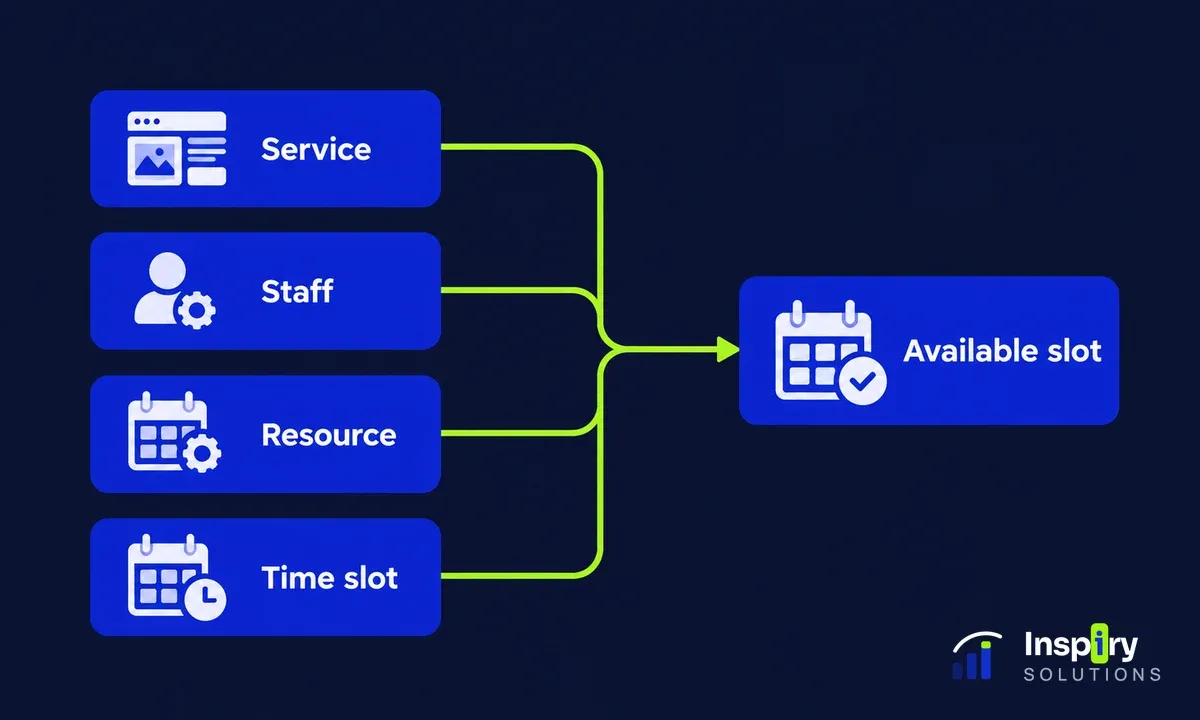
Services, durations, staff and resources
List every service customers can reserve. Record its duration, preparation time, required staff member and any room, vehicle or equipment it uses.
- Can customers select a specific employee or should the system assign one?
- Does a service require a particular room or piece of equipment?
- Can two services happen at the same time with different staff?
- Is preparation or cleaning time required between appointments?
- Can a customer book several services in one visit?
- Should availability change for particular locations or working days?
Deposits, cancellations and reminders
Decide when a customer must pay and what happens when plans change.
- Deposits and balance payments
- Cancellation and rescheduling deadlines
- Late arrivals and no-shows
- Refund approval and processing
- Email or SMS confirmations
- Appointment reminders
- Staff-initiated changes
Who manages the diary every day?
Customer-facing design is only half the decision. Staff need a reliable way to create, move, cancel and review appointments.
Create a one-page booking brief
Before comparing products, prepare a short document containing your services, staff, resources, working hours, payment rules, notification requirements and administrative responsibilities.
- Essential: the business cannot operate correctly without them.
- Useful: they would save time but have an acceptable workaround.
- Future: they may become relevant as the business expands.
Three ways to add a WordPress booking system
There are three practical approaches: install a WordPress plugin, connect a hosted booking platform or commission a custom build.
Booking plugin
A WordPress booking plugin adds appointment management functionality to your existing website. Depending on the product, you may get customer-facing calendars, staff schedules, payment integrations and automatic notifications.
- Customers can complete the process within your WordPress website.
- Design and content can follow your existing site.
- Staff may be able to manage reservations through WordPress.
- Standard features can reduce initial development work.
Check the WordPress plugin directory for available products, update history and support information. For commercial plugins, review the developer’s documentation, licensing terms and support arrangements as well.
Hosted booking tool
A hosted platform runs the appointment system outside WordPress. Customers reach it through an embedded widget, a linked page or a booking button.
- Appointment management is handled outside your WordPress installation.
- The provider may manage software updates and hosting for its platform.
- Staff can use a dedicated interface for reservations.
- Some platforms include specialist scheduling and reminder features.
Custom booking build
A custom booking build uses development work to implement scheduling rules that existing software cannot handle appropriately.
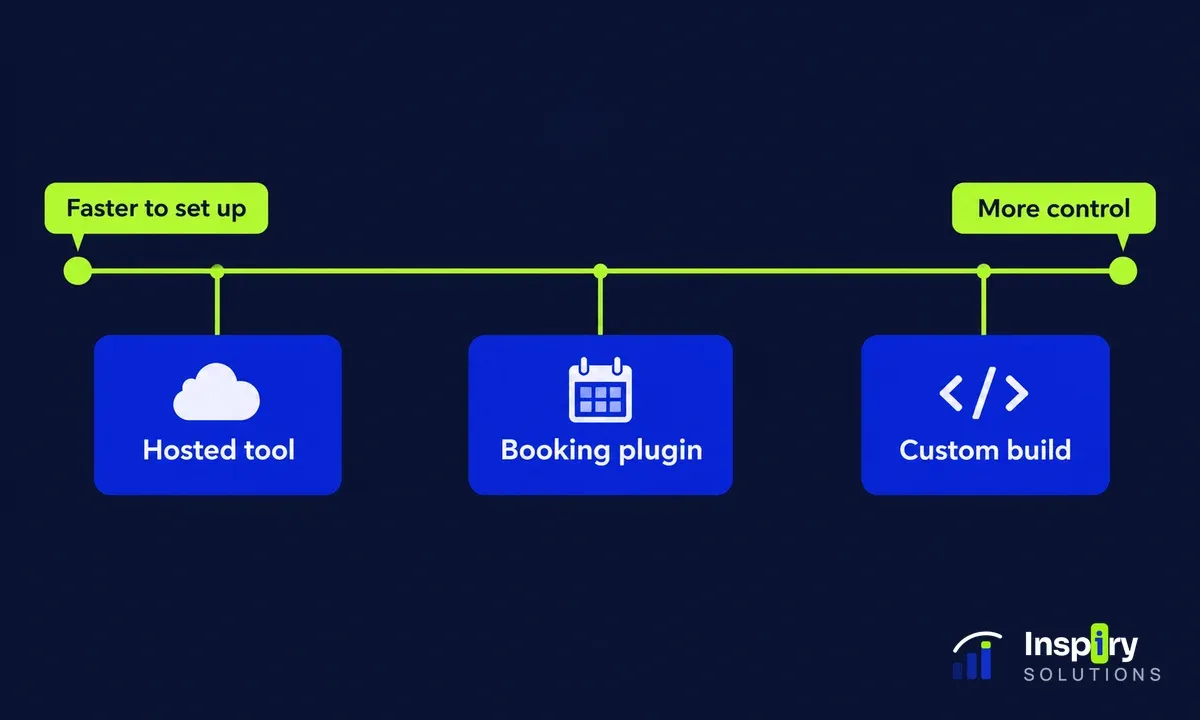
If your requirements fit a standard product, start there. If you want booking features built into WordPress, the first development task should be verifying compatibility with your existing site, not immediately writing new code.
Plugin, hosted tool or custom compared
The following comparison describes typical differences. Individual products vary, especially in their paid plans and integrations.
| Factor | Booking plugin | Hosted booking tool | Custom build |
|---|---|---|---|
| Upfront cost | Usually lower, with configuration and possible licences | Often lower setup effort, depending on integration | Generally higher because requirements and development must be scoped |
| Ongoing cost | Renewals, hosting and maintenance | Provider subscription and possible usage charges | Hosting, support, maintenance and future development |
| Fit with your exact rules | Limited by features, settings and extensions | Limited by platform capabilities and plan | Can be designed around documented requirements |
| Data stored where | Often in WordPress, sometimes partly with connected providers | Primarily with the external provider | Depends on the architecture and integrations |
| Calendar sync | Depends on plugin, licence and integration | Depends on provider and subscription | Must be specified and implemented |
| Payment options | Supported gateways and extensions vary | Provider-supported gateways and payment rules | Can be integrated to agreed requirements |
| Effect on page speed | Scripts and database operations need testing | Embedded widgets and third-party scripts need testing | Depends on implementation and hosting |
| Maintenance responsibility | Site owner or developer, plus plugin vendor | Provider for its platform; site owner for integration | Business and its appointed development team |
| Effort to switch later | Depends on export options and data structure | Depends on data portability and provider access | Depends on documentation, architecture and ownership |
Review judging plugins by their workload when assessing whether an additional plugin is sensible for your website.
Payments, deposits and calendars
Payment collection and calendar management are two areas where an apparently suitable system can fail under normal business conditions.
Check payment gateway support
Confirm which payment providers the software supports and whether your required payment method works in your operating country.
Understand two-way calendar synchronisation
Calendar synchronisation connects your appointment software with staff calendars. Two-way synchronisation means changes can flow in both directions, subject to the integration’s rules.
- A practitioner blocks time in their personal calendar.
- A customer books a slot through the website.
- Reception reschedules an appointment.
- A staff member cancels a recurring calendar event.
- Two customers attempt to reserve the same remaining slot.
Where WooCommerce fits
WooCommerce can be useful when a service business also sells products, packages or prepaid services.
Deposits and bookable packages in WooCommerce usually depend on additional extensions, so confirm that the booking tool and those extensions work together before relying on them.
Refunds and no-show rules
Your cancellation policy should be visible before the customer confirms a reservation.
Speed, accessibility and mobile booking
A system can meet every administrative requirement and still lose customers through slow loading or a confusing mobile experience.
Limit unnecessary scripts
Some booking widgets load external JavaScript, stylesheets, tracking code and remote content. These can add weight, compete for network resources and delay interaction.
Google’s guidance on efficient third-party JavaScript explains why third-party code should be assessed carefully.
Our guide to common causes of a slow WordPress site explains other performance problems worth checking alongside the new scripts.
Make the calendar usable for everyone
Date pickers, dropdowns and multi-step forms need particular attention because not every visitor uses a mouse or touchscreen.
The WCAG 2.2 accessibility requirements provide the relevant standards for keyboard operation, labels, focus and input assistance.
Use our accessibility checks for business sites when reviewing the rest of the customer journey.
Test the whole journey on a phone
Do not judge mobile usability from a desktop browser with its window narrowed.
Use a real phone to check the service selector, calendar, available times, customer details and payment confirmation.
Pay attention to:
- Small date-selection controls
- Pop-ups that cover important buttons
- Forms hidden behind the mobile keyboard
- Long service names that wrap awkwardly
- Unclear error messages
- Checkout redirects that confuse customers
Also test what happens when the customer changes their chosen service halfway through the process.
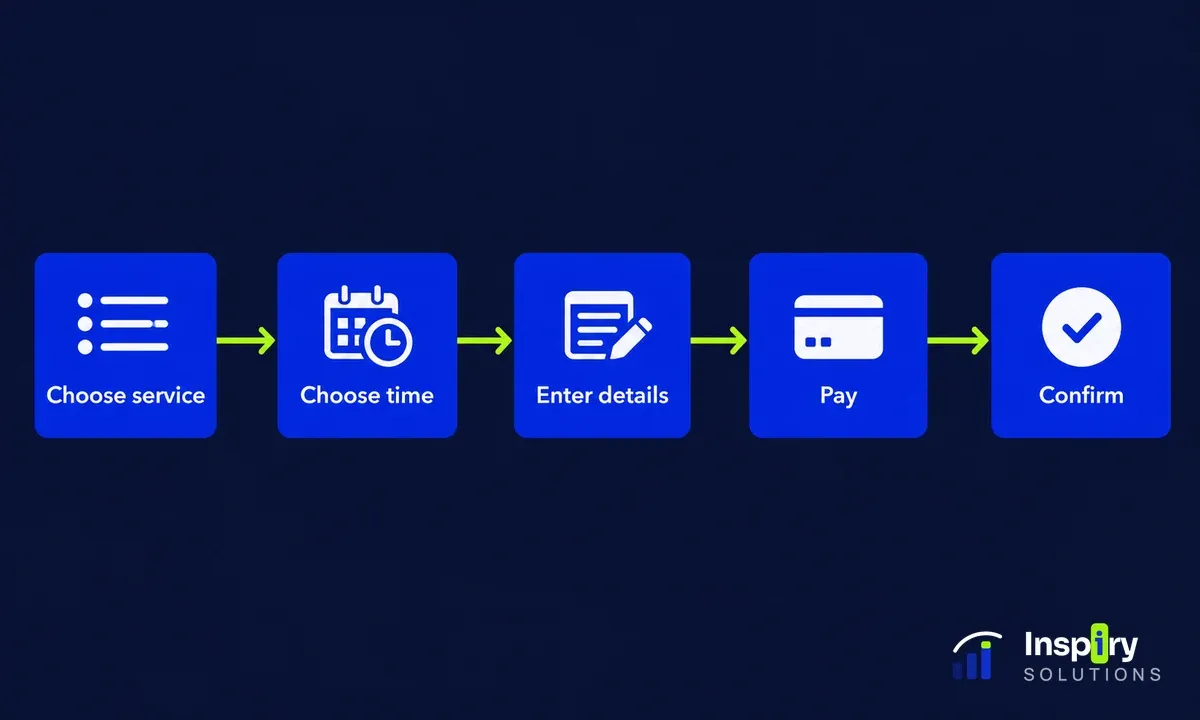
A shorter form is useful, but removing essential fields can create additional administration. Ask only for information needed to schedule and deliver the service, then collect anything else at an appropriate stage.
When a custom booking system is justified
Custom development becomes reasonable when your documented requirements cannot be met reliably by existing products, or when the workarounds create unacceptable operational problems.
The important distinction is between a genuinely unsupported rule and a preference that can be handled through configuration.
Prove the limitation before commissioning code
Test shortlisted options against your essential scenarios.
For example, a clinic may require a practitioner and treatment room to be available simultaneously. If an existing plugin can enforce this, there may be little value in recreating it.
If the software only checks practitioner availability and allows conflicting room assignments, that is a meaningful limitation.
Compare building a custom plugin or using an existing one before deciding to develop a new solution.
Hypothetical example: A physiotherapy clinic has several practitioners, shared treatment rooms and a deposit requirement for new patients.
Its essential rules are:
- Customers choose a treatment and suitable practitioner.
- Each accepted appointment reserves a compatible treatment room.
- New patients pay a deposit before confirmation.
- Existing patients can follow a different payment rule.
- Reception can move an appointment without losing payment information.
The clinic selects two candidate plugins and tests them in a staging website, which is a separate copy used for safe testing.
Plugin A supports practitioner schedules and deposits but cannot reliably reserve shared rooms. Plugin B handles resource availability but fails the new-patient deposit scenario without an unsuitable workaround.
Neither meets every essential requirement in this hypothetical test.
The next step is not automatically custom development. The clinic evaluates a hosted tool designed for multi-resource scheduling and checks the same scenarios again.
If that platform handles the rules and provides acceptable data access, costs and customer experience, it may be the better choice.
Only if the available tools fail essential requirements should the clinic investigate custom development, potentially limited to the missing integration rather than a complete replacement.
This is an illustrative decision process, not a claim about particular products or real clinic results.
Integration with internal systems
Custom work may be justified when appointments must connect with an existing customer database, job management platform or internal scheduling system.
The key questions are what data moves, which system controls it and how failures are detected.
For example, a trade company might need confirmed visits assigned to technicians in a separate operational platform.
An integration should prevent duplicates, report failures and allow authorised staff to correct exceptional cases.
Building these connections can be worthwhile, but their reliability and support requirements must be included in the scope.
Account for ongoing ownership
Custom code does not finish when it launches.
The business needs someone responsible for security updates, compatibility testing, error monitoring, data protection, backups and changes to payment or calendar integrations.
Documentation should explain the architecture, important business rules, administrative permissions and recovery process.
Confirm who owns the code and data, who can access the repository and whether another developer could maintain the system if your original supplier becomes unavailable.
Scope costs from evidence
A credible custom quotation requires a written brief, a review of existing software and defined acceptance tests.
At Inspiry Solutions, one-off WordPress fixes are priced at $400-$1,800, while typical business website projects are $2,500-$8,000. These are published service ranges, not prices for a custom appointment platform.
Custom booking work is quoted separately according to scope.
A narrowly defined integration and a complete scheduling application are different projects. Giving one generic price without examining the rules would be misleading.
Common questions
What is the best booking plugin for WordPress?
It depends on your booking rules rather than a universal product ranking. A salon with individual staff calendars may need different features from a clinic managing shared rooms. Shortlist suitable plugins, then test them against real scenarios involving availability, payments, cancellations and notifications. Choose the option that handles essential tasks reliably with manageable ongoing costs.
Can a WordPress booking system take deposits?
Yes. Many plugins support online payments or deposits, although the exact features depend on the product and licence. WooCommerce can also handle deposits and service packages with appropriate extensions. Before choosing, test partial payments, failed transactions, cancellations and refunds. Confirm that the appointment status remains accurate when the payment situation changes.
Will a booking widget slow down my site?
It can. Embedded third-party widgets may add JavaScript, stylesheets and remote requests that affect loading and responsiveness. Load them only on booking pages where possible, or use a link when embedding is unnecessary. Measure performance before and after integration, particularly on mobile devices. A lightweight-looking widget is not automatically lightweight in operation.
How much does a custom booking system cost?
A custom booking system should be scoped after an audit of your rules, integrations and maintenance needs. Inspiry’s published one-off fixes run $400-$1,800, and typical business websites cost $2,500-$8,000. Those ranges are not custom booking quotations. Custom booking work is priced according to the actual requirements, development effort, testing and ongoing responsibilities.
Testing a booking setup before launch
A successful test is not simply seeing a confirmation message.
The website must reserve the correct resources, handle payment consistently and provide staff with an accurate diary.
Build a small testing checklist based on your one-page brief and complete it before accepting live customers.
Test the entire appointment lifecycle
Use test customers and your payment provider’s test environment where available.
Create an appointment, change its time, cancel it, make a test payment and process a refund.
Check the customer-facing outcome and the administrative record after every action.
Repeat the process for different service lengths, staff members and cancellation conditions.
Also test incomplete submissions and payment failures. An abandoned checkout should not leave availability blocked indefinitely unless that behaviour is intentionally configured.
Verify notifications
Confirm that customers receive the correct appointment details, location, time, payment status and cancellation instructions.
Check staff notifications separately. The person delivering the service may need different information from the receptionist managing the diary.
Test spam handling and email delivery configuration, not just whether the software reports that a notification was sent.
If SMS reminders are enabled, verify the timing, message content and any additional provider charges.
Check time zones and conflicts
Time zone mistakes can create serious scheduling problems for organisations serving customers in different locations.
Test appointments from another time zone and check how daylight saving changes are handled.
The customer’s displayed time, confirmation message and staff calendar should refer to the same appointment correctly.
Try submitting competing reservations for the same staff member or resource. One accepted appointment must prevent an incompatible second reservation.
Assign responsibility after launch
For the first two weeks after launch, nominate a specific person to review new reservations and reported errors.
They should compare the appointment dashboard with staff diaries and payment records, investigate unusual behaviour and log any corrections.
Decide who contacts affected customers if a problem is found.
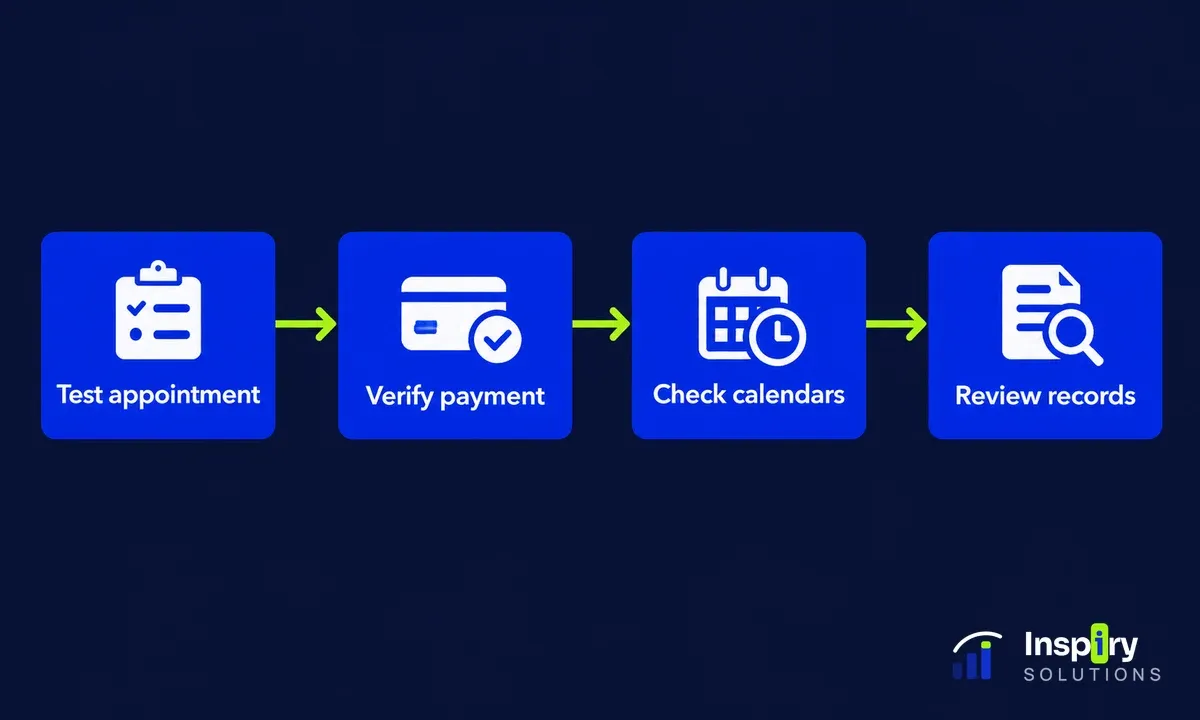
This early review period helps identify practical issues that structured testing may miss, such as unclear service descriptions or staff using the administrative interface differently from expected.
Keep the test checklist available for future plugin updates and workflow changes. A working system today still needs verification after significant changes.
Start by documenting the appointments you offer, the resources each one needs and the rules staff follow every day.
Then compare a WordPress plugin and a hosted platform against those requirements. Test deposits, resource availability, calendars, cancellations and the mobile experience before committing to a full implementation.
If an existing tool passes those checks, custom development may introduce more cost and responsibility without enough benefit.
If essential rules remain unsupported, a targeted integration or custom build may be justified.
Tell us how your bookings work and send your website for a free audit. Our WordPress development service will test the options against your rules before recommending a build. Send your website URL and a short description of your requirements to hello@inspirysolutions.com. You will receive a plain-language reply within two working days.