WordPress malware removal makes sense when the infection is contained, the entry point can be closed and the existing website is worth keeping. A rebuild is often better when attacks keep returning, software is no longer maintained or too much of the site has changed without explanation. There is also a middle route: replace compromised code while preserving inspected content. The right choice depends on the investigation, the site’s condition and the cost of future problems, not simply whether the website appears to work after cleaning.
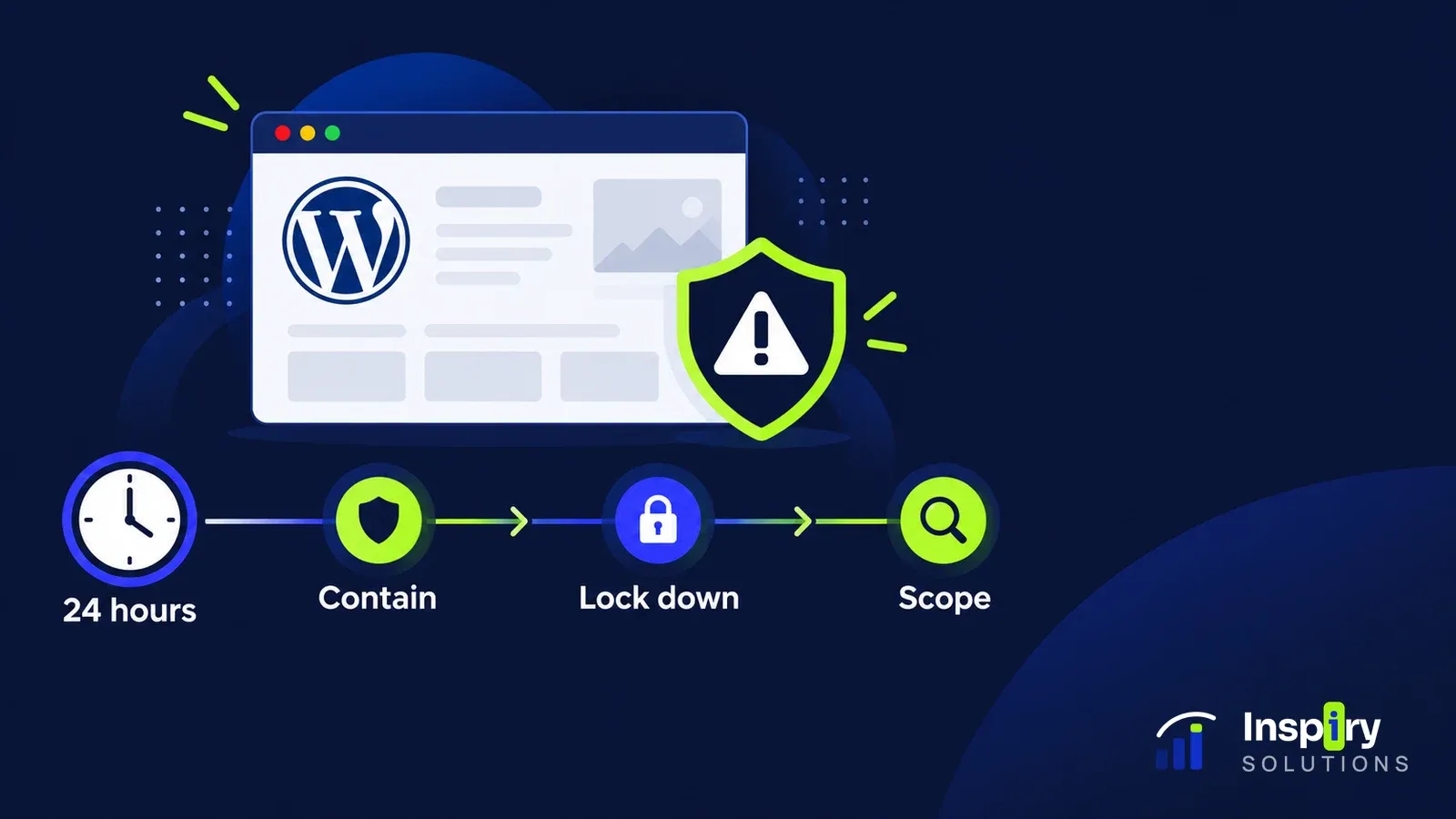
This guide helps owners compare the cost and risk of all three approaches. If your website is actively compromised, start with the first day after a hack before deciding on permanent repairs.
What WordPress malware removal actually involves
A proper WordPress malware removal service investigates how attackers entered, what they changed and whether they left a way to regain access. Deleting suspicious files alone is insufficient.
A website can appear normal while containing malicious code, hidden administrator accounts or unwanted database entries.
Inspect files, database and access
The investigation begins with a protected website copy and available server logs. Preserving evidence helps identify the likely entry point.
The developer examines:
- WordPress core files for unexpected changes.
- Theme and plugin directories for injected code.
- Uploads for suspicious executable files.
- Database records for spam links and scripts.
- Administrator accounts and unusual permissions.
- Scheduled tasks, configuration files and backdoors.
- Hosting logs for suspicious activity.
A backdoor is hidden code or access that allows an attacker to return. Leaving one behind creates a reinfection risk.
Replace compromised components
Once the scope is established, the developer removes malicious files and replaces affected WordPress core, plugins and themes with verified copies.
Custom code needs separate inspection because there may be no official version for comparison.
Database changes require care. Deleting suspicious records without understanding them can damage content, forms or functionality.
Close the entry point
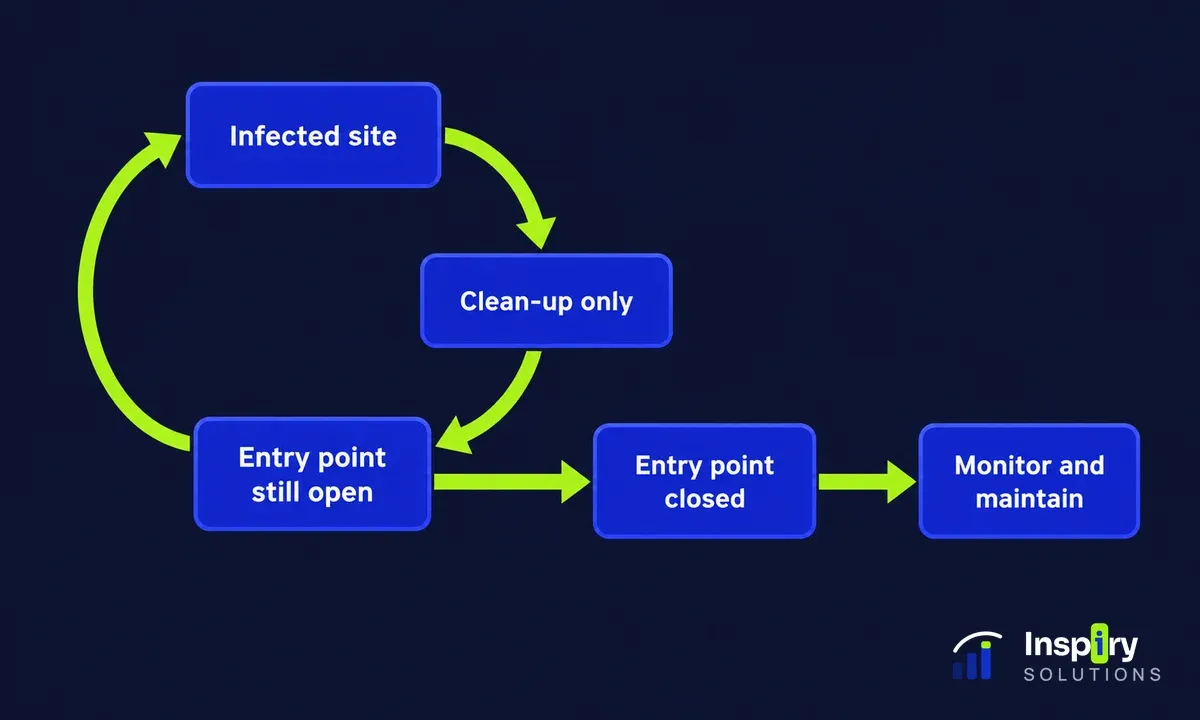
A clean-up is incomplete until the original weakness is addressed.
This might mean patching a vulnerable plugin, replacing an abandoned theme, removing unknown accounts or changing compromised passwords.
Review administrator, hosting, SFTP and database access where relevant. Revoke affected sessions and enable multifactor authentication (MFA).
If the entry point remains unknown, the developer should explain the uncertainty rather than promise complete security.
Check search visibility and warnings
Attackers sometimes create spam pages, hidden links or redirects. Google’s spam policies on hacked content explain the search risks.
Use Google Search Console to check security issues and request a review when the relevant issue has been resolved.
Investigate unexpected indexed URLs. Our guide to fixing pages Google stopped indexing covers related checks.
After recovery, ongoing WordPress maintenance and security can help manage updates, monitoring and backups.
What a rebuild involves
Rebuilding a hacked WordPress site means creating a new installation with trusted software and transferring legitimate content and functionality.
It is more than installing another theme on the infected website.
A rebuild becomes attractive when unsupported components or widespread changes make the original installation difficult to trust.
Start with trusted software
The developer creates a clean WordPress environment, installs a maintained theme and selects plugins from legitimate sources.
The compromised website serves as a reference, not a package to copy without inspection.
Typical work includes:
- Preparing clean hosting and WordPress.
- Installing verified themes and plugins.
- Recreating templates and required functionality.
- Inspecting content before migration.
- Configuring accounts, forms and integrations.
- Testing before launch.
Custom features need separate assessment. Recreating undocumented functionality may require substantial work.
Preserve URLs and SEO
A rebuild should not automatically change every page address.
Document existing URLs, preserve useful content and plan permanent redirects wherever addresses must change.
Review page titles, metadata, internal links, canonical settings and indexability.
Our guide to keeping rankings through a rebuild explains the migration process.
Careful planning reduces avoidable disruption, although rankings cannot be guaranteed.
Compare delivery requirements
A focused clean-up generally involves less development than a complete rebuild, but investigation still requires time.
A rebuild adds template development, content migration, integration testing and launch preparation.
Complex forms, memberships, ecommerce records and custom functionality increase the work.
Temporary containment may be necessary while the replacement is prepared.
The middle route: clean code, keep content
An alternative exists between repairing compromised components and paying for a complete redesign.
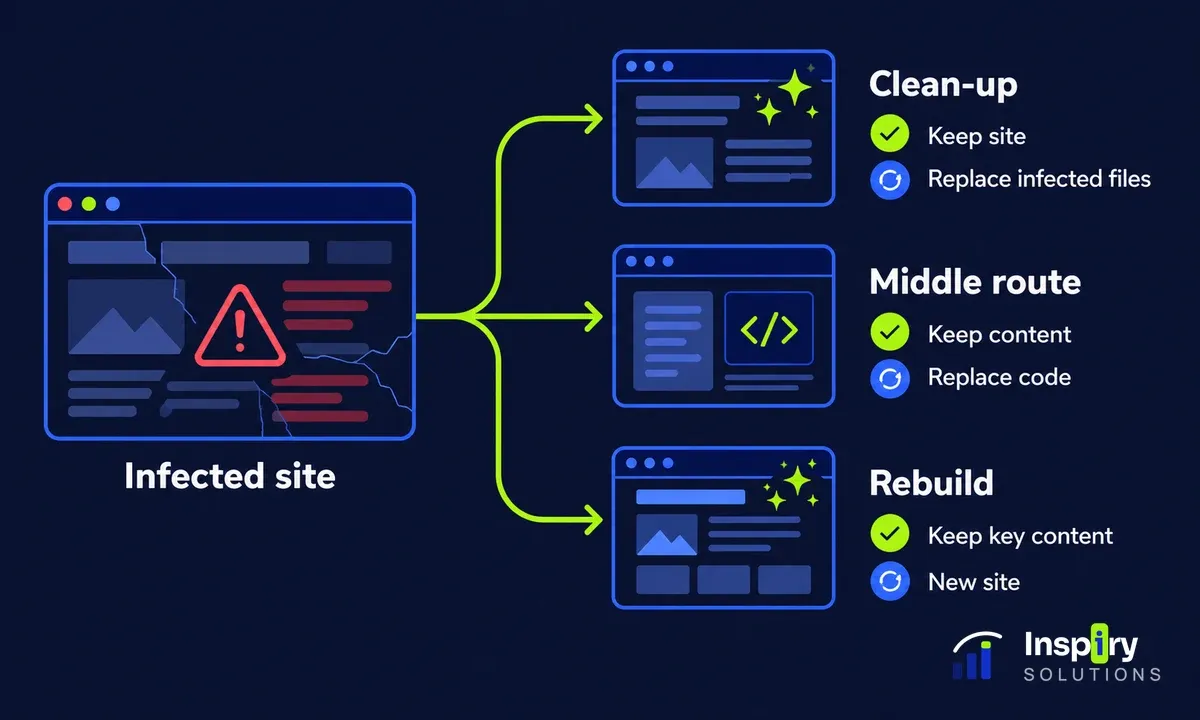
The middle route replaces executable code while preserving content that can be inspected and safely transferred.
It suits websites with valuable content and acceptable designs but questionable installations.
What gets replaced
The developer installs fresh WordPress, verified theme files and legitimate plugins.
Existing executable files are not transferred simply because the website previously depended on them.
Custom code requires inspection or recreation. Unsupported plugins need maintained replacements.
Important configuration settings, particularly permissions and redirects, are rebuilt where necessary.
What gets preserved
Useful pages, posts, media and legitimate records can be exported, inspected and migrated.
However, an ordinary WordPress export is not automatically safe. Content may contain injected scripts, suspicious links or manipulated records.
Imported material must be checked before publication.
Retain existing URLs and important metadata where practical.
When this route works
The middle route makes sense when the design remains useful and required software is available from trusted sources.
It avoids unnecessary redesign while replacing questionable code.
It is less suitable when the theme is abandoned or essential functionality cannot be recreated reliably.
Investigation remains necessary even when the entire codebase is replaced.
Six questions that decide it
These six questions help establish whether WordPress malware removal is sufficient, whether the middle route offers better value or whether rebuilding is justified.
Consider the answers together rather than treating one finding as decisive.
1. Do we know how they got in?
An identifiable entry point that can be fixed makes clean-up more defensible.
For example, finding an exploited plugin and replacing it with a patched version addresses a specific weakness.
However, if attackers obtained hosting credentials, replacing WordPress files alone will not solve the problem.
Ask which logs were examined, what identifies the entry point and which risks remain.
An unknown cause increases uncertainty and strengthens the case for wider replacement.
2. How widespread are the changes?
Limited changes with a known cause may justify focused clean-up.
Alterations across themes, plugins, database tables and administrator accounts make recovery more complicated.
Scanner alert counts matter less than whether the remaining installation can be verified as trustworthy.
Request a summary of affected areas, replaced components and unresolved findings.
If substantial portions cannot be trusted, replacing code may be more practical than individual repairs.
3. Is this a repeat infection?
Repeated incidents demand a different investigation.
If WordPress keeps getting hacked, possible causes include unresolved vulnerabilities, stolen credentials, contaminated backups or surviving backdoors.
Repeating the same clean-up without finding the cause risks another incident.
Compare previous repair reports, software changes and access controls.
A repeat infection does not automatically require rebuilding, but the next proposal must explain how the approach differs.
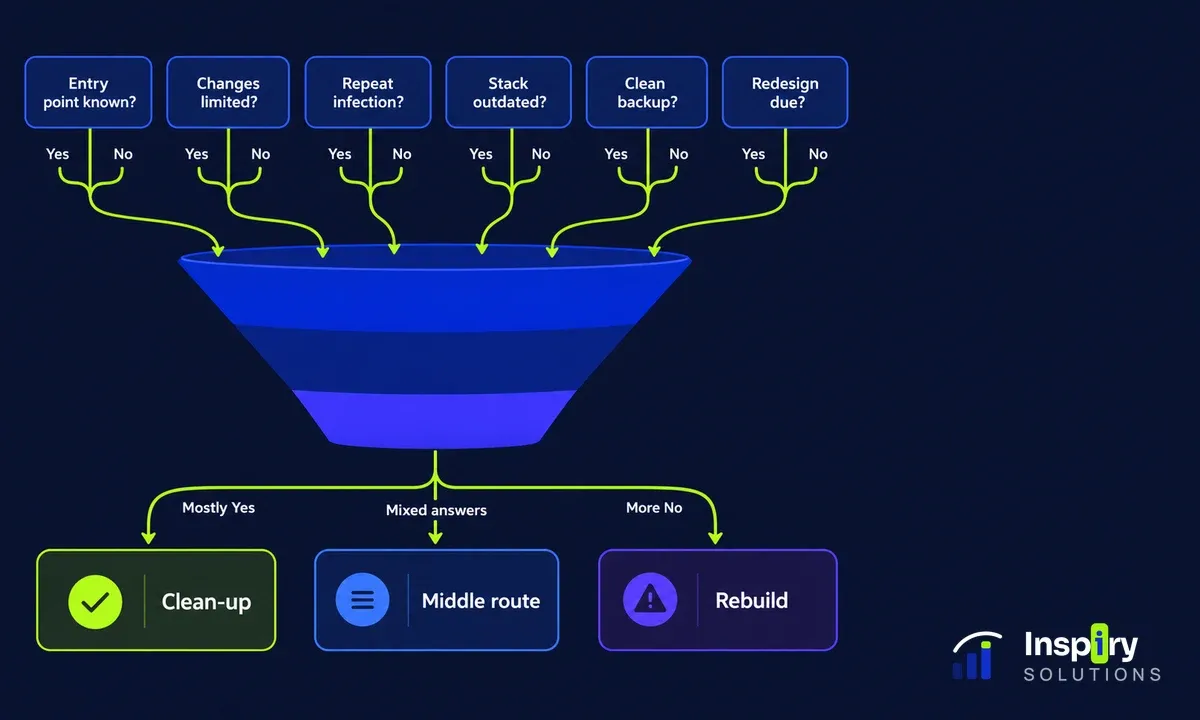
4. Is the theme or plugin stack outdated anyway?
Abandoned themes and plugins create ongoing maintenance problems.
A nulled premium theme is especially concerning because its modified files cannot be trusted as originals.
Replacing unsupported software may require rebuilding templates or changing functionality.
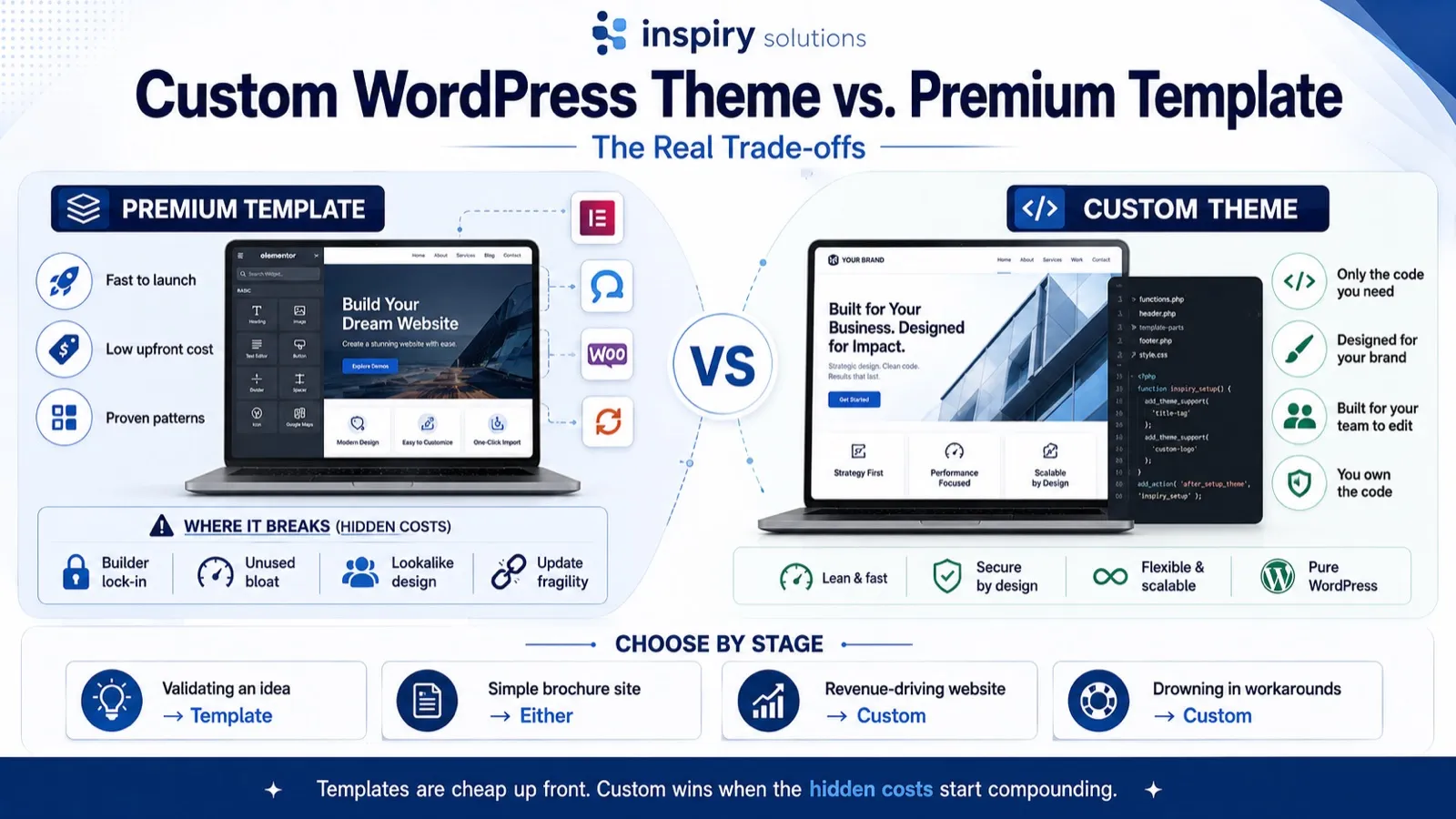
Consider the custom theme versus premium template trade-offs when choosing a replacement.
If the software is legitimate and maintained, preserving the design may be reasonable.
Otherwise, rebuilding addresses both the infection and existing technical weaknesses.
5. Is there a clean backup from before the infection?
A verified clean backup can simplify recovery, particularly when the entry point is understood.
However, its creation date does not prove it predates the compromise. Attackers may have accessed the website before visible symptoms appeared.
Compare logs, suspicious changes and backup contents.
Even a clean restoration requires updates, credential changes and correction of the original weakness.
Treat uncertain backups as material requiring inspection, not trusted recovery points.
6. Was the site due for a redesign?
If a website already needs significant improvements, rebuilding may combine planned development with security recovery.
But infection alone does not justify a redesign.
An effective existing design, familiar editing workflow and reliable integrations have value.
Compare repair requirements with improvements the business already needs.
A redesign becomes more attractive when the platform is difficult to maintain or important functionality requires replacement.
How to read the answers together. A first infection, known entry point, limited changes and maintained software generally favour clean-up.
An acceptable design with questionable installed code may favour the middle route.
Repeated infections, unsupported components and extensive uncertainty strengthen the case for rebuilding.
An audit must distinguish confirmed findings from assumptions.
Decision matrix
Use this matrix to compare the approaches before requesting a quote.
| Situation | Clean-up | Middle route | Rebuild |
|---|---|---|---|
| First infection, entry point found | Strong if changes are contained | Consider if code is questionable | Usually unnecessary |
| Repeated infections | Only with a different approach | Strong if content remains useful | Strong for unreliable systems |
| Unknown entry point | Higher risk pending investigation | Consider with access review | Consider if integrity is uncertain |
| Nulled or abandoned theme | Insufficient if unsafe software remains | Requires a trusted replacement | Often preferable |
| Clean pre-infection backup available | May simplify restoration | Source for inspected content | Can support migration |
| Redesign already planned | Temporary containment | Suitable if design is retained | Often sensible |
| Heavy custom functionality | May preserve verified code | Requires review or recreation | Potentially costly |
The cheapest immediate repair is not necessarily the lowest-risk choice.
Ask developers why they recommend a particular path, what evidence supports it and which risks remain.
Cost and time: what to expect
The clean hacked WordPress site cost depends on infection scope, investigation effort and preventing reinfection.
At Inspiry Solutions, one-off fixes typically cost $400-$1,800, with a fixed quote after a free audit.
Small website builds start from $1,200, while typical business websites range from $2,500-$8,000.
These published ranges are not automatic quotes. The middle route requires individual scoping.
What affects a clean-up quote?
A contained infection may need less work than extensive database changes, multiple backdoors or compromised accounts.
The quote should clarify whether investigation, file replacement, database repair, access security and testing are included.
Ask what evidence will be provided and whether monitoring is included.
Removing scanner alerts without identifying the cause is insufficient.
What affects a rebuild quote?
A rebuild may require templates, content migration, forms, integrations and testing.
Keeping existing content and design elements can reduce unnecessary development.
However, undocumented custom functionality can increase scope.
A credible proposal identifies what will be migrated, replaced, rebuilt and tested.
The hidden cost of repeated clean-ups
An unsuccessful clean-up costs more than another developer invoice.
Repeated incidents can interrupt enquiries, cause downtime and consume staff time.
Further compromise may make it harder to establish which records remain trustworthy.
Compare long-term recovery costs with the operational risk of repeated repairs.
Hypothetical example: third infection in a year
Hypothetical example: a charity’s WordPress website has been cleaned twice in a year and reinfected after each repair.
It runs a nulled premium theme and four plugins that have received no updates for years.
Its content remains valuable, existing URLs are established and staff understand the website’s structure.
The charity requests another clean-up because rebuilding appears more expensive.
Why another clean-up is questionable
Previous repairs have not provided lasting protection.
The precise cause still requires investigation, but the website depends on software that cannot be reliably trusted or maintained.
Deleting newly discovered malicious files would leave an underlying problem unresolved.
The developer recommends replacing the code while preserving legitimate content.
What the developer proposes
The replacement uses fresh WordPress, a maintained theme and verified plugins.
Pages, posts and media are exported, inspected and migrated. Suspicious records and scripts are excluded.
Required functionality is recreated, access is secured and the replacement is tested.
Existing URLs are retained where appropriate, with redirects for necessary changes.
The infected installation remains isolated.
What this example teaches
The charity does not automatically need an entirely new visual design.
It needs a trustworthy code foundation with useful content preserved.
The middle route avoids repeated ineffective repairs without unnecessary design work.
Actual costs depend on the audit and functionality involved.
Common questions
How much does WordPress malware removal cost?
At Inspiry, one-off fixes are typically $400-$1,800 with a fixed quote after a free audit. Cost depends on how far the infection spreads and whether the entry point is found. Compromised accounts, database changes and unsupported software can increase the required work. A rebuild is scoped separately and should not be recommended automatically.
Why does my WordPress site keep getting hacked?
Usually the entry point was never closed: an outdated plugin, reused password, nulled theme or a backdoor left behind. Cleaning symptoms without fixing the cause leads to reinfection. Compromised hosting access and contaminated backups can also contribute. Ask what caused previous incidents, which weaknesses were corrected and how the changes were verified.
Will rebuilding my site hurt my SEO?
Not if URLs, content and redirects are planned carefully, although rankings cannot be guaranteed. Leaving spam pages or a flagged site in place harms visibility more than a properly managed migration. Preserve valuable pages, review metadata, test redirects and monitor Search Console after launch. Avoid unnecessary changes to existing URLs and content.
Can I just restore an old backup instead?
Only if it predates the infection and you close the entry point afterwards. Otherwise the same weakness is restored with it. Inspect restored files, update vulnerable software, rotate compromised credentials and verify functionality before treating recovery as complete. Remember that anything added since that backup, such as new orders or enquiries, will need recovering separately.
After either path: keep it clean
Whether you choose WordPress malware removal, the middle route or a complete rebuild, recovery should end with a maintenance process.
A repaired website without monitoring or updates can develop further problems unnoticed.
Monitor the first 30 days
Arrange heightened monitoring for the first 30 days following recovery.
Watch for unexpected file changes, unfamiliar administrator accounts, suspicious redirects, unusual server behaviour and security warnings.
Check forms, enquiries, scheduled tasks and important integrations.
Monitoring cannot guarantee complete protection, but it helps detect problems needing investigation.
Maintain the installation
Apply WordPress core, theme and plugin security updates promptly, with appropriate compatibility testing.
Remove unused accounts and software. Enable MFA, use unique passwords and limit permissions.
The official WordPress security hardening guidance covers access controls, updates, backups and related measures.
Security requires ongoing attention rather than a one-time repair.
Keep recoverable backups elsewhere
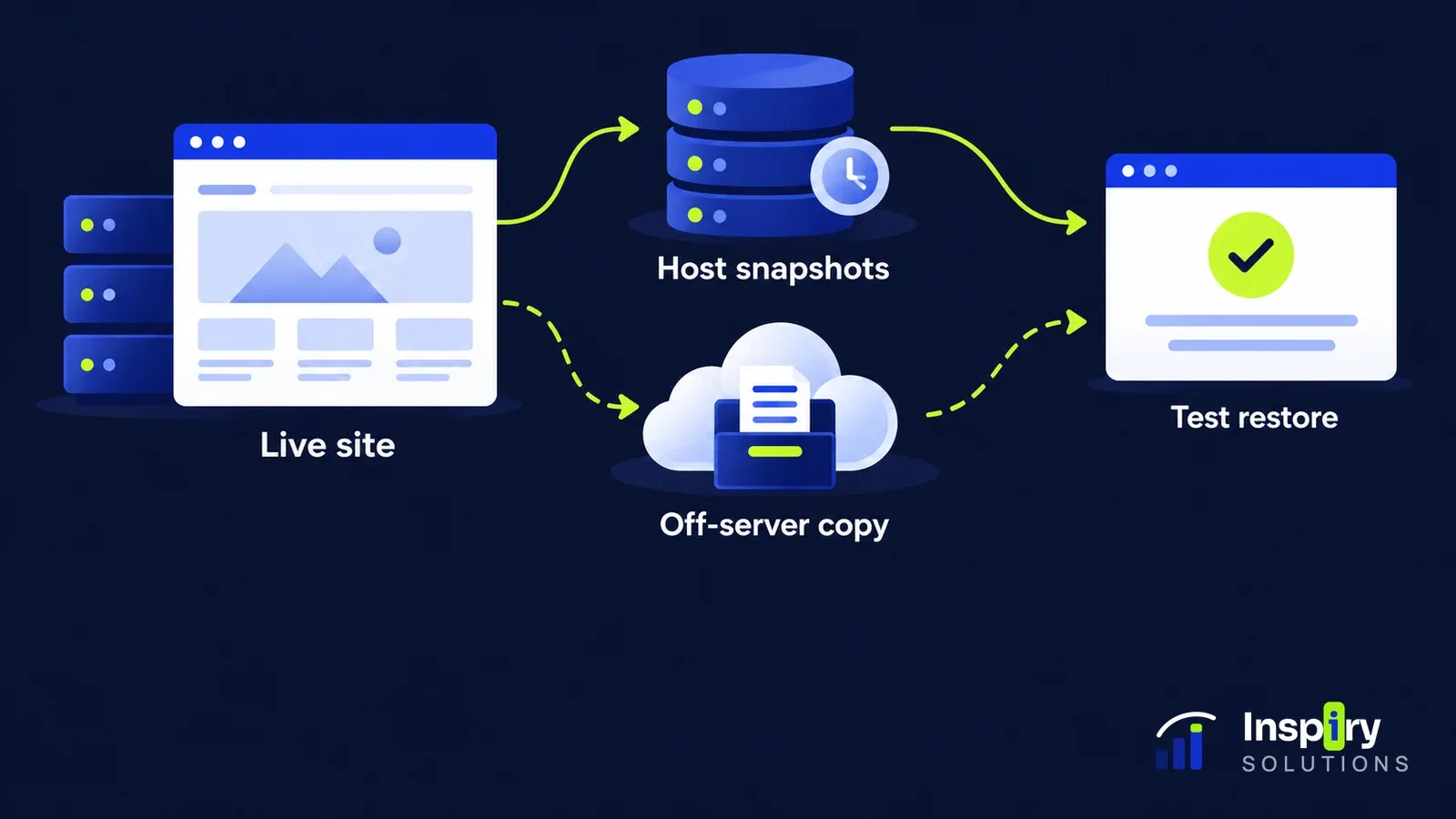
Store backups outside the website’s hosting environment so a compromised server cannot easily destroy every recovery copy.
Maintain multiple recovery points, including copies that may predate problems discovered late.
Test restoration rather than relying only on backup notifications.
Our guide to keeping backups that predate an infection explains retention and recovery planning.
Get an evidence-based recommendation
Before authorising another repair, request an assessment of infection scope, entry point, software condition and remaining risks.
The right approach may be a focused clean-up, fresh code with existing content or a complete rebuild.
Send us your URL for a free audit and we will reply within two working days with whether we recommend clean-up, the middle route or a rebuild, and a fixed quote.
Keep it clean afterwards with our WordPress maintenance plans from $99/month. You can also contact hello@inspirysolutions.com to discuss your website.