Do I need a CDN? Probably, if your visitors are spread across countries and your website serves large files. If your audience is local and your hosting is already close to them, the benefit may be small. A content delivery network can make images and other website files arrive faster, but it will not automatically fix a slow server, heavy scripts or a poorly built page. Before paying for another service, check where your visitors are, what your hosting already provides and what is actually taking time to load.
What a CDN does, in plain English
A CDN, short for content delivery network, is a group of servers in different locations that can deliver website content to visitors without fetching every file from your main hosting server.
According to Cloudflare’s explanation of content delivery networks, distributing cached content closer to visitors can reduce the distance involved in delivering website resources.
What files are usually cached?
The simplest setup concentrates on static files.
- Images used throughout the website
- CSS files controlling layout and appearance
- JavaScript files providing interactive features
- Fonts and icons
- Downloadable documents and other eligible assets
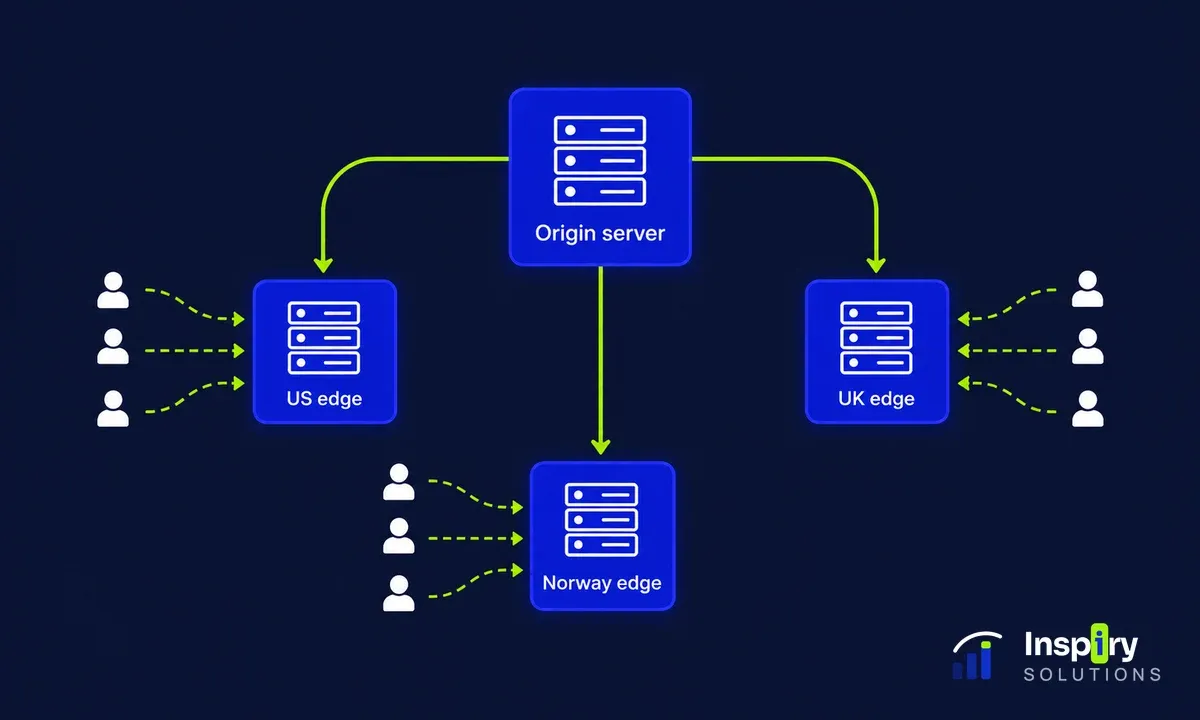
CDN versus hosting
A CDN and your hosting provider perform different jobs.
What a CDN will not fix
Before asking whether a CDN is worth it, identify what is slow.
Slow PHP and database processing
WordPress generates many pages using PHP and database queries.
When those pages are not cached, a CDN usually still has to fetch the HTML from your server, so a slow server response stays slow unless full-page caching is set up safely.
Google’s guidance on optimising TTFB explains how server response, network conditions and other factors affect this measurement.
For more detail, read our guide to server response time explained.
Heavy JavaScript and third-party scripts
A CDN can deliver JavaScript files more efficiently, but the visitor’s browser still needs to download, parse and execute the code.
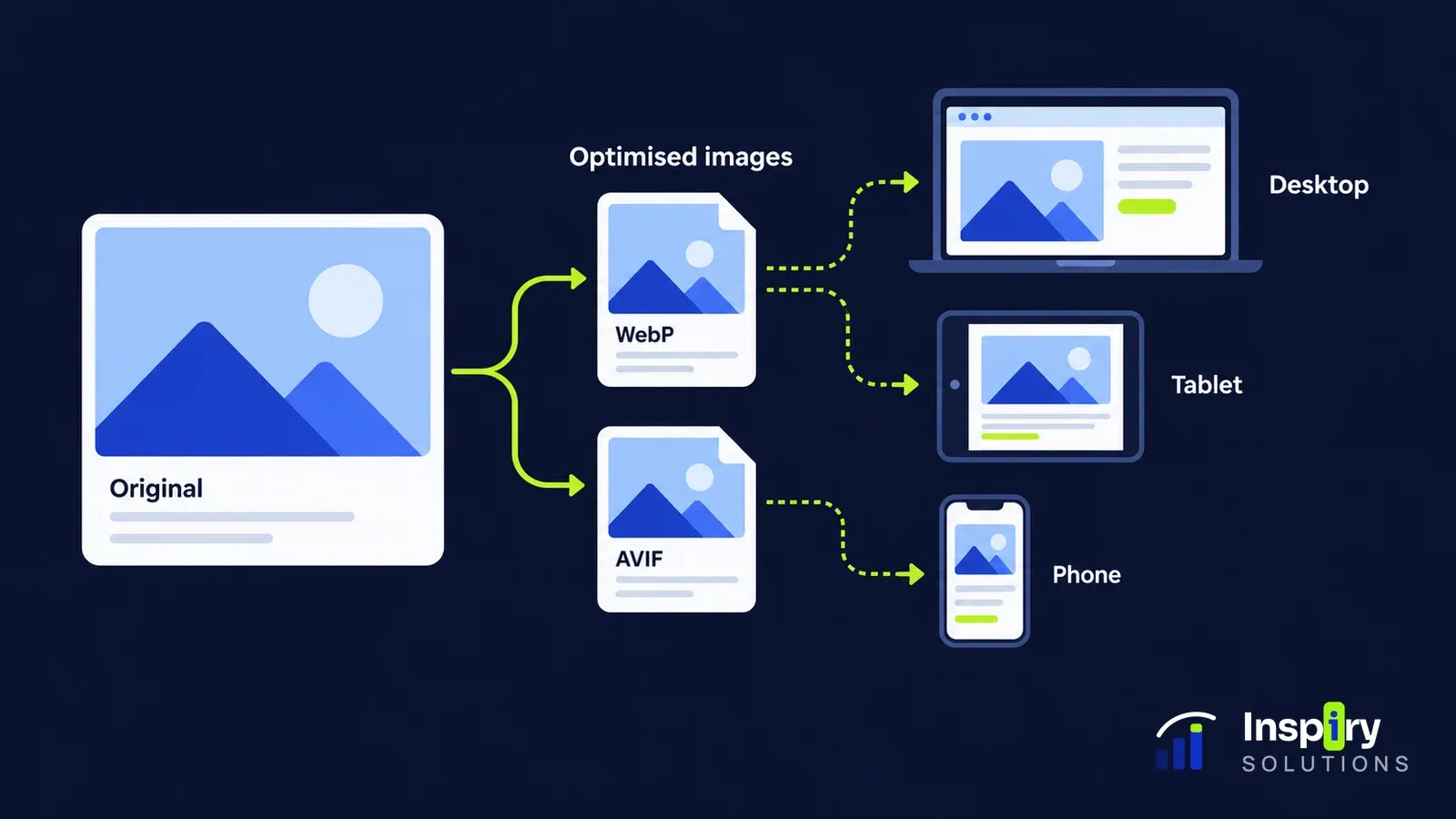
Oversized images
A CDN can reduce the distance an image travels.
Our guide to image formats and sizes explains the practical improvements to make.
Our website performance diagnosis service examines hosting, caching, frontend assets and scripts so that fixes target the cause instead of the symptom.
Do I need a CDN? 3 checks to run first
You do not need a complicated infrastructure review to make an initial decision.
The following table gives a practical starting point.
| Situation | Likely benefit from a CDN | What to check first |
|---|---|---|
| Local audience, server in the same country | Often small | Hosting response time and existing caching |
| Visitors across the UK, US and Europe | Potentially useful | Performance by country and origin location |
| Shopify store | Separate CDN usually unnecessary | Shopify’s existing delivery network |
| Image-heavy portfolio site | Potentially significant | Image sizes, formats and cache behaviour |
| Slow server response caused by slow PHP | Limited for uncached HTML | PHP execution, database and hosting |
| Traffic spikes from campaigns | Potentially useful | Which requests can be cached and origin capacity |
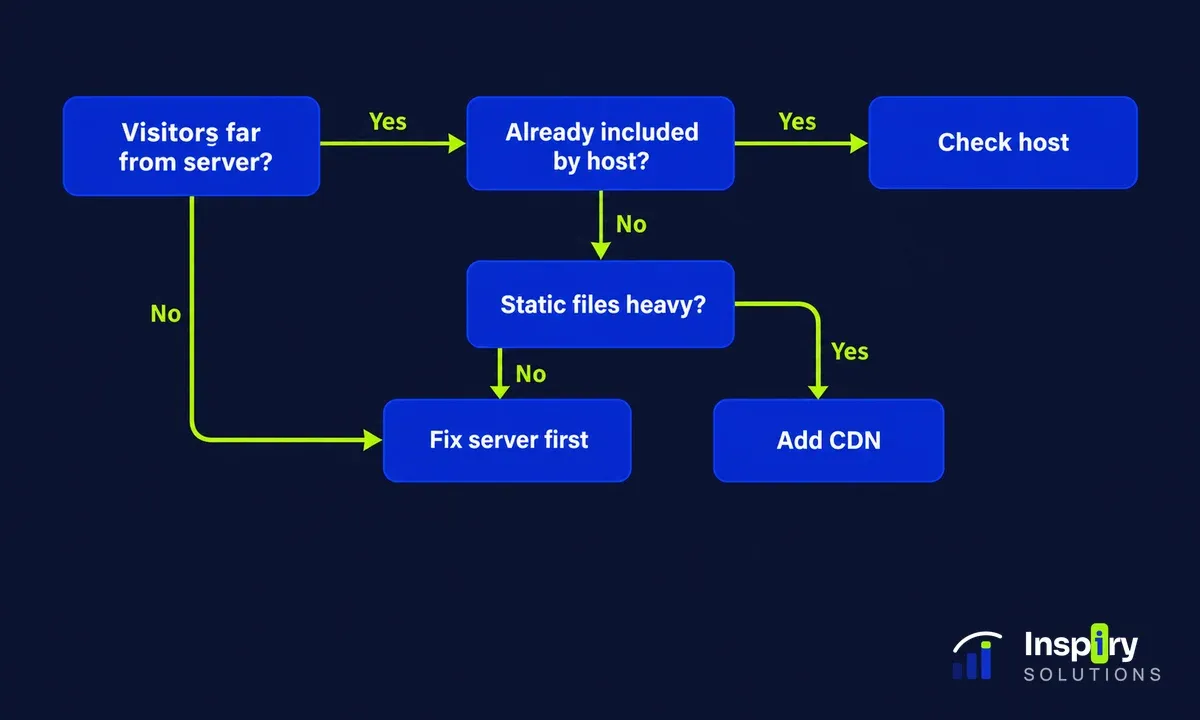
Where are your visitors and your server?
First, identify the countries where your real visitors are located.
Does your host or platform already include one?
Before purchasing a CDN, examine your existing hosting or website platform.
Ask your host three specific questions:
- Is a CDN included and enabled for my domain?
- Does it cache only static resources or also public HTML?
- How are cached files refreshed when I update the website?
Is the slow part something a CDN serves?
This is often the deciding factor.
An image-heavy portfolio or a website expecting visitors from international advertising campaigns has a stronger case, particularly when static resources make up much of its transferred data.
Campaign traffic spikes may also benefit from cached delivery, although uncached form submissions and dynamic requests still reach the origin.
The question is not whether a CDN is generally useful.
You may already have one
Many business websites already use a CDN without their owners realising it.
This is especially common with managed platforms and hosting packages that bundle performance services.
Shopify websites
Shopify serves store assets through its own content delivery infrastructure.
That does not mean Shopify stores are automatically fast.
Large product images, inefficient themes, unnecessary applications and third-party scripts can still affect performance.
Read what you can speed up on Shopify before considering additional infrastructure.
Managed WordPress hosting
Some managed WordPress hosts provide a CDN or edge caching as part of their service.
Others require an optional feature, plan upgrade or separate activation.
A hosting package advertising caching does not automatically mean it includes geographically distributed delivery.
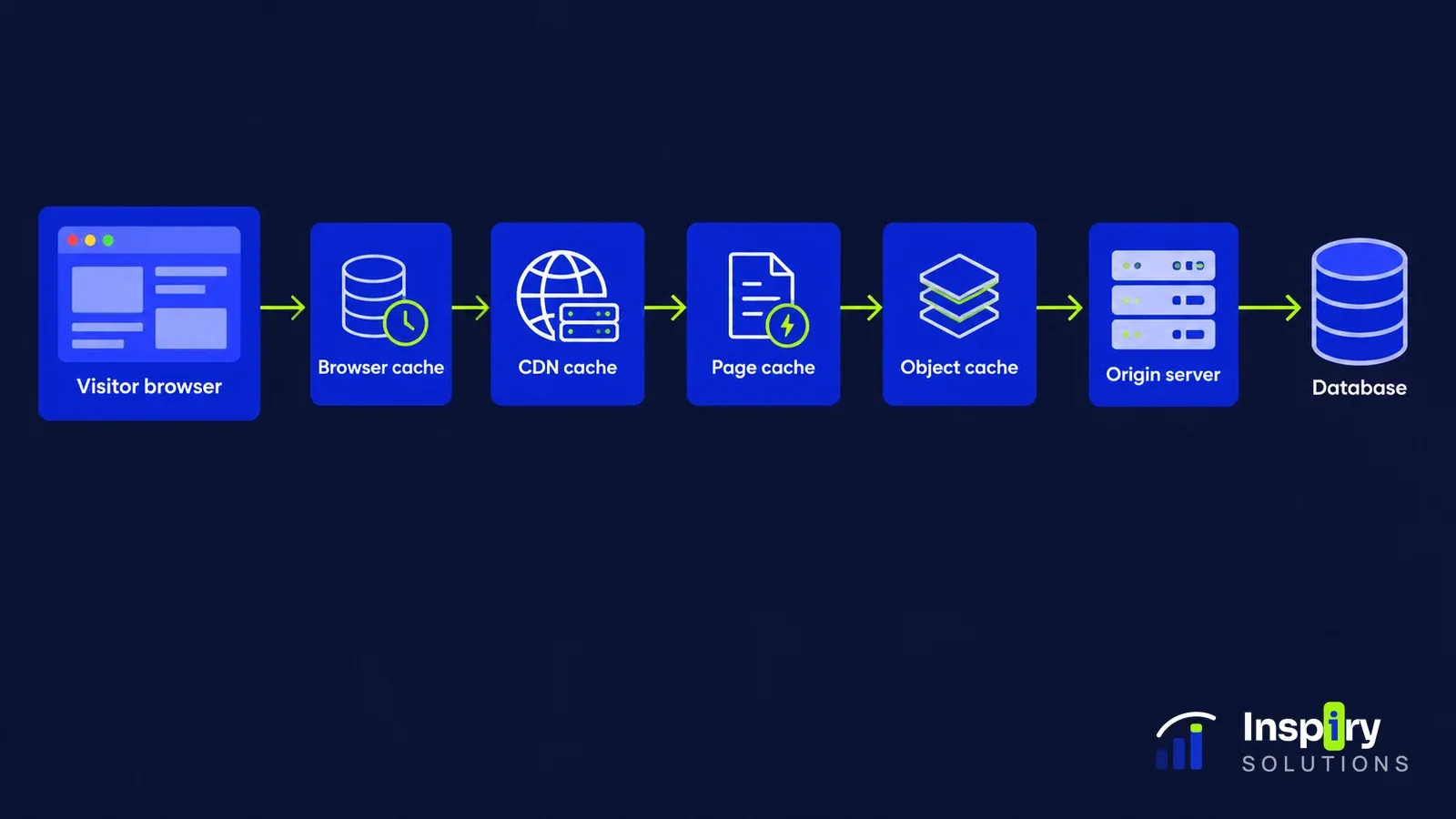
The distinction between server-side caching, browser caching and edge delivery is worth understanding.
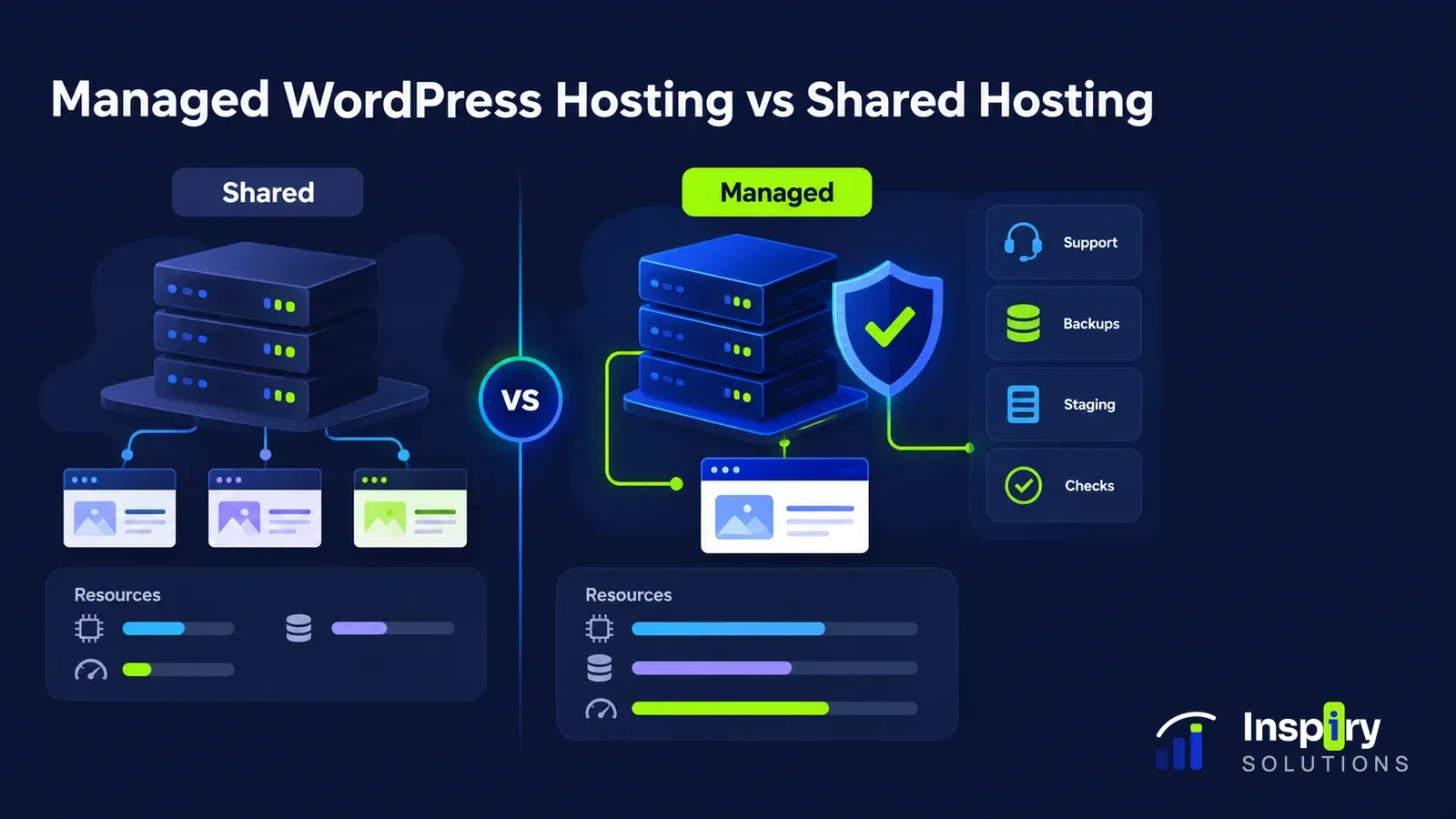
Our comparison of managed versus shared hosting explains the wider differences between hosting arrangements.
How to check your existing setup
Start with your hosting control panel and look for options labelled CDN, Edge, Network or Performance.
You can also open your browser’s developer tools, select the Network tab and inspect response headers for a publicly accessible static file.
Headers such as CF-Cache-Status, Age or a provider-specific cache indicator may help identify how a response was delivered.
However, a missing header does not prove that no CDN exists.
The most reliable approach is to ask your host what is enabled, what is cached and how you can verify it.
Static files versus full-page caching at the edge
Not all CDN configurations cache the same content.
Understanding the difference between static file caching and full-page caching prevents some of the most common mistakes.
Static file caching
This is the safer starting point for most WordPress business websites.
Images, CSS, fonts and eligible JavaScript can be cached at distributed locations while WordPress continues to generate HTML when needed.
Static files generally change less frequently and are less likely to contain visitor-specific information.
Their caching behaviour depends on configuration and HTTP headers, which tell caches whether a response can be stored and for how long.
Google’s guide to HTTP caching explains how caching directives help control reuse and freshness.
Full-page HTML caching
Full-page caching stores generated HTML so that later requests may avoid repeated WordPress processing.
When implemented at the edge, eligible public HTML can be served from CDN locations without every request reaching the origin.
This can improve response times for pages that are safe to share across visitors.
But it introduces additional risks.
A public service page is different from a customer account area, shopping cart or page containing personal information.
If a caching rule stores the wrong response, another visitor could receive outdated content or, in a serious misconfiguration, information intended for somebody else.
Dynamic areas need carefully defined bypass rules.
For a typical WordPress website, start with static assets and consider edge HTML caching only after understanding the site’s login, form, commerce and personalisation behaviour.
Our explanation of how caching layers fit together covers the distinction between browser, server and page caching.
A more aggressive cache is not automatically a better cache.
Security and reliability extras
Performance is not the only reason businesses consider a CDN.
Some providers include additional services that can help protect a public website.
These may include:
- Distributed denial-of-service (DDoS) protection to help absorb or filter malicious traffic
- Web application firewall rules to block selected suspicious requests
- TLS certificate management for encrypted connections
- Traffic filtering and rate limiting
- Distributed infrastructure that can improve delivery resilience
The exact features depend on the provider, plan and configuration.
A CDN can help filter traffic before it reaches your hosting server, but it cannot replace WordPress updates, secure passwords, backups or sound hosting security.
Likewise, a distributed network does not guarantee your website will remain available if its origin server or database fails.
For many businesses, these extras are valuable secondary benefits.
They should not distract from the initial question: is your current performance problem something the CDN can improve?
Setting up a CDN without breaking things
If the checks support adding a CDN, treat implementation as a controlled website change.
Do not switch DNS settings without knowing where the current records point or how email and other services are configured.
The following approach is suitable for a typical WordPress business website, although details differ between providers.
DNS and SSL
Begin by recording your existing DNS configuration, including website, email and verification records.
Confirm which domain and subdomains should use the CDN.
Some services require changing nameservers.
Check the actual method before making changes.
Verify that HTTPS works between the visitor and the CDN, and that the connection from the CDN to the origin server is also correctly protected.
Avoid SSL modes that leave the origin connection unencrypted.
For additional precautions, see changing DNS safely during a move.
Make the change during a period when you can monitor the website and correct problems promptly.
Cache rules and exclusions
Begin with conservative caching rules for static files.
Check that WordPress administration, authentication and dynamic requests are handled correctly.
For websites with ecommerce or membership functionality, pay particular attention to:
- WordPress login and administration
- Shopping carts and checkout
- Customer account pages
- Membership and other authenticated areas
- Form submissions and payment requests
- Responses containing personalised information
Forms may appear on publicly cached pages, but the submission endpoints, tokens and dynamic behaviour must remain functional.
Avoid applying a blanket rule that caches every HTML response without understanding the consequences.
Also verify how cache control headers, cookies and query parameters affect eligibility.
A developer should document the exclusions instead of relying on memory.
Purging when content changes
Purging means removing a cached copy so the next request can retrieve updated content.
Without a suitable refresh process, visitors may continue seeing old styles, images or HTML after you publish changes.
Check whether your hosting or WordPress integration automatically clears affected cached resources.
Where possible, prefer targeted purging over repeatedly clearing the entire network.
Also inspect versioned CSS and JavaScript files after deployments.
Before considering the setup complete, update a test page and confirm that the public version changes as expected.
Finally, test contact forms, mobile navigation, logins and any checkout process.
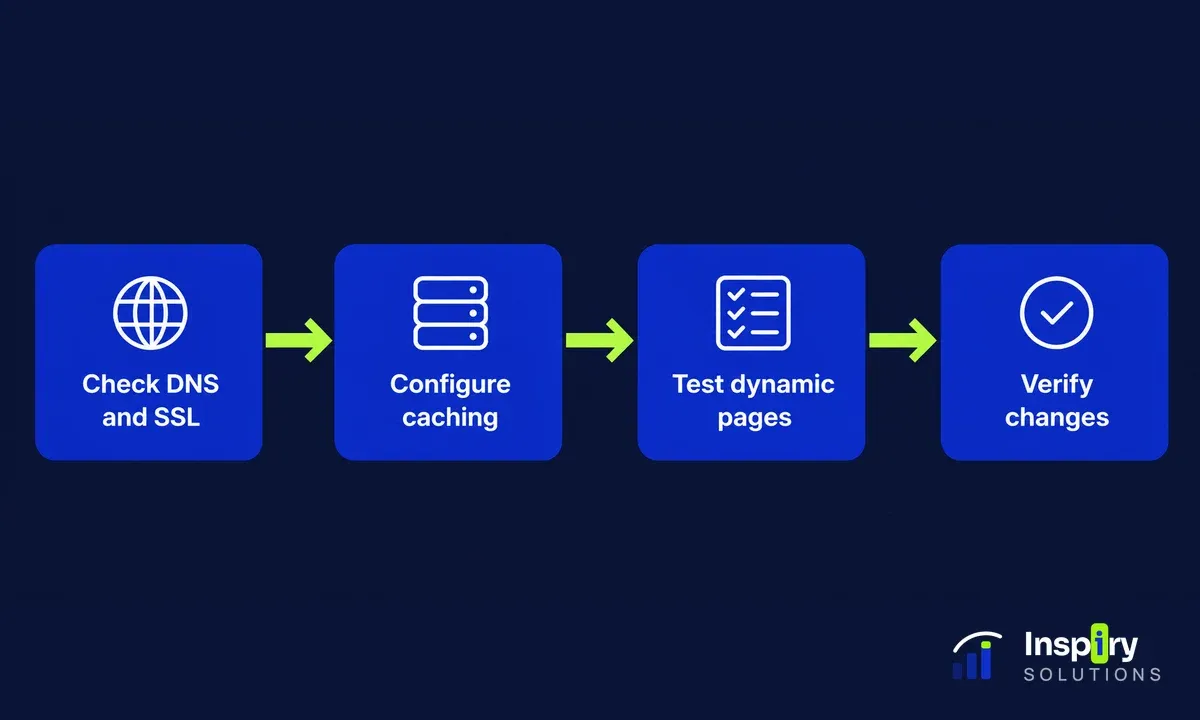
A successful CDN setup should be reversible.
Hypothetical example: a UK practice winning US projects
Hypothetical example: A UK architecture practice hosts its website on a server in London.
Most enquiries come from the UK, where its portfolio pages load quickly. However, the practice also wins projects from clients in the US.
American visitors notice slower image-heavy pages because the original resources travel a greater distance.
The business introduces a CDN to deliver portfolio images, CSS and JavaScript from locations nearer those visitors.
The difference between UK and US loading experiences becomes smaller because eligible files no longer need to travel from London on every request.
However, its contact page remains slow.
Further investigation finds that the delay comes from server-side processing rather than downloading static assets.
The business addresses that problem separately by examining the form integration and the origin server.
This is an illustrative scenario, not a real client result or a promised outcome.
The lesson is that a CDN can help with geographical delivery while leaving unrelated performance problems untouched.
A good optimisation plan separates those issues instead of expecting one service to solve everything.
How to tell whether it helped
A CDN should produce measurable benefits for the visitors and pages that justified installing it.
Do not judge success from a single improved headline score.
Take baseline measurements before switching it on and repeat the same tests afterwards.
Compare different locations
Test representative pages from the countries that matter to your business.
Include a straightforward service page, an image-heavy page and an important conversion page.
Compare:
- Initial HTML response time, including TTFB
- Image and stylesheet transfer times
- Overall loading behaviour
- Largest Contentful Paint, where relevant
- Cache hit and miss behaviour
- Errors or unexpectedly stale content
Run repeated tests under comparable conditions.
If your main problem was international static asset delivery, concentrate on whether those resources now load more efficiently.
Do not attribute every improvement or regression to the CDN without checking other changes.
Review real visitor data
Laboratory tests are useful for controlled comparisons, but they do not fully represent what real visitors experience.
Review available field performance data after 28 days to allow a meaningful comparison window.
Segment by country and device where your tools permit it.
Watch for improvements in relevant loading metrics without overlooking responsiveness or layout stability.
Remember that Core Web Vitals field data uses a rolling 28-day window.
Test business-critical functions
Speed is not a success if enquiries stop arriving.
Check forms and confirm that test submissions reach their intended destinations.
If your site sells products, complete a test checkout using an appropriate testing method.
Verify customer logins, account details, password resets and any membership restrictions.
Also check newly published content from a logged-out browser session.
If these features break, investigate caching rules before leaving the configuration active.
Keep a short record of what changed, what improved and which problems remain.
Common questions
Is a CDN worth it for a small local business?
Often the gain is small if most visitors and the hosting server are in the same country, especially when the website is already fast. A CDN can still be useful for an image-heavy portfolio or a business receiving occasional international traffic. Some providers also offer security features. Measure your existing performance before assuming the extra service is necessary.
Is Cloudflare a CDN?
Yes. Cloudflare operates a CDN and offers a free plan with content delivery and selected security features. It can be a reasonable starting point for a WordPress website, but setup may involve changing DNS or nameservers. Plan those changes carefully, preserve existing records and confirm SSL and cache behaviour before relying on the new configuration.
Will a CDN improve my SEO?
A CDN may improve loading performance, which contributes to page experience, particularly when visitors are far from the origin server. However, faster delivery does not guarantee higher Google rankings. Content relevance, accessibility, technical issues and other factors still matter. Check actual performance improvements and avoid treating a CDN as a direct search ranking solution.
Can a CDN break my website?
Yes. Incorrect caching rules can serve outdated pages, interfere with logins or affect features requiring dynamic responses. Forms, carts, checkout processes and logged-in areas need appropriate cache exclusions. Test those functions after setup and after changing rules. Keep the previous configuration available so you can reverse changes if problems occur.
Do I need a separate CDN for Shopify?
No, not normally. Shopify already serves storefront files through its own CDN infrastructure, so adding another service solely for that purpose is generally unnecessary. If a Shopify store feels slow, inspect theme code, apps, third-party scripts and image sizes first. Those issues can remain even when static resources are delivered efficiently.
Your next step
This week, choose one important page on your website and check its performance from the two countries that matter most to your business.
Record the results, identify your hosting location and ask whether your current platform already includes a CDN.
If you see a meaningful difference between locations, look at which resources are responsible. If the origin response is slow everywhere, investigate hosting or WordPress processing first.
When you involve a developer, send your website URL, hosting provider, visitor countries, test results and a description of the slow pages. Mention any contact forms, checkout processes or membership features that must remain dynamic.
That information makes a diagnosis more useful than simply requesting that somebody install Cloudflare.
Not sure whether a CDN is the right fix? Send your URL to hello@inspirysolutions.com for the free audit and get a plain-language answer within two working days, or see our website performance service for diagnosis plus fixes, typically $400-$1,800.