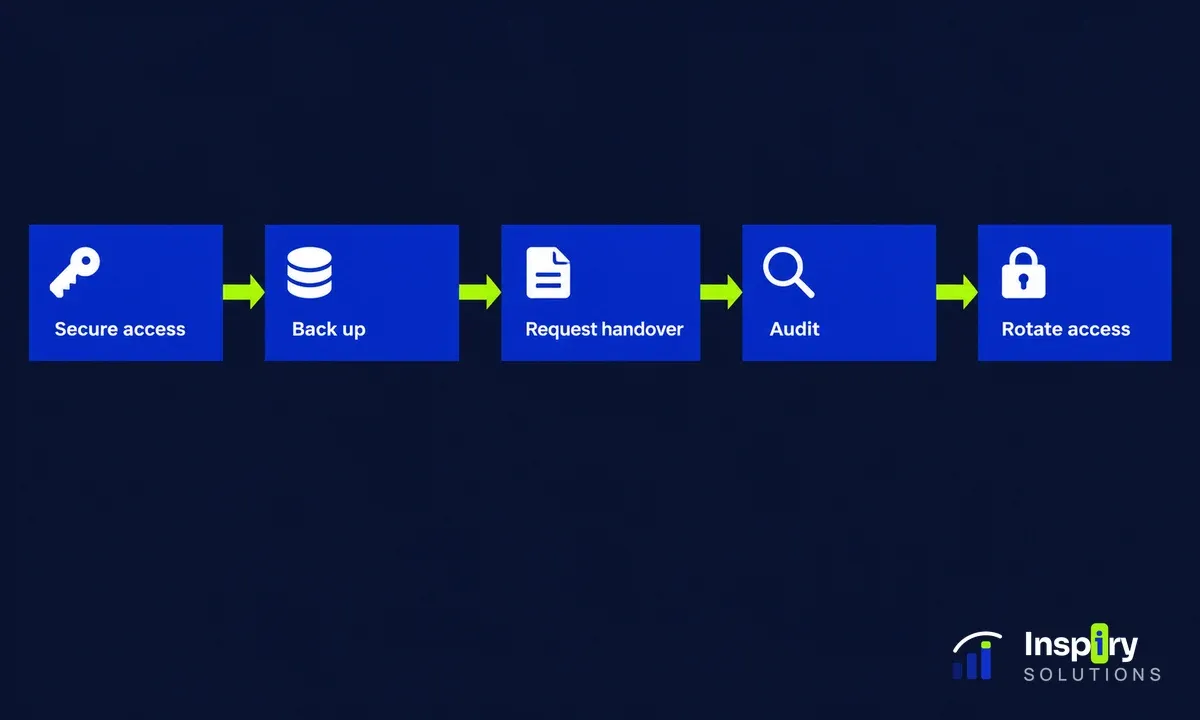
You can switch web developers without rebuilding your website in most cases. First secure the accounts you control, create and test a complete backup, request a written handover, and let the incoming developer audit the site before making changes. Only then should you rotate access and decide whether hosting needs to move. This order reduces the risk of losing content, email settings, paid licences or access to your domain. You do not need your outgoing developer’s approval to start checking what belongs to your business, although account ownership and contractual terms may affect what you can recover.
Before you switch web developers, secure what you can reach
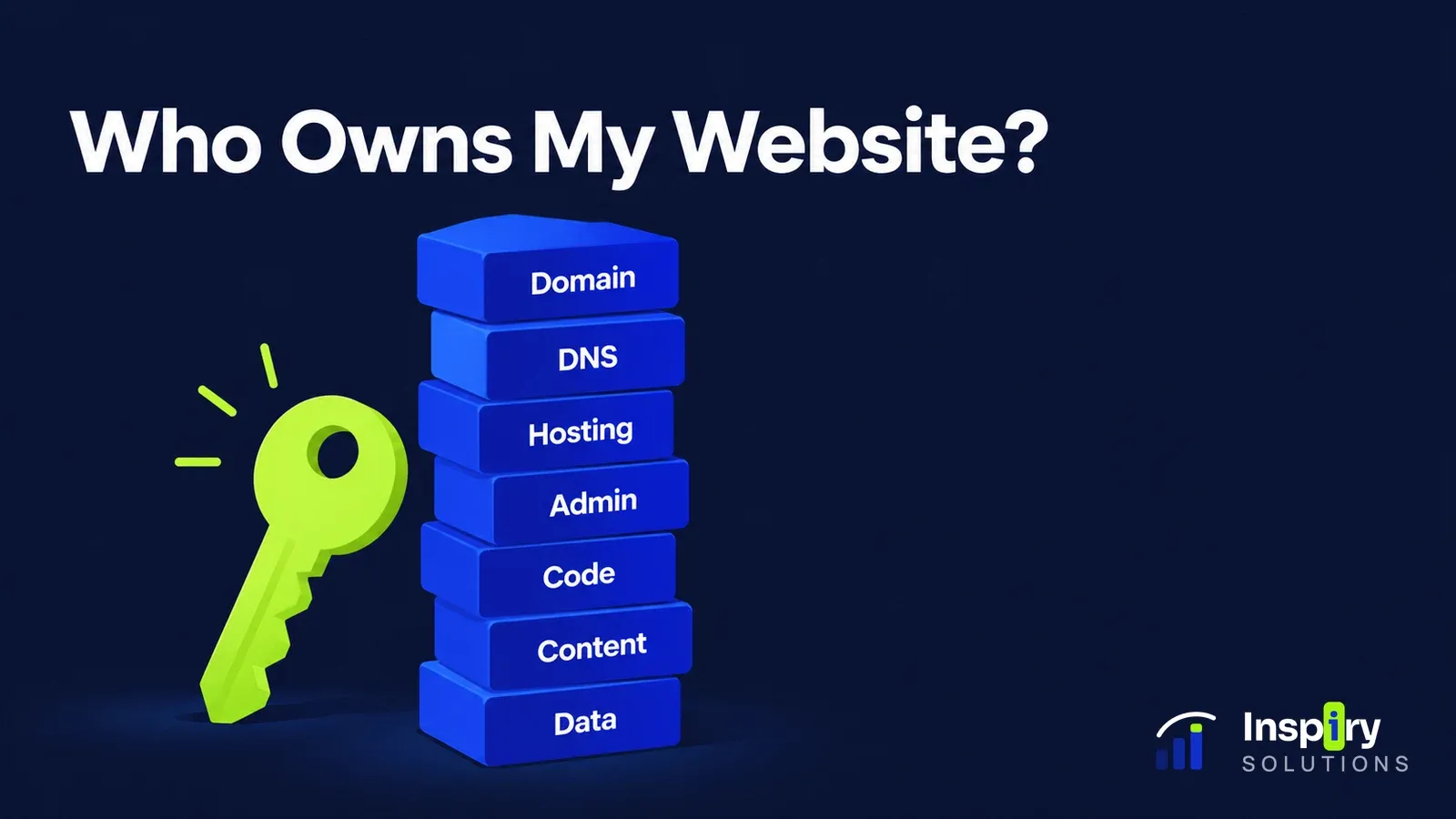
Start with an account inventory.
- Domain registrar: The company where your website address is registered.
- Website hosting: The server account holding your WordPress files and database.
- WordPress administration: Your login to the site’s management dashboard.
- Business email: Your mail provider and the associated domain settings.
- DNS provider: The service managing records that direct website and email traffic.
- Premium licences: Paid themes, plugins and third-party tools.
- Analytics and search: Google Analytics, Search Console and Tag Manager.
- Other integrations: Payment gateways, forms, CRM systems, booking tools and external APIs.
An account inventory is not just a list of passwords.
For a more detailed ownership review, use our guide to checking who owns each account.
Confirm your domain registration
Your domain is particularly important because it connects your website, business email and often other online services.
If the registrar account belongs to the current developer, ask about transferring control. Do not assume that paying their invoices automatically makes the domain technically accessible to you.
Record the current DNS settings before changing anything. An accidental DNS change can interrupt your website or email even when WordPress itself is working normally.
Confirm your WordPress Administrator account
WordPress uses roles to determine what each user can do.
Sign in using an account assigned to your own business email address.
Do not delete the outgoing developer’s account yet.
If you cannot log in, check whether the hosting account provides a supported recovery method. Ask the host to verify your account ownership before making changes.
The objective at this stage is straightforward: know what you control, document what you cannot reach and avoid making irreversible changes.
Take a backup you control and prove it restores
A complete backup is your main protection during a website takeover.
For a typical WordPress website, a complete backup needs both the site files and the database. The official WordPress backup documentation explains why these components must be preserved together.
The database contains content, settings and other stored information. Saving only one part may leave you unable to recreate the working website.
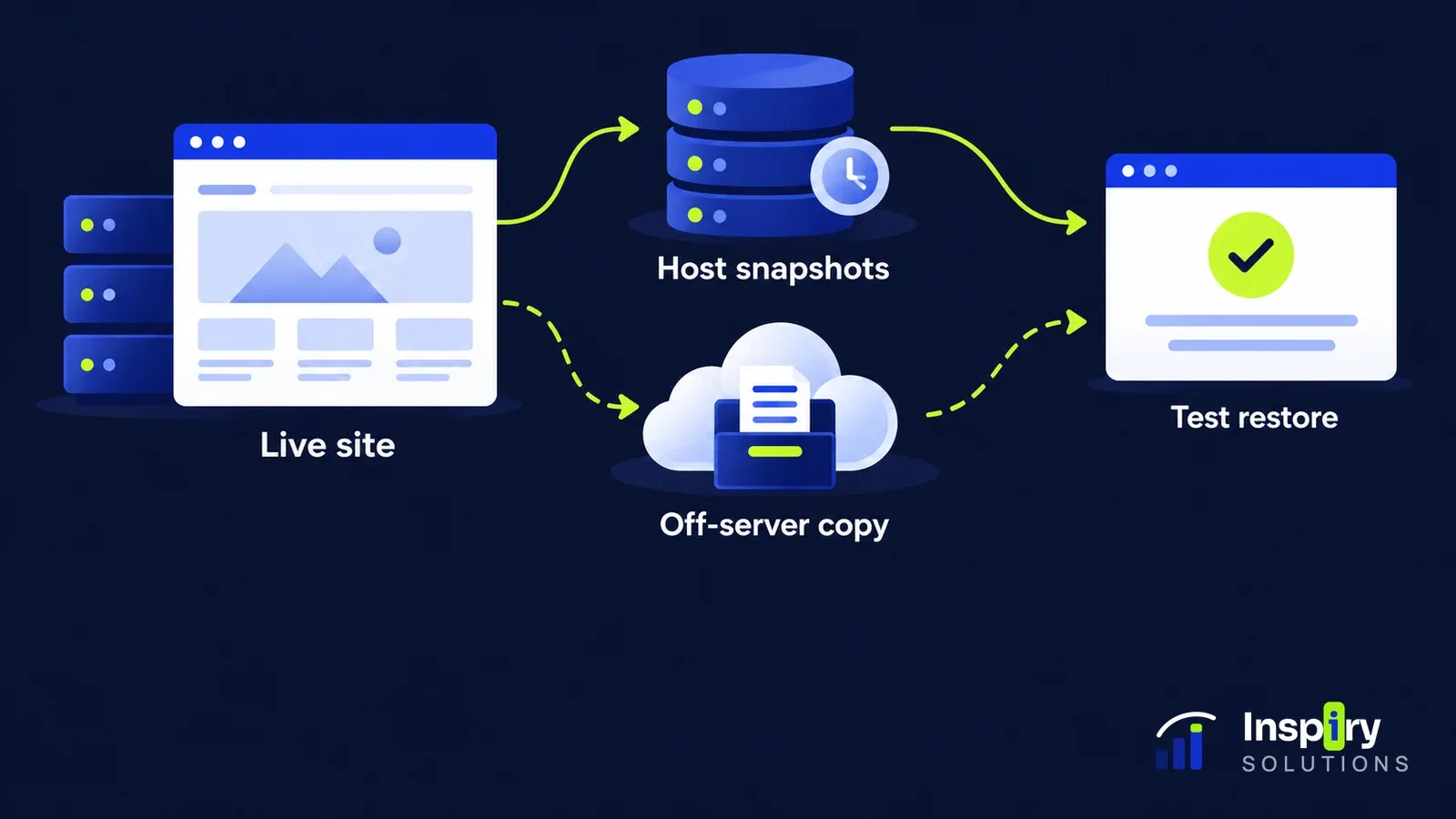
Keep a copy outside the existing host
Ask the hosting provider or your authorised developer to create a complete backup and store it somewhere you control.
That could be a secure cloud storage account or an encrypted local copy.
Label the backup with the website, creation date and relevant environment.
If the website processes customer information, treat the backup as sensitive business data.
Test the restore, not just the download
- The homepage and important pages load.
- Images, layouts and navigation appear correctly.
- Forms and essential features can be tested safely.
- The database connects without errors.
- Custom functionality is present.
- Required configuration files are available.
Disable outgoing emails, live payment actions and other potentially disruptive integrations in the test environment where appropriate.
Document the restore result and any missing dependencies. For a deeper explanation, read our guide to backups you can actually restore.
Why the backup comes before the conversation
Most developer changes are cooperative.
Creating a legitimate backup while you still have authorised access gives your business more options.
Do not bypass permissions or access accounts that do not belong to you.
Our WordPress maintenance and site takeovers service can help assess the current setup and establish a safe starting point.
Ask the outgoing developer for the right things
Once your accessible accounts and backups are documented, send a polite written handover request.
Keep the request in email so both parties have a record. If there is a contract, check its termination, intellectual property, payment and access provisions.
Your request should cover exactly five areas.
1. Credentials
This may include hosting, WordPress administration, the domain registrar, DNS, deployment tools, repositories and relevant integrations.
Ask for ownership or administrator invitations wherever supported rather than shared passwords.
Also ask which accounts are personally owned by the developer and which belong to your business.
If an account cannot be transferred, establish what needs to be recreated before removing the existing connection.
2. Licences
Premium WordPress plugins and themes can depend on paid licences for updates, support or continued access to particular services.
Not every licence can legally be transferred.
Your incoming developer should identify these dependencies and arrange suitable replacements or business-owned licences where necessary.
Do not immediately deactivate a licensed plugin simply because the outgoing developer purchased it.
3. Custom code
Some code may already exist in the theme, a custom plugin or the database.
Ask specifically about code that is not included in the production website backup.
Request available source files, repository access, build instructions and relevant technical documentation, subject to your contractual rights.
Without these materials, future changes can become unnecessarily difficult or expensive.
4. Documentation
Useful documentation includes hosting arrangements, plugin configurations, deployment procedures, integration settings, scheduled tasks and recovery instructions.
Scheduled tasks are automated jobs that may send reminders, process data or perform routine maintenance.
Documentation does not need to be a large technical manual.
Also ask whether there is a staging site and how changes have previously been tested before publication.
5. Outstanding issues
This should include failed updates, unreliable forms, performance problems, security warnings and compatibility issues already identified.
Ask which changes are currently in progress and whether any releases or automatic updates are scheduled.
An outgoing developer may not know every problem.
The new developer should verify important claims against the existing website.
If the outgoing developer does not respond
Meanwhile, contact providers through their official account recovery or ownership verification processes.
Do not assume the provider can release an account simply because your business website is hosted there.
If accounts are legally or contractually held by the developer, you may need a formal written demand or legal advice.
Avoid public accusations, threats or sudden access changes that could make recovery more difficult.
Let the new developer audit before changing anything
A website takeover should start with diagnosis, not a round of plugin updates.
The incoming developer needs to understand how the existing site works, which components are business-critical and which changes could cause failures.
Agree on a short freeze on non-essential updates and design changes until the initial audit is complete.
Review the WordPress installation
The developer should identify unused components, abandoned dependencies, premium licence problems and custom modifications that might be overwritten during an update.
Plugin count alone does not measure website risk.
Our article on judging plugin risk explains what deserves attention before removing anything.
WordPress also provides a built-in Site Health screen. The official Site Health documentation explains the checks available through the dashboard.
These checks are useful, but they do not replace a full technical review.
Inspect integrations and hidden dependencies
The new developer should inspect contact forms, transactional email, payment integrations, CRM connections, analytics events, caching and scheduled tasks.
Also review domain-related email settings, external APIs and any services dependent on the outgoing developer’s personal accounts.
A visual homepage check alone is not enough to establish that the takeover is safe.
Record what is fragile
Examples include old plugins with no supported replacement, custom checkout behaviour, theme modifications, server-specific settings or integrations without current credentials.
The result should be a short written work plan explaining what needs attention, why it matters and how each change will be tested.
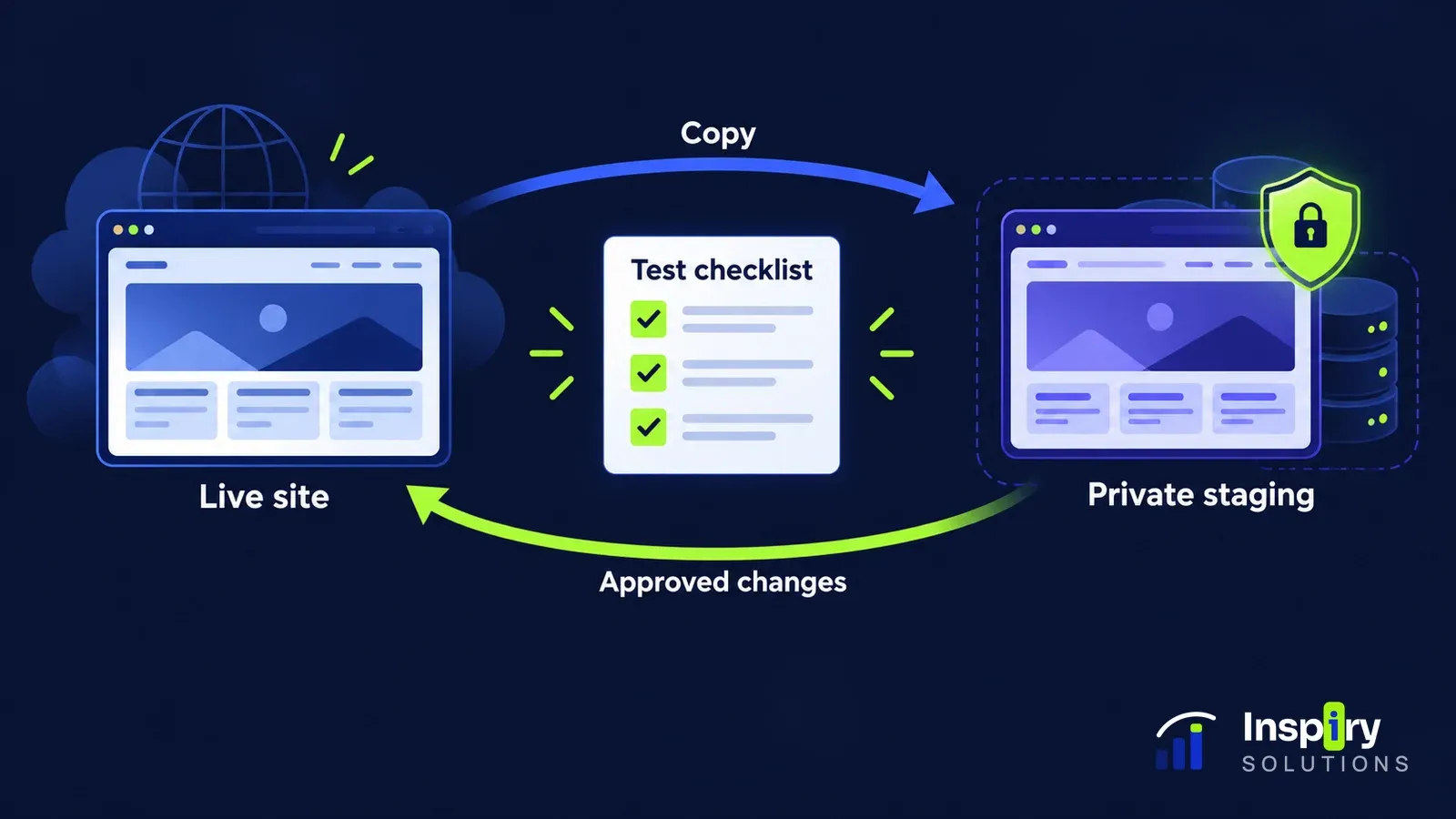
Use testing changes on a staging copy before applying non-urgent changes to the live website.
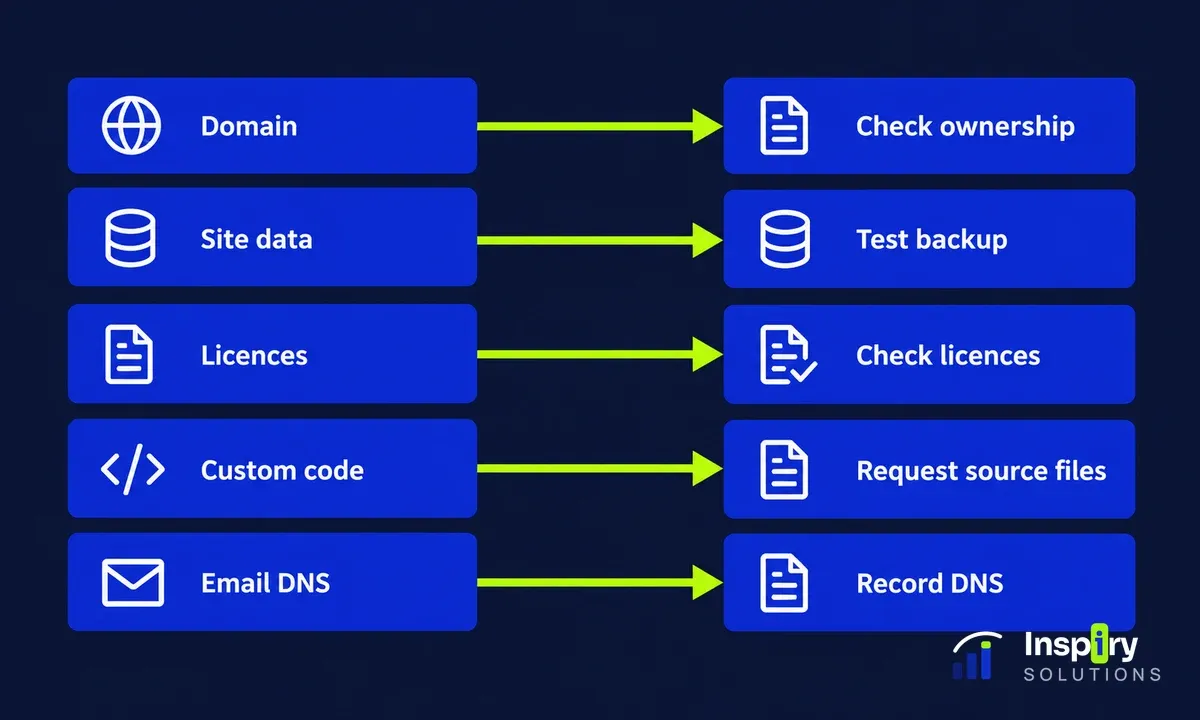
Use a takeover checklist
| Step | Who does it | Done when |
|---|---|---|
| Account inventory | Business owner | Every essential account and owner is documented |
| Domain check | Business owner | Registration, renewal and recovery access are confirmed |
| Own admin login | Business owner and incoming developer | A business-controlled Administrator login works |
| Off-site backup | Incoming developer | Complete files and database are stored independently |
| Test restore | Incoming developer | A staging restore has been checked |
| Handover request | Business owner | Five requested items are documented and sent |
| Code and plugin audit | Incoming developer | Findings and dependencies are recorded |
| Password rotation | Business owner and incoming developer | Relevant credentials and keys are replaced |
| Old access removed | Business owner and incoming developer | Former access is revoked or reduced appropriately |
| Monitoring and updates in place | Incoming developer | Responsibilities, checks and maintenance schedule are agreed |
Do not mark the transition complete merely because a new developer can log in.
Rotate passwords and remove old access
After the new developer has confirmed recovery options and completed the essential audit, review all remaining access.
Where possible, rotate credentials in a controlled sequence:
- Hosting control panel, SFTP and server access.
- WordPress Administrator accounts.
- Domain registrar and DNS account access.
- Business email administration and recovery settings.
- API keys, integrations, deployment tokens and connected services.
Coordinate this process with the people responsible for each service.
If the outgoing developer has administrator access, revoke it once the agreed handover is finished.
WordPress documents its different permission levels in the roles and capabilities guide.
Avoid sharing a single Administrator account between different people.
Enable two-factor authentication, also called two-factor sign-in, wherever the service supports it.
The WordPress two-step authentication documentation provides relevant guidance.
Finally, verify that old recovery emails, connected applications, SSH keys and other access methods have been reviewed.
Move hosting only if there is a reason
Changing your web developer does not automatically mean changing your hosting provider.
If the hosting account belongs to your business, performs adequately and supports the existing website, keeping it may be the safest option.
A hosting migration creates additional work and introduces avoidable risk if there is no clear business or technical reason.
However, migration may be necessary when the website is hosted inside the outgoing developer’s private agency account, your business cannot obtain proper control, or the current environment is unsuitable.
In those cases, treat the hosting move as a separate project rather than an automatic part of switching developers.
A planned migration should include:
- A current, restorable backup.
- A documented inventory of hosting requirements.
- A new environment with suitable software and resources.
- A staging migration and functional testing.
- A plan for DNS changes and potential downtime.
- A rollback procedure if the new environment fails.
- Post-migration checks for forms, email, payments and other integrations.
Pay particular attention to business email.
Do not replace DNS records without checking what each record supports.
Use a hosting migration checklist to plan and verify the move.
The objective is continuity, not changing as many providers as possible.
Hypothetical example: a takeover in two weeks
Hypothetical example: An accountancy firm’s web developer stops replying to maintenance requests. The website is still online, but the firm does not know who controls its hosting or premium plugins.
The following timeline is illustrative. Actual work depends on account access, site complexity, contractual requirements and the findings of the initial audit.
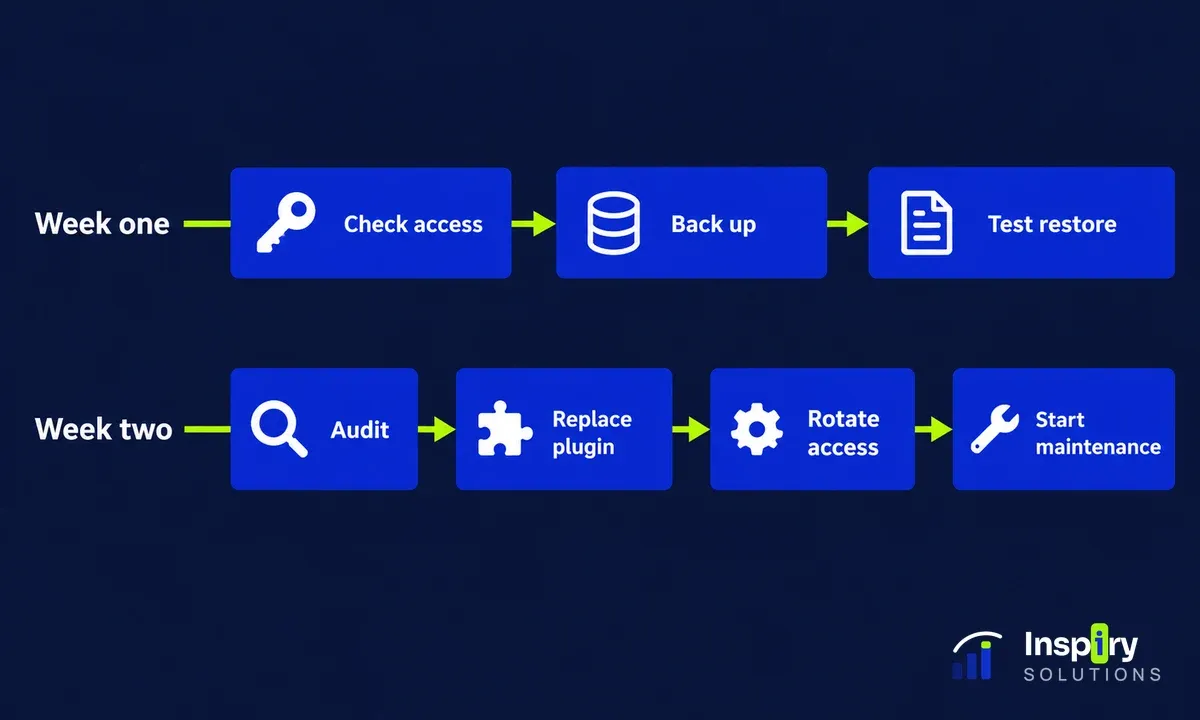
Week one: establish control and recovery
Day 1: The firm lists its known website accounts and checks its domain registrar. It confirms that the domain is registered under a business-controlled account.
Day 2: The firm contacts its hosting provider and completes the provider’s ownership verification process. The host helps the authorised account holder establish an independent WordPress Administrator login.
Days 3-4: The incoming developer takes a complete copy of the WordPress files and database, stores it outside the existing host and restores it on staging.
Day 5: The developer checks important pages, contact forms and essential functionality on the restored copy. The firm sends the outgoing developer a written handover request.
Week two: audit and controlled changes
Days 6-8: The incoming developer reviews plugins, theme modifications, scheduled tasks and hosting configuration.
The audit identifies a premium plugin without a usable business-owned licence. The developer checks which features depend on it and selects a suitably licensed replacement.
Days 9-10: The replacement is tested on staging. The firm reviews the findings and agrees which work should proceed.
Days 11-12: Once access is secured and necessary changes are verified, the developer rotates credentials and removes the outgoing developer’s access.
Days 13-14: The team checks the live website, confirms backup and monitoring arrangements, and starts the first monthly maintenance cycle.
The example does not mean every website takeover takes fourteen days. It illustrates why recovery, auditing and controlled changes should happen in a deliberate order.
A more complicated website might need additional investigation, while a straightforward site with complete access could move more quickly.
Common questions
Can I switch web developers without rebuilding my site?
Yes. In most cases, your existing website can be taken over by another developer without rebuilding it. The incoming developer should first audit its theme, plugins, custom code, hosting and integrations. A rebuild is only necessary if that audit identifies serious problems that cannot reasonably be resolved through maintenance or targeted repairs. Changing the person responsible for a website is not the same as replacing the website.
What if my web developer will not give me access?
Start by checking which accounts you can access directly, particularly your domain registrar and hosting provider. These companies can often help verified account holders regain access through their recovery procedures. If essential accounts are registered in the developer’s name, you may need a formal written request and potentially legal advice. Keep contracts, invoices and correspondence available as supporting documentation.
Do I need to change hosting when I change developer?
No. You can usually keep your current hosting when you change web developer, provided the account is under your control and the environment remains suitable. Moving may make sense if the website is hosted on the outgoing developer’s private server or the provider cannot meet your needs. Treat any hosting move as a separate, planned migration with testing and recovery arrangements.
How long does a website takeover take?
Access checks and a complete backup can often be arranged within days when the relevant accounts are registered to your business. The audit takes longer when the website has extensive custom functionality, complicated integrations or missing documentation. The time required also depends on how quickly account holders and providers respond. Agree on milestones and deliverables rather than assuming a fixed completion date.
What should I ask the outgoing developer for?
Ask for all relevant credentials and account access, premium licence information, custom code that is not already on the server, available documentation and a summary of known issues. Send the request in writing and set a reasonable response date. Where possible, request administrator invitations and secure transfers instead of passwords sent through email. Keep a copy of the correspondence for the incoming developer.
Your next step
If you are planning to change web developer, start with two things this week: identify the accounts your business controls and arrange a complete, independently stored backup.
Do these even if you have not selected a replacement developer.
Next, ask the incoming developer for a written takeover audit, not an immediate promise to redesign the site.
The first work plan should address ownership gaps, recovery options, security concerns, unsupported components and the maintenance responsibilities that need to continue.
Before agreeing to ongoing support, understand what maintenance plans cost and which checks, updates and response arrangements are included.
If you are changing developers, we can run the takeover: access, backup, audit and ongoing care through our WordPress maintenance plans from $99/month. Or start with a free audit and a plain-language reply within two working days.