Service area business SEO helps businesses appear in local searches even when they do not have a shopfront. If you travel to customers rather than welcoming them to your premises, you can create a Google Business Profile, hide your home address where appropriate, define the towns you genuinely cover and build website pages that explain your services. You do not need a publicly displayed address to compete locally. However, hiding your address or adding more towns does not remove Google’s distance considerations, so your approach must focus on accuracy, useful content and evidence of real work.
What counts as a service-area business
A service-area business visits customers or delivers services to them rather than receiving customers at its own address.
Google distinguishes these businesses from traditional shopfronts. Its guidance for service-area and hybrid businesses explains when a business should display an address and when it should use service areas instead.
Having a registered company address does not automatically mean customers can visit that address.
| Set-up | Address shown? | Service areas? | Website pages to prioritise |
|---|---|---|---|
| Shopfront | Yes, if the location is eligible and customer-facing | Not needed unless it also serves customers off-site | Location page, main services and contact information |
| Service-area business | No, when customers do not visit the operating address | Yes, covering genuine customer locations | Main service pages, coverage information and useful area pages |
| Hybrid | Yes, for an eligible staffed customer-facing location | Yes, where off-site services are provided | Location page, service pages and relevant coverage pages |
For tradespeople, the distinction also affects how to organise local content. Our guide to local SEO for trades explains how service-specific searches differ from searches for a physical business location.
Setting up your Business Profile in four steps
Your Google Business Profile is the business listing that can appear in Google Search and Maps.
Verify with a real address
Start with the genuine location from which your business operates.
Google’s Business Profile eligibility guidelines explain that a virtual office, meaning a rented mailing address the business does not operate from, is not eligible. A shared or co-working office only qualifies if it has clear signage, receives customers and is staffed by your business during business hours.
Using an artificial address creates an unnecessary risk of suspension or removal. Read our guide to avoiding a profile suspension before making changes to questionable location information.
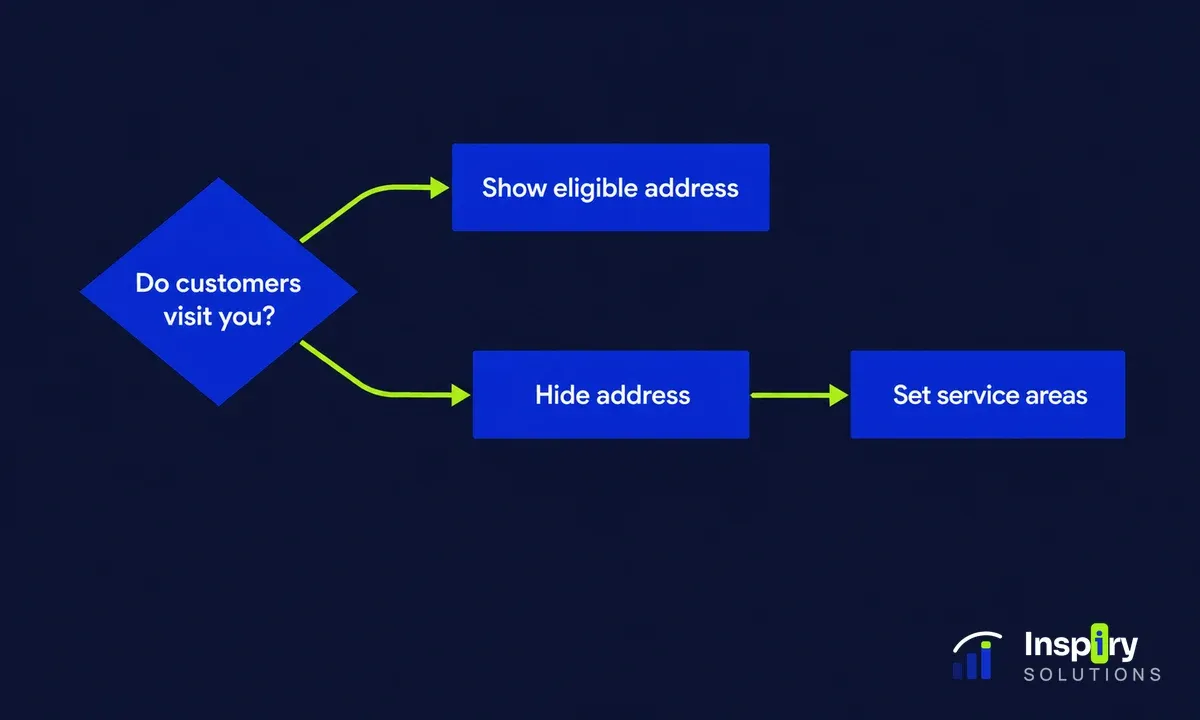
Hide the address if customers do not visit
If customers never visit your operating address, remove the address from the publicly displayed business profile.
Choose service areas you genuinely cover
Next, specify the cities, towns or postal areas in which you regularly provide services.
A service area is a statement about where customers can book your services.
Link the profile to the right service page
Finally, connect your business profile to a website page that helps visitors understand your offering and make an enquiry.
For a business with one main service, the homepage may be suitable if it clearly explains that service.
For a company providing several distinct services, a strong overview page or relevant core service page may be more helpful.
The destination should match what customers expect after viewing your listing.
Check that the page explains the service, coverage, contact process and any relevant booking requirements.
Once the core decisions are complete, use our guide to completing the rest of your profile to review categories, descriptions, services, photographs and business hours.
For help bringing the profile and website together, our local SEO for service-area businesses service focuses on practical implementation rather than simply adding more locations to a map.
Choosing your service areas sensibly
Google currently allows businesses to specify up to 20 service areas using cities, postal codes or other supported geographic areas.
Its guidance also says the overall boundary should generally remain within about two hours’ driving distance from the business base, although the appropriate coverage depends on the business.
You cannot simply draw an unlimited radius around your address in the current service-area editor.
These limits are boundaries for accurate configuration, not targets you must reach.
A business serving four nearby towns has no reason to add another sixteen locations to fill every available entry.
Start with the places where you regularly accept work.
For example, a mobile mechanic might have excellent availability within a short journey but only accept distant appointments for certain repairs.
The website should make that distinction clear rather than presenting every location as equally convenient.
Most importantly, adding a location does not guarantee visibility there.
Google explains that local results are influenced by relevance, distance and prominence in its local ranking guidance.
Distance remains important even if your home address is hidden.
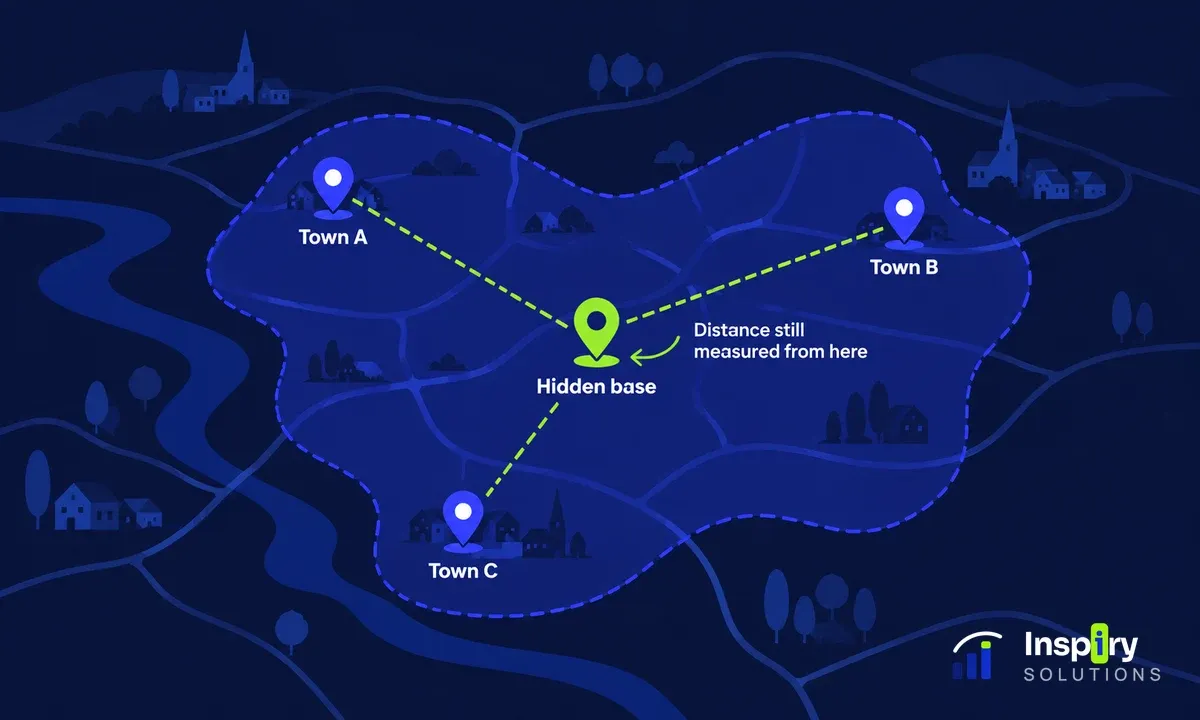
The shaded coverage in the diagram represents places you serve.
This difference is often misunderstood when discussing service area business Google Maps visibility.
You control your business information, services, coverage and supporting website content.
If enquiries consistently arrive from locations you cannot serve profitably, narrow your advertised coverage or explain any additional travel conditions.
Accurate coverage makes your marketing more useful even when it means targeting fewer towns.
Service area business SEO on your website
Your website should support the business profile by explaining what services you offer, where you work and why a prospective customer should contact you.
The most useful starting point is usually the main service pages.
A roofing company should explain roof repairs, replacement and inspections before creating numerous town-specific pages.
A cleaner might need distinct pages for regular domestic cleaning, end-of-tenancy cleaning and deep cleaning.
Each page should describe what the service includes, who it suits, what affects availability and how to request a quote.
Once these pages are useful, consider whether individual area pages will answer questions that the main service pages cannot.
Build service pages before town pages
A service page should provide the information customers need to make a decision.
That can include the types of work undertaken, the appointment process, photographs of completed work and answers to common questions.
Explain the business’s coverage naturally.
Good service pages also help visitors arriving from searches that do not include a town name.
A customer searching for emergency plumbing may be primarily interested in availability, response arrangements and the type of repair.
Make that information easy to find before expanding the website into geographical sections.
Create area pages only when they add value
An individual town page can be useful when you have specific information about your work there.
For example, a cleaning company might show photographs from permitted local projects, describe its appointment coverage and include genuine customer feedback from that area.
The page should answer a question that the general service page does not answer as clearly.
Our article on when area pages make sense explains the difference between useful coverage content and pages that merely repeat a town name.
Do not create a page for every nearby postcode simply because a keyword tool identifies some search activity.
Google’s spam policies address doorway abuse, including pages created to rank for similar searches while directing visitors to substantially the same destination.
A group of almost identical pages with only town names changed provides little value.
Instead, combine smaller areas into a helpful coverage page until you have enough distinctive material to justify separate pages.
Show evidence of genuine local work
Useful proof can make both service pages and area pages more persuasive.
Consider including completed projects, photographs taken with permission, customer feedback and explanations of local service arrangements.
A gardener might describe the maintenance work completed for a property in one town.
Avoid inventing local offices or describing remote work as though it occurred at a premises you operate.
Likewise, do not add fabricated reviews, stock photographs presented as customer work or unsupported claims about being the leading provider in an area.
If you are still establishing a customer base in a town, state your genuine coverage and explain how appointments work.
Clear information is more valuable than fictional evidence.
Make coverage and enquiries easy to understand
A potential customer should not need to inspect several pages to discover whether you visit their location.
Include a clear coverage explanation, an accessible contact method and any important geographical restrictions.
Where relevant, a postcode enquiry form can help establish whether a customer is within your normal working area.
Keep contact details consistent with your business profile.
Internal links should connect the main services, relevant town pages and booking information.
For a practical structure, see our guide to linking service and area pages together.
Building local prominence without premises
Prominence is one of the broad factors Google discusses when explaining local rankings.
A service-area business can build a stronger local reputation without operating a public shopfront.
Customer reviews are an important starting point.
Ask customers for honest feedback after completed appointments.
If a customer naturally mentions the service completed and their town, that can help other customers understand the business’s coverage.
A review describing a successful boiler repair is more useful than generic praise that provides no information about the work.
You can also develop genuine connections with local organisations, suppliers, trade associations or community groups.
For example, participation in a relevant local association may create a legitimate opportunity for a business listing or website mention.
A sponsorship should have a real commercial or community purpose.
Consistency matters too.
Check important directories and industry listings for the correct business name, phone number, website and service information.
Where you operate from home, avoid publishing a residential address unnecessarily across directories simply to create matching citations.
Maintain an accurate public identity that reflects how customers actually interact with the business.
Do not attempt to manufacture prominence by creating separate business profiles for every town.
The objective is to build evidence of an established business serving real customers, not to imitate a chain of physical branches.
Over time, your reviews, projects, references and useful content provide a more credible foundation than a large collection of artificial location entries.
Measuring results across a coverage area
Good local SEO for home based business operations should be measured through genuine customer activity, not rankings alone.
A single search performed from your home or office cannot represent how your business appears across every town.
People searching from different locations can see different results.
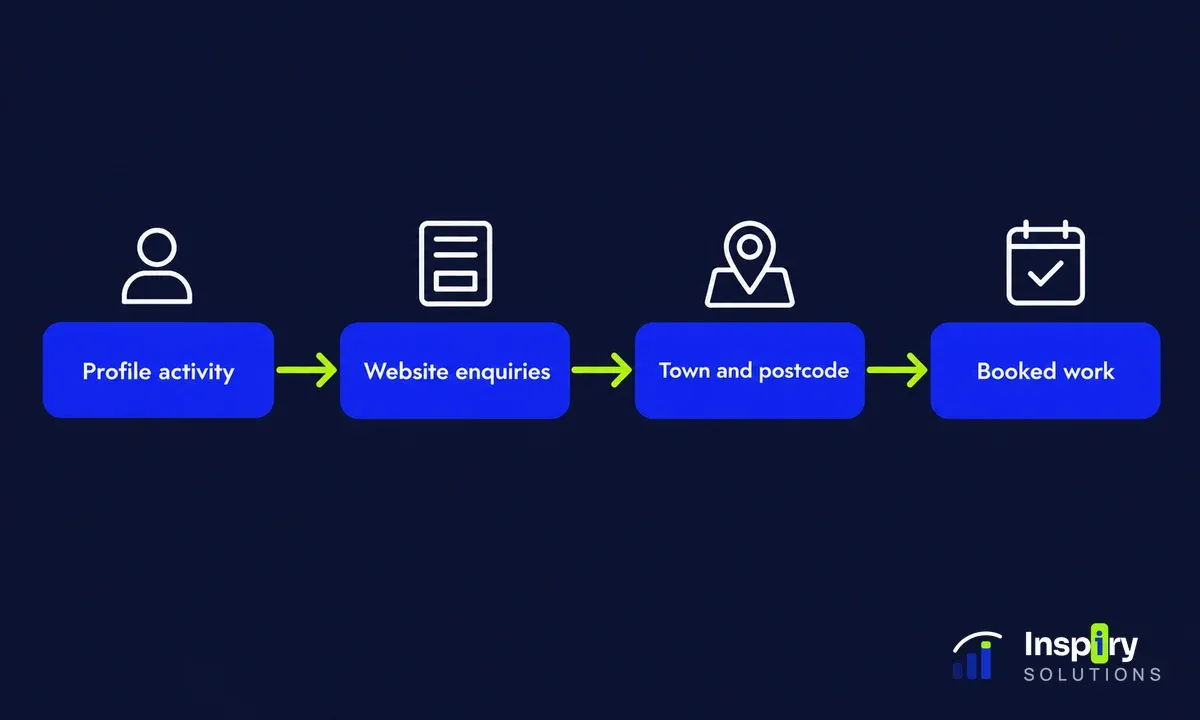
Start with the performance information available in your Google Business Profile.
Review calls, website clicks and other relevant customer interactions.
Profile interactions are useful indicators, but they do not automatically represent completed bookings or revenue.
Next, record the locations from which customers contact you.
A simple customer relationship management system, or CRM, can store the town or postcode, requested service, enquiry date and outcome.
This helps answer more practical questions:
- Which towns generate enquiries that turn into booked work?
- Which services are requested most often?
- Which locations involve excessive travelling?
- Are customers requesting services outside your stated coverage?
- Do certain areas generate website visits but few enquiries?
You do not need a complicated reporting system to begin collecting this information.
A consistently maintained enquiry spreadsheet can be useful while the business is small.
For visibility checks, review a selection of searches from several towns in your coverage area.
Use consistent search phrases and record the location, date and observations.
Treat these checks as directional evidence, not a definitive ranking report for every resident.
If an area page attracts visits but customers rarely enquire, inspect its relevance, contact options and clarity before publishing additional pages.
If calls increase but bookings do not, the issue may involve pricing, availability or the quality of enquiries rather than search visibility.
Review business profile activity, website performance and actual customer outcomes together.
The most useful measure is whether your local visibility supports work you can genuinely deliver.
Hypothetical example: a mobile dog groomer
Hypothetical example: A mobile dog groomer works from home and covers four nearby towns. She hides her address, lists the four towns, links the profile to a grooming services page, and adds a short page per town only where she has local reviews and photos to show.
Her first priority is establishing the correct business model.
Customers do not visit her house, so she configures the listing as a service-area business rather than advertising her residential address as a grooming salon.
She uses her genuine operating address for the applicable verification process and removes it from public display.
Next, she lists the four towns where appointments are practical.
She does not add distant cities merely because customers might occasionally be willing to pay additional travel charges.
On the website, her main grooming page explains available treatments, appointment arrangements, service coverage and how to make a booking.
She then reviews the evidence available from completed work.
Where she has suitable photographs and genuine local feedback, a dedicated town page may help customers understand her availability.
Where she lacks distinctive information, the main coverage page is sufficient.
Finally, she records enquiries by town, checks business profile interactions and reviews which locations produce suitable bookings.
If one town generates little activity, she investigates the available evidence before changing coverage or building more pages.
This hypothetical example illustrates a sensible sequence. It is not a claim about actual customer results or guaranteed rankings.
Common questions
Can I have a Google Business Profile without a business address?
You need a real, eligible business address for verification, but a service-area business can hide that address from its public profile when customers do not visit the location. This allows a home-based operator to maintain a business profile without publicly advertising a residential address. The actual operating location still matters for Google’s local ranking calculations.
Can I use a virtual office for my Business Profile?
Google’s guidelines do not allow virtual offices or remote mailboxes as a business address. A shared or co-working office only qualifies if it has clear signage, receives customers and is staffed by your business during business hours. Using a rented mailing address to create an artificial local presence risks profile suspension. Use your real operating location and hide its public address when your business qualifies.
Will I rank in every town I list as a service area?
No. Service areas describe where your business provides services; they do not guarantee rankings in those locations. Google considers relevance, distance and prominence when producing local results. Distance from your verified operating location can still affect visibility, even when the address is hidden. Listing more towns does not remove this limitation.
Should I create a page for every town I serve?
Only create individual area pages when each one contains genuinely useful local information. Relevant projects, photographs, service arrangements and authentic feedback can justify separate pages. Thin duplicate pages that simply replace one town name with another can create doorway-page problems under Google’s spam policies. A clear coverage page is often better than many repetitive pages.
Your first three decisions
Before changing your website or expanding your business profile, make three practical decisions.
First, decide whether your address should be visible. If customers never visit your operating location, use the appropriate service-area configuration and hide the address. If you operate an eligible staffed shopfront and also travel to customers, assess whether a hybrid profile is appropriate.
Second, decide which towns you genuinely serve. Base the list on real availability, reasonable travel and services you can fulfil. Remember that the coverage setting describes your working area, not your guaranteed Google Maps reach.
Third, decide which website page your profile should link to. Choose a page that clearly explains your main service, relevant locations and enquiry process. Build additional area pages only when you have distinctive content that helps customers.
After these decisions, check reviews, local evidence, website navigation and enquiry tracking. Measure outcomes before expanding the number of location pages.
If you work from home or a van and want to show up across your area, our local SEO service sets this up properly, scoped to your website. Send your URL for a free audit and get a reply within two working days.