WordPress custom post types give repeated business content, such as services, locations and team members, a consistent structure instead of separate pages. They make sense when entries share information, need filtering or must appear automatically in several parts of a website. Ordinary pages are still suitable for smaller collections or content with individual layouts. The decision is not about making WordPress more complicated. It is about choosing a structure that editors can maintain, visitors can understand and developers can carry through a future redesign.
What WordPress custom post types are
WordPress already has several built-in content types. Posts normally support articles and news, while pages handle more permanent content such as About, Contact and individual service information.
A custom post type introduces another kind of content into WordPress. Instead of managing every service, branch or employee as an ordinary page, editors can manage them under dedicated sections such as Services, Locations or Team.
The WordPress developer documentation on custom post types explains how developers register these types and retrieve their content.
A content model usually contains three important elements:
- Post type: The kind of entry being managed, such as Service or Project.
- Taxonomy: A system for grouping entries, such as service category, industry sector or operating region.
- Custom fields: Structured information attached to an entry, such as a price range, location address, job title or completion date.
For example, a Service entry might contain its title, description, introduction, benefits and enquiry call to action.
A Location entry could store an address, telephone number, opening hours and available services.
Tools such as Advanced Custom Fields provide interfaces for managing additional information. The ACF documentation and resources describe how fields can be configured and attached to content.
These elements work together, but they do different jobs.
How structured content becomes a website
Think of the content model as a set of records connected to presentation templates. Editors enter information once. Templates decide how that information appears on an individual page, a listing or a related-content section.
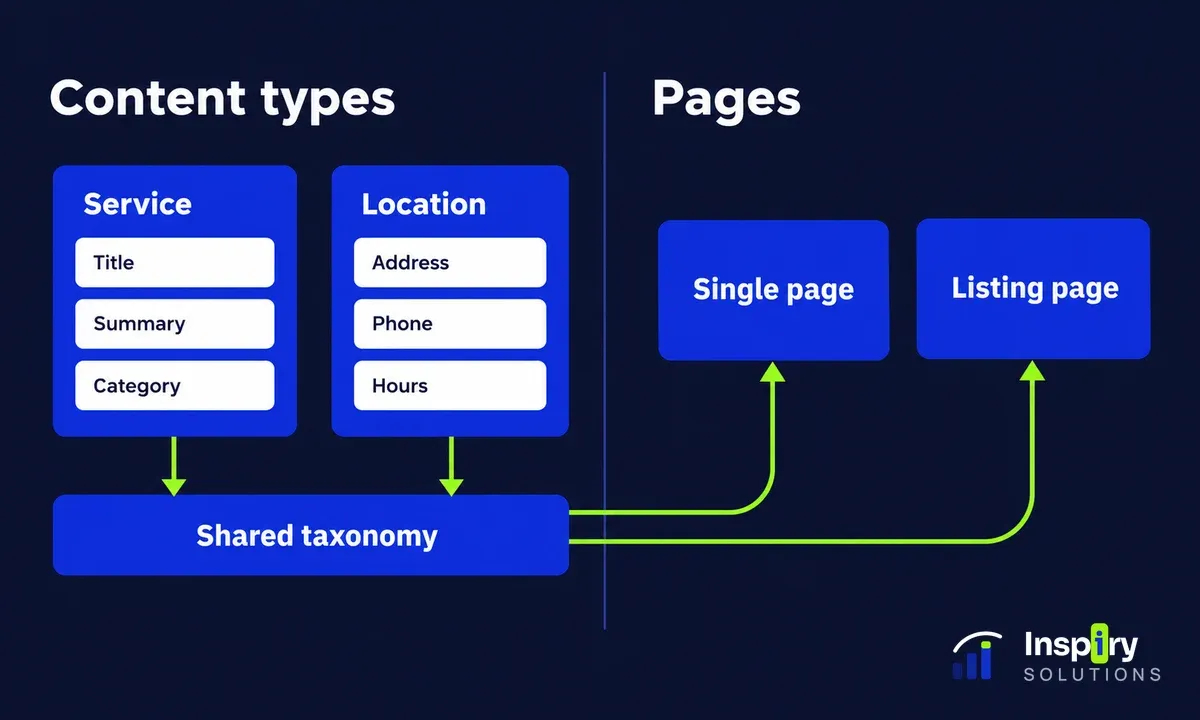
In the diagram, Service and Location entries contain their own fields. A shared location taxonomy can provide a grouping relationship where appropriate, while both types supply individual pages and relevant listings.
The result is a website where information has a predictable home. The relationship between entries can also support navigation without requiring editors to rebuild links manually.
Signs your content needs its own type
Many entries follow the same structure. If every project contains a client sector, service delivered, overview, images and outcome description, a shared model makes sense. The fields can be consistent even when the written content differs.
Visitors need lists or filters. A collection of projects might need filtering by sector or service. A location directory might need regional listings. Structured content makes these requirements easier to maintain.
Information appears in several places. A team member might appear on a team listing, service page and project entry. Storing a single managed record helps reduce duplicated information.
Editors repeatedly copy layouts. Copying an existing page, replacing its content and adjusting the same design elements is a warning sign. It creates opportunities for inconsistent spacing, missing fields and outdated details.
Another signal is increasing dependence on developers for routine publishing.
However, repeated content does not automatically justify a separate type.
This is why content models planned before the build can prevent avoidable changes later.
A useful early test is to ask an editor to create three realistic entries.
When ordinary pages are enough
Not every repeated-looking page needs a custom post type.
A business with three core services may only need three carefully written pages.
Pages are also suitable for content that does not need a shared listing, special filtering or repeated use elsewhere.
Consider an About page, a detailed methodology page and a unique consultation offer.
The difference between a WordPress custom post type vs page is therefore primarily about content organisation, not whether one format is inherently better for SEO.
Before introducing another content type, check whether ordinary pages plus reusable blocks or templates would solve the problem.
Over-engineering carries costs.
A sensible approach is to start with the simplest structure that satisfies real publishing requirements, while avoiding choices that make likely growth unnecessarily difficult.
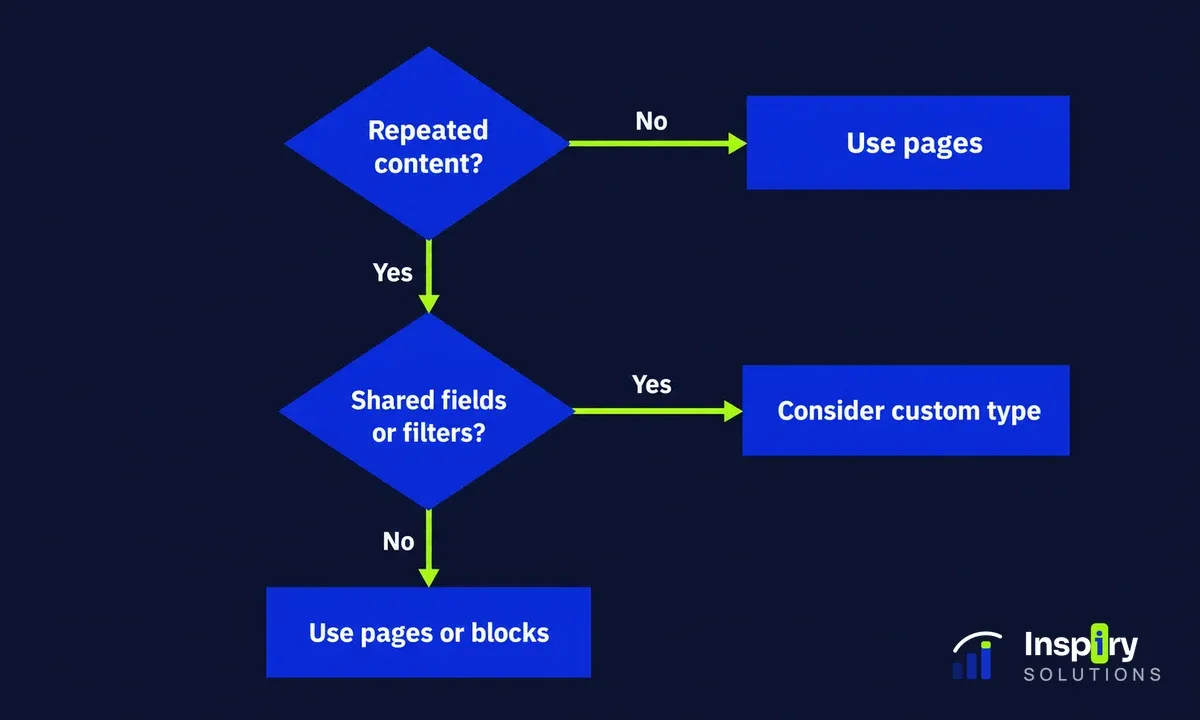
The decision should be based on how the content behaves, not an arbitrary number of pages.
If entries require consistent fields, filtering and reusable listings, a separate structure is more defensible.
This distinction matters for agencies preparing a scope.
Common business examples
The following six examples show how a custom post type can solve common publishing problems. Each requires different fields, grouping rules and decisions about public listings.
Services
A Services type can suit an organisation with a substantial catalogue of related offerings, particularly when services appear across sectors or locations.
Typical fields include a short summary, detailed description, service category, featured image, benefits, frequently asked questions and enquiry call to action.
For a small business with only a few distinct services, ordinary pages may remain preferable.
Locations or branches
Typical fields include location name, address, postcode, telephone number, opening hours, map details, relevant services and contact information.
A region taxonomy can support geographic browsing.
However, creating many near-identical location entries does not solve a local SEO problem.
Our guide to location pages without duplication explains why distinct local value matters more than producing numerous similar URLs.
Team members
A Team type can help businesses manage staff profiles across department pages, service areas and leadership listings.
Typical fields include name, role, biography, photograph, professional credentials, department and public contact information where appropriate.
A Department taxonomy may support separate team listings.
Not every employee needs a public profile.
Case studies
A Case Studies or Projects type is useful when an organisation publishes repeated examples of its work.
Typical fields include project summary, sector, services delivered, challenge, approach, completion date, images and approved outcomes.
A Sector taxonomy can support filtering, while relationships to service entries can show relevant work alongside an offering.
This structure is particularly valuable when projects need both individual detail pages and a browsable portfolio.
Hypothetical example: An engineering firm has 60 project write-ups stored as ordinary pages and cannot filter them by sector. Moving them to a Projects type with a Sector taxonomy would give filterable listings and consistent fields, with redirects for any changed URLs.
Job vacancies
A Jobs type can give recruitment teams a repeatable publishing process.
Typical fields include job title, department, work location, employment type, salary information when published, closing date, role responsibilities and application destination.
A Department or Location taxonomy may make listings easier to browse.
Vacancies also introduce lifecycle requirements.
The content model should make this manageable rather than requiring developers to manually update every vacancy page.
Events
An Events type can support seminars, workshops, exhibitions or scheduled sessions.
Typical fields include event title, start and end times, time zone, venue, registration link, organiser, description and event status.
Events may need upcoming and past listings, topic filtering and consistent event detail pages.
Dates require particular attention.
If events are infrequent and each has a different promotional format, ordinary pages or an existing event-management solution may be sufficient.
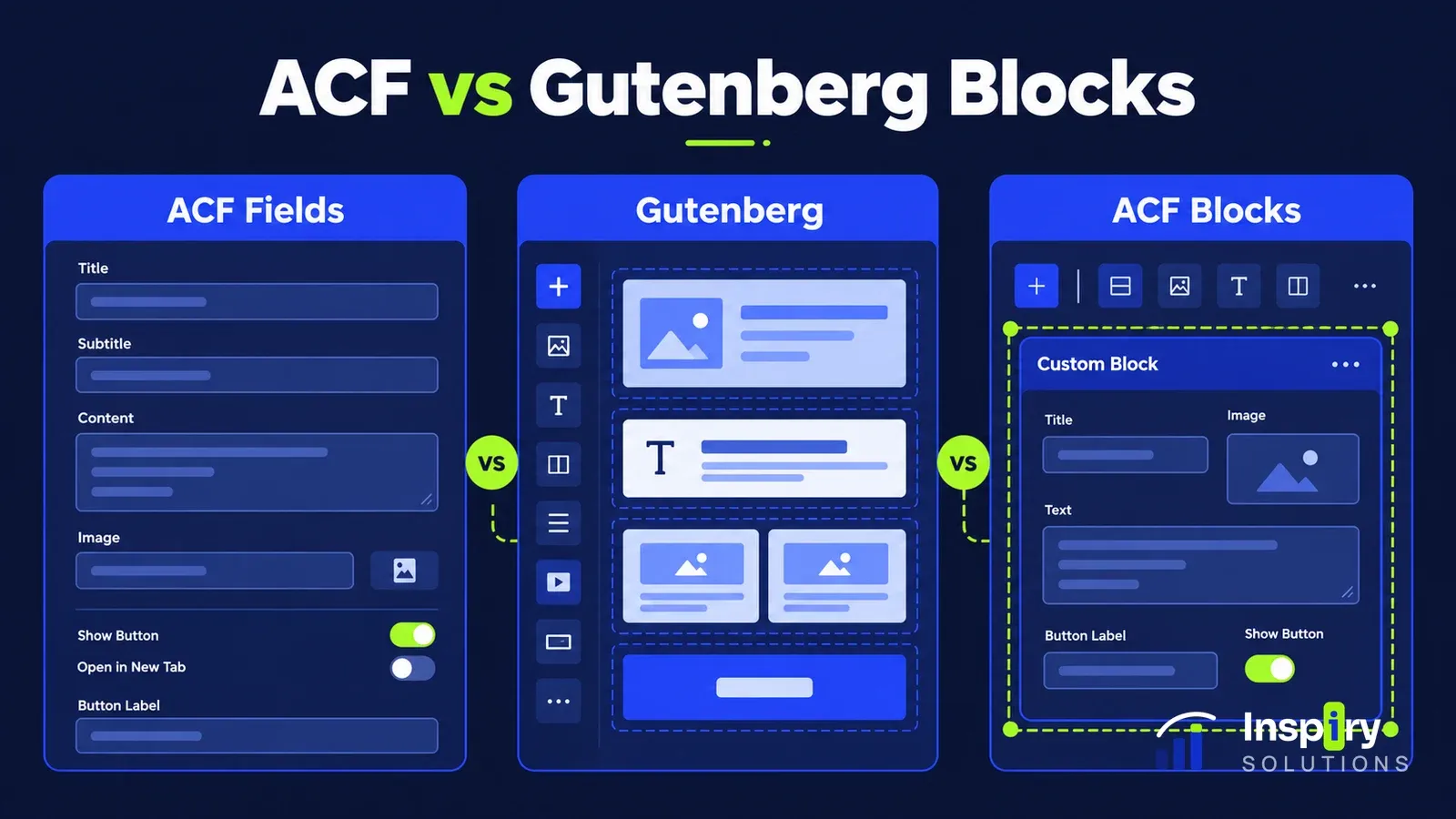
Across all six examples, structured fields make information easier to reuse. The choice between how editors fill in structured content is also important when selecting custom fields, blocks and templates.
Which structure suits each content collection?
| Content | Pages, posts or custom type? | Typical fields | Needs an archive? | Notes |
|---|---|---|---|---|
| Core services | Pages or custom type | Summary, benefits, category, CTA | Sometimes | Use a type for larger repeatable catalogues |
| Locations or branches | Custom type for multiple branches | Address, telephone, hours, services | Often | Publish genuine, useful location details |
| Team members | Custom type for structured directories | Role, bio, photo, department | Often | Consider privacy and ongoing updates |
| Case studies | Custom type or posts | Sector, challenge, approach, images | Often | Useful for project and sector filtering |
| Job vacancies | Custom type | Role, location, type, deadline | Usually | Needs expiry and lifecycle management |
| Events | Custom type or event plugin | Date, venue, registration, status | Usually | Needs date-aware listings |
| Testimonials | Fields, reusable content or custom type | Quote, attribution, approval | Rarely | Avoid unnecessary individual URLs |
| FAQs | Page sections, blocks or shared fields | Question, answer, topic | Rarely | Group where they serve a clear user need |
An archive is a listing page generated from a group of entries, rather than the individual detail page for one entry.
Not every type needs a public archive.
The table is a starting point, not a universal WordPress rule.
URLs, archives and SEO
The SEO value of a custom post type comes from how the content is organised and presented.
A sensible content model can support clearer URLs, consistent templates and internal links that help visitors discover relevant information.
Choose URL structures deliberately
A Services type might use URLs such as:
- /services/
- /services/roof-repairs/
- /services/commercial-roofing/
A Projects type might use:
- /projects/
- /projects/warehouse-refurbishment/
These structures are examples, not mandatory conventions. In the developer reference for register_post_type(), the URL base defaults to the post type key unless a rewrite slug is set, and an archive listing such as /projects/ only exists when has_archive is enabled, which is off by default. A type also needs show_in_rest enabled to appear in the block editor.
Choose slugs that are readable, stable and appropriate to the site’s broader information architecture. The Google guidance on readable URL structure explains why descriptive, understandable URLs are preferable.
Our guide to URL folders and slugs covers the wider implications of choosing and changing website addresses.
Decide whether an archive deserves indexing
A WordPress archive can list entries belonging to a type.
That does not mean every automatically generated archive should be indexed.
A thin archive containing little beyond repeated titles may offer limited standalone value, especially if another listing serves the same purpose.
Review each intended archive for usefulness, unique context, pagination, navigation and overlap with existing pages.
Some listings should be developed into useful landing pages.
A noindex decision should be based on the site’s actual content and search strategy, not applied automatically to every archive.
Use listings to support internal links
A well-designed listing can direct visitors from broad topics to detailed service, location or project entries.
For example, a sector page might link to relevant projects, which in turn link to the services involved.
This creates understandable journeys between related content.
The structure only works if those relationships are maintained.
Our guide to internal linking architecture for service sites explains how hubs, service pages and supporting content can work together.
Generate appropriate structured data
Custom fields can make structured data easier to maintain.
A location record may contain the address and contact details needed for relevant business markup.
However, the existence of a field does not automatically produce valid schema markup.
Developers still need to map fields to suitable schema properties, check required information and ensure markup matches the visible page.
Our guide to schema types that help service businesses explains how to choose appropriate markup rather than adding unrelated schema types.
Check the actual SEO implementation
Custom post type SEO should be tested at the rendered-page level, not assumed from settings.
Check whether individual URLs are accessible, titles and descriptions are appropriate, canonical signals make sense and intended pages can be discovered through internal links and XML sitemaps.
Also inspect pagination, duplicate listings and empty taxonomy pages.
Some public types should be searchable; others are primarily for internal content management.
Finally, verify how the SEO plugin supports each type.
Plugin or theme: where to register it
A custom post type must be registered so WordPress understands that the content exists and how it should behave.
The central architectural decision is whether that registration belongs in the active theme or a plugin.
For business content that must survive redesigns, a plugin is normally the better choice.
Why theme-only registration creates risk
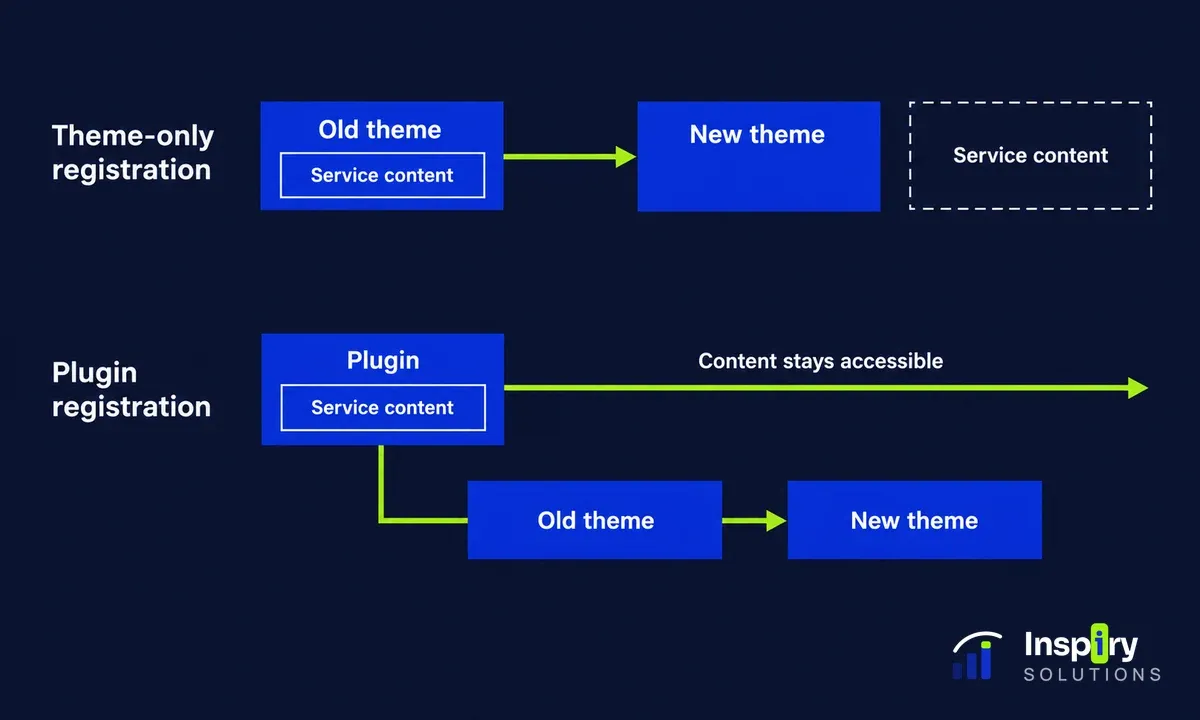
Themes control presentation. If the registration code for a custom post type exists only in the theme, replacing that theme can remove the registration.
The stored content is not necessarily deleted from the database, but WordPress may no longer expose it through the expected administration screens, queries or public URLs.
That can create a serious problem during a redesign.
A developer may deliver a new visual design only to discover that essential services, projects or team records are no longer registered.
The repair then becomes part of the migration rather than a straightforward design replacement.
Keep content registration independent
A small custom plugin can hold the registration code, taxonomy definitions and other site-specific content logic.
Alternatively, a suitable fields plugin may provide the interfaces needed to register and manage types.
The choice depends on maintenance requirements, dependencies, permissions and the development team’s experience.
The principle is separation: the content model should not disappear because the visual theme changes.
Our guide to small custom plugins worth building explains when dedicated functionality makes more sense than adding everything to the theme.
Presentation templates can still belong to the theme.
Plan for slug changes and maintenance
Changing registration settings can affect public URL structures and rewrite rules. A later slug change may require redirects from old URLs to their new destinations. According to the register_post_type() reference, rewrite rules must be refreshed after registration changes, either in the plugin’s activation code or by saving Settings > Permalinks.
Also update internal links, sitemap references and any templates or integrations relying on the previous addresses.
Record which plugin owns the registration and who is responsible for maintaining it.
A plugin-based model is more portable, but it is not maintenance-free.
Common questions
Do custom post types help SEO?
Not directly. A custom post type is a content-management feature, not a search ranking shortcut. It can help through cleaner URLs, consistent content and better internal linking when the implementation supports those outcomes. Search visibility still depends on page usefulness, accessibility and wider SEO factors. Review the actual published pages rather than assuming the content type itself improves rankings.
Should I use a plugin to create custom post types?
Yes, or a small custom plugin built specifically for the website. Avoid registering them only in the theme, because changing themes can make the content type unavailable until its registration is restored. A suitable management plugin may also work. The important requirement is that the content structure remains independent of visual design and has a clear maintenance owner.
What is the difference between a custom post type and a taxonomy?
A post type is a kind of content, such as Service, Project or Team Member. A taxonomy groups content, like categories or tags. For example, Projects could be the post type while Sector is the taxonomy used to group those projects. Custom fields then hold details belonging to each project, such as a completion date or summary.
Can I change a custom post type’s URL later?
Yes, but every URL using the changed structure can change. Set up redirects from the old addresses and update internal links to their new destinations. Review canonical settings, sitemaps and external integrations as well. Plan URLs before launch whenever possible, because a change after publication creates migration work and opportunities for broken links.
Planning your content model
Start with a content inventory before opening a registration interface or writing code.
List the collections that already exist, the entries likely to be added and the ways visitors need to find them.
For each proposed type, record its intended purpose.
Next, list required and optional fields.
Choose taxonomies only where grouping has a genuine purpose.
A Sector taxonomy makes sense if visitors need sector listings.
Then decide the URL pattern, individual templates, archives and relationships between types.
Test with real content before committing
Create representative sample entries, including incomplete or unusual cases.
Ask an editor to add an entry, update its information and check where those changes appear.
Test the public page, relevant listings and internal relationships.
Review accessibility, mobile layout and navigation alongside the editing workflow.
Finally, document ownership.
A practical planning handover should include:
- Content types and their purposes
- Required fields and optional fields
- Taxonomies and relationships
- Public URL patterns and archive decisions
- Template and editing requirements
- Migration and redirect requirements
- Plugin ownership and maintenance responsibilities
This information makes development easier to estimate and acceptance testing more objective.
A content model should make the site manageable for the people who publish it, not just technically tidy for the people who build it.
The right content model balances publishing efficiency, useful navigation and long-term maintainability.
If your site’s content has outgrown pages, send us the URL for a free audit and we will sketch the content model. Our WordPress development service builds it so it survives future redesigns.